by Kavio Labs · for WooCommerce 10.1+ on WordPress 6.7+
Classic, conversion-first block theme for auto parts and accessories stores: a garage finder in the header, a fitment check on every product, filters, a category mega menu and a clean checkout. Four styles, one-click demo content, full site editing. Pairs with Vehicle Fitment & YMM Search for WooCommerce.
AvailableVersion 1.0.2Compatible with WooCommerce 10.1 – 11.2, WordPress 6.7+ No core file edits
Built forWooCommerce
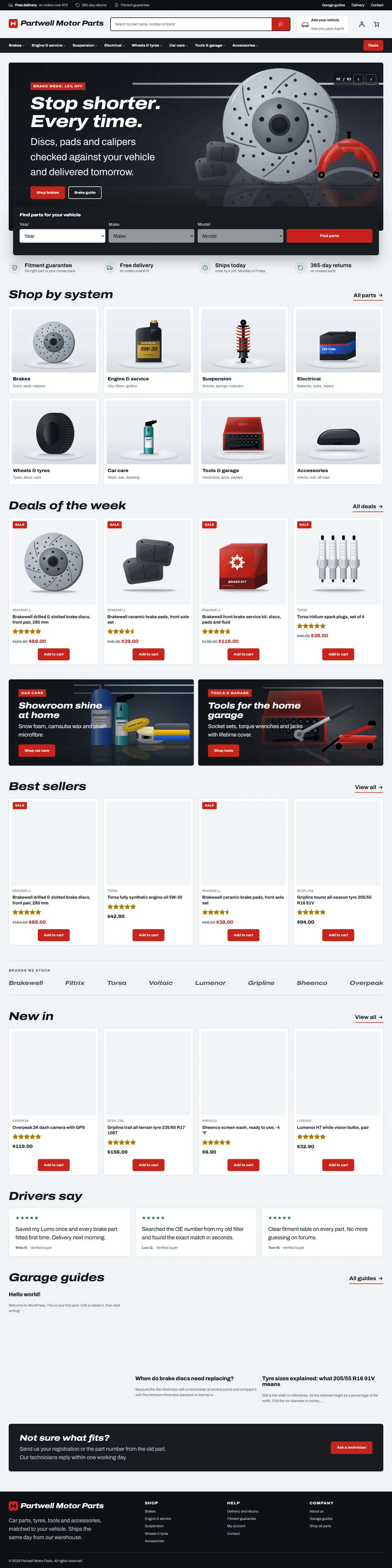
Home page: promise bar, garage finder, hero slider and the Shop by system tiles1 of 8
Classic, conversion-first block theme for auto parts and accessories stores: a garage finder in the header, a fitment check on every product, filters, a category mega menu and a clean checkout. Four styles, one-click demo content, full site editing. Pairs with Vehicle Fitment & YMM Search for WooCommerce.
WooCommerce 10.1 - 11.2, WordPress 6.7+
Overview
Axle is a classic, conversion-first block theme for auto parts and accessories stores: brakes, service parts, batteries, lighting, tyres and wheels, car care, tools and accessories. Every standard e-commerce element sits where shoppers expect it, and the theme answers the first question every parts shopper has: "does this fit my car?"
It is built to sit next to Vehicle Fitment & YMM Search for WooCommerce (a separate Kavio Labs product): the garage finder, the saved vehicle in the header and the fitment check on every product page come from that plugin and are styled by the theme. Without the plugin the theme is a complete parts-store theme; the fitment parts simply do not appear.
What you get
A block theme (full site editing): every template, template part, pattern, colour and font is editable in Appearance > Editor.
Four styles (Appearance > Editor > Styles): Redline (default, garage grey with brake-light red), Pitlane (white and navy, square corners, capital headlines), Overland (sand and olive, pill buttons) and Nightshift (dark graphite with amber).
Header: promise bar, logo, product search, a My garage dropdown (vehicle finder), account and mini cart, and a category bar with drop-down menus and a Deals button. Phones get a compact header with a menu button.
Home page: hero slider (three offers), garage finder, promise strip, Shop by system tiles, deals, best sellers, new in, promo banners, brand strip, driver reviews, latest guides and a help banner. All are patterns.
Shop and category pages: product filters (price, brand, rating, availability), sorting, result count, product grid.
Product pages: gallery with thumbnails, brand, price and saving, fitment check, add to cart, tabs (description, vehicle fitment, specifications, reviews) and related products.
Cart and Checkout: the WooCommerce blocks, styled; a minimal secure checkout header.
Demo content (optional, one click): 55 products in 32 categories with images, prices, specifications, vehicle fitment rows and reviews, four pages and four guides. It can be removed again with one click.
Self-hosted fonts (Archivo and IBM Plex Mono, SIL Open Font License); no external requests.
Compatibility
WordPress 6.7 or newer (tested on 7.1), PHP 7.4 to 8.3.
WooCommerce 10.1 to 11.2 (tested on 11.2): product collection, product filters, mini cart, customer account, product gallery, Cart and Checkout blocks.
Neutral to High-Performance Order Storage: the theme never reads or writes orders.
Right-to-left ready (logical CSS properties). English product.
Licence
Axle is GPL-2.0-or-later. In the own-site (Kavio Labs) edition a licence key unlocks updates, the demo importer and the hero slider controls; templates, patterns, styles and your store keep working without it, and the admin is never blocked. The CodeCanyon edition uses a purchase code for updates and support only. The WooCommerce.com edition has no licence screen. See configuration.
Axle, Redline style
Installation
Requirements
WordPress 6.7+, WooCommerce 10.1+, PHP 7.4+. Recommended: the Vehicle Fitment & YMM Search for WooCommerce plugin.
Steps
In WordPress go to Appearance > Themes > Add New > Upload Theme, choose the Axle zip and click Install now, then Activate.
Open Appearance > Axle. In the own-site edition enter your licence key and click Save and check.
Optional: click Import demo content to fill the store with the sample catalogue, pages and guides.
Check WooCommerce > Settings > Products and make sure the Shop page is set. The Cart and Checkout pages must use the Cart and Checkout blocks (the WooCommerce default).
Choose a style in Appearance > Editor > Styles and change the site title and logo in Appearance > Editor.
Demo content
The importer creates product categories, brands, products (with prices, stock, specifications, images and reviews), four pages (About, Delivery and returns, Fitment guarantee, Contact), four posts in the category Garage guides and, when the Vehicle Fitment plugin is active, the fitment rows. Everything it creates is tagged, so Remove demo content deletes exactly those items and nothing else. Running the import again updates the items instead of duplicating them.
Upload the new zip over the old one (WordPress asks to replace the theme). Your template edits made in the Site Editor are stored in the database and are kept.
Uninstalling
Switch to another theme and delete Axle. If you imported the demo content, remove it first (Appearance > Axle).
Configuration
Appearance > Axle
Section
What it does
Licence (own-site and CodeCanyon editions)
Enter the licence key or purchase code. The check runs from the admin once a day and sends the site address and the key to kaviolabs.com; nothing about customers, visitors or orders.
Demo content
Import, update or remove the sample store.
What the licence controls (own-site edition)
Without a valid licence
Still works
Hero slider buttons and counter
All templates, patterns, styles and the Site Editor
Demo importer
Cart, Checkout, orders and every store setting
Updates
The admin (never blocked)
A new installation has a 14-day start period; if the licence server cannot be reached, a 14-day grace period applies. Development hosts (localhost, .test, private addresses) are always accepted. The CodeCanyon edition never locks features: the purchase code only enables updates and support. The WooCommerce.com edition has no licence screen and sends nothing.
Style variations and tokens
The theme exposes its shape as custom values in theme.json: custom.radius, radiusSm, radiusBtn, heading.weight, heading.stretch, heading.style, heading.transform, card.border. A child theme or a style variation can override them together with the colour palette.
Using Axle
The garage finder
With the Vehicle Fitment plugin active, the Vehicle search block appears in three places: the header dropdown (Add your vehicle), the home page under the hero, and any page where you insert it (Vehicle search in the WooCommerce block category). Shoppers pick year, make and model; the shop then shows only parts that fit, and the vehicle is remembered in their browser (My garage). The theme only styles the plugin; import your fitment data with the plugin's CSV import.
Customising
Colours, fonts, spacing: Appearance > Editor > Styles. Axle ships four styles; every colour has a role name (Primary, Highlight, Top bar and footer, Category bar, Sale...).
Header and footer: Appearance > Editor > Patterns > Template parts. The category menu is a normal Navigation block: add or reorder items, submenus open on hover and keyboard focus.
Home page: Appearance > Editor > Templates > Front Page. Each section is a pattern; replace or reorder them, or insert others from the Axle sections pattern category.
Store pages: the Axle store pages pattern category has starters for About, Delivery and returns and the fitment guarantee.
Product cards: the grid is a Product Collection block; change columns, number of products and the order in the block settings. Brand names come from the WooCommerce Brands taxonomy.
Hero slider
Three full-width offers in a scroll-snap row. Shoppers swipe or scroll; with the licence extras on, previous and next buttons and a counter appear. Edit each slide like any Cover block (image, headline, text, buttons).
Accessibility
Visible keyboard focus, body text and button colours chosen for AA contrast in the default style, a skip link, labelled landmarks, reduced motion respected (the slider and hover effects), 44 px touch targets for buttons and form fields.
Right-to-left
The theme uses logical CSS properties; it works with RTL languages when WordPress is set to one.
Developer notes
Structure
kv-axle/
  style.css  theme.json  functions.php  screenshot.png  readme.txt  LICENSE.txt
  templates/   front-page, index, page, page-wide, single, archive, search, 404 + WooCommerce:
               archive-product, product-search-results, single-product, page-cart, page-checkout, order-confirmation
  parts/       header, footer, checkout-header   (thin wrappers around the PHP patterns of the same name)
  patterns/    kv-axle/* PHP patterns (translatable text, home_url(), theme file URIs); sections and store pages
  styles/      pitlane.json, overland.json, nightshift.json  (Redline = theme.json)
  assets/      css/theme.css (front end + editor), css/admin.css, js/theme.js (extras), fonts/, images/
  inc/         KavioLabs\Axle\  Theme, Settings, Admin\ThemePage, Demo\{Importer,Cli}, License\{Manager,Client,Envato}
  demo/        pack.json + images (demo importer data)
  languages/   kv-axle.pot (English only; no translation files ship)
Why a block theme
WooCommerce 10 and 11 build the shop, product, cart, checkout and mini cart from blocks (product collection, product filters, product gallery, Cart and Checkout blocks, customer account). A block theme reaches all of them through templates and theme.json, so shop owners can edit every page in the Site Editor, the Vehicle Fitment hooks (woocommerce_before_add_to_cart_form, woocommerce_product_tabs) still fire inside the add-to-cart form and product details blocks, and no template overrides of WooCommerce files are needed (no maintenance when WooCommerce changes its templates). A classic theme would mean copying WooCommerce templates and styling blocks anyway.
Hooks and conventions
Everything is prefixed kv_axle_ / KavioLabs\Axle / KV_AXLE_; text domain kv-axle.
Class kv-axle-needs-fitment on a block hides it when the Vehicle Fitment plugin is not active.
The pattern cache of a theme is a transient: after changing pattern files on a dev store run wp transient delete --all.
The theme never touches orders (HPOS neutral) and declares nothing on before_woocommerce_init; WooCommerce reads theme compatibility from block-theme support.
Block markup is normalised with the editor's own serialiser so templates and patterns pass block validation. New themes start from tooling/templates/woocommerce/theme/ (kv theme-new woo_theme_<name> --name "<Name>").
FAQ
Do I need the Vehicle Fitment plugin?
No. Without it Axle is a complete parts-store theme; the garage finder, the fit check and the fitment tab simply do not appear. With it, they are styled to match.
Can I use it for a store that does not sell car parts?
Yes. Replace the demo content and edit the patterns; the layout (header, filters, product grid, product page) is generic.
Does it work with the classic cart and checkout shortcodes?
The cart and checkout pages are designed for the WooCommerce Cart and Checkout blocks. The shortcode pages still render inside the theme, but without the block styling.
Does it support High-Performance Order Storage?
Yes; the theme does not read or write orders.
Which languages are available?
The theme is English. All text is translatable (patterns, theme code), but no translation files are included.
Where do the product images come from?
The demo images are original illustrations created for the theme; no photos, people or real brands.
The demo products show no brand. Brands use the WooCommerce Brands taxonomy (WooCommerce 9.6+); the importer creates it. For your own products assign brands under Products > Brands.
Why is a menu item missing after I changed category names?
The header menu is a Navigation block with fixed links; edit it in the Site Editor.
Year/make/model parts search for WooCommerce: fitment table per product, CSV import, My Garage, fits / does not fit badge and vehicle-filtered shop and search pages.
EN 16931 e-invoices and credit notes from WooCommerce orders: XRechnung (CII/UBL), ZUGFeRD/Factur-X PDF/A-3 and Peppol BIS 3.0 UBL, gapless numbering, B2B checkout fields, validation, e-mail attachments, My Account downloads and ZIP export.