by Kavio Labs · for WooCommerce 10.1+ on WordPress 6.7+
EU withdrawal button ("Withdraw from contract here" with a two-step statement, Confirm withdrawal, an instant acknowledgement e-mail and a withdrawal register), the official EU legal guarantee notice per language at the block and classic checkout, GARAN producer guarantee labels, the Omnibus lowest price of the 30 days before a reduction and GPSR product safety information. Every text editable per language, HPOS and Cart/Checkout blocks.
On saleVersion 1.0.0Compatible with WooCommerce 10.1 – 11.2, WordPress 6.7+ No core file edits
Built forWooCommerce
Withdrawal, legal guarantee notice, GARAN, Omnibus and GPSR in one plugin1 of 10
EU withdrawal button ("Withdraw from contract here" with a two-step statement, Confirm withdrawal, an instant acknowledgement e-mail and a withdrawal register), the official EU legal guarantee notice per language at the block and classic checkout, GARAN producer guarantee labels, the Omnibus lowest price of the 30 days before a reduction and GPSR product safety information. Every text editable per language, HPOS and Cart/Checkout blocks.
One plugin for the EU consumer-law information duties that hit online shops in 2026, plus the older ones that are easy to get wrong:
Module
Law
What your store gets
Withdrawal function
Directive (EU) 2023/2673 (Art. 11a CRD), since 19 June 2026
"Withdraw from contract here" on every page, a two-step online statement ending with "Confirm withdrawal", an acknowledgement e-mail with the date and time, a withdrawal register
Legal guarantee notice
Directive (EU) 2024/825, Reg. (EU) 2025/1960, since 27 September 2026
The official harmonised notice at the checkout, on product pages and on a guarantee page, per language
GARAN label
same
The producer's commercial guarantee label as a badge that opens the full label on the first click or hover
Lowest prior price
Directive 98/6/EC Art. 6a (Omnibus)
"Lowest price in the 30 days before this reduction" under every reduced price, from a recorded price history
Product safety (GPSR)
Regulation (EU) 2023/988 Art. 19
Manufacturer, EU responsible person, identifiers and warnings in the product offer
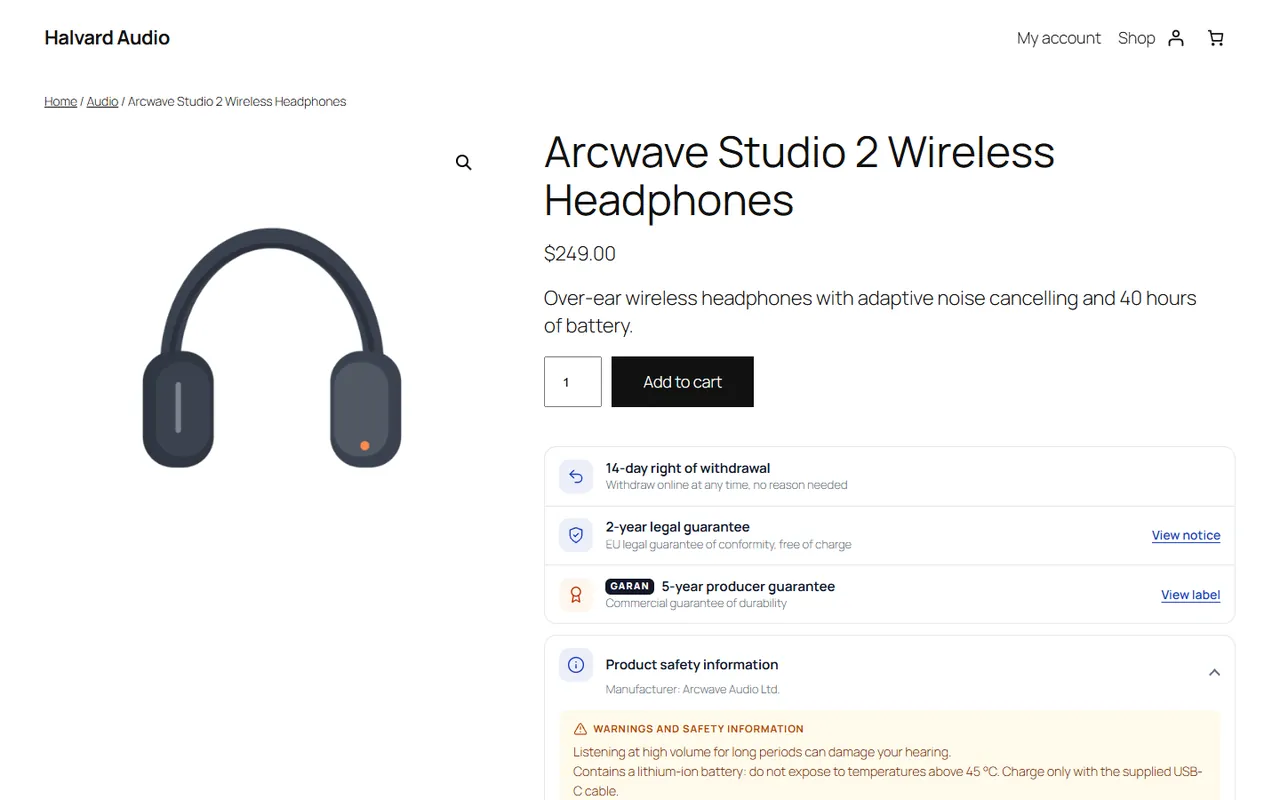
Product page with the rights panel
Not legal advice. The plugin helps you provide the information and functions EU consumer law asks for. It does not make your shop compliant by itself: national rules differ (period lengths, wording, exceptions for perishable goods, longer legal guarantees in some countries). Every text is editable; check the rules of your country and ask a lawyer when in doubt.
Shortcodes, block, hooks, data, Store API, templates
A free edition with the withdrawal function and the legal guarantee notice is available on WordPress.org (Kavio EU Withdrawal Button for WooCommerce). This edition uses the same data, so you can move up at any time.
Installation
Requirements
WordPress 6.7 or later, WooCommerce 10.1 or later (tested with 11.2.1), PHP 7.4 to 8.3.
Works with High-Performance Order Storage (HPOS) and the legacy order storage, the block Cart and Checkout and the classic shortcode pages, block themes (Twenty Twenty-Five) and classic themes.
Install
Download kv-eu-consumer-kit-kv.zip from My licences > Downloads on woocommerce.kaviolabs.com.
In WordPress: Plugins > Add New > Upload Plugin, choose the zip, Install Now, Activate.
Activation creates two pages, Withdraw from contract ([kv_euc_withdrawal]) and Legal guarantee ([kv_euc_guarantee]), three database tables (wp_kv_euc_withdrawals, wp_kv_euc_attempts, wp_kv_euc_prices) and starts recording the price history of all products in the background (Action Scheduler).
Open WooCommerce > Settings > EU Consumer Law and work through the setup checklist.
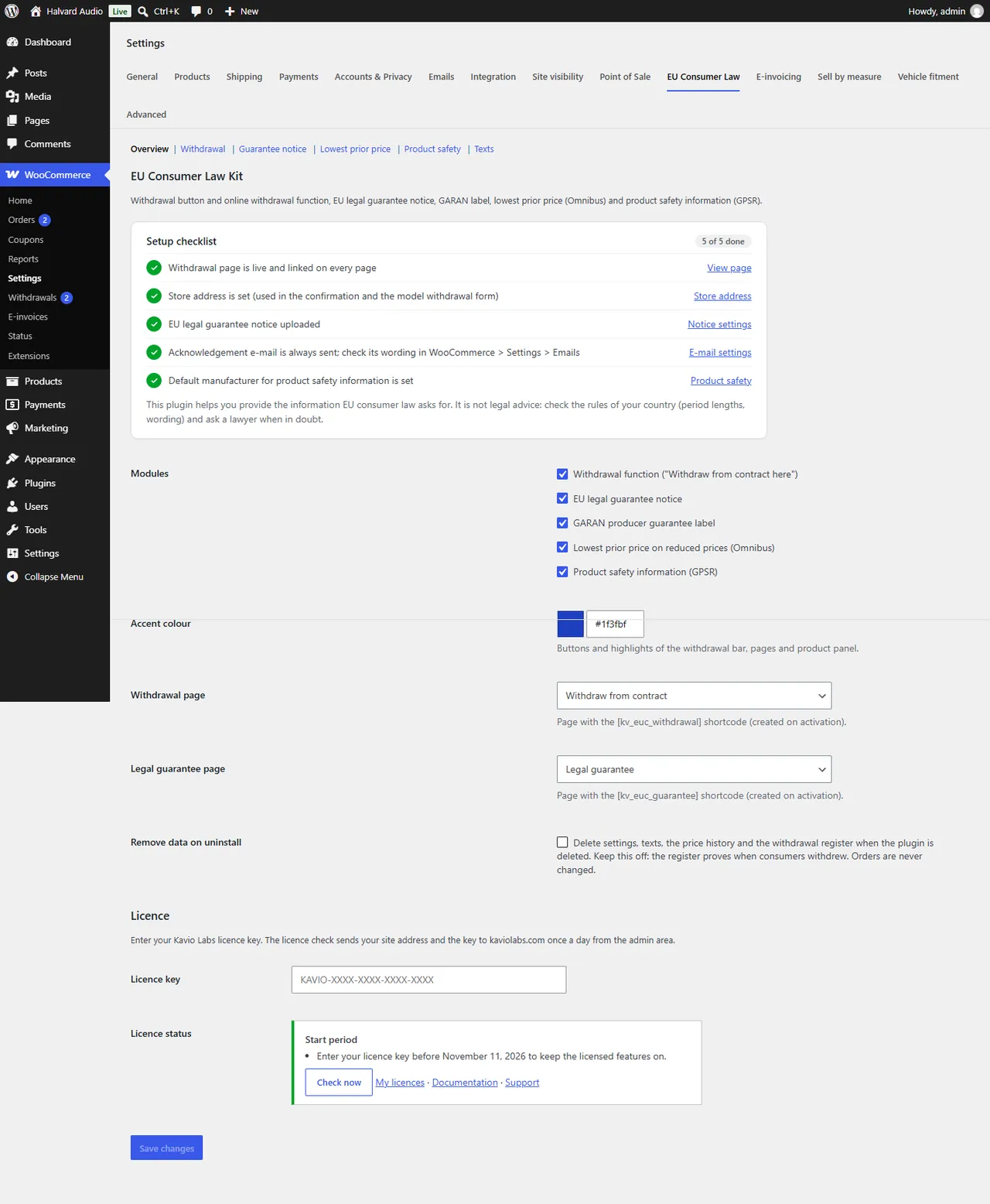
Setup checklist
Setup checklist
Item
What to do
Withdrawal page
Created on activation. Keep it published; you can rename it or move the shortcode into another page and choose that page in the settings.
Store address
WooCommerce > Settings > General. It appears in the acknowledgement e-mail, the confirmation and the model withdrawal form.
EU legal guarantee notice
Download the official notice from the European Commission (Your Europe business portal, "EU legal guarantee notice and GARAN label") in your store language and upload it under Guarantee notice. Use the high-resolution file (at least 600 px wide).
Acknowledgement e-mail
Check its wording in WooCommerce > Settings > Emails > "Withdrawal: acknowledgement of receipt".
Default manufacturer
Product safety > store default, or per brand in Products > Brands.
Licence
Enter your licence key (KAVIO-XXXX-XXXX-XXXX-XXXX) on the Overview section. The plugin checks it once a day from the admin area (site address + key only). After installing you have a 14-day start period.
Without a valid licence the withdrawal button, statement, acknowledgement e-mail and register keep working; the guarantee notice, GARAN badge, lowest-price line and product-safety section are hidden on the storefront, and item-level withdrawal, the order e-mail link and CSV export are switched off. The admin is never blocked and no data is removed.
Update
Upload the new zip (Plugins > Add New > Upload Plugin, "Replace current with uploaded"). Tables and settings are upgraded automatically.
Uninstall
Deactivating stops the daily job; nothing else changes. Deleting the plugin removes the licence state. Settings, texts, pages, product fields, the price history and the withdrawal register are removed only when Remove data on uninstall is on (Overview section). Keep it off unless you have exported the register: it proves when consumers withdrew. Orders are never changed. While the free edition is installed nothing is removed, because it uses the same data.
Configuration
WooCommerce > Settings > EU Consumer Law has six sections.
Overview
Setting
Default
Notes
Modules
all on
Withdrawal function, legal guarantee notice, GARAN label, lowest prior price, product safety. Switch off what you handle elsewhere.
Accent colour
#1f3fbf
Buttons and highlights of the withdrawal bar, pages and the product panel.
Counted from the day the order first reaches a "delivered" status, to the end of that day in your store's time zone.
Delivered statuses
Completed
The period starts when an order first gets one of these statuses (the time is stored on the order). Before that, the function stays open without an end date.
Orders that can be withdrawn
Processing, Completed, On hold
Other statuses (pending, failed, cancelled, refunded) cannot be looked up.
Late statements
on
On: statements after the period are accepted and flagged "After period"; you decide. Off: the consumer sees the end date and cannot send.
Item-level withdrawal
on
Consumers choose items and quantities. Off: always the whole order.
Reasons to choose from
5 lines
Optional for the consumer. Empty = no reason field.
Order status after a withdrawal
keep
Keep the status and add an order note, or move the order to a status (e.g. a custom "Withdrawal received").
Placements
all on
Bar at the bottom of every page; My Account menu item; button on the order details (thank-you page, My Account > Orders); link in the customer's order e-mails (processing, completed, invoice; signed so it works without signing in).
Place the button anywhere else with the Withdrawal button block (widgets category) or the [kv_euc_withdraw_button] shortcode (style="link" for a text link).
Guarantee notice
Notice image: the default for all languages. With WPML, Polylang or several installed languages you get one more picker per language; visitors see the notice of their language or the default.
Show the notice: checkout (block and classic, as pre-contract information), product page ("2-year legal guarantee" row), "Legal guarantee" link in the withdrawal bar.
Digital goods: hide the notice on virtual/downloadable products and on carts without shipping.
GARAN label > Listings: also show a small GARAN chip on product cards.
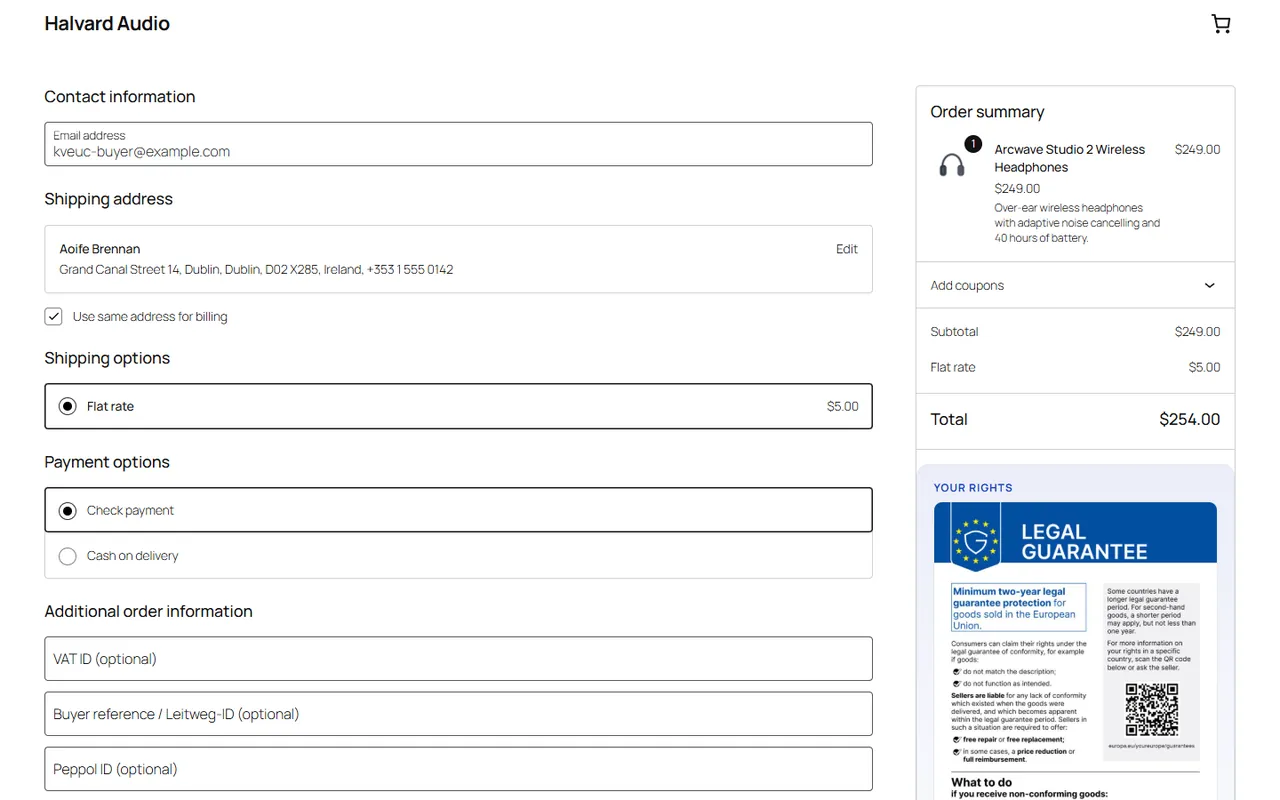
Guarantee notice at the block checkout
Lowest prior price
Setting
Default
Notes
Period (days)
30
At least 30 days in the EU.
Calculation
days before the reduction
Directive 98/6/EC Art. 6a: the lowest price in the period before the reduction started. "Rolling" uses the last N days up to today.
Progressive reductions
on
Consecutive reductions count as one: the period ends when the price first dropped below the regular price.
Not enough history
regular price
Show the regular price as the prior price, the same with "(new product)", or hide the line.
Listings
on
Also on shop, category, related products and block product grids.
Product safety
The store default manufacturer (name, postal address, e-mail, website, outside the EU) and EU responsible person. Contact data is taken from the product (override) first, then its brand (Products > Brands, fields "Product safety (GPSR)"), then this default.
Texts
Every storefront text can be changed per language, so you can use the exact wording of your national law: the withdrawal button ("Withdraw from contract here"), the confirmation button ("Confirm withdrawal"), the bar text, the page intros, the done message ({email}), what happens next, the guarantee intro, the lowest-price line ({days}, {price}), the GARAN badge ({years}), the product safety title and the excluded-item note. Empty fields use the default shown in grey.
E-mails
WooCommerce > Settings > Emails:
Withdrawal: acknowledgement of receipt: to the consumer (and a copy to the order e-mail when another address was used). It cannot be switched off. Subject, heading, additional content and format are editable. Template emails/kv-euc-withdrawal.php can be overridden in your theme.
Withdrawal: staff notice: to the recipients you set (default: the admin e-mail).
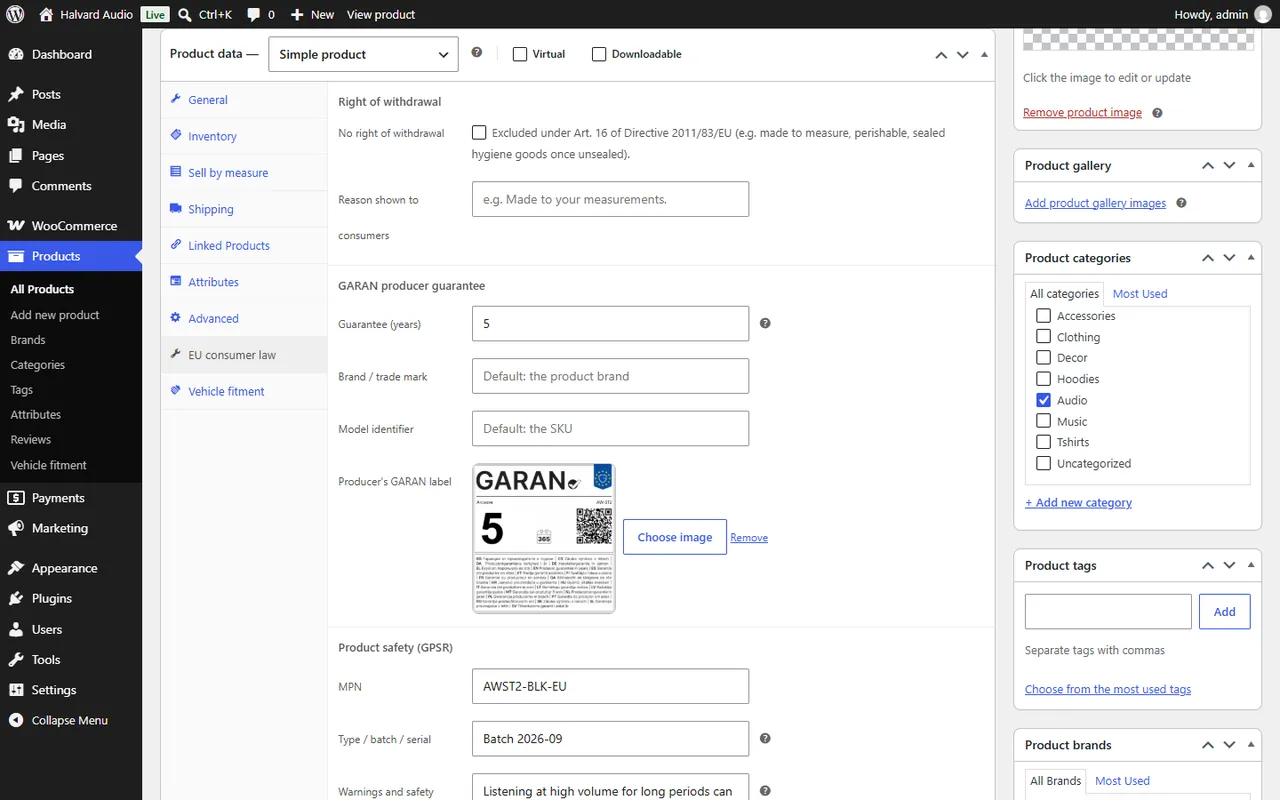
Product data tab "EU consumer law"
Right of withdrawal: "No right of withdrawal" + reason shown to consumers (Art. 16 exceptions).
GARAN: years (shown when more than 2), brand (default: product brand), model (default: SKU), the producer's label image.
Product safety: MPN, type/batch, warnings and safety information, safety document URL, a manufacturer and EU responsible person for this product only. Completeness hints show what is missing.
Lowest prior price: hide the line for this product; the recorded prices.
Product tab
Usage
The consumer's withdrawal
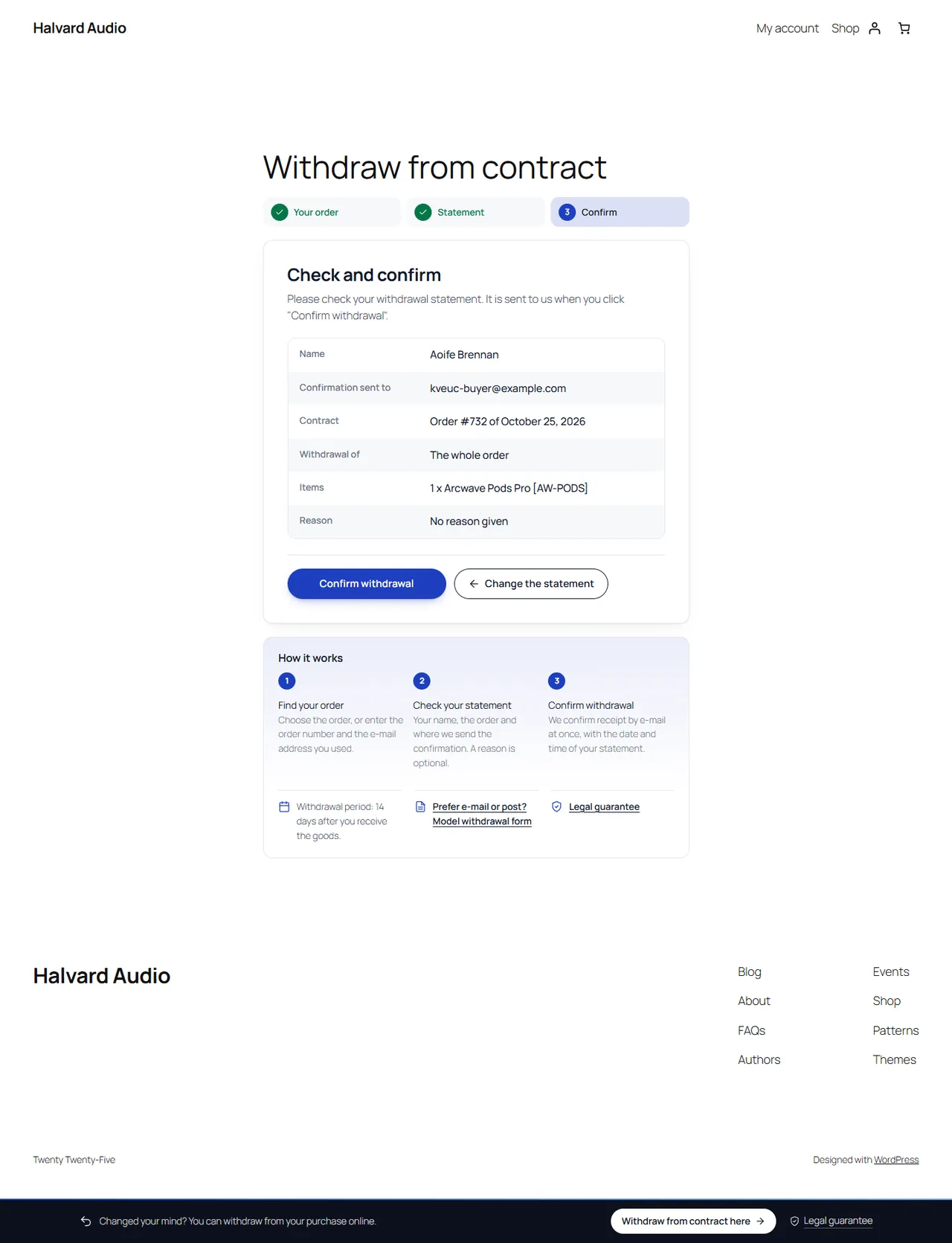
"Withdraw from contract here" is in the bar at the bottom of every page, in My Account and on the order.
Find the order. Signed-in customers pick one of their orders (each shows until when it can be withdrawn). Guests enter the order number and the e-mail address of the order. A wrong pair always shows the same message, so nobody can find out whether an order exists; after 10 failed look-ups per hour the form pauses for that connection.
The statement. Name and e-mail for the confirmation are prefilled from the order and can be changed. The whole order is selected; with item-level withdrawal the consumer can choose items and quantities. Items without a right of withdrawal are listed as "not covered" with your reason. A reason and a comment are optional.
Review and "Confirm withdrawal". The consumer sees exactly what will be sent and confirms with one button. The statement is signed between the steps, so it cannot be changed in the browser, and a double click creates one statement only.
Confirmation. The page shows the reference (WD-XXXXXXXX), the date and time with the time zone and the whole statement, with "Print or save as PDF". The acknowledgement e-mail with the same content goes out at once.
Review step
After the period: with "Late statements" on, the consumer sees a note and can still send; the statement is flagged "After period". With it off, the consumer sees the end date.
For consumers who prefer e-mail or post, the withdrawal page links to the model withdrawal form (Annex I(B)) with your store's name, address and e-mail.
Your side
The staff e-mail and an order note arrive with every statement (and the order status changes if you chose one).
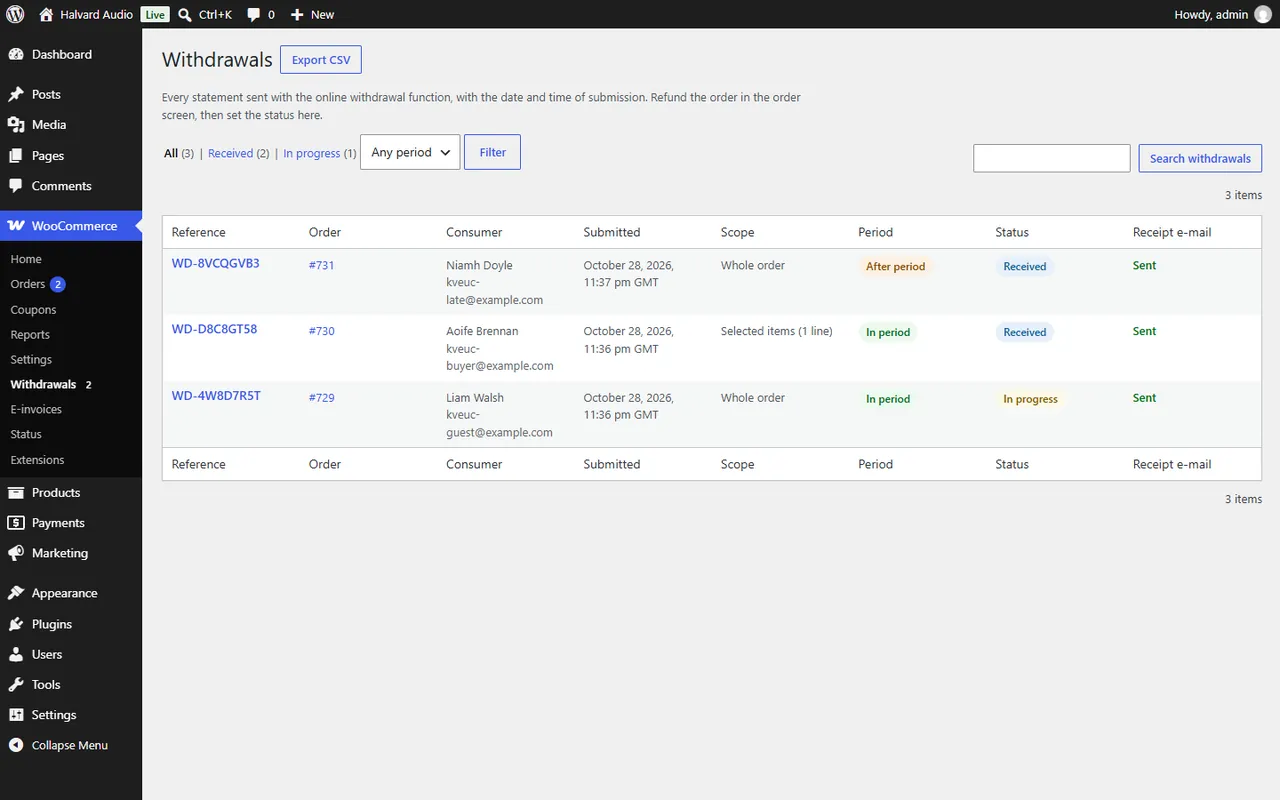
WooCommerce > Withdrawals lists every statement: reference, order, consumer, submitted, scope, period, status and whether the acknowledgement was sent. Filter by status and period, search by reference, name, e-mail or order, export CSV.
Open a statement to set its status (Received, In progress, Refunded, Closed, Declined) and internal notes, resend the acknowledgement, open the printable confirmation or go to the order to refund it (WooCommerce refunds).
The order screen has a Withdrawals box.
Register
Legal guarantee notice
Upload the official image once. It appears unedited and in colour at the checkout (block checkout: in the order summary; classic checkout: above "Place order") with "View full size", on product pages as a "2-year legal guarantee" row that opens it, and on the Legal guarantee page with a link to Your Europe.
GARAN label
Enter the producer's guarantee years (more than 2) and upload the producer's label in the product tab. The product page shows a compact "GARAN" badge; the full label appears on the first mouse-over, click, tap or keyboard Enter. Without a label file the badge states the guarantee in words and the admin shows "label image missing".
Lowest prior price
Nothing to do: prices of all products and variations are recorded on every change (admin, REST, imports, scheduled sales, a daily check). A reduced price then shows "Lowest price in the 30 days before this reduction: $X" under it. Scheduled sales are back-dated to their start and end dates.
Product safety
The product page shows a "Product safety information" section (open when there are warnings) with the manufacturer, the EU responsible person, SKU, GTIN, MPN, type/batch, the warnings and the safety document. It is never behind a login.
Developers
Namespace KavioLabs\EuConsumerKit, prefix kv_euc_, text domain kv-eu-consumer-kit. HPOS: orders only through the WooCommerce CRUD (wc_get_order, wc_get_orders, order meta _kv_euc_delivered_at).
Shortcodes and block
Shortcode / block
Output
[kv_euc_withdrawal]
The withdrawal function (look-up, statement, review, confirmation, model form)
[kv_euc_guarantee]
Guarantee intro, the notice image, Your Europe link
`[kv_euc_withdraw_button style="button
link"]`
The labelled link to the withdrawal page
Block kv-euc/withdrawal-button
Same as the shortcode (attribute style)
URLs: ?kv-euc-order=<id> (own order; with &k=<token> for signed e-mail links), ?kv-euc-done=<ref>&t=<token> (printable confirmation), ?kv-euc-view=model-form.
Hooks
Hook
Type
Use
kv_euc_lookup_order_id
filter ( int $id, string $typed_number )
Map a typed order number to an order id (sequential order number plugins)
woocommerce_email_classes
–
E-mails kv_euc_ack and kv_euc_staff (class KavioLabs\EuConsumerKit\Emails\WithdrawalEmail)
kv_euc_daily
Action Scheduler (group kv-eu-consumer-kit)
Daily job: price sweep + purge of look-up attempts
kv_euc_price_sweep
Action Scheduler
Records price changes in batches of 200 products
The lowest-price line is added in woocommerce_get_price_html (priority 20), so it appears wherever WooCommerce prints a price HTML, including the Store API price_html used by block product grids.
// Records of an order.
$records = \KavioLabs\EuConsumerKit\Withdrawals::for_order( $order_id );
// Lowest prior price of a product shown with a reduced price (null when none).
$lowest = \KavioLabs\EuConsumerKit\Prices::lowest( wc_get_product( $id ) );
Templates and CSS
E-mail templates emails/kv-euc-withdrawal.php and emails/plain/kv-euc-withdrawal.php can be copied to yourtheme/woocommerce/emails/. Storefront markup is scoped under .kv-euc; the accent colour is the CSS variable --kv-euc-accent.
FAQ
Does the withdrawal button work with page caching?
Yes. The bar is plain HTML on every page, so cached pages keep it. The withdrawal page sends no-cache headers and sets DONOTCACHEPAGE; guest steps use signed tokens instead of WordPress nonces, so a cached form never expires.
Which themes are supported?
Block themes (the panel goes after the add-to-cart form block) and classic themes (product summary hook). The block Checkout shows the notice in the order summary slot, the classic checkout above "Place order".
My store is multilingual (WPML, Polylang). Upload a notice image per language and change the texts per language in the Texts section. Product fields such as the warnings are translated with the product. E-mails use the language the consumer withdrew in.
Does the plugin refund automatically?
No. You refund in the WooCommerce order (refunds, restocking and payment gateways work as usual) and set the status of the statement.
What counts as "delivered"?
The first time the order reaches one of the "delivered statuses" (default: Completed). If you use a shipment-tracking status such as "Delivered", choose it in the settings.
Can I change the 14 days?
Yes (Withdrawal period). The texts "14 days" in "What happens next" are editable too.
Where do the notice and the GARAN label come from?
The notice is the European Commission's official file (download it in your language). The GARAN label is the producer's: they fill in years, brand and model. The plugin never redraws either.
Which data is stored? GDPR?
The statement (name, e-mail, order, items, reason, comment, date and time, store time zone) and, for 24 hours, a keyed hash of the IP of look-ups (never the address). Tools > Export Personal Data includes the statements; erasure requests keep them because they prove when a consumer withdrew. A privacy-policy text is suggested in Settings > Privacy.
Does it slow the shop down?
One small CSS and JS file. The lowest-price line reads the recorded history (one indexed query per reduced product); recording runs on saves and in the background.
I have the free edition. Install this plugin; the free edition goes idle and everything (pages, settings, register) carries over. You can then delete it.
Year/make/model parts search for WooCommerce: fitment table per product, CSV import, My Garage, fits / does not fit badge and vehicle-filtered shop and search pages.
EN 16931 e-invoices and credit notes from WooCommerce orders: XRechnung (CII/UBL), ZUGFeRD/Factur-X PDF/A-3 and Peppol BIS 3.0 UBL, gapless numbering, B2B checkout fields, validation, e-mail attachments, My Account downloads and ZIP export.