Volt: Electronics & Gadgets Deal Theme for WooCommerce
by Kavio Labs · for WooCommerce 10.1+ on WordPress 6.7+
Block theme for electronics and gadget stores where every deal shows its numbers: a dark deal stage with spec callouts and a countdown, product cards with key spec chips, a saving pill and a monthly price line, an icon department bar, a brand row and a trade-in band. Pairs with Make an Offer. Four styles, one-click demo content, full site editing.
AvailableVersion 1.0.0Compatible with WooCommerce 10.1 – 11.2, WordPress 6.7+ No core file edits
Built forWooCommerce
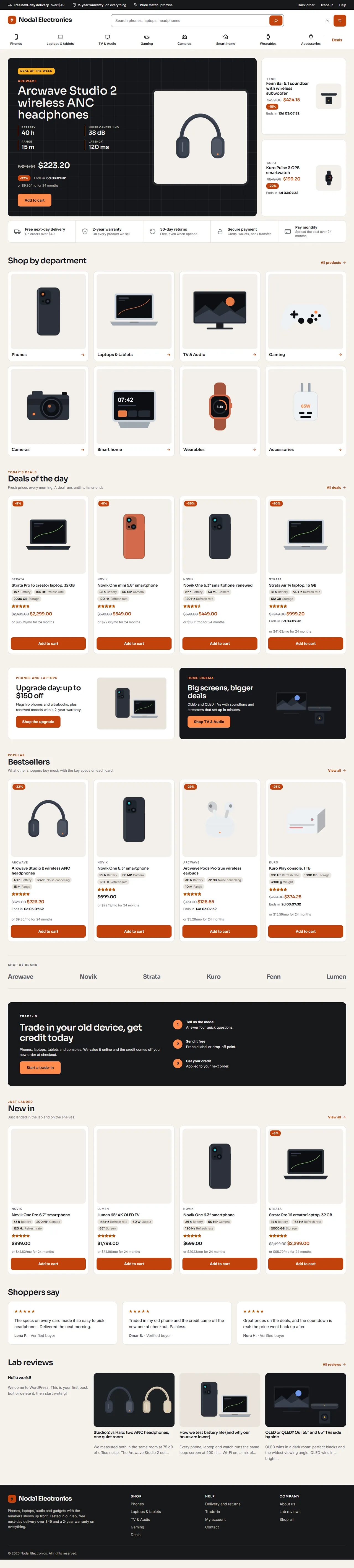
Home page: dark deal stage with spec callouts and a countdown, deal tiles, icon department bar1 of 6
Block theme for electronics and gadget stores where every deal shows its numbers: a dark deal stage with spec callouts and a countdown, product cards with key spec chips, a saving pill and a monthly price line, an icon department bar, a brand row and a trade-in band. Pairs with Make an Offer. Four styles, one-click demo content, full site editing.
WooCommerce 10.1 - 11.2, WordPress 6.7+
Overview
Volt is a classic, conversion-first block theme for electronics and gadget stores: phones, laptops, audio, gaming, cameras and smart-home gear. A dark deal stage with spec callouts and a countdown, square product wells, key-spec chips on every card, a saving pill, a monthly price line, an icon department bar, a brand row and a trade-in band. The same identity as the Volt themes for OpenCart and PrestaShop.
What you get
A block theme (full site editing): every template, template part, pattern, colour and font is editable in Appearance > Editor.
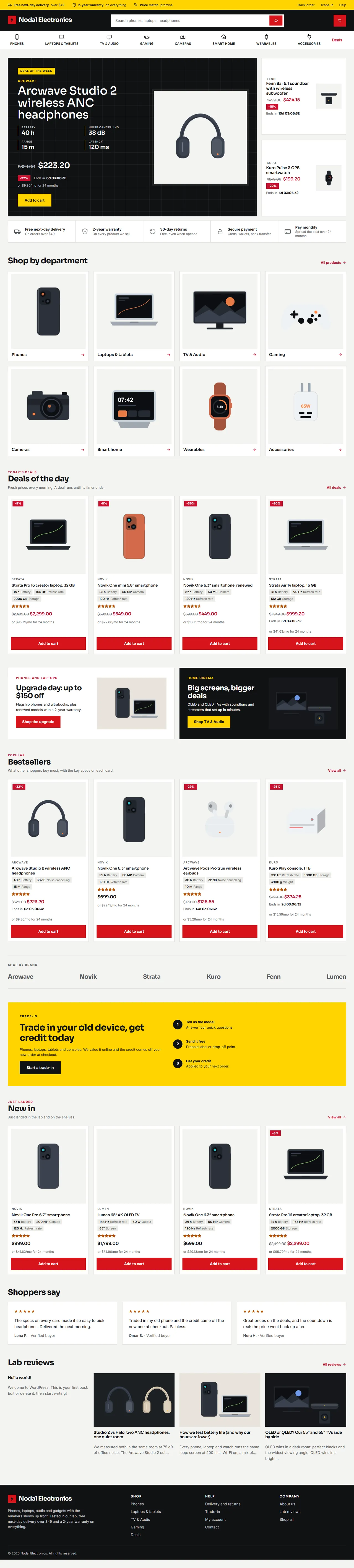
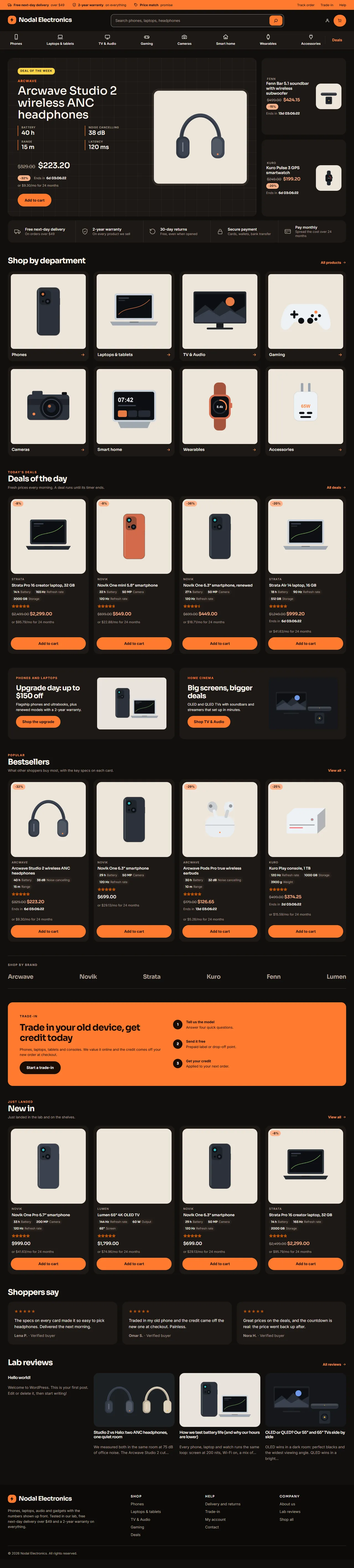
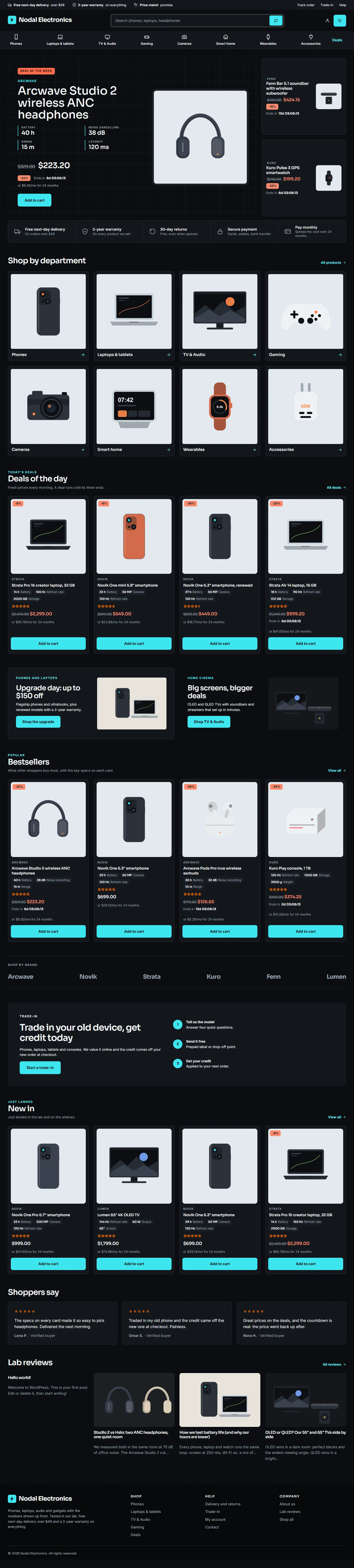
Four styles (Appearance > Editor > Styles): Daylight (default, warm aluminium white with burnt orange), Signal (retail energy: yellow top band, ink header, red buttons, square corners), Ember (warm dark, orange, pill buttons) and Carbon (cool near-black with cyan lines). All four meet WCAG AA contrast for text, form fields and focus rings.
Header: promise bar, logo, wide product search, account, mini cart and a department bar with icons and drop-down menus plus a Deals link. Phones get a compact header with a menu button.
Home page: deal stage (the deal of the week with four spec callouts, saving, "or $x/mo" line and countdown, plus two deal tiles), promise strip, Shop by department tiles, Deals of the day, two promo banners, bestsellers, brand row, trade-in band, new in, reviews and lab reviews (posts). All are patterns.
Product cards (shop, category, search, home): key spec chips taken from product attributes, a saving pill, the sale countdown and the monthly line, all from standard WooCommerce data.
Product page: gallery, price with saving, countdown, monthly line, spec tiles, add to cart, tabs and related products.
Cart and Checkout: the WooCommerce blocks, styled; a minimal secure checkout header.
Demo content (optional, one click): "Nodal Electronics", a sample store with 40 products in 30 categories, six brands, specifications, three timed deals, 140 reviews, four pages and four posts. It can be removed with one click.
Self-hosted fonts (Sora and Inter, SIL Open Font License); no external requests.
Compatibility
WordPress 6.7 or newer (tested on 7.1), PHP 7.4 to 8.3.
WooCommerce 10.1 to 11.2 (tested on 11.2): product collection, product filters, mini cart, customer account, product gallery, Cart and Checkout blocks.
Neutral to High-Performance Order Storage: the theme never reads or writes orders.
Right-to-left ready (logical CSS properties). English product.
Works well with
Make an Offer for WooCommerce (shoppers propose a price; the button sits under the add-to-cart form and takes the style's colours) and Sell by Measure for WooCommerce. Both are separate Kavio Labs products; the theme does not depend on them.
Licence
Volt is GPL-2.0-or-later. In the own-site (Kavio Labs) edition a licence key unlocks updates, the demo importer and the live countdown script; templates, patterns, styles and your store keep working without it (timers then show the time left when the page was built), and the admin is never blocked. The CodeCanyon edition uses a purchase code for updates and support only. The WooCommerce.com edition has no licence screen. See configuration.
Volt, Daylight style
Installation
Requirements
WordPress 6.7+, WooCommerce 10.1+, PHP 7.4+.
Steps
In WordPress go to Appearance > Themes > Add New > Upload Theme, choose the Volt zip and click Install now, then Activate.
Open Appearance > Volt. In the own-site edition enter your licence key and click Save and check.
Optional: click Import demo content to fill the store with the sample catalogue, pages and posts.
Check WooCommerce > Settings > Products and make sure the Shop page is set. The Cart and Checkout pages must use the Cart and Checkout blocks (the WooCommerce default).
Choose a style in Appearance > Editor > Styles and change the site title and logo in Appearance > Editor.
Demo content
The importer creates eight departments with sub-categories, six brands (as product brands), 40 products with prices, stock, specifications, images and reviews, three timed deals (a sale price with an end date), four pages (About, Delivery and returns, Trade-in, Contact) and four posts in the category Lab reviews. Everything it creates is tagged, so Remove demo content deletes exactly those items and nothing else. Running the import again updates the items instead of duplicating them. Timed deals end at midnight N days after the import.
Upload the new zip over the old one (WordPress asks to replace the theme). Your template edits made in the Site Editor are stored in the database and are kept.
Uninstalling
Switch to another theme and delete Volt. If you imported the demo content, remove it first (Appearance > Volt).
Configuration
Appearance > Volt
Section
What it does
Licence (own-site and CodeCanyon editions)
Enter the licence key or purchase code. The check runs from the admin once a day and sends the site address and the key to kaviolabs.com; nothing about customers, visitors or orders.
Demo content
Import, update or remove the sample store.
What the licence controls (own-site edition)
Without a valid licence
Still works
Live countdown script (timers show the time at page build)
All templates, patterns, styles and the Site Editor
Demo importer
Cart, Checkout, orders and every store setting
Updates
The admin (never blocked)
A new installation has a 14-day start period; if the licence server cannot be reached, a 14-day grace period applies. Development hosts (localhost, .test, private addresses) are always accepted. The CodeCanyon edition never locks features: the purchase code only enables updates and support. The WooCommerce.com edition has no licence screen and sends nothing.
Filters
Filter
Default
Effect
kv_volt_monthly_months
24
Months in the "or $x/mo" line; 0 hides it.
kv_volt_spec_skip
condition, connection, ...
Attribute names that never become spec chips.
Style variations and tokens
The theme exposes its shape as custom values in theme.json: custom.radius, radiusSm, radiusBtn, heading.weight, heading.tracking, nav.transform, card.border, card.shadowHover. A child theme or a style variation can override them together with the colour palette (28 named colours: page, surface, ink, muted, primary and hover, pop, accent text, in stock, panel, line, footer, deal stage, header, product well, top band and their text colours). Pick text and background pairs from the same style to keep AA contrast.
Using the theme
Home page
The home page template (front-page) is a list of patterns. In Appearance > Editor > Templates > Front Page click a section to change its text, pictures, links or products, or drag sections to reorder them. The same sections are in the block inserter under Volt sections so you can use them on any page.
Section
Notes
Deal stage
The deal of the week and two deal tiles, picked when the page is built: products that are on sale, featured ones first, then by their order in the product list and the sale end date. Mark a product as featured and give it a sale price with an end date to put it on the stage.
Promise strip
Five short promises with icons (delivery, warranty, returns, secure payment, monthly payments).
Shop by department
Eight tiles; replace the pictures and links with your own categories.
Deals of the day, Bestsellers, New in
Product collection blocks (on sale, popularity, newest). Change the query in the block settings.
Promo banners
Two offer banners with a picture.
Brand row
Names that link to the product brand pages.
Trade-in band
A bold call to action with three steps; point the button at your own trade-in page.
Reviews, Lab reviews
Three quotes; the latest four posts.
Spec chips, saving pill, countdown and monthly line
These come from standard product data, so they work on products you add yourself:
Spec chips: the first visible product attributes with a short value (for example Battery: 40 h). Put the most important attribute first in the product's Attributes tab. Attributes named Condition, Connection, Water resistance, Lab score, Brand, Colour and Size are never shown as chips (filter kv_volt_spec_skip).
Saving pill: the percentage off, from the regular and sale price (simple products).
Countdown: shown when the sale price has an end date (Product data > General > Schedule). The licence-enabled script updates it every second.
Monthly line ("or $9.30/mo for 24 months"): the price divided by the number of months, for products from $99. It is information only, not a payment plan. Change the months with the filter kv_volt_monthly_months (0 turns it off).
Navigation
The header navigation is a Navigation block with drop-down menus. Edit it in Appearance > Editor > Patterns > Header or open the header template part. Item links point to the demo categories (/product-category/<slug>/); change them to match your own categories. The department icons come from the class on each top-level item (kv-nav-ico--phone, laptop, tv, gamepad, camera, home, watch, plug).
Styles
Open Appearance > Editor > Styles > Browse styles and pick Daylight, Signal, Ember or Carbon. Colours, fonts and corner radius change everywhere, including the Cart and Checkout blocks.
SignalEmberCarbon
Pages
The block inserter has three page patterns under Volt store pages: About us, Delivery and returns, Trade-in. The Wide page template removes the narrow text column for custom layouts.
Shop and product pages
Filters, sorting and the grid are WooCommerce blocks. Add or remove filters in the Archive Product template. The single product template shows the brand above the title; assign brands under Products > Brands.
Developer notes
Structure
kv-volt/
  style.css  theme.json  functions.php  screenshot.png  readme.txt  LICENSE.txt
  templates/   front-page, index, page, page-wide, single, archive, search, 404 + WooCommerce:
               archive-product, product-search-results, single-product, page-cart, page-checkout, order-confirmation
  parts/       header, footer, checkout-header   (thin wrappers around the PHP patterns of the same name)
  patterns/    kv-volt/* PHP patterns (translatable text, home_url(), theme file URIs); sections and store pages
  styles/      signal.json, ember.json, carbon.json  (Daylight = theme.json)
  assets/      css/theme.css (front end + editor), css/admin.css, js/theme.js (countdowns), fonts/
  inc/         KavioLabs\Volt\  Theme, Settings, Admin\ThemePage, Demo\{Importer,Cli}, License\{Manager,Client,Envato}
  demo/        pack.json + images (demo importer data)
  languages/   kv-volt.pot (English only; no translation files ship)
Hooks and conventions
Everything is prefixed kv_volt_ / KavioLabs\Volt / KV_VOLT_; text domain kv-volt.
The theme never touches orders (HPOS neutral) and leaves Cart and Checkout to the WooCommerce blocks.
Product extras: Theme::render_block() (filter render_block) appends spec chips after core/post-title blocks with the class kv-card__title or kv-stage__title, a saving pill after woocommerce/product-image with kv-card__image, and the countdown, monthly line and spec tiles after woocommerce/product-price blocks with kv-card__price, kv-stage__price, kv-dealtile__price or kv-product__price. Add these classes to your own blocks to get the same extras.
Theme::deal_ids() returns the products for the stage (on sale, featured first, then menu order and sale end); the result is cached for ten minutes in the transient kv_volt_deals.
Patterns are generated by tests/gen-patterns.js, theme.json and the three style files by tests/gen-theme-json.js (one palette table), and the demo pack by tests/demo/build-pack.js. Edit the generators, not the output.
tests/contrast.js checks every palette pair used by the theme against WCAG AA for all four styles.
The pattern cache of a theme is a transient: after changing pattern files on a dev store run wp transient delete --all.
Applying a style on a dev store from the command line: wp --user=admin eval-file tests/variation.php signal (a user is needed, otherwise WordPress strips the global styles content).
FAQ
Does Volt work with the Cart and Checkout blocks?
Yes. Both are styled by the theme and nothing replaces them.
Does it support HPOS?
The theme never reads or writes orders, so it is neutral to High-Performance Order Storage.
Which WooCommerce versions?
10.1 to 11.2, on WordPress 6.7 or newer.
Why is no deal on the stage?
The stage shows products that are on sale. Give a product a sale price (optionally with an end date) and mark it as featured; without sale products the stage stays empty.
Why do some cards have no spec chips?
Chips come from visible product attributes with a short value. Add attributes such as Battery: 40 h on the product (Attributes tab, visible on the product page).
Is the monthly price a financing offer?
No. It is the price divided by the number of months, shown as information. Turn it off with the filter kv_volt_monthly_months.
Does it work with Make an Offer?
Yes. The button sits under the add-to-cart form and uses the style's colours.
Can I use it for a store that is not electronics?
Yes. The templates and styles are general; the demo content and home sections are written for electronics and are all editable.
Is a translation included?
The product is English. Strings are translatable (text domain kv-volt, .pot file in languages/).
Does it call home?
Only the own-site and CodeCanyon editions, once a day from the admin, to check the licence. The WooCommerce.com edition makes no external request.
Year/make/model parts search for WooCommerce: fitment table per product, CSV import, My Garage, fits / does not fit badge and vehicle-filtered shop and search pages.
EN 16931 e-invoices and credit notes from WooCommerce orders: XRechnung (CII/UBL), ZUGFeRD/Factur-X PDF/A-3 and Peppol BIS 3.0 UBL, gapless numbering, B2B checkout fields, validation, e-mail attachments, My Account downloads and ZIP export.