by Kavio Labs · for WooCommerce 10.1+ on WordPress 6.7+
Block theme for toy, kids and baby stores: a Shop by age panel and growth chart, a gift finder by age, interest and budget, pastel toy-box product cards with age chips and safety shields, a boxed small-parts warning and a Make it a gift set builder. Four styles, one-click demo content, full site editing.
AvailableVersion 1.0.0Compatible with WooCommerce 10.1 – 11.2, WordPress 6.7+ No core file edits
Built forWooCommerce
Home page: hero with promo tiles, gift wrap bar and a category bar that starts with Shop by age1 of 9
Block theme for toy, kids and baby stores: a Shop by age panel and growth chart, a gift finder by age, interest and budget, pastel toy-box product cards with age chips and safety shields, a boxed small-parts warning and a Make it a gift set builder. Four styles, one-click demo content, full site editing.
WooCommerce 10.1 - 11.2, WordPress 6.7+
Overview
Kite is a block theme for toy, kids and baby stores. It is built for parents and gift givers who shop by age: a Shop by age panel and growth chart, a gift finder that works in the browser, pastel toy-box cards with age chips and safety shields, a boxed small-parts warning, a gift wrap line and a Make it a gift set builder. Typography is Fredoka and Nunito (self-hosted). The layout is a classic e-commerce store: top bar, search, category bar, hero with promo tiles, tiles, product rows and a footer.
What you get
A block theme (full site editing): every template, template part, pattern, colour and font is editable in Appearance > Editor.
Four styles (Appearance > Editor > Styles): Playroom (default: cream, navy and sunshine yellow), Nursery (soft white, blush and deep teal), Woodland (oat, forest green and terracotta with stitched outlines) and Bedtime (a dark midnight blue). All four meet WCAG AA contrast for text, form fields and focus rings.
Header: gift wrap and delivery bar, wordmark, wide search, account, cart and a category bar that starts with Shop by age, then the categories with drop-down menus, a Gift finder and a Sale button.
Home page (all patterns): hero with two promo tiles, promise strip, Shop by age tiles, shop by interest tiles, New arrivals, the Gift finder, Best sellers, a Birthday week offers band, the age growth chart, the gift set builder, a safety strip, shop by brand, play ideas, reviews and a gift wrap banner.
Product cards in six pastel wells: age chip, safety shield, small-parts mark, colour dots, price per piece, the end date of a sale and badges (New, Eco, Only 3 left).
Product page: gallery, age chip and safety chips, a boxed small-parts warning, colour swatches and size chips, delivery and gift wrap lines, tabs and related products.
Shop and category pages: filters (price, brand, rating, availability), sorting and age chips.
Cart and Checkout: the WooCommerce blocks, styled; a minimal secure checkout header.
Demo content ("Skylark Toys & Baby", optional, one click): 62 toys, baby essentials and clothes from eight fictional brands in 29 categories, 17 of them with colour or size variations, the Age and Interest attributes, real sale end dates, 200 reviews, seven pages and four posts. It can be removed again with one click.
Self-hosted fonts (SIL Open Font License); no external requests.
Compatibility
WordPress 6.7 or newer (tested on 7.1), PHP 7.4 to 8.3.
WooCommerce 10.1 to 11.2 (tested on 11.2): product collection, product filters, mini cart, customer account, product gallery, Cart and Checkout blocks.
Neutral to High-Performance Order Storage: the theme never reads or writes orders.
Right-to-left ready (logical CSS properties). English product.
Works well with
Product Personalizer for WooCommerce (a child's name on a toy) and Make an Offer for WooCommerce (negotiated prices on gift sets and multi-buys). Both are separate Kavio Labs products; the theme does not depend on them and their fields and buttons are styled to fit.
Licence
Kite is GPL-2.0-or-later. In the own-site (Kavio Labs) edition a licence key unlocks updates, the demo importer, the colour swatches, the gift finder and the gift set button; templates, patterns, styles and your store keep working without it, and the admin is never blocked. The CodeCanyon edition uses a purchase code for updates and support only. The WooCommerce.com edition has no licence screen. See configuration.
Kite, Playroom style
Installation
Requirements
WordPress 6.7+, WooCommerce 10.1+, PHP 7.4+.
Steps
In WordPress go to Appearance > Themes > Add New > Upload Theme, choose the Kite zip and click Install now, then Activate.
Open Appearance > Kite. In the own-site edition enter your licence key and click Save and check.
Optional: click Import demo content to fill the store with the sample toy catalogue, pages and posts.
Check WooCommerce > Settings > Products and make sure the Shop page is set. The Cart and Checkout pages must use the Cart and Checkout blocks (the WooCommerce default).
Choose a style in Appearance > Editor > Styles and change the site title and logo in Appearance > Editor.
Your own data (what the theme reads)
Element
Where it comes from
Brand line, Brands A-Z, Shop by brand
Products > Brands (WooCommerce product brands)
Shop by age, growth chart, age chips, gift finder
A global attribute Age (Products > Attributes) with the terms 0-12 months, 1-2 years, 3-4 years, 5-7 years, 8-11 years, 12+ years; the links use ?filter_age=<slug>
Gift finder interest list
A global attribute Interest with your own terms
Safety shield and chips
A product attribute named Safety, a comma separated list such as Safety tested, Non-toxic finishes
Small-parts warning box
A product attribute named Warning with the full text
Price per piece
A product attribute named Pieces with a number
Colour swatches
A variable product with a variation attribute named Colour (or Seat cushion); the swatch colour comes from the name (Mint, Blush, Coral, Teal, Navy and about 30 more)
Size chips
A variation attribute named Size
Sale end date on cards
The scheduled sale dates of the product or of its variations
Gift set builder
The products named in the pattern's class kv-dyn-set-<slug>_<slug>_<slug> (up to four simple products)
Without this data those elements are simply not shown or fall back to normal WooCommerce behaviour.
Demo content
The importer creates 29 product categories, eight brands, 62 products (17 variable, with prices, stock, attributes, images and 200 reviews), the global attributes Age and Interest, seven pages (Brands A-Z, Gift finder, Shop by age, About, Delivery and returns, Safety and age guide, Contact) and four posts in the category Play ideas. Everything it creates is tagged, so Remove demo content deletes exactly those items (and the attributes it created) and nothing else. Running the import again updates the items instead of duplicating them. The first run creates the attributes and continues in a second request automatically.
Upload the new zip over the old one (WordPress asks to replace the theme). Your template edits made in the Site Editor are stored in the database and are kept.
Uninstalling
Switch to another theme and delete Kite. If you imported the demo content, remove it first (Appearance > Kite).
Configuration
Appearance > Kite
Section
What it does
Licence (own-site and CodeCanyon editions)
Enter the licence key or purchase code. The check runs from the admin once a day and sends the site address and the key to kaviolabs.com; nothing about customers, visitors or orders.
Demo content
Import, update or remove the sample store.
What the licence controls (own-site edition)
Without a valid licence
Still works
Colour swatches (the normal select is shown), the gift finder form and the Add gift set to cart button
All templates, patterns, styles and the Site Editor
Demo importer
Cart, Checkout, orders and every store setting
Updates
The admin (never blocked)
A new installation has a 14-day start period; if the licence server cannot be reached, a 14-day grace period applies. Development hosts (localhost, .test, private addresses) are always accepted. The CodeCanyon edition never locks features: the purchase code only enables updates and support. The WooCommerce.com edition has no licence screen and sends nothing.
Style variations and tokens
The theme exposes its shape as custom values in theme.json: custom.radius, radiusSm, radiusBtn, heading.weight, heading.stretch, heading.tracking, card.border, card.shadowHover, pill.bg and pill.ink (the category bar buttons), well.1 to well.6 (the pastel card wells) and chip.1 to chip.6 with chip.ink-1 to chip.ink-6 (age chips, badges and the warning box). A child theme or a style variation can override them together with the colour palette.
Using the theme
Home page
The home page template (front-page) is a list of patterns. In Appearance > Editor > Templates > Front Page click a section to change its text, photos, links or products, or drag sections to reorder them. The same sections are in the block inserter under Kite sections so you can use them on any page.
Section
Notes
Hero with promo tiles
A campaign banner with two buttons and two promo tiles. Replace the pictures and text.
Promise strip, Safety promise
Short promises and safety badges with icons.
Shop by age
Six age tiles with product counts that open the shop filtered by the Age attribute.
Shop by interest
Eight category tiles on pastel wells; replace the pictures and links with your categories.
New arrivals, Best sellers, Offers
Product collection blocks (newest, popularity, on sale). The offers band shows the end date of each sale.
Gift finder
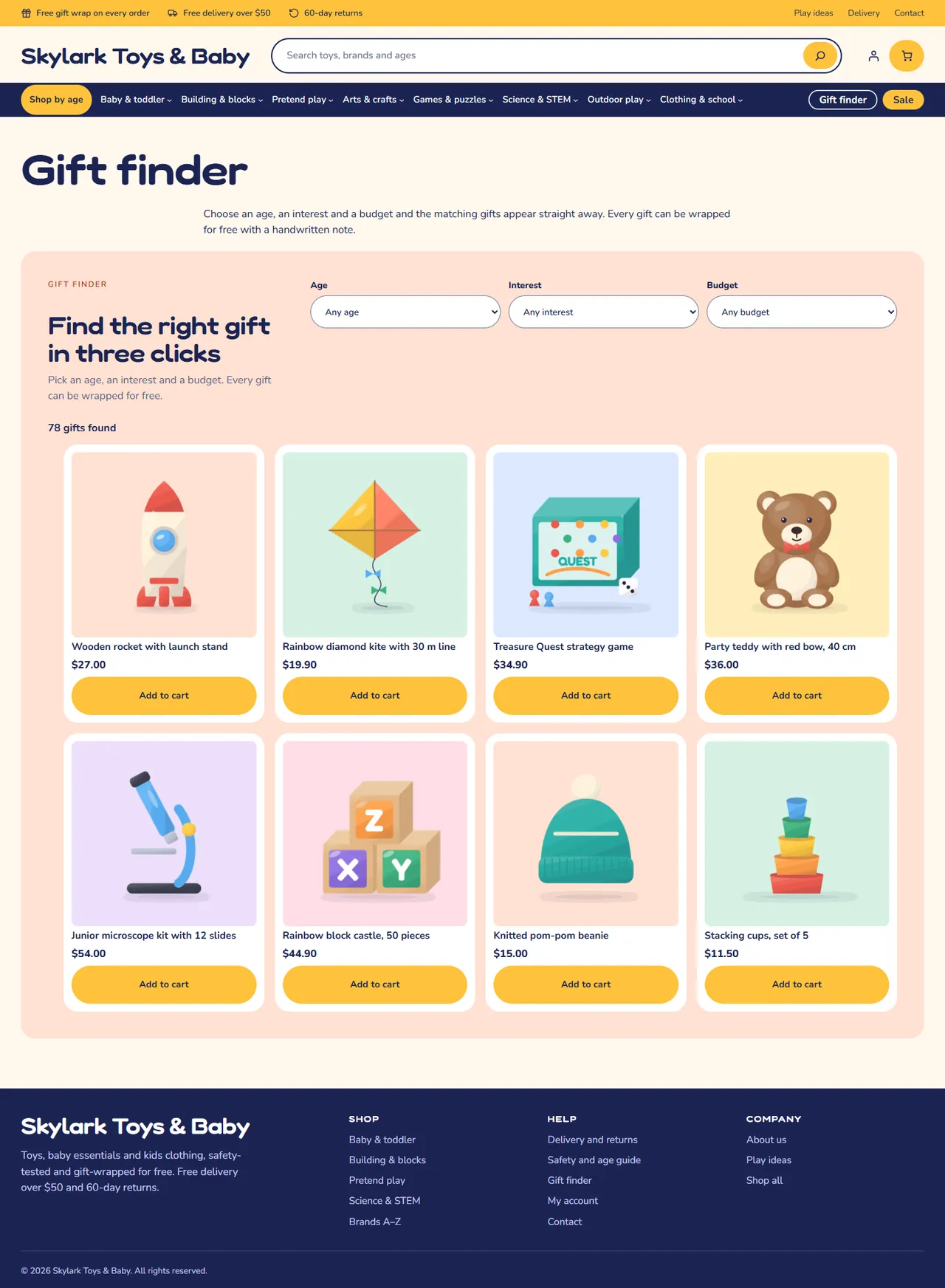
Age, interest and budget selects; the matching gifts appear instantly without a page load.
Age growth chart
Growing bars, one per age step, each linking to its age filter.
Gift set builder
Three toys with checkboxes, a running total and Add gift set to cart.
Shop by brand, Play ideas, Reviews, Gift wrap line
Brands from Products > Brands, latest posts, three quotes and a call to action.
Shop by age, Age growth chart, Gift finder, Gift set builder and Brands are filled by the theme on the front end from store data: in the editor they show as an empty group with a marker class (kv-dyn-age, kv-dyn-growth, kv-dyn-giftfinder, kv-dyn-giftset, kv-dyn-brands). The Safety badges pattern (kv-dyn-safety) sits in the single product template.
Navigation
The header navigation is a Navigation block. Its first item is Shop by age, then the categories with drop-down menus. Edit it in Appearance > Editor > Patterns > Header. Item links point to the demo categories (/product-category/<slug>/); change them to match your own.
Styles
Open Appearance > Editor > Styles > Browse styles and pick Playroom, Nursery, Woodland or Bedtime. Colours, the six well tones, corner radius and the heading weight change everywhere, including the Cart and Checkout blocks.
NurseryWoodlandBedtime
Product page, safety and gift wrap
The age chip and the safety chips are built from the Age and Safety attributes; a Warning attribute becomes a boxed notice above the add to cart button. Kite does not make toys safe: the text is whatever you enter, so only list claims you can prove. The gift wrap line under the button is plain text in the Product perks pattern; to make gift wrap a real service, mention it in the order note or add a gift wrap product or fee with a plugin.
With Product Personalizer and Make an Offer
A name field from Product Personalizer for WooCommerce appears in the product summary and the Make an Offer button sits under the Add to cart button. Both inherit the colours and shapes of the active style.
Pages
The block inserter has page patterns under Kite store pages: Brands A-Z, Gift finder, Shop by age, About us, Delivery and returns, Safety and age guide.
Gift finder
Developer notes
Hooks and conventions
Everything is prefixed kv_kite_ / KavioLabs\Kite / KV_KITE_; text domain kv-kite.
The theme never touches orders (HPOS neutral) and leaves Cart and Checkout to the WooCommerce blocks.
Catalog filters woocommerce_dropdown_variation_attribute_options_html (swatches next to the select), render_block_woocommerce/product-price (age chip, shield and warning mark above the price on cards, colour dots, price per piece and the sale end date below it) and render_block_woocommerce/product-image (New, Eco and Only N left badges). Swatch colours: Catalog::COLOURS; age steps: Catalog::AGE_STEPS.
Blocks filters render_block_core/group: an empty Group with the class kv-dyn-brands (options kv-dyn-az, kv-dyn-limit-8), kv-dyn-age, kv-dyn-growth, kv-dyn-giftfinder, kv-dyn-giftset (option kv-dyn-set-<slug>_<slug>) or kv-dyn-safety is filled from store data. A theme cannot register blocks or shortcodes (Theme Check), hence the marker classes. The gift finder script (assets/js/theme.js) filters a JSON list printed in a data attribute; it builds the result cards with DOM calls, never with innerHTML.
Patterns are generated by tests/gen-patterns.js, theme.json and the three style files by tests/gen-theme-json.js (one palette table), and the demo pack by tests/demo/build-pack.js (from the shared Skylark Toys & Baby pack of the other platforms). Edit the generators, not the output.
tests/contrast.js checks every palette pair used by the theme against WCAG AA for all four styles.
The pattern cache of a theme is a transient: after changing pattern files on a dev store run wp transient delete --all.
Applying a style on a dev store from the command line: wp eval-file tests/variation.php nursery --user=admin (a user is needed, otherwise WordPress strips the global styles content).
FAQ
Does Kite work with the Cart and Checkout blocks?
Yes. Both are styled by the theme and nothing replaces them.
Does it support HPOS?
The theme never reads or writes orders, so it is neutral to High-Performance Order Storage.
Which WooCommerce versions?
10.1 to 11.2, on WordPress 6.7 or newer.
Why do I not see age chips or Shop by age?
They need a global attribute called Age with the standard terms and products that use it (see Installation > Your own data). The demo content creates them.
Why do I not see colour swatches?
Swatches need a variable product whose variation attribute is called Colour (or Seat cushion). In the own-site edition they also need an active licence or the start period.
Does the gift finder reload the page?
No. The server lists up to 120 in-stock products once and your browser filters them. Out-of-stock products are not listed.
Does Kite make my toys safe or certified?
No. The Safety and Warning text is whatever you enter. Only publish claims you can prove and follow the toy safety rules of your country.
Can I use it for a store that is not toys?
Yes, the templates and styles are general; the home sections are written for toy and baby stores and are all editable.
Is a translation included?
The product is English. Strings are translatable (text domain kv-kite, .pot file in languages/).
Does it call home?
Only the own-site and CodeCanyon editions, once a day from the admin, to check the licence. The WooCommerce.com edition makes no external request.
Are there product photos?
No. The demo uses generated illustrations of fictional brands.
Year/make/model parts search for WooCommerce: fitment table per product, CSV import, My Garage, fits / does not fit badge and vehicle-filtered shop and search pages.
EN 16931 e-invoices and credit notes from WooCommerce orders: XRechnung (CII/UBL), ZUGFeRD/Factur-X PDF/A-3 and Peppol BIS 3.0 UBL, gapless numbering, B2B checkout fields, validation, e-mail attachments, My Account downloads and ZIP export.