by Kavio Labs · for WooCommerce 10.1+ on WordPress 6.7+
The campaign block theme for WooCommerce that makes a store feel like a sale is always on: a flash bar with the sale that ends first, a bento hero with a live deal tile, a dark flash deals zone with flip-tile countdowns on real sale end dates, round discount stickers, a category pill bar, stories with a player, a Discover feed with promo cells inside the grid, a product page campaign strip and a sticky phone buy bar. Sixteen colour styles as Site Editor style variations, two of them dark. Cart and Checkout blocks styled, HPOS neutral.
Tested on WooCommerce 11.2.1 & WordPress 7.1.3Updated Oct 31, 2026Version 1.0.0Compatible with WooCommerce 10.1 – 11.2, WordPress 6.7+ No core file edits
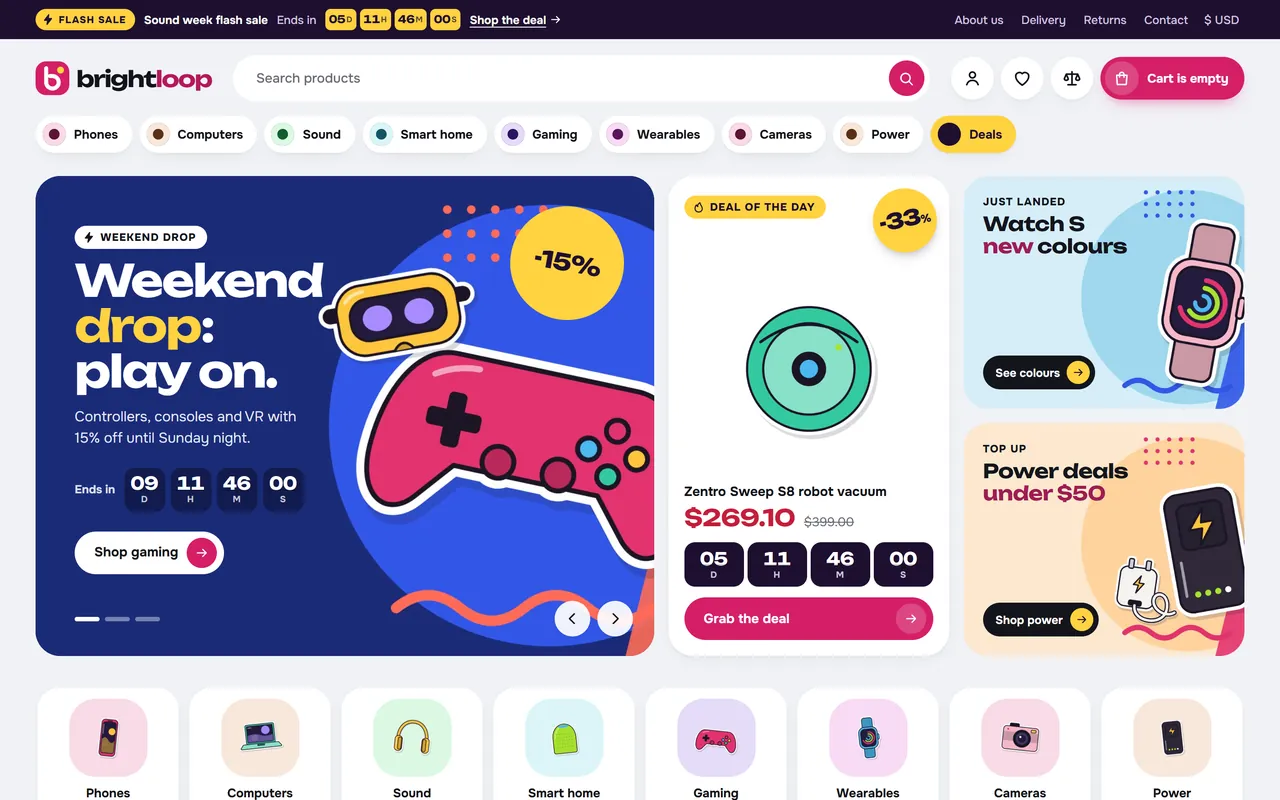
A sale that is always on: flash bar, category pills and a bento hero with a live deal1 of 15
What it does
The campaign block theme for WooCommerce that makes a store feel like a sale is always on: a flash bar with the sale that ends first, a bento hero with a live deal tile, a dark flash deals zone with flip-tile countdowns on real sale end dates, round discount stickers, a category pill bar, stories with a player, a Discover feed with promo cells inside the grid, a product page campaign strip and a sticky phone buy bar. Sixteen colour styles as Site Editor style variations, two of them dark. Cart and Checkout blocks styled, HPOS neutral.
Features
Same design and demo as Pulse on CS-Cart and OpenCart: Brightloop, one-click import and removal.
Real countdowns: every timer reads the WooCommerce sale end date, so it never restarts on reload and it stops when the price changes.
Flash bar: the running sale that ends first, on every page.
Bento hero: slider, live deal of the day tile and two tiles in one rounded block.
Flash deals zone: dark band, big flip-tile countdown, swipe rail of products on sale.
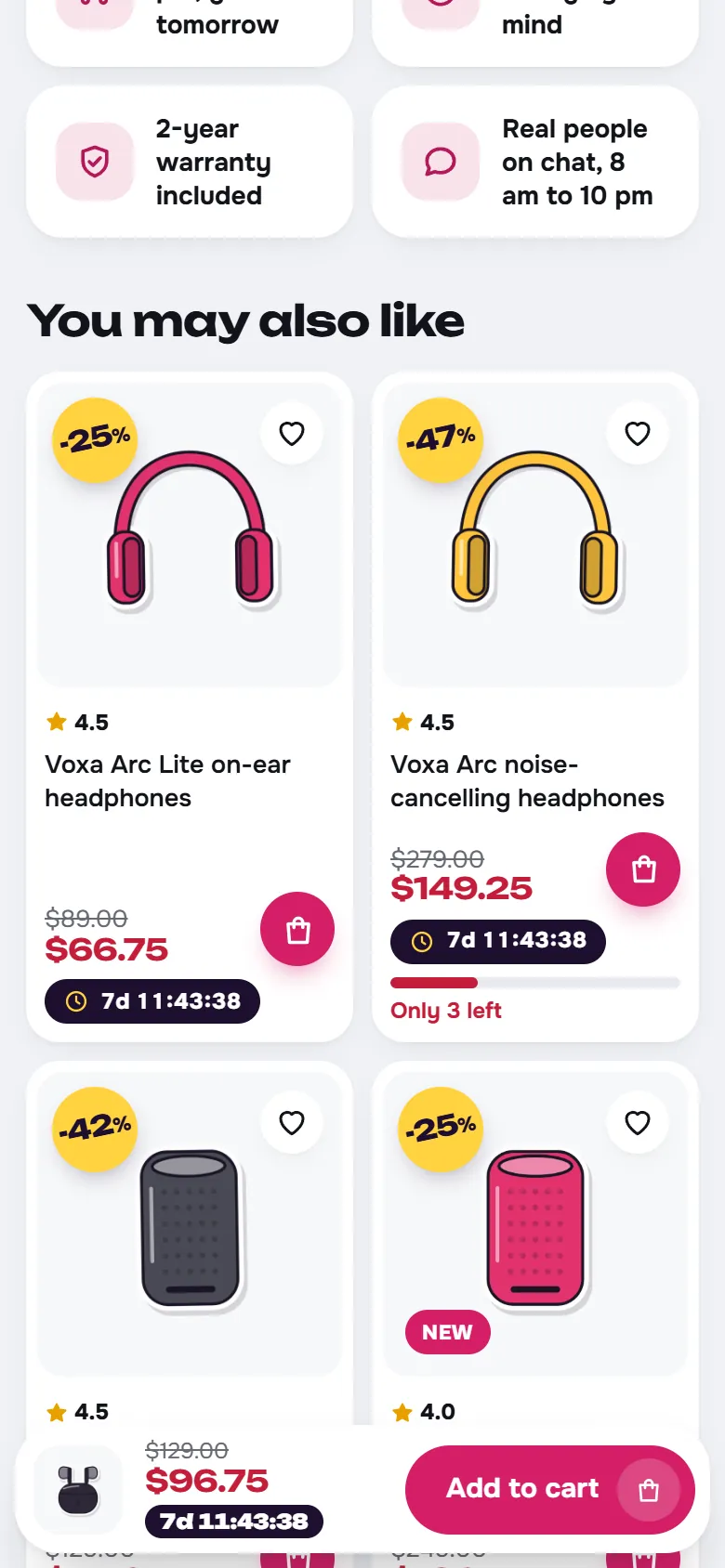
Product cards: round tilted discount stickers, top rated and new flags, colour dots, low-stock meter, round add button, countdown pill, wish list, compare, quick view.
Promo cells in grids: banner, countdown, video and article cells inside the Discover feed and category pages.
Stories: circles that open a 9:16 player with a shop button.
Category pill bar with mega panels, squircles, pill-tab shelves, promo cards, counters, video articles, chat-bubble reviews, brand and trust strips; every section is a block pattern.
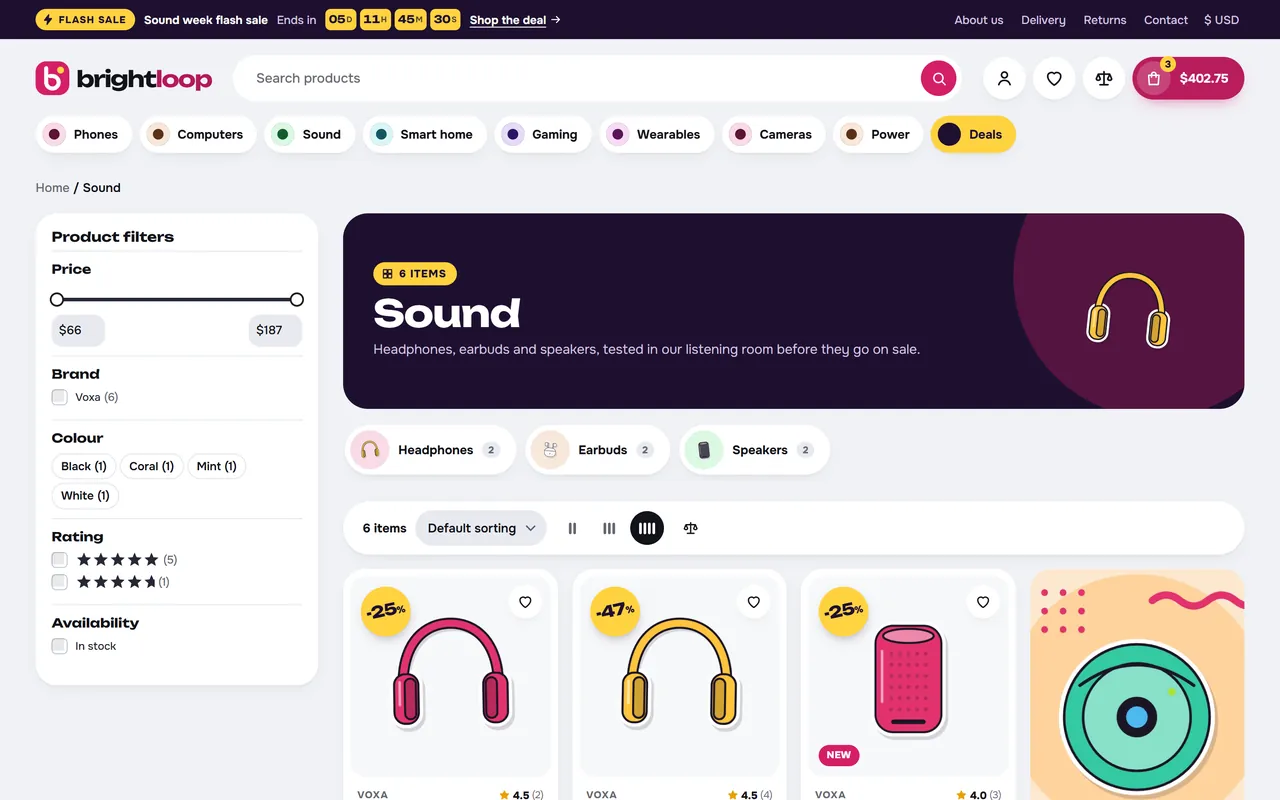
Category pages: hero island, subcategory pills, WooCommerce AJAX product filters, active filter chips, Show more, Deals view, Filter and Sort bar on phones.
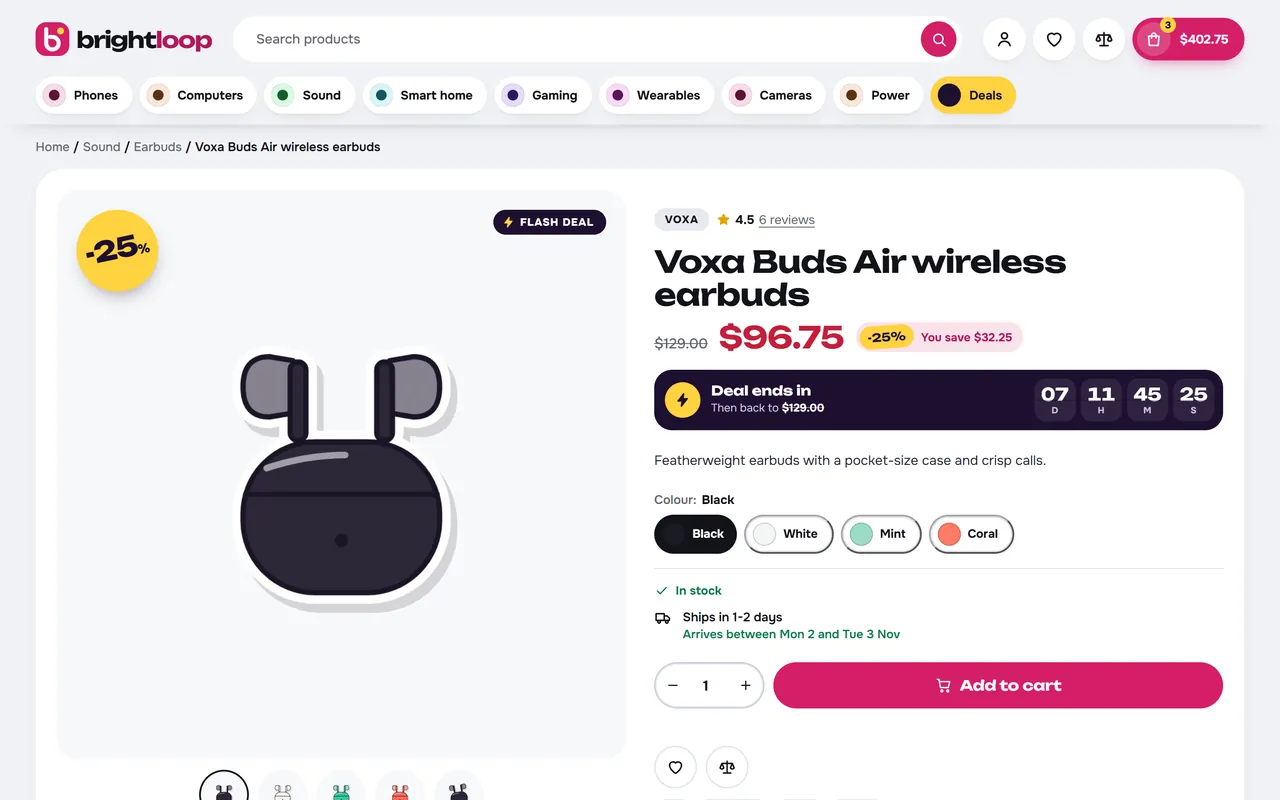
Product page: big sticker, campaign strip with the price after the deal, colour and option chips, delivery dates, perks, sticky phone buy bar with the deal countdown.
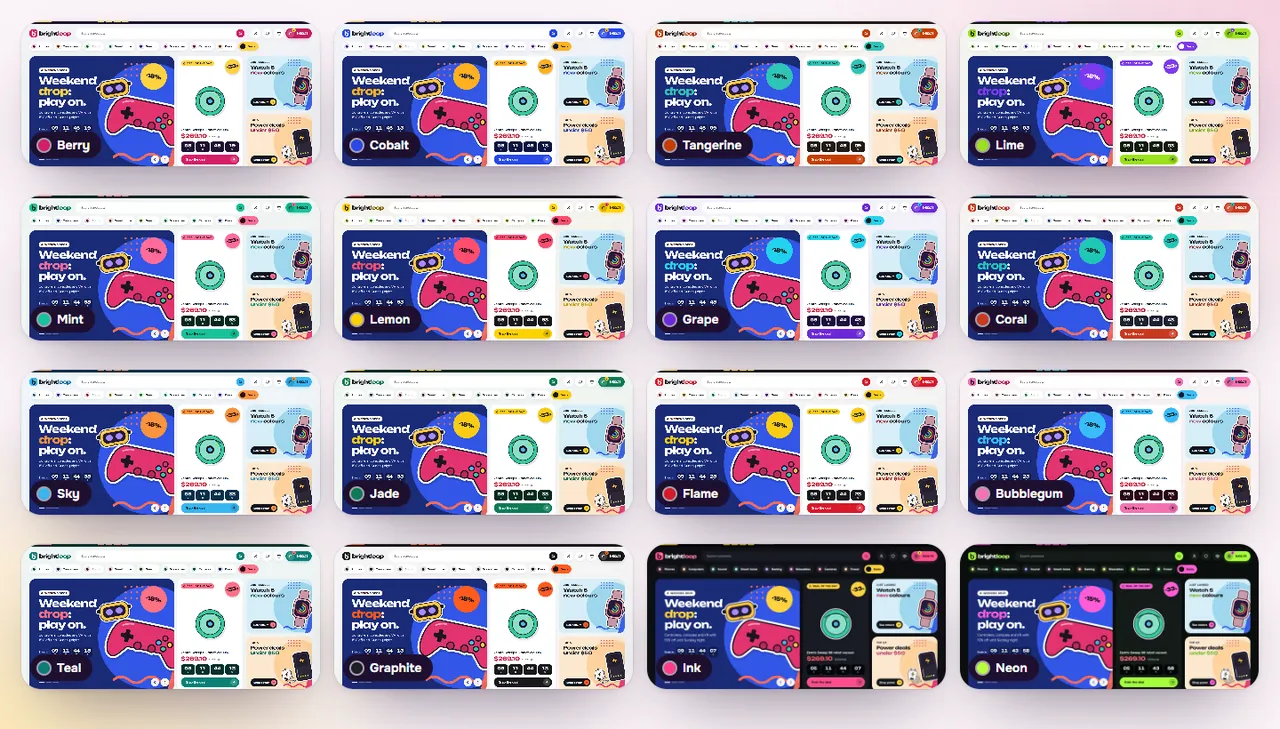
Sixteen colour styles as Site Editor style variations, two of them dark; every colour editable and AA contrast checked.
What you get
Download & installThe theme .zip, installed in Appearance > Themes > Add New Theme > Upload Theme. Download it from My licenses right after payment.
12 months of updates & supportNew versions and help for 12 months (24 or 36 months at checkout). After that the theme keeps working; renew anytime at 50%.
License for your storeOne production domain with all its subdomains; staging and local development hosts are free. How licensing works
30-day refundFull refund within 30 days of your first purchase, no reason needed. Refund policy
Tested buildsWooCommerce 10.1 – 11.2, WordPress 6.7+. Tested on WooCommerce 11.2.1 and WordPress 7.1.3, before every release.
Documentation & supportFull guide (Installation, Configuration, Using Pulse, Developer notes) on this page. Tickets from your account, first reply within 1 business day.
Compatibility
Pulse: Campaign Theme works with WooCommerce 10.1 – 11.2, WordPress 6.7+.
We list the builds we install and test on. “Tested” means the full test plan runs on that build before every release; “Supported” means the build is inside the supported range.
Compatibility
Version
Range
Runs on
Status
WooCommerce 11
11.0 – 11.2
WordPress 6.7 – 7.1
Tested on 11.2.1 before every release
WooCommerce 10
10.1 – 10.x
WordPress 6.7+
Supported
WordPress
6.7 – 7.1
PHP 7.4 – 8.3
Tested on 7.1.3 before every release
1.0.0
Oct 31, 2026
Latest
Pulse for WooCommerce 10.1+ on WordPress 6.7+ (tested with WooCommerce 11.2 and WordPress 7.1): the WooCommerce block theme edition of the Pulse campaign theme, with the same design and Brightloop demo as Pulse on CS-Cart and OpenCart.
Flash bar with a countdown to the running sale that ends first (or your own end date), a note when nothing runs.
Countdowns on real data: every timer reads WooCommerce's sale price end date as it is stored (the date field stores 23:59:59 of that day in the site time zone), nothing is added, and a timer hides when its end passes.
Bento hero (slider, deal of the day tile, two tiles), category squircles, dark flash deals zone, story circles with a story player, Discover feed with promo, countdown, video and article cells, pill-tab shelves, promo cards, counters, video articles, chat-bubble reviews, brand and trust strips. Every section is also a block pattern.
Product cards with round discount stickers, top rated and new flags, colour dots that switch the image, a low-stock meter, a round add button (Store API, mini cart stays current), a countdown pill, wish list, compare and quick view.
Category pages with a hero island, squircle subcategory pills, WooCommerce's AJAX product filters, promo cells in the grid, density switch, Show more or scroll loading, a Deals view and a phone Filter and Sort bar.
Product page with a big discount sticker, campaign strip, colour and option chips that drive the variation form, delivery dates, perks strip, recently viewed and a sticky phone buy bar with the deal countdown.
Sixteen colour styles as Site Editor style variations, two of them dark, all checked for WCAG AA. Unbounded and Onest, self-hosted (SIL Open Font License).
Cart and Checkout blocks and the classic cart, checkout and account pages styled; free-shipping progress on the cart.
How do I install the theme?
Download the package from My licenses and install it in Appearance > Themes > Add New Theme > Upload Theme, like any other WooCommerce theme. The Documentation tab has every step, from the first activation to the theme settings.
Which WooCommerce versions does it work with?
WooCommerce 10.1 – 11.2, WordPress 6.7+. Every release is installed and tested on WooCommerce 11.2.1 and WordPress 7.1.3 before it is published. The Compatibility tab lists every version range.
What does the license cover?
One production store domain with every subdomain (www, shop., staging.), plus local development hosts such as localhost, *.local and *.test. A store on another domain needs its own license; a second-store license is 40% off. You have 14 days after installing to enter the key. 12 months of updates and support are included; after that the theme keeps working and renewals are 50% off. How licensing works
Can I get a refund?
Yes. Ask for a full refund within 30 days of your first purchase, no reason needed: open a ticket or write to [email protected] with your order number. The money goes back to the card or bank account you paid with within 5 business days of approval. Refund policy
How do I get help?
Open a ticket from your account, so your license details are attached. We answer Monday to Friday: bug reports within 1 business day, how-to questions within 2. Support policy. Not a customer yet? Ask a pre-sales question.
Pulse is the campaign block theme of Kavio Labs for WooCommerce, the WooCommerce edition of the Pulse theme for CS-Cart and OpenCart. It makes a store feel like a sale is always on: a flash bar, a bento hero with a live deal, a dark flash deals zone, round discount stickers, promo cells inside the product grids, a story player and a sticky phone buy bar. Every timer reads the end date of a real WooCommerce sale price, so a countdown never lies.
Pulse home page, Berry style
What you get
Flash bar. The running sale that ends first with a live countdown, on every page. Without a dated sale it shows a note of your own instead.
Bento hero. A slider with an optional countdown and a round sticker, a deal of the day tile (your product, or the running sale with the biggest saving) and two small tiles.
Flash deals zone. A dark band with a big flip-tile countdown and a rail of products on sale, ending soonest first.
Product cards. Round tilted discount stickers, top rated and new flags, brand and rating line, colour dots that switch the image, a low-stock meter, a round add button (no reload; a dark one goes to the product page when a choice is needed), a countdown pill on every dated sale, wish list, compare and quick view.
Promo cells. Banner, countdown, video and article cells between the products of the Discover feed and of category pages, one or two products wide.
Stories. Round story circles that open a full-screen 9:16 player: progress bars, tap left or right, auto-advance, Esc, and a shop button on every story.
Home page. Twelve sections in any order, each for all devices, desktop only or phones only, and each also a block pattern for any page: bento hero, category squircles, flash deals zone, story circles, Discover feed, pill-tab shelves, promo cards, counters, video articles, chat-bubble reviews, brand strip and trust strip.
Category pill bar. Your top categories as pills with mega panels (subcategories, popular products or your banner), a yellow Deals pill and a More panel for what does not fit.
Category pages. A hero island with the item count, squircle subcategory pills, WooCommerce's AJAX Product filters (your attributes added automatically), sorting, density, active filter chips, Show more or loading while scrolling and a Deals view. On phones the filters open from a Filter and Sort bar.
Product page. Gallery with a big sticker, hover zoom and an optional product video; a campaign strip with the deal countdown and the price it goes back to; colour and option chips that drive the variation form; delivery dates, perks strip, recently viewed and a sticky phone buy bar with the deal countdown.
Sixteen colour styles. Berry, Cobalt, Tangerine, Lime, Mint, Lemon, Grape, Coral, Sky, Jade, Flame, Bubblegum, Teal, Graphite and the dark Ink and Neon. Styles are Site Editor style variations, so every colour stays editable in Appearance > Editor > Styles > Colors. All sixteen pass WCAG AA.
Block theme done right. WooCommerce's Cart and Checkout blocks, Product Collection, Product Filters and Mini Cart blocks are used and styled; the classic cart, checkout and account pages are styled too. Pulse never reads or writes orders, so it is neutral to High-Performance Order Storage (HPOS).
Safe and fast. Two self-hosted fonts (Unbounded and Onest, SIL Open Font License 1.1), one stylesheet and one deferred script, no font or icon CDNs.
The sixteen stylesCategory page with promo cells in the gridProduct page with the campaign strip
On a phone the bento stacks, the rails swipe, a floating bar gives Home, Menu, Search, Account and Cart, category pages get a Filter and Sort bar and product pages a sticky buy bar with the deal countdown.
Pulse on a phone
Pages of this documentation
Installation
Requirements
WordPress 6.7 or newer (tested with 7.1), PHP 7.4 or newer (tested with 8.3).
WooCommerce 10.1 or newer (tested with 11.2). The Cart and Checkout blocks and the classic cart and checkout pages are both styled. Pulse never reads or writes orders, so High-Performance Order Storage (HPOS) needs nothing extra.
Install
Appearance > Themes > Add New Theme > Upload Theme: choose kv-pulse-kv.zip (or the zip of your marketplace) and install it.
Activate Pulse.
Open Appearance > Pulse. On the own-site build, enter the licence key from your Kavio Labs account on the Licence tab: it switches on the theme extras (quick view, wish list, compare, live search, promo cells, Show more, the sticky buy bar) and the demo importer. Templates, styles and home sections work without a key.
Order your top product categories (Products > Categories, drag and drop): they fill the pill bar. Optionally set a shorter name, an icon and a mega panel banner on each.
Give your sale prices an end date (Product data > General > Schedule): that date drives every countdown.
Demo store (optional)
Appearance > Pulse > Demo store > Import the demo store adds the Brightloop store: 31 categories with images, 32 illustrated products (three with colour variations), 6 brands, reviews, four guides, four pages (About us, Delivery and payment, Returns, Contact us) and all the home and catalog settings. Demo sales end five to nine days after the import. Your own products, pages and orders are never touched. Remove the demo store deletes exactly the demo items again and restores the settings you had before.
From WP-CLI: wp kv-pulse demo import, wp kv-pulse demo remove, wp kv-pulse demo status, wp kv-pulse demo scheme <style> --user=1. Run commands that change styles with --user=1.
Update
Upload the new zip (Upload Theme > Replace current with uploaded). Settings, styles and your Site Editor changes stay.
Configuration
Everything lives in Appearance > Pulse. Colours and block layout live in Appearance > Editor.
Design
Sixteen style cards: one click applies a style. Text logo (shown with the Pulse mark when the site has no logo image; wrap a word in \stars\ to colour it) and Subtle animations.
Flash bar & menu
Flash bar: show it, label, sale name, Ends (empty = the running sale that ends first; see countdown values), link text and link, note when no sale runs, help links, opening hours, phone.
Header: sticky header, search hint, live search.
Category pill bar: number of pills, Deals pill label (empty = no pill), extra pill and its link.
Home page
Section order (comma separated) and, for every section, Show and Show on (all devices, desktop and tablet, phones).
Bento hero: seconds per slide; slides (label, title, text, image, phone image, two buttons, round sticker, countdown); two small tiles; the deal of the day tile (label, button, product; empty = the running sale with the biggest saving).
Category squircles: categories (slugs or ids, empty = the top categories), number.
Flash deals zone: label, title, products (empty = products on sale, ending soonest first), number, button.
Story circles: title and stories (name, label, 9:16 image, button, link).
Pill-tab shelves: products per shelf, three shelves (title, products; empty = best sellers, newest, on sale).
Promo cards: up to three (label, title, text, image, link, sticker, countdown).
Counters, Video articles (latest posts), Chat-bubble reviews (your quotes, else the latest product reviews), Brand strip, Trust strip.
Catalog & cards
Category pages: subcategory pills, products per row, pagination (Show more, loading while scrolling, page numbers), phone Filter and Sort bar.
Promo cells: place (category pages or Discover feed), categories (slugs, a category covers its subcategories), place in the grid (1 = first; cells count as places), width, type (banner, video, article), texts, image, link, countdown, video, post id.
Product cards: brand, colour dots, second image on hover, quick view, wish list, compare, deal countdowns, round discount stickers, new flag and days, top rated flag (4.6+ from three reviews), low-stock meter threshold.
Product page
Hover zoom, sticky phone buy bar, highlights from the description, stock line, dispatch attribute (for example an attribute "Ships in" with "Ships in 1-2 days" shows arrival dates), delivery line without that attribute, payment chips, perks strip, related products title.
Footer & mobile
Promo card above the footer, brand text, help line, payment chips, social links (one per line: Name|https://...), phone bottom bar, back to top, free shipping amount (empty = the minimum of your Free shipping method).
Category fields
Products > Categories > Edit: Menu bar name, Menu icon (phone menu, when the category has no image), Mega menu banner (image, title, text, link). Without a banner the panel shows popular products.
Demo store and Licence
Import or remove the Brightloop demo; enter the licence key (own-site build).
Using Pulse
How the countdowns work
Every timer reads a real date, so it never restarts on reload.
Product timers (card pill, campaign strip, sticky buy bar, flash flag) use WooCommerce's sale price end date. The date field stores 23:59:59 of the day you pick, in the site time zone (Settings > General), and WooCommerce ends the sale at that moment, so the timer stops when the price changes. A sale without an end date shows no timer, and an end date more than 60 days away is not treated as a deal.
The flash bar runs to the sale that ends first. The flash deals zone runs to the first end among its products.
Countdown values
The "Ends" and "Countdown" fields of the flash bar, slides, promo cards and promo cells take:
Value
Meaning
empty
no countdown (flash bar: the sale that ends first)
2026-11-30
the end of that day in the site time zone
2026-11-30 18:00
that moment
p:123 or p:SKU
the sale end of that product
auto
the sale that ends first
An end that has passed removes the timer; a promo card or cell with a passed date disappears.
Styles and colours
Pick a style on Appearance > Pulse, or in Appearance > Editor > Styles > Browse styles. Edit any palette colour in Styles > Colors: hover and soft shades follow your colour. Picking a style again resets the palette to that style.
Sections as patterns
Every home section is a block pattern (inserter > Patterns > Pulse sections), so a landing page can use the flash deals zone or the Discover feed. The home page is one block group in the front page template, so you can add any blocks around it in the Site Editor.
Visibility
Every block has a Pulse visibility panel in the editor: hide on desktop, tablet or phone.
Promo cells
Catalog & cards > Promo cells. Place in the grid counts cells too: a cell at place 8 is the eighth item. A cell past the end of a short grid is left out. Video cells take an MP4 file, YouTube or Vimeo link and play in a dialog; without a video the cell is a link.
Stories
Home page > Story circles. Use 9:16 images (about 720 x 1280). Each story opens in the player and has a shop button.
Product video
Product data > General > Product video: an MP4 / WebM file, YouTube or Vimeo link.
Colour dots and chips
An attribute named Colour, Color, Shade or Finish shows dots on cards and colour chips on the product page. The colour comes from the term's color meta, else from its name. Variation images switch the card image and the gallery.
Developer notes
Block theme, text domain kv-pulse, PHP namespace KavioLabs\Pulse, option kv_pulse_settings (one autoloaded array; the schema in inc/Settings.php drives defaults, sanitising and the settings page).
Storefront parts are marker groups in templates, parts and patterns (class pu-dyn-*, for example pu-dyn-header, pu-dyn-home, pu-dyn-home-flash, pu-dyn-card, pu-dyn-pinfo, pu-dyn-pbuytop, pu-dyn-ptabs, pu-dyn-pperks); inc/Blocks.php fills them on render_block.
The product grid is WooCommerce's Product Collection; each item renders the Pulse card (inc/Cards.php). Promo cells are inserted into the product template output (inc/Catalog.php, filter render_block_woocommerce/product-template).
Countdowns: Data::sale_end() is get_date_on_sale_to() unchanged (earliest of the variations on sale; 0 beyond 60 days), Data::soonest() the first end among the running sales, Data::end_of() resolves the "Ends" settings. Markup: Cards::clock() and [data-pu-end] (unix time) with [data-pu-left] (seconds, used by static snapshots when window.KVDEMO is set). The script hides an element when its end passes.
The product page keeps WooCommerce's Add to cart form block (classic form) in the buy box; the colour and option chips ([data-pu-proxy]) set its selects. Product tabs are WooCommerce's tabs (woocommerce_product_tabs) in the Pulse markup, so tabs added by other extensions stay.
Colour tokens: --pu-* CSS variables read the theme.json palette (--wp--preset--color--*) and settings.custom.pu of the active style (--wp--custom--pu--*). The styles are theme.json (Berry) and styles/*.json; css/00-map.css, inc/schemes.php and the variations are generated by tests/gen-theme-json.js with a contrast gate.
Top categories: Data::depts(); term meta kv_pulse_short, kv_pulse_icon, kv_pulse_banner_*. Product video: product meta _kv_pulse_video. Post products: post meta _kv_pulse_products.
Caches: transients kv_pulse_menu, kv_pulse_depts, kv_pulse_deals, kv_pulse_brands (cleared when products, categories, brands or settings change; expired deals are filtered on read).
Script: assets/js/theme.js (no jQuery except the variation form events on product pages), settings in window.puCfg; add to cart, quick view and lists use the Store API. After an add it fires wc-blocks_store_sync_required so the Interactivity mini cart reads the cart again. Editor: assets/js/editor.js.
Visibility classes: pu-hide-d, pu-hide-t, pu-hide-m (usable in any block's Additional CSS classes).
The sale price has no end date, the end is more than 60 days away, or "Deal countdowns" is off in Catalog & cards.
Why is the flash bar showing my note instead of a countdown?
No running sale has an end date. Set one, or set your own end in Flash bar & menu > Ends.
Does the timer restart when the page reloads?
No. It counts to the stored date.
When exactly does a sale end?
At 23:59:59 of the "to" date in the time zone of Settings > General. WooCommerce changes the price at that moment through its scheduled actions, so WP-Cron or a real cron must be running.
My full-page cache keeps old prices after a sale ends. The timer hides by itself in the browser, but a cached page keeps the sale price text until the cache is refreshed. Clear the cache when big sales end.
Do the Cart and Checkout blocks work?
Yes, and the classic shortcode pages too.
Is it compatible with High-Performance Order Storage?
Yes. Pulse never touches orders.
Is a wish list stored on the server?
No. Wish list, compare and recently viewed stay in the shopper's browser.
Can I use it without a licence key?
Templates, styles, home sections and all store pages work. The extras (quick view, wish list, compare, live search, promo cells, Show more, sticky buy bar) and the demo importer need the key on the own-site build.
Will the demo touch my products?
No. It adds tagged items, and Remove deletes only those.
Is it translated?
Pulse ships in English with a translation template in languages/.
The department store block theme for WooCommerce: colour-coded departments, a department list beside the hero slider with two side promos, a big search with a department picker, tabbed product grids, a 2 + 1 + 2 offer grid, deals of the day with real countdowns, a department showcase, a promotions band and a three-column product page with a sticky buy box. Four styles (Meridian, Harbor, Citrus, Night) as Site Editor style variations, every colour editable. Cart and Checkout blocks styled, HPOS neutral.
Stop AI crawlers, scrapers, card testers, vulnerability scanners and unwanted countries before WordPress builds a page. Googlebot and Bingbot are verified by DNS and always allowed; 50+ bots get one switch each; country rules use free GeoIP databases and can close only the checkout (block and classic checkout, wc-ajax and Store API); card testing protection on order submissions; the add to cart flood fix for requests without a WooCommerce session; IP and network lists, rate limits for search, filters, forms and login, honeypots; a one-second challenge instead of a captcha; learning mode, dashboard, log, IP tester and Cloudflare export. HPOS and blocks compatible.
Flagship multipurpose block theme: five ready-made stores (Fashion, Electronics, Home, Beauty, Grocery) imported with one click, each switching colours, fonts, header, footer and home page. Three headers, two footers, mega menu, quick view, wishlist and compare, live search, AJAX filters, colour and size swatches, deal countdowns, a sticky add-to-cart bar and a free-shipping bar.