by Kavio Labs · for WooCommerce 10.1+ on WordPress 6.7+
Order fraud scoring for WooCommerce that runs on your store: a 0-100 risk score with every reason shown, block and allow lists (e-mail, domain, phone, IP range, address, customer), cash on delivery hidden for risky buyers, refused checkouts, a hold-for-review queue and cash on delivery confirmation by e-mail link, 6-digit code or phone, with automatic cancel. Classic and block checkout, HPOS. No outside service.
Tested on WooCommerce 11.2.1 & WordPress 7.1.3Updated Nov 2, 2026Version 1.0.0Compatible with WooCommerce 10.1 – 11.2, WordPress 6.7+ No core file edits
Built forWooCommerce
A risk score with every reason, before you ship1 of 6
What it does
Order fraud scoring for WooCommerce that runs on your store: a 0-100 risk score with every reason shown, block and allow lists (e-mail, domain, phone, IP range, address, customer), cash on delivery hidden for risky buyers, refused checkouts, a hold-for-review queue and cash on delivery confirmation by e-mail link, 6-digit code or phone, with automatic cancel. Classic and block checkout, HPOS. No outside service.
Fake cash on delivery orders cost you twice. the parcel goes out and comes back. Order Risk & COD Guard scores every order on your own store and acts before you ship.
Features
Risk score 0-100 with every reason and its points
Block and allow lists for e-mails, domains, phones, IP ranges, addresses and customers, with an action per entry
Risky buyers do not see cash on delivery; refuse the checkout for the worst
Offline orders wait for your approval in a review queue
Cash on delivery confirmation by e-mail link and 6-digit code, your own SMS gateway optional, "Confirmed by phone"
Unconfirmed orders are cancelled by themselves
Order box, Risk column, refused checkouts log, CSV import/export
Classic and block checkout, HPOS. Nothing leaves your store.
What you get
Download & installThe plugin .zip, installed in Plugins > Add New Plugin > Upload Plugin. Download it from My licenses right after payment.
12 months of updates & supportNew versions and help for 12 months (24 or 36 months at checkout). After that the plugin keeps working; renew anytime at 50%.
License for your storeOne production domain with all its subdomains; staging and local development hosts are free. How licensing works
30-day refundFull refund within 30 days of your first purchase, no reason needed. Refund policy
Tested buildsWooCommerce 10.1 – 11.2, WordPress 6.7+. Tested on WooCommerce 11.2.1 and WordPress 7.1.3.
Documentation & supportFull guide (Installation, Configuration, Usage, FAQ) on this page. Tickets from your account, first reply within 1 business day.
Compatibility
Order Risk & COD Guard works with WooCommerce 10.1 – 11.2, WordPress 6.7+.
We list the builds we install and test on. “Tested” means the test plan ran on that build; “Supported” means the build is inside the supported range.
Compatibility
Version
Range
Runs on
Status
WooCommerce 11
11.0 – 11.2
WordPress 6.7 – 7.1
Tested on 11.2.1
WooCommerce 10
10.1 – 10.x
WordPress 6.7+
Supported
WordPress
6.7 – 7.1
PHP 7.4 – 8.3
Tested on 7.1.3
1.0.0
Nov 2, 2026
Latest
First release for WordPress 6.7+ and WooCommerce 10.1+ (tested with WordPress 7.1.3 and WooCommerce 11.2.1); HPOS and Cart/Checkout blocks compatible. Ported from the OpenCart and PrestaShop editions of Order Risk Guard.
Local risk score 0-100 with every reason: block / allow lists (e-mail, domain, phone, IP and CIDR v4/v6, address fingerprint, customer) with an action per entry, expiry and hit counter; earlier problem and good orders; velocity by e-mail, phone and IP; country mismatch; IP country from a CDN header or the WooCommerce MaxMind database; disposable e-mail (built-in list + your own); high total and first high order.
Checkout (classic, block, Store API): prepayment-only methods (cash on delivery) hidden for risky buyers with a neutral note (classic above the methods, block checkout in the order summary); refusal above a score or for block-listed buyers, logged.
Orders: offline orders held on hold for review; orders paid online flagged; cash on delivery confirmation by signed link and 6-digit code on the order received page (classic and block confirmation), optional own SMS gateway, resend limits, customer cancel, automatic cancel after the time limit (hourly Action Scheduler job).
Admin: WooCommerce > Order risk (review queue with approve / cancel / confirmed by phone / resend, scored orders with level filter, lists with CSV import and export, refused checkouts), Order risk box on the order with quick block-list entries, Risk column in the order list, settings tab, alert e-mail for high scores.
Privacy policy text, exporter and eraser; retention of scores.
English texts.
How do I install the plugin?
Upload the plugin. Plugins > Add New Plugin > Upload Plugin: choose the .zip from My licenses and click Install Now.
Activate. Activate it on the Plugins screen. WooCommerce must be active; the plugin tells you if it is not.
Enter the license key. WooCommerce > Settings, the plugin's own tab: paste the key from My licenses. You have 14 days to do it; staging and local sites are included.
WooCommerce 10.1 – 11.2, WordPress 6.7+. Tested on WooCommerce 11.2.1 and WordPress 7.1.3. The Compatibility tab lists every version range.
Do the plugins work with HPOS and the block checkout?
Yes. Every plugin declares compatibility with High-Performance Order Storage and the Cart and Checkout blocks, and is tested in both the block and the classic cart and checkout.
Will they work with my theme?
They use WooCommerce hooks, blocks and the Store API instead of template overrides, so block themes and classic themes both work. We test on Twenty Twenty-Five.
What does the license cover?
One production store domain with every subdomain (www, shop., staging.), plus local development hosts such as localhost, *.local and *.test. A store on another domain needs its own license; a second-store license is 40% off. You have 14 days after installing to enter the key. 12 months of updates and support are included; after that the plugin keeps working and renewals are 50% off. How licensing works
Can I get a refund?
Yes. Ask for a full refund within 30 days of your first purchase, no reason needed: open a ticket or write to [email protected] with your order number. The money goes back to the card or bank account you paid with within 5 business days of approval. Refund policy
How do I get help?
Open a ticket from your account, so your license details are attached. We answer Monday to Friday: bug reports within 1 business day, how-to questions within 2. Support policy. Not a customer yet? Ask a pre-sales question.
Fake and careless orders cost money, most of all with cash on delivery: the parcel goes out, nobody pays, it comes back. Order Risk & COD Guard gives every order a risk score from 0 to 100 with every reason shown, and acts before you ship: risky buyers do not see cash on delivery, the worst are refused, offline orders can wait for your approval, and cash on delivery buyers can be asked to confirm their order by e-mail.
Everything runs on your own store. No outside fraud service, no account, no lookup limit; no customer data leaves the store.
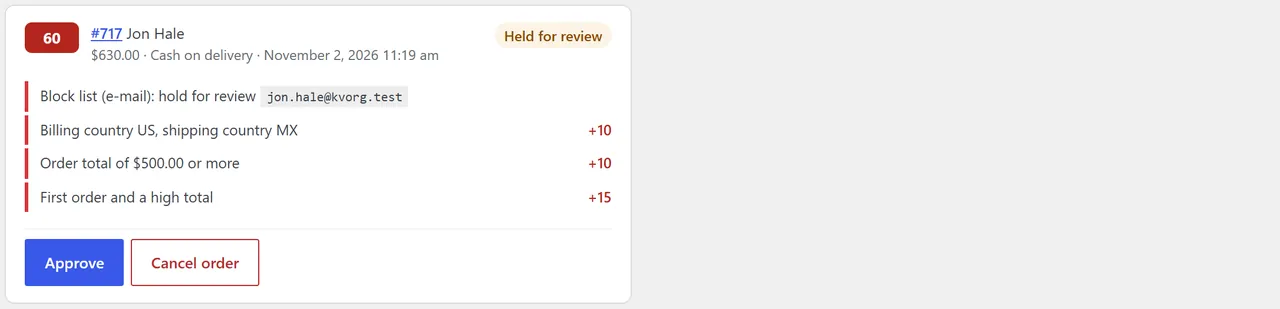
Review queue
Key features
Score 0-100 with reasons on every order placed through the checkout (classic, block and Store API).
Block and allow lists: e-mail, e-mail domain, phone, IP address or range (IPv4 and IPv6), address and customer. Each block entry has an action: refuse the checkout, require prepayment, hold for review or add points; entries can expire. Allow-listed buyers skip every check. CSV import and export.
Signals: earlier failed, cancelled or refunded orders; earlier good orders (minus points); many orders from the same e-mail, phone or IP in a short time; billing and shipping country differ; IP country differs from the shipping country; disposable e-mail address; high order total; first order with a high total. Points per signal are yours to set.
Require prepayment: from a score (40 by default) or for listed buyers, cash on delivery and other prepayment-only methods are not offered. A neutral note tells the buyer to choose another method.
Refuse the checkout from a score (off by default) or for listed buyers; refusals are logged.
Hold for review: offline orders (cash on delivery, bank transfer, cheque) above the review score wait on hold; you approve or cancel them in one click. Orders paid online are flagged instead.
Cash on delivery confirmation: the buyer gets a link and a 6-digit code by e-mail (and by SMS through your own provider if you set one). The order waits on hold, is confirmed on the order page or by the link, and is cancelled when not confirmed in time. "Confirmed by phone" for buyers you called.
Admin: review queue, scored orders with a level filter, lists, refused checkouts, an Order risk box on every order with quick block-list buttons, a Risk column in the order list, an e-mail alert for high scores.
Compatibility
WordPress 6.7+, WooCommerce 10.1+ (tested with WordPress 7.1.3 and WooCommerce 11.2.1), PHP 7.4 - 8.3.
HPOS and the legacy order storage; Cart and Checkout blocks and the classic checkout.
The IP country signal needs a country header from your CDN (for example Cloudflare) or the WooCommerce MaxMind geolocation database; without either it stays off.
What it does not do
It does not ask a card network or an outside fraud database. It sees your store's own history and your lists.
Orders created in the admin or through the REST API are not scored (only checkout orders).
Installation
Requirements
WordPress 6.7 or later, WooCommerce 10.1 or later (tested with 11.2.1), PHP 7.4 - 8.3
WP-Cron or a real cron job for the hourly job that cancels unconfirmed orders (WooCommerce's Action Scheduler runs it)
Install
Download kv-order-risk-guard-kv.zip from My licences > Downloads on woocommerce.kaviolabs.com.
In WordPress: Plugins > Add New > Upload Plugin, choose the zip, Install Now, Activate.
Enter your licence key under WooCommerce > Settings > Order risk. The plugin works for 14 days without a key.
First steps
Under WooCommerce > Settings > Order risk check the thresholds (prepayment 40, review 60, refuse off) and the methods: which are prepayment-only (cash on delivery) and which are offline (cash on delivery, bank transfer, cheque).
Decide on the cash on delivery confirmation: never, from a score (20 by default) or for every order.
Add buyers who refused parcels before to the block list, and your trusted trade customers to the allow list (WooCommerce > Order risk > Block and allow lists), or import them from a CSV file.
Place a test order with a disposable e-mail address (for example a yopmail.com address) to see a score.
Update
Upload the new zip and choose Replace current with uploaded. Settings, lists and scores are kept.
Uninstall
Deactivating stops the hourly job. Deleting the plugin removes the settings, lists, scores and confirmations only when Remove data on uninstall is ticked. Orders are never changed.
Configuration
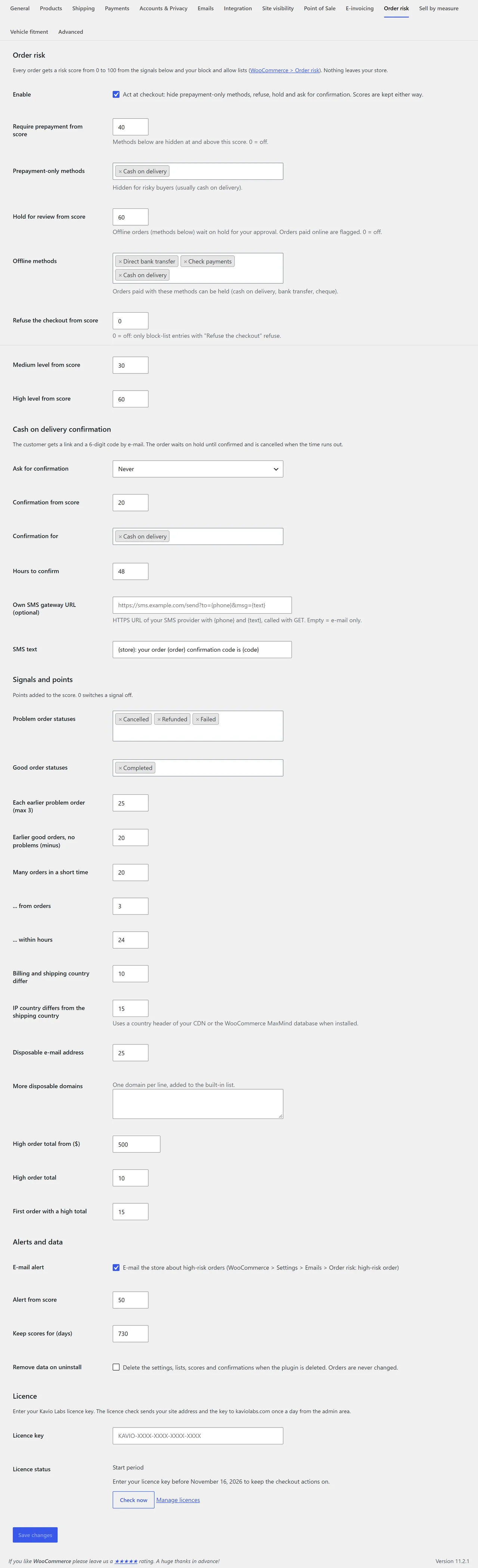
WooCommerce > Settings > Order risk
Thresholds and methods
Setting
Default
What it does
Enable
on
Act at checkout. Off: orders are still scored, nothing is hidden, refused or held
Require prepayment from score
40
Prepayment-only methods are hidden at and above this score (0 = off)
Prepayment-only methods
Cash on delivery
Methods hidden for risky buyers
Hold for review from score
60
Offline orders wait on hold for your approval; orders paid online are flagged (0 = off)
Offline methods
Cash on delivery, bank transfer, cheque
Orders paid with these can be held
Refuse the checkout from score
0 (off)
Above it the checkout is refused; block-list entries with "Refuse the checkout" always refuse
Medium / High level from score
30 / 60
Colour of the score badge and the level filter
Cash on delivery confirmation
Setting
Default
What it does
Ask for confirmation
From the score below
Never, from a score, or for every order
Confirmation from score
20
Confirmation for
Cash on delivery
Methods that ask for a confirmation
Hours to confirm
48
Not confirmed by then: the order is cancelled
Own SMS gateway URL
empty
HTTPS URL of your SMS provider with {phone} and {text}, called with GET. Empty = e-mail only
SMS text
{store}: your order {order} confirmation code is {code}
Signals and points
Signal
Default points
Each earlier problem order (max 3)
25
Earlier good orders and no problems
-20
Many orders in a short time (3 orders within 24 hours)
20
Billing and shipping country differ
10
IP country differs from the shipping country
15
Disposable e-mail address
25
High order total (from 500)
10
First order with a high total
15
Problem order statuses (failed, cancelled, refunded) and good order statuses (completed) decide which earlier orders count. More disposable domains adds domains to the built-in list of about 170.
Alerts and data
E-mail alert to the store from a score (60 by default). Recipients under WooCommerce > Settings > Emails > Order risk: high-risk order.
Keep scores for 730 days.
Remove data on uninstall.
Settings
E-mails
WooCommerce > Settings > Emails:
E-mail
Sent to
Order risk: confirm your order
customer (link + code)
Order risk: high-risk order
store
Licence
Own-site edition: without an active licence the checkout actions (hide cash on delivery, refuse, hold, confirmation) are off. Orders are still scored and every admin screen works.
Usage
At checkout
Low risk: nothing changes for the buyer.
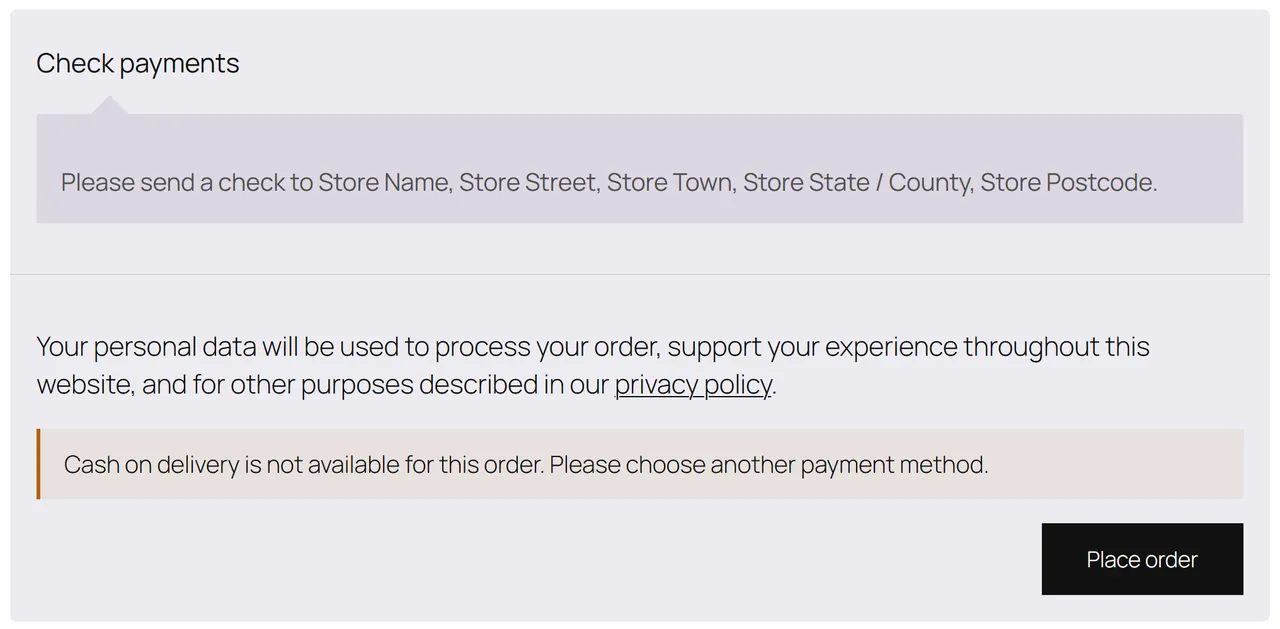
Prepayment required: cash on delivery is not in the list of payment methods. Classic checkout: a note above the methods; block checkout: a note in the order summary ("Cash on delivery is not available for this order. Please choose another payment method.").
Refused: the order is not placed and the buyer sees "We cannot accept this order online. Please contact us and we will help you place it." The attempt is logged under Refused checkouts.
Cash on delivery hidden for a risky buyer
Cash on delivery confirmation
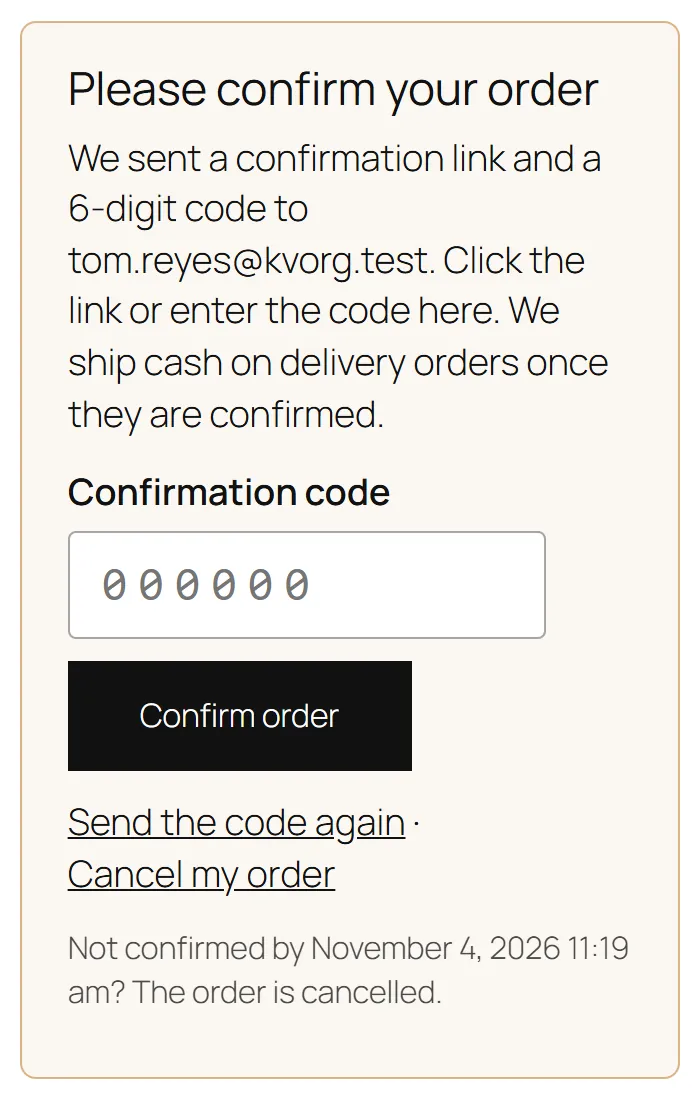
The order is placed "on hold" and the buyer gets an e-mail with a Confirm my order button and a 6-digit code. On the order received page they can enter the code, ask for a new one (3 times, one minute apart) or cancel the order. A wrong code can be tried 5 times. When the time runs out, the hourly job cancels the order and WooCommerce puts the stock back.
Confirmation on the order received page
Review queue
WooCommerce > Order risk > Review queue shows held orders and orders waiting for a confirmation, with the score and the main reasons:
Approve: the order goes to the status the payment method would have set (usually Processing).
Cancel order: the order is cancelled.
Confirmed by phone / Send the code again for orders waiting for a confirmation.
Review queue
On the order
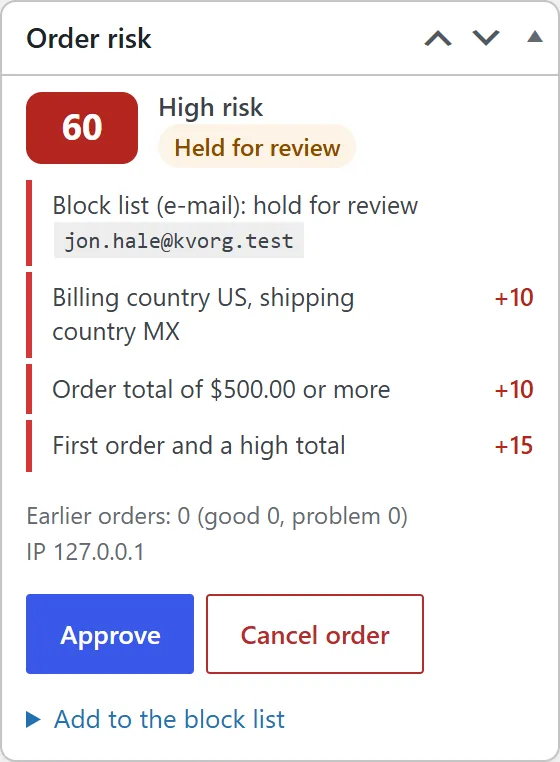
The Order risk box shows the score, the level, every reason with its points, earlier orders, the IP address and the state, with the same buttons. Add to the block list adds the e-mail, phone or IP of the order with "Require prepayment" in one click. The order list has a Risk column.
Order risk box
Lists
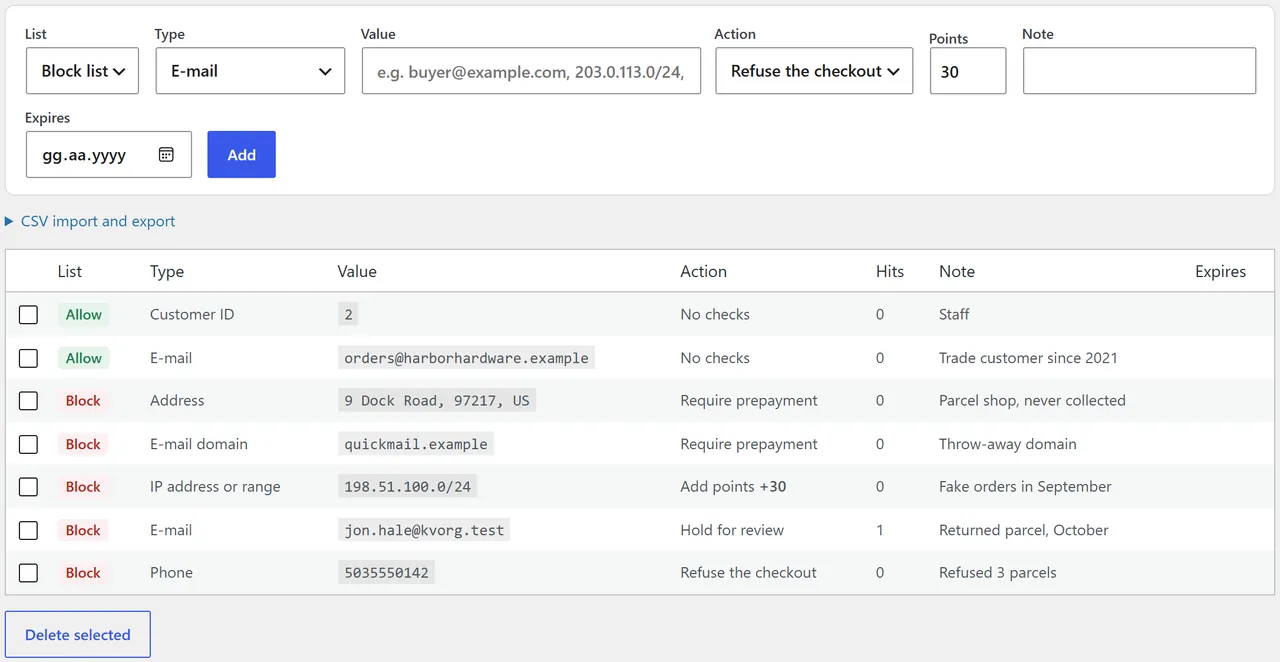
WooCommerce > Order risk > Block and allow lists: add an entry (list, type, value, action, points, note, expiry date), delete entries, export and import CSV (list, type, value, action, points, note, expires).
Values: e-mail ([email protected]), domain (example.com), phone (any format, the last 10 digits count), IP (203.0.113.7 or 203.0.113.0/24, IPv6 too), address (street, zip, country), customer ID.
Lists
Scored orders and refused checkouts
Scored orders lists the last 200 scored orders with a level filter. Refused checkouts lists refused attempts with the e-mail, phone, IP and reasons.
FAQ
Does it use an outside fraud service?
No. The score comes from your own orders, your lists and the order data. Nothing is sent anywhere, except the SMS through your own provider if you set it up.
Why is the IP country signal not showing?
On many hosts WooCommerce does not know the visitor's country. The signal needs a country header from your CDN (Cloudflare sends one) or the MaxMind geolocation database of WooCommerce (WooCommerce > Settings > Integration). Without either the signal stays off and nothing else changes.
A good customer was asked to confirm. How do I stop that?
Add the customer (e-mail, phone or customer ID) to the allow list. Allow-listed buyers skip every check.
Are orders paid by card held?
No. Holding is only for offline methods. Orders paid online above the review score are flagged so you can look at them before shipping.
What happens to stock when an order is cancelled?
WooCommerce puts the stock back when an order is cancelled, as usual.
Can the buyer get around the hidden cash on delivery?
No. WooCommerce refuses a payment method that is not offered, in the classic checkout and through the Store API.
What happens without an active licence?
The checkout actions are off. Orders are still scored and every admin screen works.
Which e-mails does it send?
The confirmation e-mail to the buyer and, if switched on, the high-risk alert to the store. Both are WooCommerce e-mails you can edit or switch off.
The department store block theme for WooCommerce: colour-coded departments, a department list beside the hero slider with two side promos, a big search with a department picker, tabbed product grids, a 2 + 1 + 2 offer grid, deals of the day with real countdowns, a department showcase, a promotions band and a three-column product page with a sticky buy box. Four styles (Meridian, Harbor, Citrus, Night) as Site Editor style variations, every colour editable. Cart and Checkout blocks styled, HPOS neutral.
Stop AI crawlers, scrapers, card testers, vulnerability scanners and unwanted countries before WordPress builds a page. Googlebot and Bingbot are verified by DNS and always allowed; 50+ bots get one switch each; country rules use free GeoIP databases and can close only the checkout (block and classic checkout, wc-ajax and Store API); card testing protection on order submissions; the add to cart flood fix for requests without a WooCommerce session; IP and network lists, rate limits for search, filters, forms and login, honeypots; a one-second challenge instead of a captcha; learning mode, dashboard, log, IP tester and Cloudflare export. HPOS and blocks compatible.
The campaign block theme for WooCommerce that makes a store feel like a sale is always on: a flash bar with the sale that ends first, a bento hero with a live deal tile, a dark flash deals zone with flip-tile countdowns on real sale end dates, round discount stickers, a category pill bar, stories with a player, a Discover feed with promo cells inside the grid, a product page campaign strip and a sticky phone buy bar. Sixteen colour styles as Site Editor style variations, two of them dark. Cart and Checkout blocks styled, HPOS neutral.