1.0.0
Nov 4, 2026
Latest- First release.

by Kavio Labs · for WooCommerce 10.1+ on WordPress 6.7+
Gift wrap with pictures and prices for single items or the whole order, a gift message with To and From names, a gift receipt without prices and a price-free packing note for your team. Product page, cart and checkout, classic and block; one Gift wrap fee line, details in e-mails, the order screen and My Account. HPOS.
Gift wrap with pictures and prices for single items or the whole order, a gift message with To and From names, a gift receipt without prices and a price-free packing note for your team. Product page, cart and checkout, classic and block; one Gift wrap fee line, details in e-mails, the order screen and My Account. HPOS.
Sell the wrap, not just the product. Holidays, birthdays and thank-yous: shoppers pay for a gift that arrives ready to give. Gift Wrap & Gift Messages adds it to your store without e-mails back and forth.
Gift Wrap & Gift Messages works with WooCommerce 10.1 – 11.2, WordPress 6.7+.
We list the builds we install and test on. “Tested” means the test plan ran on that build; “Supported” means the build is inside the supported range.
| Version | Range | Runs on | Status |
|---|---|---|---|
| WooCommerce 11 | 11.0 – 11.2 | WordPress 6.7 – 7.1 | Tested on 11.2.1 |
| WooCommerce 10 | 10.1 – 10.x | WordPress 6.7+ | Supported |
| WordPress | 6.7 – 7.1 | PHP 7.4 – 8.3 | Tested on 7.1.3 |
The Documentation tab covers the settings and every screen.
WooCommerce 10.1 – 11.2, WordPress 6.7+. Tested on WooCommerce 11.2.1 and WordPress 7.1.3. The Compatibility tab lists every version range.
Yes. Every plugin declares compatibility with High-Performance Order Storage and the Cart and Checkout blocks, and is tested in both the block and the classic cart and checkout.
They use WooCommerce hooks, blocks and the Store API instead of template overrides, so block themes and classic themes both work. We test on Twenty Twenty-Five.
One production store domain with every subdomain (www, shop., staging.), plus local development hosts such as localhost, *.local and *.test. A store on another domain needs its own license; a second-store license is 40% off. You have 14 days after installing to enter the key. 12 months of updates and support are included; after that the plugin keeps working and renewals are 50% off. How licensing works
Yes. Ask for a full refund within 30 days of your first purchase, no reason needed: open a ticket or write to [email protected] with your order number. The money goes back to the card or bank account you paid with within 5 business days of approval. Refund policy
Open a ticket from your account, so your license details are attached. We answer Monday to Friday: bug reports within 1 business day, how-to questions within 2. Support policy. Not a customer yet? Ask a pre-sales question.
7 more answers about setup and daily use in the Documentation tab.
A gift is more than a parcel. Gift Wrap & Gift Messages lets shoppers wrap a single item or the whole order, choose the paper from pictures, add a card with To, From and a message, and ask for a gift receipt without prices. Your team gets a price-free packing note with every wrap and message; the gift wrap is charged as one clear fee line.

woocommerce/emails/); no WooCommerce template is replaced.kv-gift-wrap-kv.zip from My licences > Downloads on woocommerce.kaviolabs.com.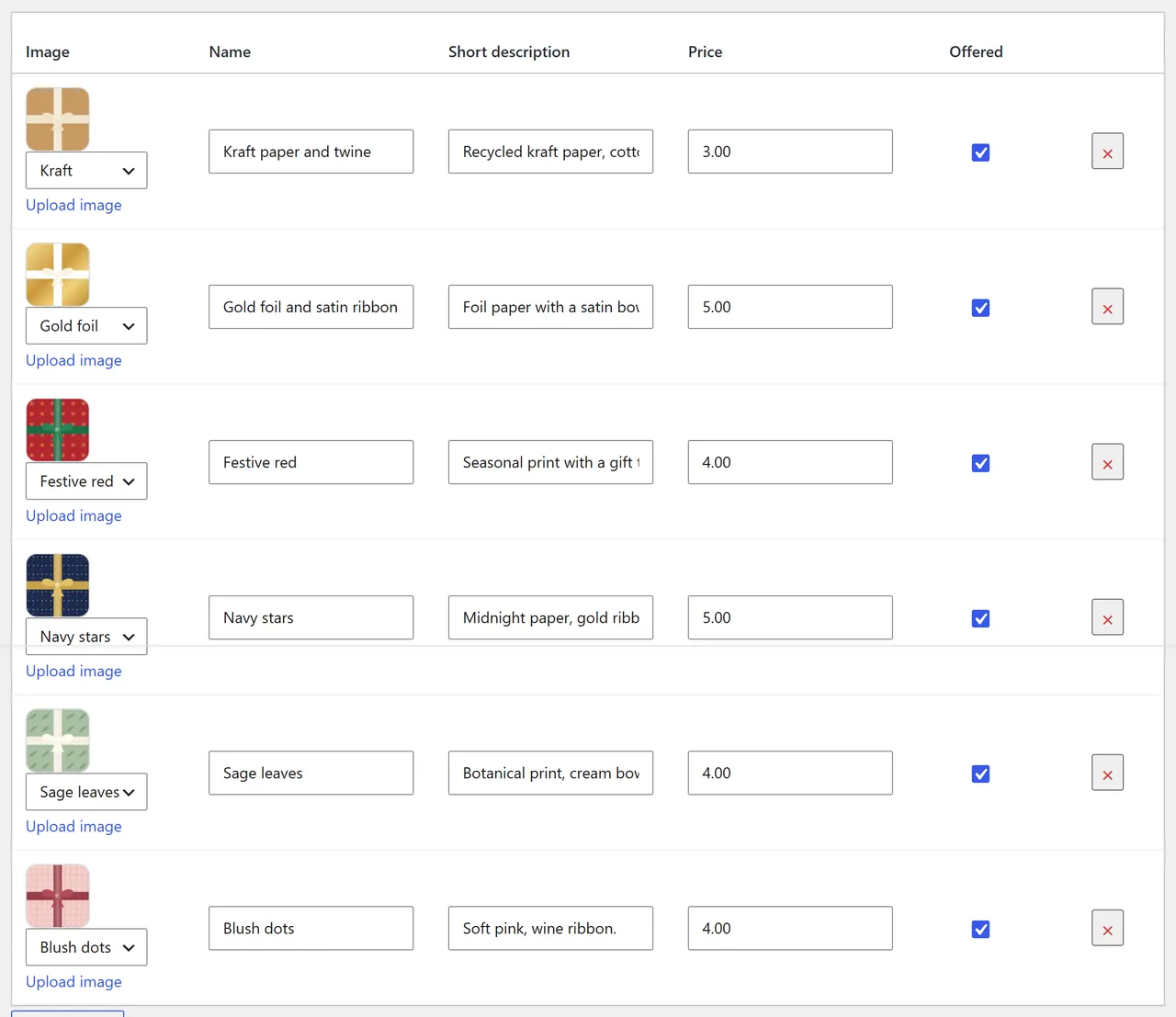
Upload the new zip the same way and choose Replace current with uploaded. Settings and wraps are kept.
Deactivating hides the panels and stops the fee; orders keep their gift details. Deleting the plugin removes the settings and the wrap list only when Remove data on uninstall is ticked. Orders are never changed.
WooCommerce > Settings > Gift wrap has three sections: General, Wraps and Report.
| Setting | What it does |
|---|---|
| Enable | Offers gift wrap in the store. Off: no panels and no fee; orders keep their gift details. |
| Where | Per item on the product page; whole order in the cart and at checkout (classic and block). |
| Charge per item wrap | Per unit (3 mugs = 3 wraps) or per cart line (3 mugs wrapped together). The whole-order wrap is charged once. |
| Free over | Gift wrap costs nothing when the order subtotal reaches this amount; the fee line then reads "Gift wrap (free)". Empty = always charged. |
| Tax / Tax class | Whether the gift wrap fee is taxable and with which tax class. |
| Gift message fields | Message, To and From names. |
| Message length | Most characters per message (20-1000, default 200). Match the size of your cards. |
| Blocked words | Comma separated whole words; messages with them are refused with a polite note. |
| Gift receipt | Lets shoppers ask for a gift receipt with a whole-order wrap. |
| Recipient e-mail | Asks for the recipient's e-mail address and sends the gift receipt there too. |
| Offer on | All products (except the categories below) or only products set to "Offer gift wrap". |
| Never in these categories | For example fresh flowers or bulky goods. A product set to "Offer gift wrap" is still offered. |
| Remove data on uninstall | See Installation. |
| Licence key | Your Kavio Labs key (own-site build) or CodeCanyon purchase code. |
One row per paper: picture (bundled pattern or Upload image), name, short description, price and Offered. Add a wrap adds a row; the x removes one. Up to 30 wraps. Prices are entered like your product prices.
Every product has a Gift wrap field in its General tab: Use the store setting, Offer gift wrap, Do not offer gift wrap.
WooCommerce > Settings > Emails > Gift receipt: enable or disable, subject, heading, additional content and format, like every WooCommerce e-mail.
| Hook | Use |
|---|---|
kv_gw_product_allowed (filter) | Own rule for which products can be wrapped: ( $allowed, $product ). |
Template emails/kv-gw-gift-receipt.php | Copy to yourtheme/woocommerce/emails/ to change the gift receipt e-mail. |
One item. On the product page, switch on Gift wrap this item, pick a paper, fill in To, From and the message, and add to cart. The wrapped item becomes its own cart line, so the same product can be in the cart wrapped and unwrapped.
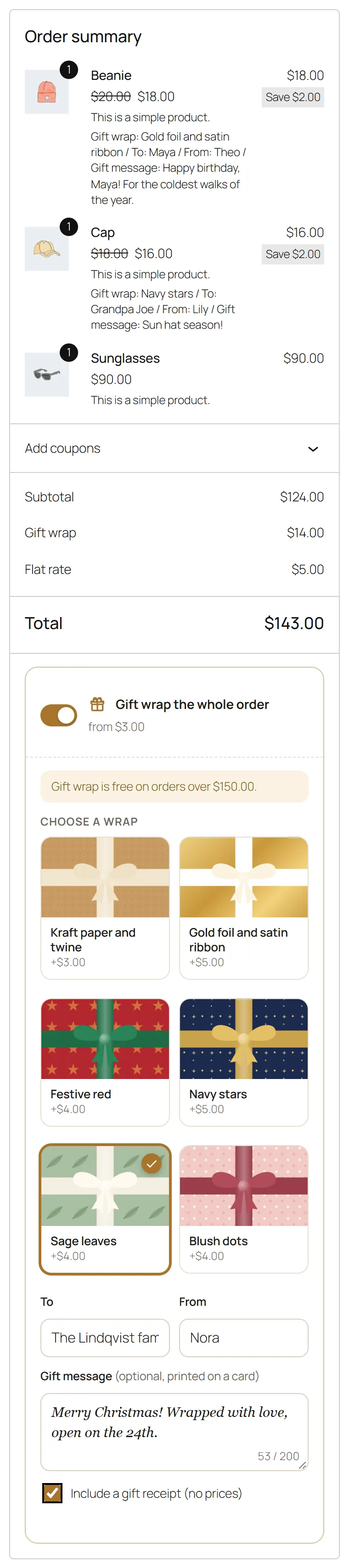
The whole order. In the block cart and checkout the Gift wrap the whole order panel sits in the order summary; in the classic checkout it sits under the address fields. The fee updates as soon as a paper is chosen. At checkout shoppers can tick Include a gift receipt (no prices).
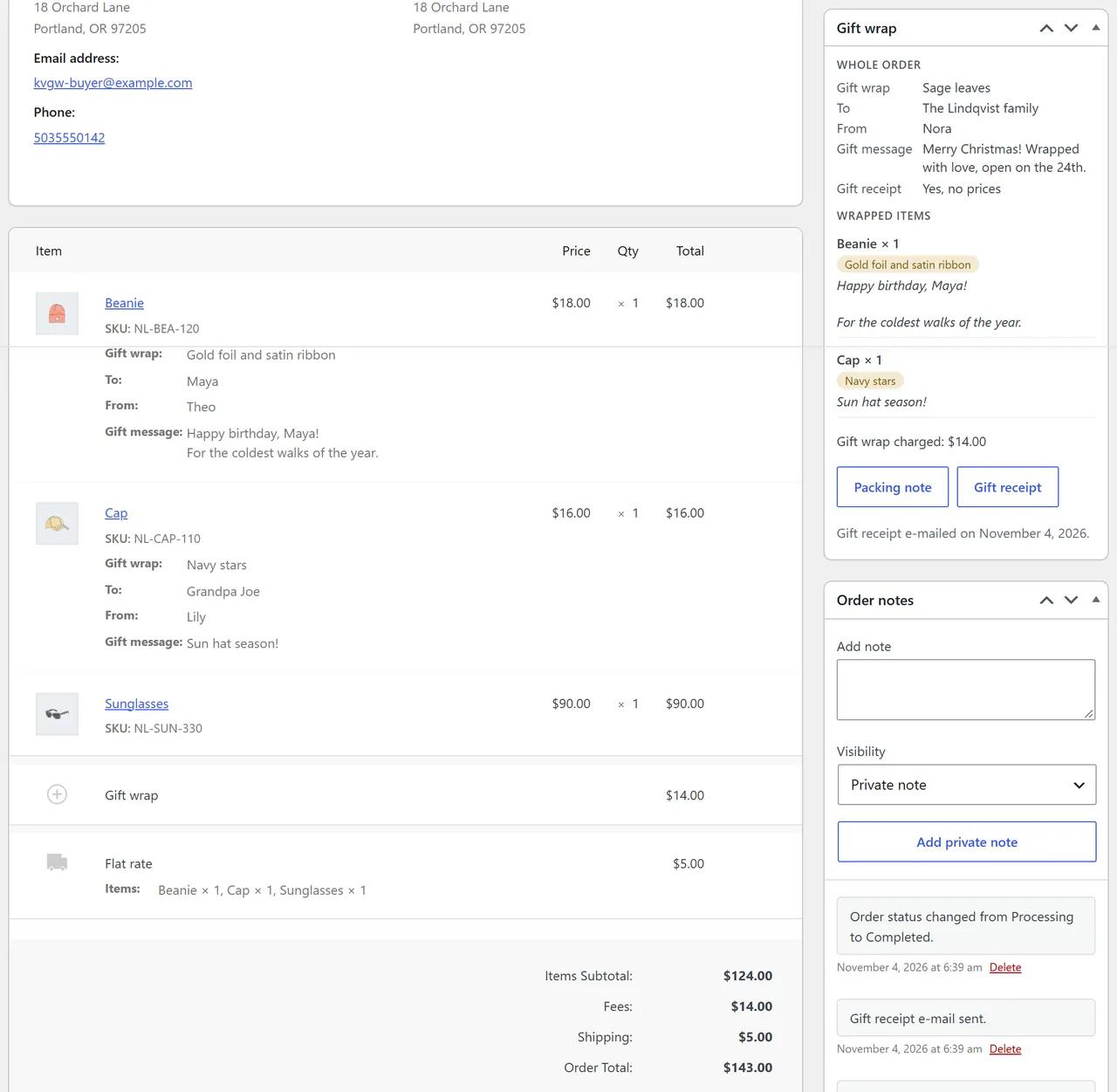
After the order the thank-you page and My Account > Orders show the gift wrap with a Print the gift receipt button.
WooCommerce > Settings > Gift wrap > Report: wrapped orders, number of wraps and gift wrap revenue in the last 30 days, and the same per paper.
Yes. The whole-order panel is part of the order summary in the Cart and Checkout blocks and is saved through the Store API; per item wraps come from the product page and show in every cart.
As one "Gift wrap" fee line: the sum of the item wraps (per unit or per cart line) and the whole-order wrap. It can be taxable and free above an order amount. Prices always come from your wrap list on the server.
Yes. Each wrap can use a bundled pattern or any image from the media library.
No. The gift receipt page and e-mail list the items, quantities, names and message only.
When Recipient e-mail is on, the checkout asks for the recipient's address and the gift receipt e-mail goes there too when the order is completed.
They are part of the WooCommerce order export, and the WooCommerce order eraser removes names, messages and the recipient e-mail (the chosen paper stays for your report).
All physical products by default; exclude categories, offer only on chosen products, or set a single product to offer or not offer. Virtual products are never wrapped.
Buy with confidence
This product was tested on these builds. Builds we did not test are not listed.
Updates and support are included in the price. The product keeps working afterwards; renewing is optional.
How licensing worksIf it is not what you expected, tell us within 30 days and we refund the order.
Refund policyPay by card, Apple Pay or Google Pay on Stripe's secure page. Your card number never reaches our server.
Ask a pre-sales questionSold by Kavio Labs Software Limited, registered in England and Wales No. 17532441. About us
More for WooCommerce

The department store block theme for WooCommerce: colour-coded departments, a department list beside the hero slider with two side promos, a big search with a department picker, tabbed product grids, a 2 + 1 + 2 offer grid, deals of the day with real countdowns, a department showcase, a promotions band and a three-column product page with a sticky buy box. Four styles (Meridian, Harbor, Citrus, Night) as Site Editor style variations, every colour editable. Cart and Checkout blocks styled, HPOS neutral.

Stop AI crawlers, scrapers, card testers, vulnerability scanners and unwanted countries before WordPress builds a page. Googlebot and Bingbot are verified by DNS and always allowed; 50+ bots get one switch each; country rules use free GeoIP databases and can close only the checkout (block and classic checkout, wc-ajax and Store API); card testing protection on order submissions; the add to cart flood fix for requests without a WooCommerce session; IP and network lists, rate limits for search, filters, forms and login, honeypots; a one-second challenge instead of a captcha; learning mode, dashboard, log, IP tester and Cloudflare export. HPOS and blocks compatible.

The campaign block theme for WooCommerce that makes a store feel like a sale is always on: a flash bar with the sale that ends first, a bento hero with a live deal tile, a dark flash deals zone with flip-tile countdowns on real sale end dates, round discount stickers, a category pill bar, stories with a player, a Discover feed with promo cells inside the grid, a product page campaign strip and a sticky phone buy bar. Sixteen colour styles as Site Editor style variations, two of them dark. Cart and Checkout blocks styled, HPOS neutral.


