1.0.0
Nov 20, 2026
Latest- Packaging and code quality changes, no change in how the product works.

by Kavio Labs · for WooCommerce 10.1+ on WordPress 6.7+
Quote requests for WooCommerce: buyers send a quote list, you answer with line prices, discounts, quoted shipping and a validity date, plus messages and a PDF; the buyer accepts and checks out at the quoted prices, enforced on the server (owner, whole quote, exact quantities, once). Price on request, guest quotes, Cart and Checkout blocks, HPOS.
Quote requests for WooCommerce: buyers send a quote list, you answer with line prices, discounts, quoted shipping and a validity date, plus messages and a PDF; the buyer accepts and checks out at the quoted prices, enforced on the server (owner, whole quote, exact quantities, once). Price on request, guest quotes, Cart and Checkout blocks, HPOS.
Big orders need a price, not a cart. B2B Request a Quote for WooCommerce lets buyers collect products in a quote list, from product pages or the whole cart, and send a request with their company and a message.
B2B Request a Quote works with WooCommerce 10.1 – 11.2, WordPress 6.7+.
We list the builds we install and test on. “Tested” means the test plan ran on that build; “Supported” means the build is inside the supported range.
| Version | Range | Runs on | Status |
|---|---|---|---|
| WooCommerce 11 | 11.0 – 11.2 | WordPress 6.7 – 7.1 | Tested on 11.2.1 |
| WooCommerce 10 | 10.1 – 10.x | WordPress 6.7+ | Supported |
| WordPress | 6.7 – 7.1 | PHP 7.4 – 8.3 | Tested on 7.1.3 |
The Documentation tab covers the settings and every screen.
WooCommerce 10.1 – 11.2, WordPress 6.7+. Tested on WooCommerce 11.2.1 and WordPress 7.1.3. The Compatibility tab lists every version range.
Yes. Every plugin declares compatibility with High-Performance Order Storage and the Cart and Checkout blocks, and is tested in both the block and the classic cart and checkout.
They use WooCommerce hooks, blocks and the Store API instead of template overrides, so block themes and classic themes both work. We test on Twenty Twenty-Five.
One production store domain with every subdomain (www, shop., staging.), plus local development hosts such as localhost, *.local and *.test. A store on another domain needs its own license; a second-store license is 40% off. You have 14 days after installing to enter the key. 12 months of updates and support are included; after that the plugin keeps working and renewals are 50% off. How licensing works
Yes. Ask for a full refund within 30 days of your first purchase, no reason needed: open a ticket or write to [email protected] with your order number. The money goes back to the card or bank account you paid with within 5 business days of approval. Refund policy
Open a ticket from your account, so your license details are attached. We answer with a same-day reply on weekdays (Mon-Fri 09:00-18:00 UTC+3). Support policy. Not a customer yet? Ask a pre-sales question.
9 more answers about setup and daily use in the Documentation tab.
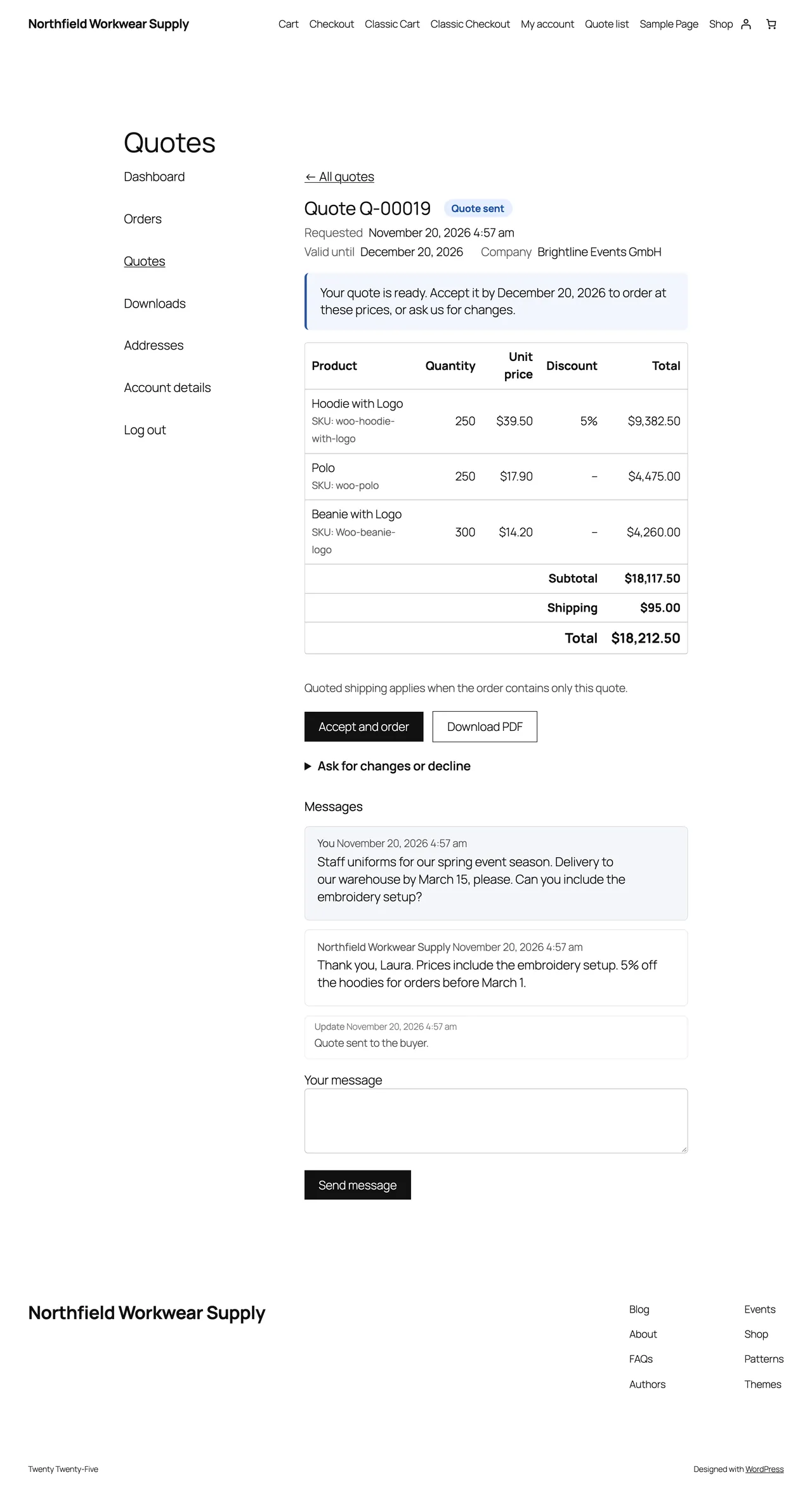
Buyers collect products in a quote list and send a request. You answer with line prices, discounts, quantities, quoted shipping and a validity date, plus messages and a PDF. The buyer accepts and checks out at the quoted prices, enforced on the server.
| WordPress | 6.7 or later (tested on 7.1.3) |
| WooCommerce | 10.1 or later (tested on 10.1.4 and 11.2.1) |
| PHP | 7.4 or later (tested on 8.1 and 8.3) |
| Order storage | HPOS and legacy posts storage (compatibility declared) |
| Cart / Checkout | Blocks and classic shortcodes |
kv-quote-request-kv.zip and click Install Now, then Activate. WooCommerce 10.1 or later must be active.On activation the plugin creates:
wp_kv_qr_quotes, wp_kv_qr_items, wp_kv_qr_messages;[kv_quote_list] (you can move the shortcode to any page and select that page in the settings);kv_qr_view_quotes and kv_qr_manage_quotes for administrators and shop managers;quotes (rewrite rules are refreshed once);Upload the new zip over the old one (Replace current with uploaded). Data and settings are kept; table changes run automatically.
Deactivating removes the background task only. Deleting the plugin keeps quotes and settings unless Remove data on uninstall is on; then the tables, settings, capabilities, saved quote lists, per-product settings and the Quote list page created by the plugin are removed. Orders are never changed (order lines keep their "Quote" line).
WooCommerce > Settings > B2B Request a Quote
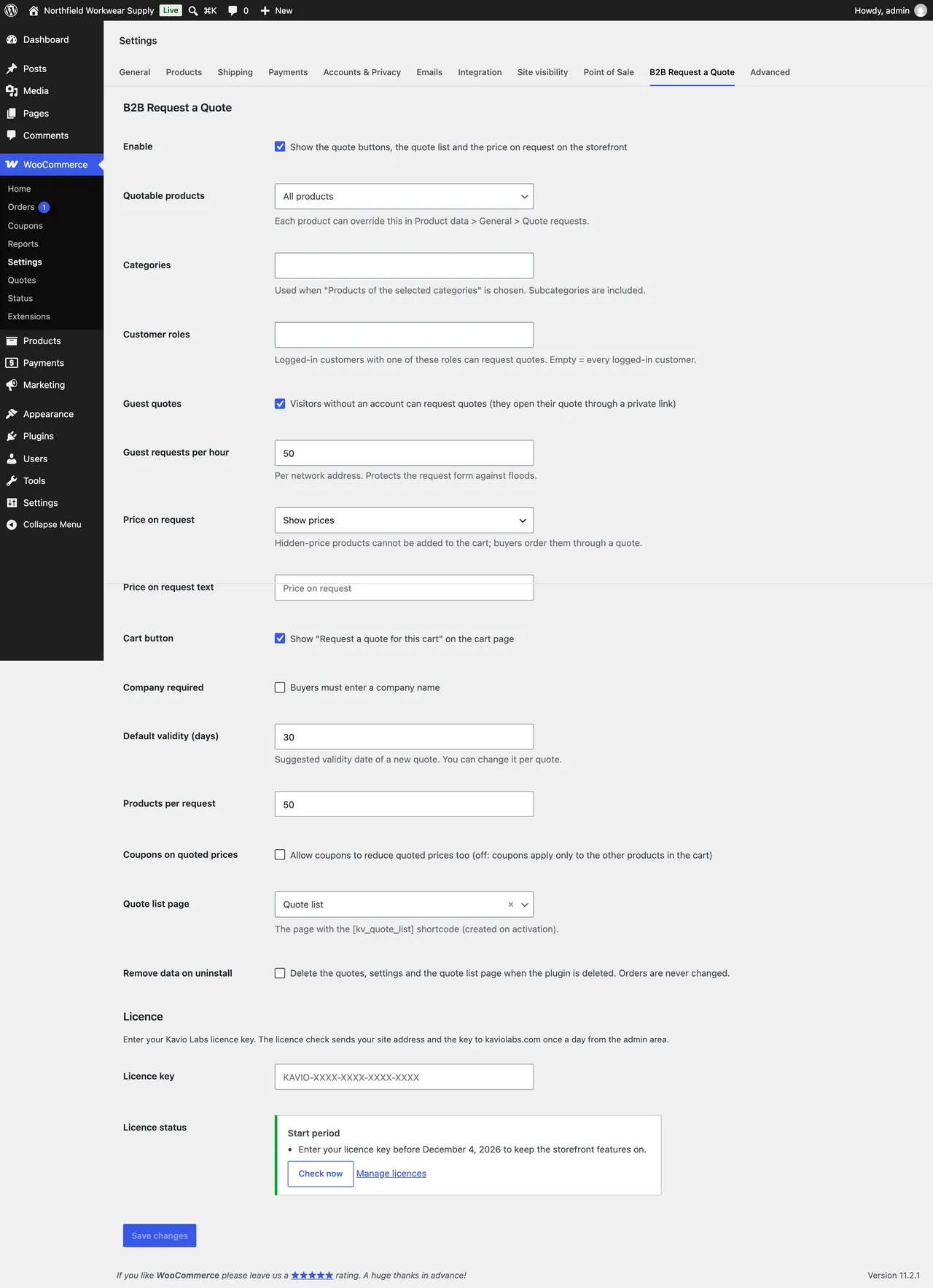
| Setting | What it does |
|---|---|
| Enable | Shows the quote buttons, the quote list and the price on request. Off: no new requests; existing quotes, the admin and accepted quotes in carts keep working. |
| Quotable products | All products or Products of the selected categories (subcategories included). Grouped and external products are never quotable. |
| Categories | The categories used by "selected categories". |
| Customer roles | Logged-in customers with one of these roles can request quotes. Empty = every logged-in customer. |
| Guest quotes | Visitors without an account can request quotes. They open their quote through a private signed link (in the e-mail and after sending the request). |
| Guest requests per hour | Requests per network address and hour (default 5). Wrong quote links are also limited (20 per hour). |
| Price on request | Show prices, Hide prices of quotable products from guests or from everybody. |
| Price on request text | The text shown instead of the price (default "Price on request"). |
| Cart button | "Request a quote for this cart" under the cart (classic and block cart). |
| Company required | Buyers must enter a company name. |
| Default validity (days) | Suggested validity date of a new quote (default 30). |
| Products per request | Maximum lines of one quote list (default 50). |
| Coupons on quoted prices | Off (default): coupons apply only to the other products in the cart and are refused when the cart holds quoted lines only. On: coupons reduce quoted prices too. |
| Quote list page | The page with [kv_quote_list]. |
| Remove data on uninstall | See Installation. |
Product data > General > Quote requests: As in the settings, Always quotable or Never quotable. "Never" removes the product from quotes and from price on request.
For a hidden-price product the storefront reads no price: the price HTML shows your text, and the page carries no amount in the price, sale badge, JSON-LD structured data, variation data, the hydrated product data of block themes, the Store API product and search endpoints, or the price meta tags of SEO plugins (Open Graph product:price). The product cannot be added to the cart; the product page shows a quantity field and Add to quote. When the buyer orders an accepted quote, its lines show the quoted price only (no struck-through catalog price).
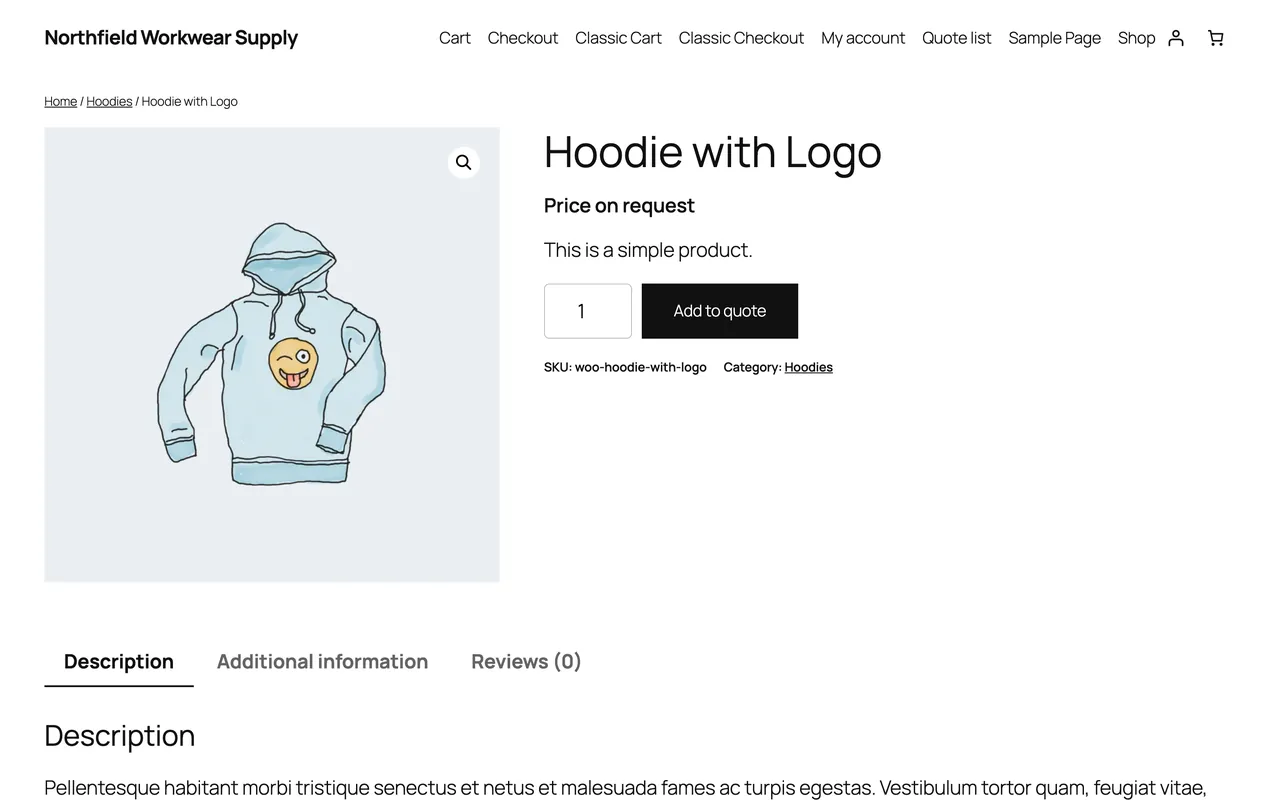
Store staff (shop managers, administrators) see the real prices in the admin, in admin AJAX requests and in the WooCommerce REST API; the storefront hides them for staff too.
Limits: the price filter range and price sorting use WooCommerce's product lookup table and still reflect catalog prices, so a visitor who tries many price ranges can narrow a hidden catalog price down. A product needs a catalog price to be quoted and ordered (hide it with price on request; quotes never use it as the quoted price). Full-page caches must not serve the same page to guests and logged-in customers when you hide prices from guests only (WooCommerce's own rule for logged-in content).
WooCommerce > Settings > Emails, all installed switched off:
| Sent to | When | |
|---|---|---|
| B2B Request a Quote: New quote request | store (recipients editable) | a buyer sends a request |
| B2B Request a Quote: Quote update | store | the buyer accepts, asks for changes, declines, writes a message or orders |
| B2B Request a Quote: Quote request received | buyer | after the request |
| B2B Request a Quote: Quote ready | buyer | you send the quote with prices |
| B2B Request a Quote: Quote message | buyer | you write a message, cancel or re-open a quote |
Subject, heading, additional content and format are editable; templates can be overridden in your theme (woocommerce/emails/kv-qr-quote.php, woocommerce/emails/plain/kv-qr-quote.php).
Enter quote prices the way your catalog prices are entered (with or without tax, WooCommerce > Settings > Tax). The quote keeps that basis; if you switch the store setting later, quoted prices are converted with the product's base tax rate. Quoted shipping is entered without tax; shipping tax is calculated by WooCommerce. Prices are displayed with or without tax by your store settings.
On a product page the buyer chooses the quantity (and the options of a variable product) and clicks Add to quote. In the cart, Request a quote for this cart copies all quotable products into the quote list (the cart stays as it is).

The Quote list page lists the products; the buyer changes quantities, removes lines, enters name, company, phone and a message, and clicks Send quote request. Customers find the quote in My Account > Quotes; guests get a private link.


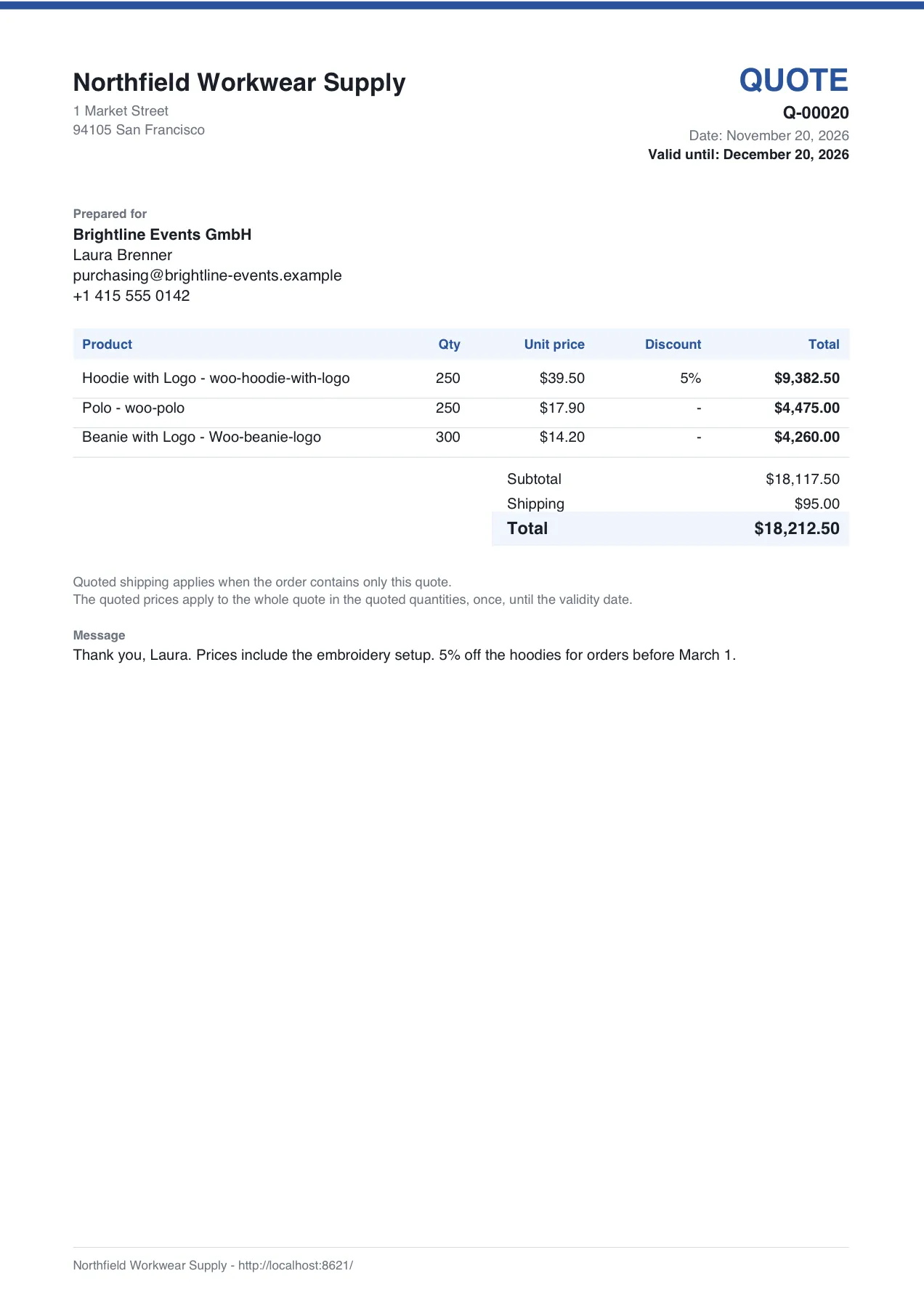
Open the request. For each line enter the unit price (the catalog price and the stock are shown next to it), an optional discount % and, if needed, a different quantity, or remove the line. Add shipping (empty = the normal shipping methods at checkout, 0 = free) and the valid until date. The total updates while you type.

Prices can be changed while the quote is Requested or Quote sent. Each save raises the revision; a buyer who accepts an older revision is asked to review the new prices first.
Accept and order puts every line of the quote into the cart at the quoted prices. The cart shows "Quote: Q-00012, valid until ..." under each line; the quantity of quoted lines is fixed. The buyer can also Download PDF, Ask for changes (the quote goes back to Requested with the message) or Decline.
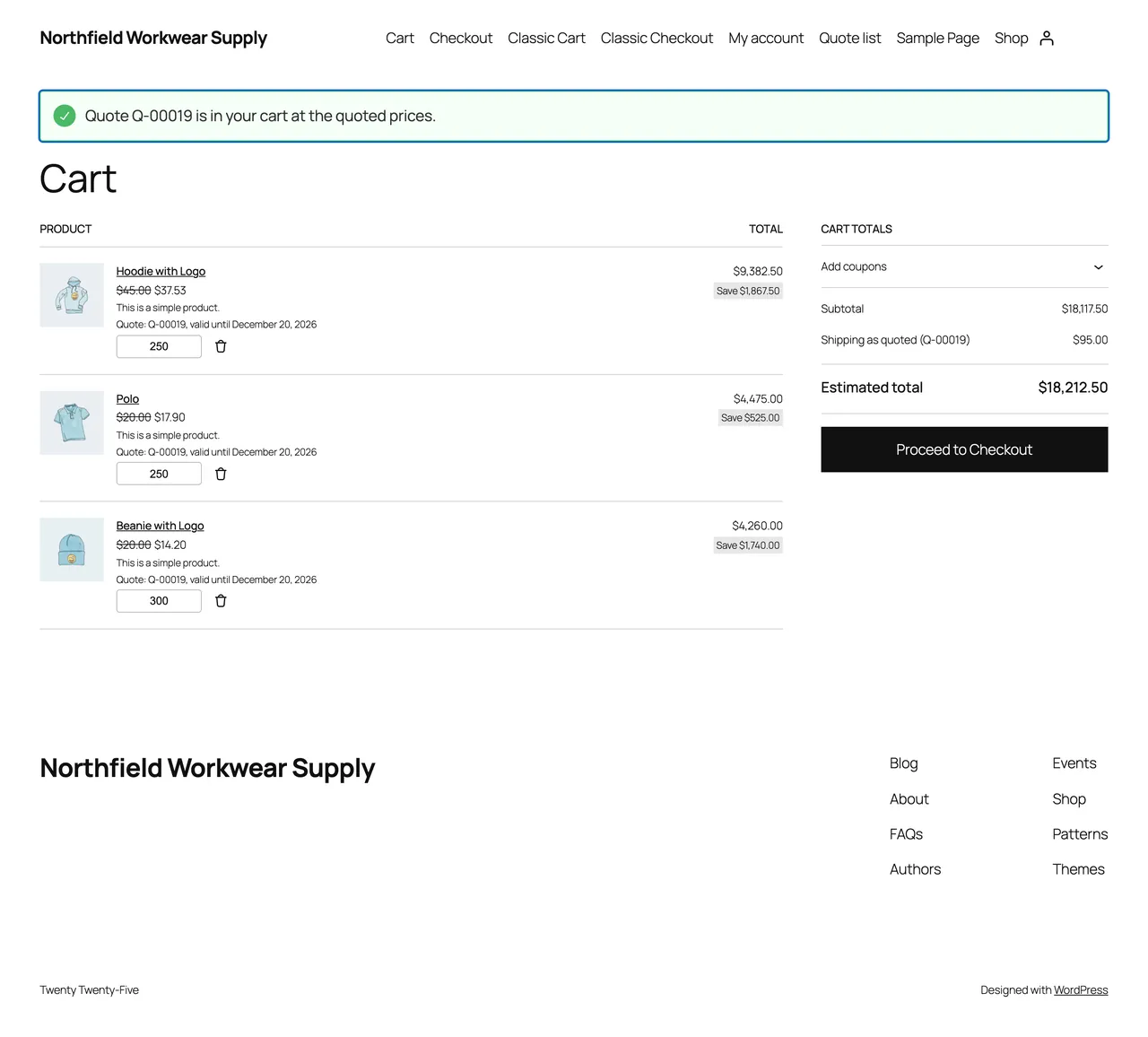
At checkout (block or classic) the quote is checked again and held for this checkout only; the order lines carry "Quote: Q-00012" (e-mails, My Account, admin). The quote becomes Ordered. If the order is cancelled, the quote can be ordered again until its validity date.

The quoted prices apply to the whole quote, in the quoted quantities, once, until the end of the validity day. If the buyer changes a quantity, removes a line, the quote expires, is cancelled or already ordered, or a product can no longer deliver the quoted quantity, no line of that quote keeps its quoted price. The next checkout attempt is refused once with the reason; after that the normal prices apply. Add the quote to the cart on the quote page restores the quote while it is still accepted.
Products added to the cart next to a quote keep their normal prices; quoted shipping then gives way to the normal shipping methods.
| Status | Meaning |
|---|---|
| Requested | sent by the buyer, waiting for your prices (also after "Ask for changes") |
| Quote sent | prices sent; the buyer can accept until the validity date |
| Accepted | the buyer accepted; can be ordered until the validity date |
| Being ordered | held by a checkout (given back after 20 minutes if no order follows) |
| Ordered | ordered (single use) |
| Declined / Cancelled / Expired | closed; you can re-open it |
| Table | Content |
|---|---|
wp_kv_qr_quotes | quote header: status, customer / guest contact, currency, tax basis, shipping, validity, revision, guest secret and session binding, checkout hold, order id |
wp_kv_qr_items | lines: product / variation, attributes, name and SKU snapshot, quantity, catalog price at request time, quoted price, discount |
wp_kv_qr_messages | buyer / staff / system messages and internal notes |
Orders: line meta _kv_qr_quote_id, _kv_qr_item_id and the visible kv_qr_quote ("Quote: Q-00012"); order meta _kv_qr_quotes. CRUD only (HPOS and legacy storage).
kv_qr = {q: quote id, i: line id, h: keyed hash}; it is only ever set by "Accept and order" / "Add the quote to the cart". Store API and form input cannot set it.woocommerce_before_calculate_totals (priority 1000) checks every quote of the cart with KavioLabs\QuoteRequest\Quote\Guard and applies the prices only when every line can be priced.woocommerce_after_checkout_validation (classic) and woocommerce_store_api_cart_errors in the Store API order placement re-check (with the billing e-mail for guest quotes) and hold each quote with a conditional UPDATE; woocommerce_checkout_order_created / woocommerce_store_api_checkout_order_processed mark only the quotes held by this request and present on this order's lines as ordered; unused holds are given back at the end of the request.extensions["kv-quote-request"] = {quote, unit_price, valid_until}; cart extensions["kv-quote-request"] = {quotes: [...], quoted_shipping}. Quantity limits of quoted lines: editable: false, minimum = maximum = quoted quantity.| Hook | Type | Use | |
|---|---|---|---|
kv_qr_cart_line_price | filter | `( float | null $price, array $quote, array $line, WC_Product $product )` quoted unit price of a cart line in the store price basis; return null to refuse the line (the whole quote then loses its prices) |
kv_qr_quote_requested | action | ( array $quote ) after a buyer sent a request | |
kv_qr_quote_offered | action | ( array $quote ) after staff sent prices | |
kv_qr_quote_accepted | action | ( array $quote ) after the buyer accepted |
kv_qr_view_quotes (list, editor read-only, PDF) and kv_qr_manage_quotes (save, send, cancel, re-open, messages). Every change also checks a nonce.
[kv_quote_list] renders the quote list and request form, or the signed guest quote page (?kv_qr_quote=<id>&kv_qr_sig=<hmac>).
No, the quantity is fixed in the cart (classic and block). If it changes anyway (for example through stock), the whole quote returns to normal prices and the next checkout explains why.
No. Each checkout holds the quote with one atomic database update; parallel checkouts of the same quote get one order at the quoted prices, the other is refused. An ordered quote cannot go into the cart again. A cancelled order gives the quote back.
Account quotes only for the logged-in owner. Guest quotes only in the browser session that accepted them through the signed link, and with the e-mail address of the request at checkout. A forged Store API request cannot set quoted prices.
On the other products in the cart, yes. Quoted prices are not reduced unless you allow it in the settings; a coupon is refused when the cart holds quoted lines only.
Quotes do not reserve stock. If a product can no longer deliver the quoted quantity, the quote returns to normal prices so the cart keeps working; send a new quote.
Yes, tested with Twenty Twenty-Five, the Cart / Checkout blocks and the classic shortcodes, on WooCommerce 10.1.4 and 11.2.1.
Not in 1.0: quotes start from a buyer request. Attachments, staff-created quotes and "convert to order" in the admin are not included.
A quote is written in the store currency; if the shop currency differs at checkout, the quote returns to normal prices.
Yes: the WordPress privacy exporter and eraser include quotes; deleting a user cancels open quotes and removes their personal data.
Buy with confidence
This product was tested on these builds. Builds we did not test are not listed.
Updates and support are included in the price. The product keeps working afterwards; renewing is optional.
How licensing worksIf it is not what you expected, tell us within 30 days and we refund the order.
Refund policyPay by card, Apple Pay or Google Pay on Stripe's secure page. Your card number never reaches our server.
Ask a pre-sales questionSold by Kavio Labs Software Limited, registered in England and Wales No. 17532441. About us
More for WooCommerce

The department store block theme for WooCommerce: colour-coded departments, a department list beside the hero slider with two side promos, a big search with a department picker, tabbed product grids, a 2 + 1 + 2 offer grid, deals of the day with real countdowns, a department showcase, a promotions band and a three-column product page with a sticky buy box. Four styles (Meridian, Harbor, Citrus, Night) as Site Editor style variations, every colour editable. Cart and Checkout blocks styled, HPOS neutral.

Stop AI crawlers, scrapers, card testers, vulnerability scanners and unwanted countries before WordPress builds a page. Googlebot and Bingbot are verified by DNS and always allowed; 50+ bots get one switch each; country rules use free GeoIP databases and can close only the checkout (block and classic checkout, wc-ajax and Store API); card testing protection on order submissions; the add to cart flood fix for requests without a WooCommerce session; IP and network lists, rate limits for search, filters, forms and login, honeypots; a one-second challenge instead of a captcha; learning mode, dashboard, log, IP tester and Cloudflare export. HPOS and blocks compatible.

The campaign block theme for WooCommerce that makes a store feel like a sale is always on: a flash bar with the sale that ends first, a bento hero with a live deal tile, a dark flash deals zone with flip-tile countdowns on real sale end dates, round discount stickers, a category pill bar, stories with a player, a Discover feed with promo cells inside the grid, a product page campaign strip and a sticky phone buy bar. Sixteen colour styles as Site Editor style variations, two of them dark. Cart and Checkout blocks styled, HPOS neutral.


