by Kavio Labs · for WooCommerce 10.1+ on WordPress 6.7+
Send WooCommerce orders and refunds to Poland's KSeF as FA(3) e-invoices over KSeF API 2.0, with own invoice numbering, UPO receipts, verification QR codes and an offline queue.
Tested on WooCommerce 11.2.1 & WordPress 7.1.3Updated Nov 20, 2026Version 1.0.0Compatible with WooCommerce 10.1 – 11.2, WordPress 6.7+ No core file edits
Built forWooCommerce
KSeF e-Invoicing for Poland for WooCommerce: WooCommerce orders and refunds in KSeF, with own invoice numbers, KSeF number, UPO and QR code.1 of 9
What it does
Send WooCommerce orders and refunds to Poland's KSeF as FA(3) e-invoices over KSeF API 2.0, with own invoice numbering, UPO receipts, verification QR codes and an offline queue.
Every WooCommerce invoice for a Polish business has to go through KSeF, and WooCommerce does not even issue invoices. KSeF e-Invoicing for Poland builds a structured FA(3) e-invoice for each order, with your own invoice numbering, sends it to KSeF over the official KSeF API 2.0 and keeps the KSeF number, the official UPO receipt and the verification QR code.
Features
Invoices from orders
Built when an order is completed (or processing, or only from the order screen), numbered in your own sequence: format, yearly or monthly restart, start number
Polish VAT rates from the WooCommerce tax rates, coupons as line discounts, shipping and fees, exemptions with their legal basis, intra-EU supply, export, OSS, split payment mark (Annex 15), GTU codes, foreign currencies with the NBP rate
Checked against the official FA(3) schema of the Ministry of Finance before it leaves your shop
Refunds and cancellations
Every refund becomes a correction (KOR) with the state before and after, linked to the KSeF number of the invoice
A cancelled order: unsent invoices are voided, invoices in KSeF or issued in offline mode (which must still reach KSeF) are flagged or corrected to zero
Sent on its own, safely
Background send queue every 5 minutes (Action Scheduler), one run at a time, "Send now" when you need it
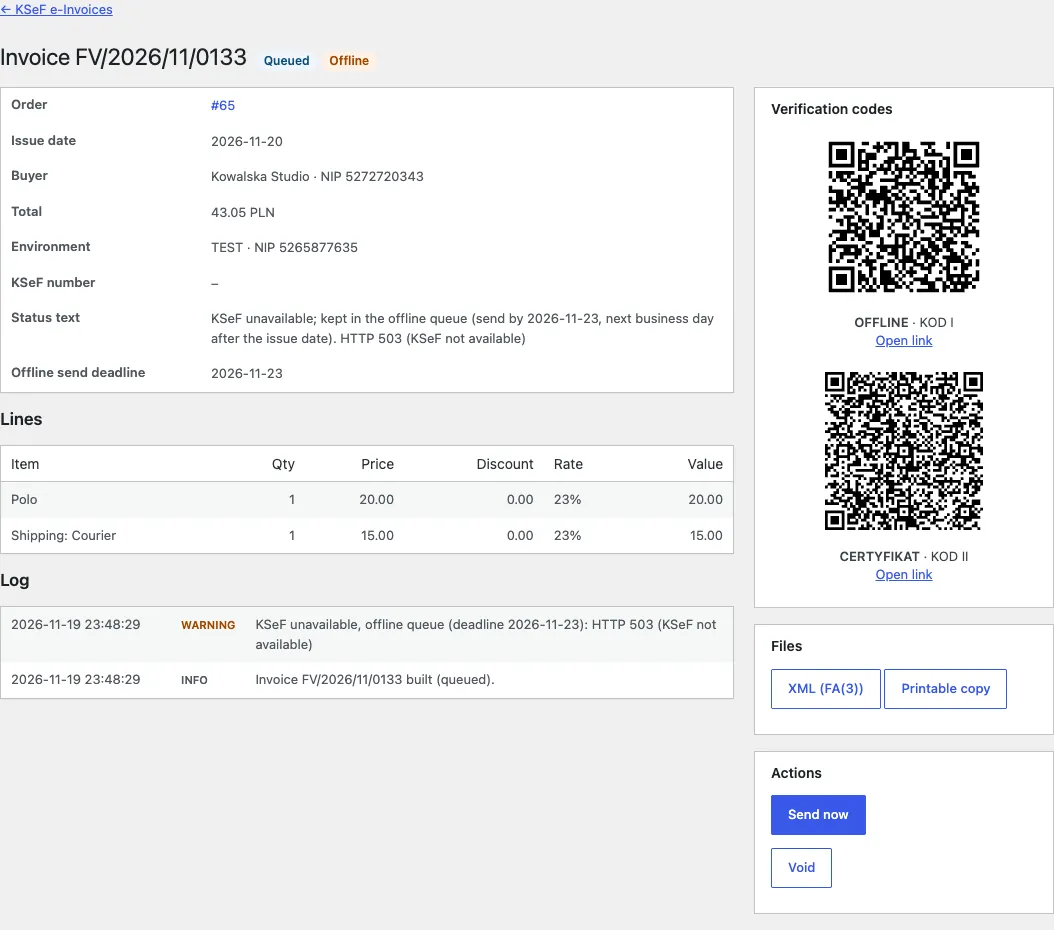
KSeF down: the invoice waits in the offline queue with its deadline and both QR codes (KOD I, KOD II)
Login with a KSeF token or certificate, TEST, DEMO and PRODUCTION; secrets encrypted at rest
Where you work
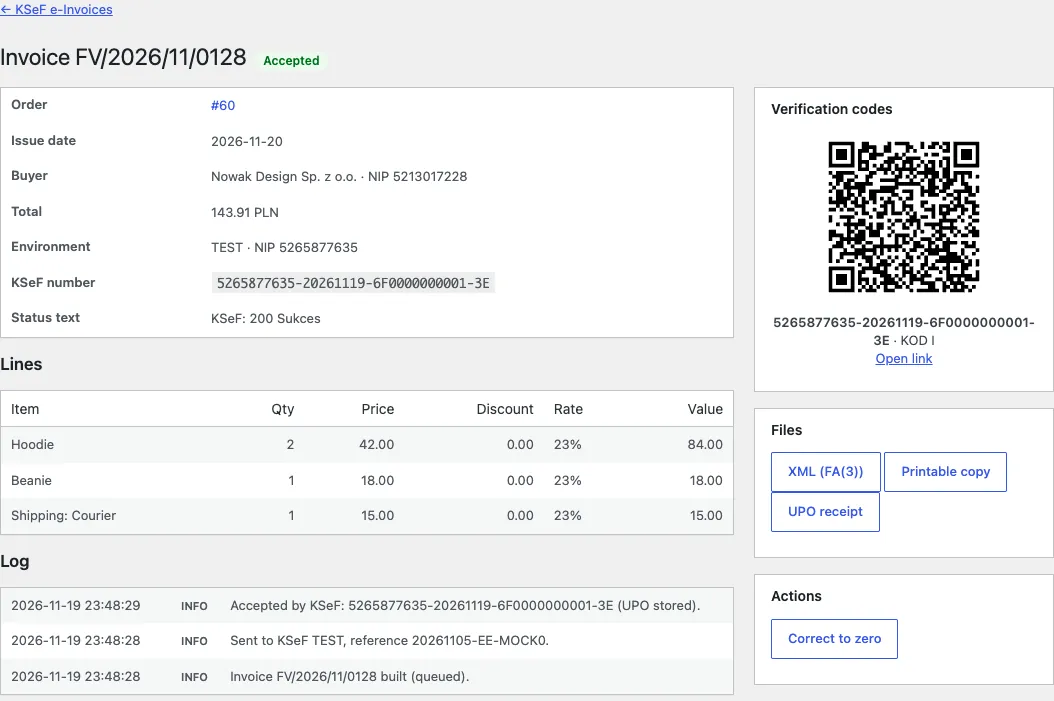
WooCommerce > KSeF e-Invoices: list, filters, document view with checks, log, QR codes, XML, UPO and a printable copy
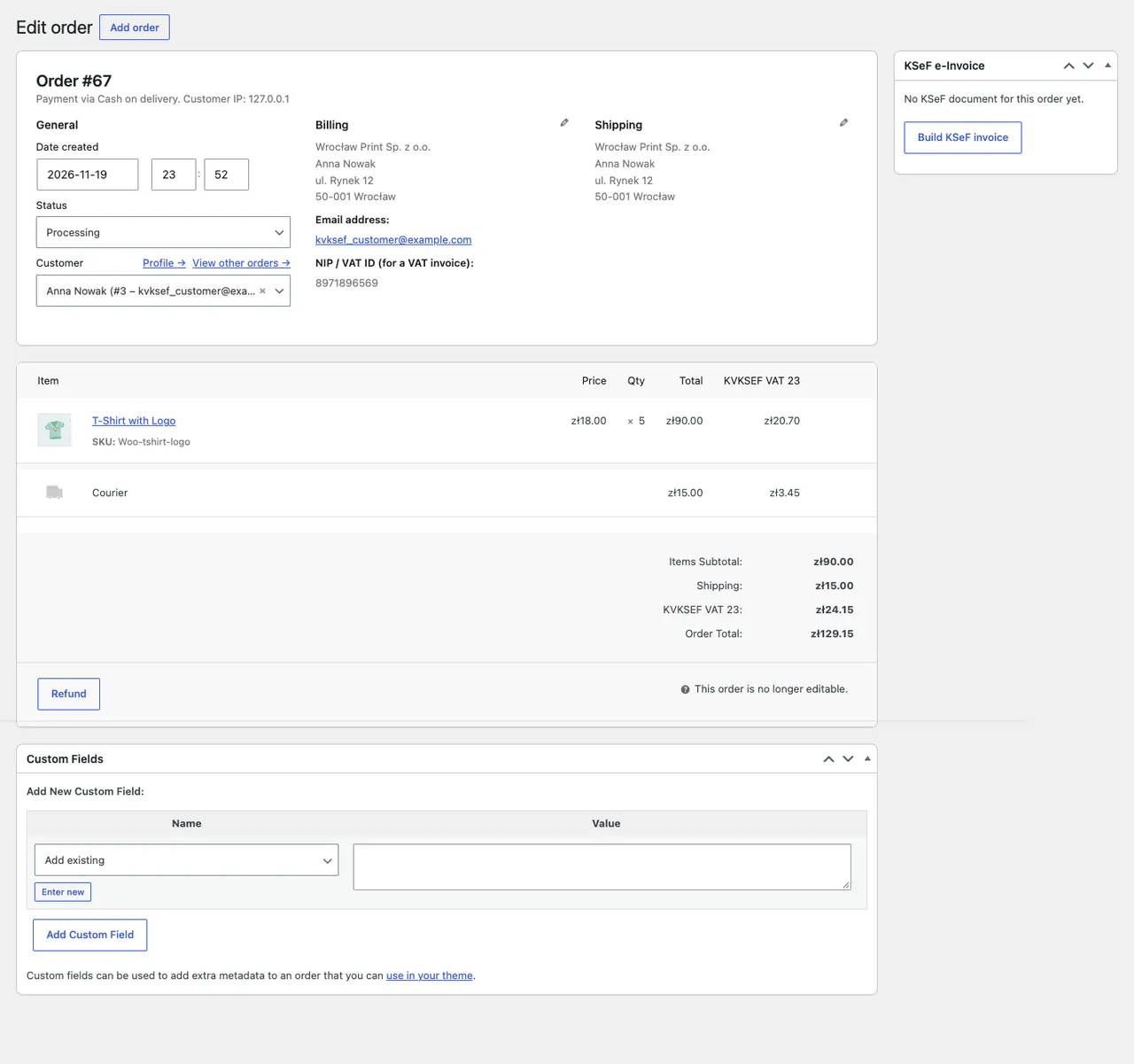
KSeF panel on the order screen and a KSeF column in the orders list (HPOS and legacy storage)
NIP / VAT ID field in the Checkout block and the classic checkout, checked before the order is placed
My Account: the customer sees the accepted invoice, its KSeF number, the printable copy and the XML
What you get
Download & installThe plugin .zip, installed in Plugins > Add New Plugin > Upload Plugin. Download it from My licenses right after payment.
12 months of updates & supportNew versions and help for 12 months (24 or 36 months at checkout). After that the plugin keeps working; renew anytime at 50%.
License for your storeOne production domain with all its subdomains; staging and local development hosts are free. How licensing works
30-day refundFull refund within 30 days of your first purchase, no reason needed. Refund policy
Tested buildsWooCommerce 10.1 – 11.2, WordPress 6.7+. Tested on WooCommerce 11.2.1 and WordPress 7.1.3.
Documentation & supportFull guide (Installation, Configuration, Usage, Developer notes) on this page. Tickets from your account, same-day reply on weekdays (Mon-Fri 09:00-18:00 UTC+3).
Compatibility
KSeF e-Invoicing for Poland works with WooCommerce 10.1 – 11.2, WordPress 6.7+.
We list the builds we install and test on. “Tested” means the test plan ran on that build; “Supported” means the build is inside the supported range.
Compatibility
Version
Range
Runs on
Status
WooCommerce 11
11.0 – 11.2
WordPress 6.7 – 7.1
Tested on 11.2.1
WooCommerce 10
10.1 – 10.x
WordPress 6.7+
Supported
WordPress
6.7 – 7.1
PHP 7.4 – 8.3
Tested on 7.1.3
1.0.0
Nov 20, 2026
Latest
First release: FA(3) invoices of WooCommerce orders with own numbering, refunds as KOR corrections, cancellations (void before KSeF, correction to zero once in KSeF; an invoice issued in offline mode is never voided: it is still sent by its deadline and then corrected to zero), KSeF API 2.0 (token or certificate login, TEST / DEMO / PRODUCTION), UPO receipts, offline queue with KOD I + KOD II, official FA(3) schema validation, NIP field in the Checkout block and the classic checkout, KSeF documents page, order panel, orders column, printable copy, My Account box, Action Scheduler send queue with a lock, WP-CLI, HPOS and legacy order storage.
How do I install the plugin?
Upload the plugin. Plugins > Add New Plugin > Upload Plugin: choose the .zip from My licenses and click Install Now.
Activate. Activate it on the Plugins screen. WooCommerce must be active; the plugin tells you if it is not.
Enter the license key. WooCommerce > Settings, the plugin's own tab: paste the key from My licenses. You have 14 days to do it; staging and local sites are included.
WooCommerce 10.1 – 11.2, WordPress 6.7+. Tested on WooCommerce 11.2.1 and WordPress 7.1.3. The Compatibility tab lists every version range.
Do the plugins work with HPOS and the block checkout?
Yes. Every plugin declares compatibility with High-Performance Order Storage and the Cart and Checkout blocks, and is tested in both the block and the classic cart and checkout.
Will they work with my theme?
They use WooCommerce hooks, blocks and the Store API instead of template overrides, so block themes and classic themes both work. We test on Twenty Twenty-Five.
What does the license cover?
One production store domain with every subdomain (www, shop., staging.), plus local development hosts such as localhost, *.local and *.test. A store on another domain needs its own license; a second-store license is 40% off. You have 14 days after installing to enter the key. 12 months of updates and support are included; after that the plugin keeps working and renewals are 50% off. How licensing works
Can I get a refund?
Yes. Ask for a full refund within 30 days of your first purchase, no reason needed: open a ticket or write to [email protected] with your order number. The money goes back to the card or bank account you paid with within 5 business days of approval. Refund policy
How do I get help?
Open a ticket from your account, so your license details are attached. We answer with a same-day reply on weekdays (Mon-Fri 09:00-18:00 UTC+3). Support policy. Not a customer yet? Ask a pre-sales question.
Issue the invoices of your WooCommerce orders in KSeF, Poland's National e-Invoice System (Krajowy System e-Faktur). WooCommerce has no invoices of its own, so the plugin builds a structured FA(3) e-invoice for every order with its own invoice numbering, turns refunds into correction invoices (KOR), sends everything over the official KSeF API 2.0 and keeps the KSeF number, the official receipt (UPO) and the verification QR codes.
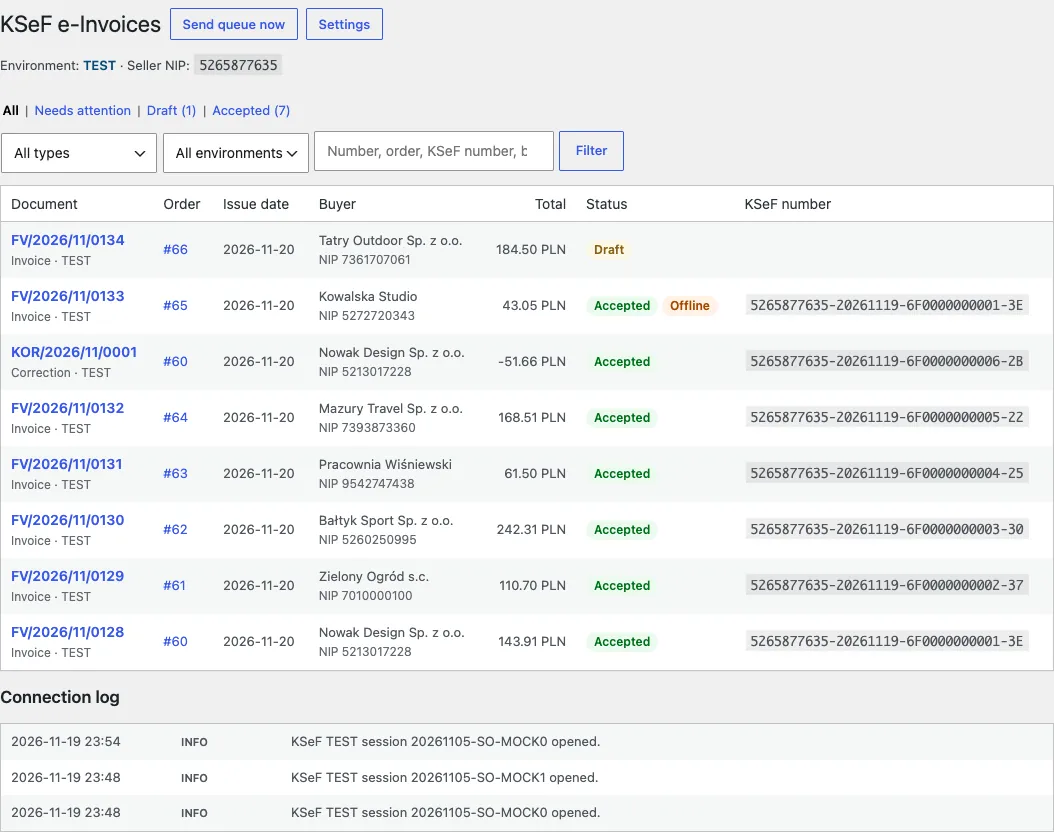
KSeF documents under WooCommerce
Who needs it
KSeF is mandatory for invoices issued in Poland (official schedule on ksef.podatki.gov.pl):
from 1 February 2026 for companies whose 2024 sales exceeded PLN 200 million (including VAT),
from 1 April 2026 for all other taxpayers,
until 31 December 2026 invoices outside KSeF are still allowed while their total in a month stays at or below PLN 10,000; from 1 January 2027 this exception ends.
What it does
FA(3) invoices from orders, built when an order reaches "Completed" (or "Processing", or only from the order screen), numbered in the plugin's own sequence.
Refunds become corrections (KOR) with "state before / state after" rows; a cancelled order already in KSeF is flagged or corrected to zero.
Checked before sending against the official FA(3) schema of the Ministry of Finance (shipped with the plugin, byte-identical, validated offline) and the VAT rules.
Background send queue (Action Scheduler, every 5 minutes, one run at a time), UPO receipts, KSeF numbers in the order notes.
Offline mode: KSeF not reachable -> offline queue with the send deadline, KOD I and KOD II QR codes.
NIP at checkout in the Checkout block and the classic checkout, checked with the Polish checksum.
Admin: KSeF documents page, order panel, orders list column, XML / UPO / printable copy, view-only and manage capabilities; secrets encrypted at rest.
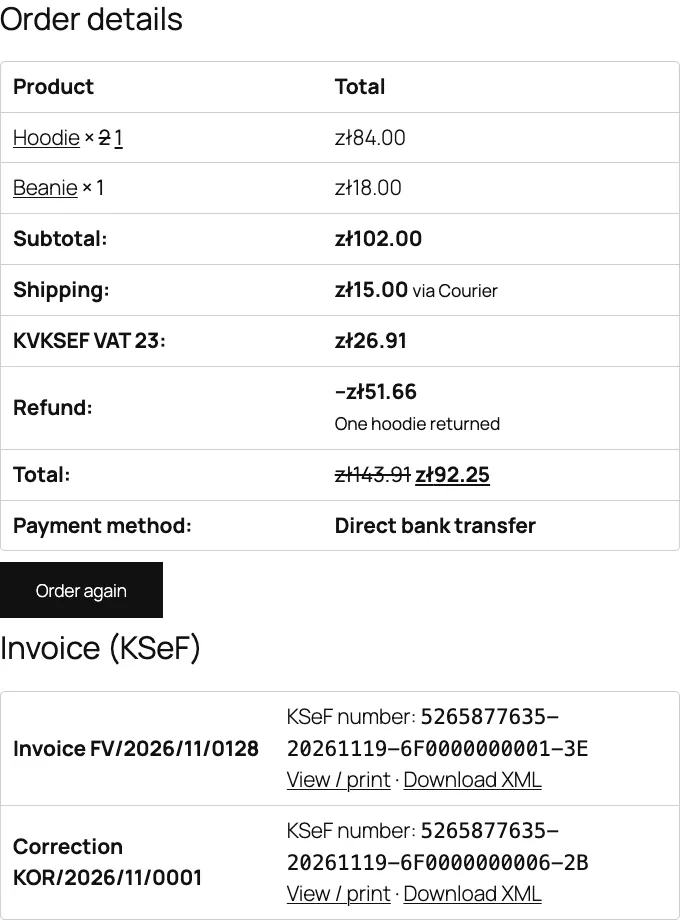
My Account: the customer sees the accepted invoice with its KSeF number, a printable copy with the QR code and the XML.
Pages
Requirements: WordPress 6.7+, WooCommerce 10.1+ (tested with WooCommerce 10.1.4 and 11.2.1 on WordPress 7.1.3), PHP 7.4 to 8.3 with OpenSSL, DOM and libxml; HPOS or the legacy order storage. A KSeF token or a KSeF certificate of the seller.
KSeF is the e-invoice system of the Polish Ministry of Finance. This plugin is made by Kavio Labs and is not affiliated with or endorsed by the Ministry of Finance.
Installation
In WordPress go to Plugins > Add New > Upload Plugin, choose kv-ksef-kv.zip and click Install Now, then Activate. WooCommerce 10.1 or later must be active.
Activation creates four tables ({prefix}kv_ksef_document, _log, _auth, _counter), grants the capabilities kv_ksef_view and kv_ksef_manage to Administrator and Shop manager, and schedules the send queue (Action Scheduler, group kv-ksef).
Open WooCommerce > Settings > KSeF and work through the sections (Configuration).
Start on the TEST environment, click Test KSeF login, place a test order and complete it. Then switch to DEMO and finally PRODUCTION with your own NIP and credentials.
Update
Upload the new zip the same way and confirm "Replace current with uploaded". Tables are upgraded automatically; documents, settings and secrets are kept.
Deactivate and uninstall
Deactivate: the scheduled send runs are removed; documents and settings stay.
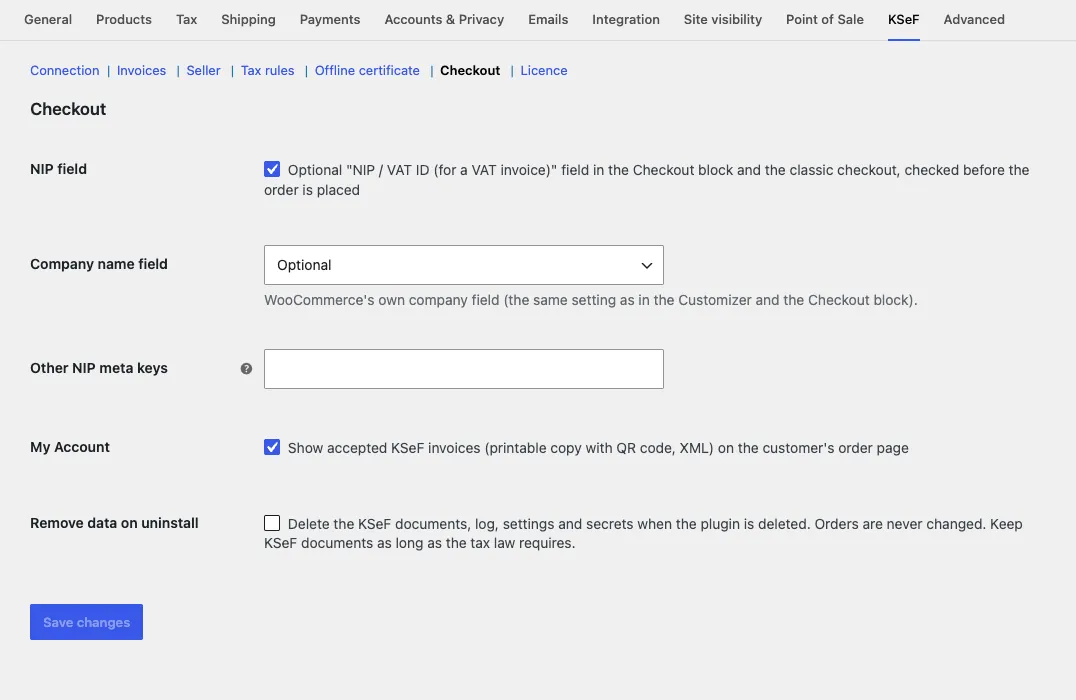
Delete: by default the KSeF documents, log, settings and secrets are kept (keep KSeF documents as long as the tax law requires). Only with Remove data on uninstall (Settings > KSeF > Checkout) are the tables, options, secrets and capabilities removed. Orders are never changed.
Server requirements
PHP 7.4 to 8.3 with the OpenSSL, DOM and libxml extensions (standard on most hosts), outgoing HTTPS to api.ksef.mf.gov.pl (and api-test / api-demo), api.nbp.pl for foreign currency invoices. WP-Cron or a real cron that runs the Action Scheduler queue.
Configuration
WooCommerce > Settings > KSeF (needs the manage_woocommerce capability).
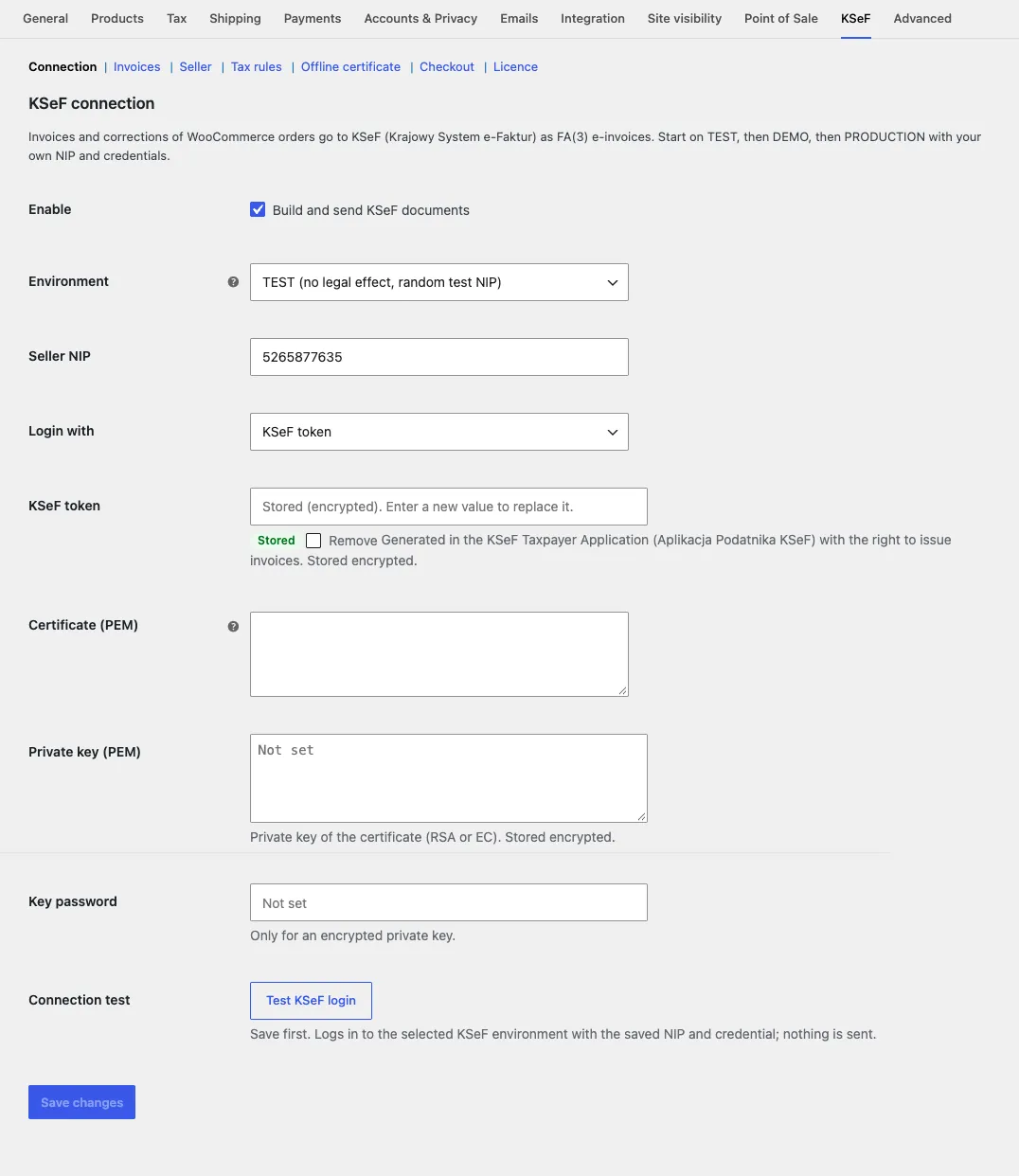
Connection
Connection settings
Setting
Meaning
Enable
Build and send KSeF documents. Off: nothing is built or sent; the documents page stays available.
Environment
TEST (no legal effect, any test NIP), DEMO (pre-production with your NIP), PRODUCTION (legally binding). A document keeps the environment it was built for.
Seller NIP
Your 10-digit NIP (checksum checked).
Login with
KSeF token or KSeF certificate (XAdES signature).
KSeF token
Generated in the KSeF Taxpayer Application with the right to issue invoices.
Certificate / Private key / Key password
For certificate login (PEM).
Secrets (token, private keys, passwords) are stored encrypted (AES-256-GCM, key derived from the WordPress secret keys in wp-config.php) and are never shown again: the field only says Stored; leave it empty to keep it, tick Remove to delete it. Test KSeF login logs in with the saved values; nothing is sent. If you change the WordPress secret keys, enter the secrets again.
Invoices
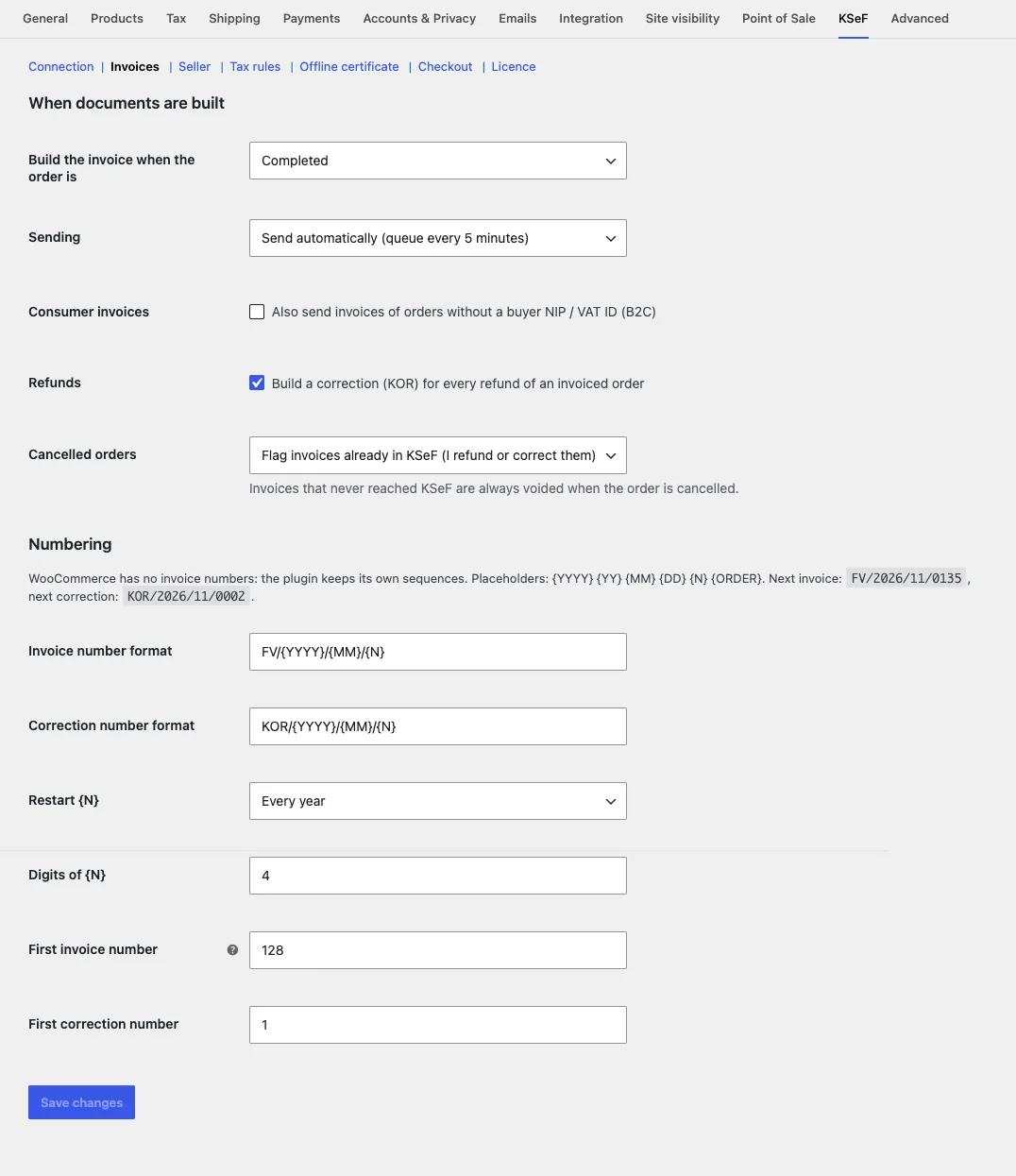
Invoices and numbering
Setting
Meaning
Build the invoice when the order is
Completed (default), Processing (paid) or only from the order screen.
Sending
Automatically (queue every 5 minutes) or keep as drafts until you send them.
Consumer invoices
Also send orders without a buyer NIP / VAT ID (B2C). Off: consumer orders get no KSeF document.
Refunds
Build a correction (KOR) for every refund of an invoiced order.
Cancelled orders
Flag invoices already in KSeF (you refund or correct them) or build a correction to zero at once. Unsent invoices are always voided.
Numbering
WooCommerce has no invoice numbers; the plugin keeps two sequences (invoices, corrections) in its own counter table, incremented atomically in the database.
Setting
Meaning
Invoice / Correction number format
Placeholders {YYYY}{YY}{MM}{DD} (issue date in Poland), {N} (sequence), {ORDER} (order number). Default FV/{YYYY}/{MM}/{N} and KOR/{YYYY}/{MM}/{N}.
Restart {N}
Every year, every month or never.
Digits of {N}
Zero padding (1 = none).
First invoice / correction number
The next number is never lower: continue the numbering of your previous system.
The settings page shows the next numbers. A number is taken only when a document is really built (a skipped consumer order takes none); a voided document keeps its number, so a voided number is missing from the series in KSeF (the voided document stays in the KSeF documents list as the record). The date placeholders and the yearly / monthly restart use the day the number is taken: a draft or a retried invoice that is re-dated to its send day (see Usage > Issue date) keeps its number, so FV/2026/10/42 can carry the issue date 1 November. Keep {YYYY} (and {MM} with a monthly restart) in the format: a number already used by another document of the same type is refused as a duplicate.
Seller
Company name, address (two lines), country, e-mail, phone, place of issue, bank account (needed for unpaid bank transfer invoices), bank name, SWIFT, KRS, REGON, BDO, footer text, payment term in days and the payment forms: one gateway id = form per line (1 cash, 2 card, 3 voucher, 4 cheque, 5 credit, 6 transfer, 7 mobile, other). Built in: cod = 1, bacs = 6, cheque = 4, przelewy24 = 6, card gateways (Stripe, WooPayments) = 2, BLIK = 7; anything else is written as "other" with the gateway title.
Tax rules
VAT rates come from the WooCommerce tax rates of each line (23, 8, 5 %; other rates are written as 23 % with a warning). Lines without VAT: exempt (zw, with its legal basis A / B / C and the text), 0 % domestic or not taxable in Poland; EU B2B sales without VAT as intra-EU supply (0 % WDT) or services (reverse charge); sales outside the EU as export. OSS: EU consumer sales at the destination rate. Unit of measure and the name of the shipping line.
Per product (Product data > General): KSeF GTU code (GTU_01 to GTU_13) and KSeF Annex 15 goods (split payment mark for Polish VAT payers above PLN 15,000). Variations use the parent product's values.
Offline certificate
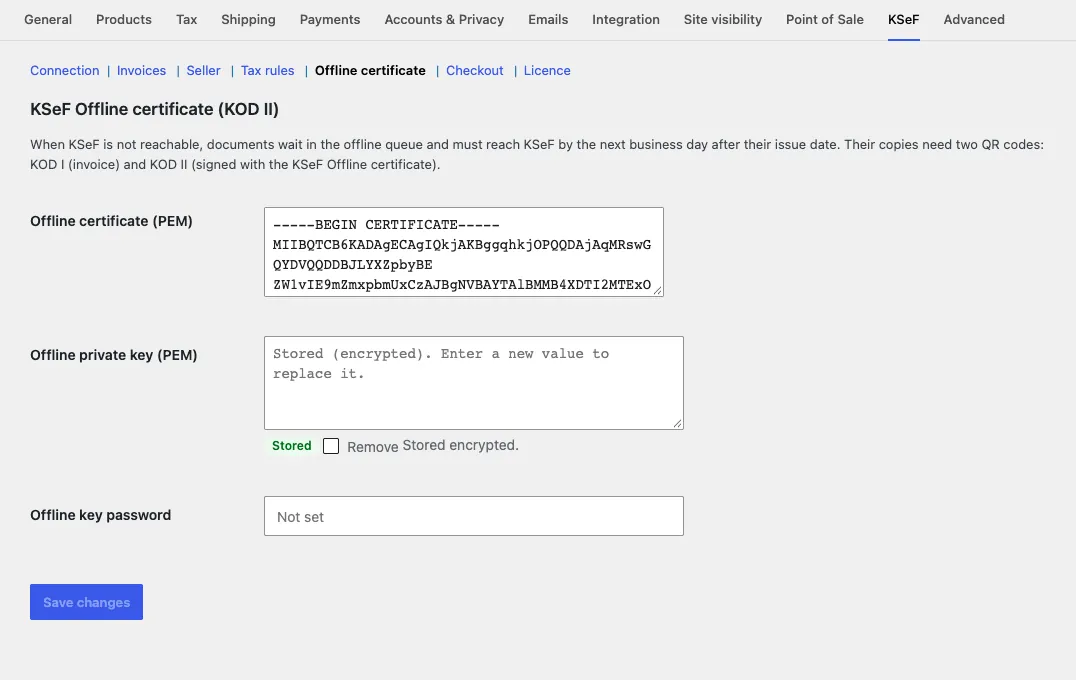
Offline certificate
The KSeF Offline certificate (PEM) and its private key: documents issued in offline mode then carry KOD II next to KOD I. Without it the admin warns about every offline document.
Checkout
Checkout settings
NIP field: an optional "NIP / VAT ID (for a VAT invoice)" field in the Checkout block (WooCommerce additional checkout fields, address section) and the classic checkout. An invalid Polish NIP (checksum) is refused before the order is placed.
Company name field: WooCommerce's own setting (the same as in the Customizer and the Checkout block).
Other NIP meta keys: order meta keys of another VAT number plugin, read when the plugin's own field is empty.
My Account: show accepted KSeF invoices on the customer's order page.
Remove data on uninstall.
Licence
Own-site build: your Kavio Labs licence key (one domain). Without a valid licence no new KSeF documents are built or sent; the documents page, downloads and settings stay available. The CodeCanyon build uses the purchase code for updates only. The licence check sends the site address and the key once a day; no order data.
Roles
kv_ksef_view opens the KSeF documents page, the order panel and the downloads; kv_ksef_manage adds every action (send, rebuild, void, build, correct). Administrator and Shop manager have both. For a view-only user (for example your accountant) give a role kv_ksef_view and view_admin_dashboard (WooCommerce keeps users without it out of wp-admin) with a role editor plugin.
Usage
Life cycle of a document
Built: when an order reaches the trigger status (default "Completed") an Action Scheduler job builds the FA(3) invoice with the next number. Orders without a buyer NIP are skipped unless "Consumer invoices" is on.
Queued (automatic sending) or Draft (manual sending: click Send now).
Sent: the send queue (every 5 minutes, or Send queue now) logs in to KSeF, opens a session, sends the documents and waits a few seconds for the answer.
Accepted: the KSeF number, the UPO receipt and the verification QR code are stored; an order note names the KSeF number. Rejected: the KSeF error is shown; correct the data and click Rebuild and queue (same number).
Other states: Waiting (a correction waits for the KSeF number of its invoice), Error (the checks failed, see the document), Void (never sent, never will be).
Document view
KSeF documents page
WooCommerce > KSeF e-Invoices: all documents with filters (status, "Needs attention", type, environment) and search (number, order, KSeF number, buyer). The document view shows the facts, the checks, the lines, the log, the QR codes and the files: XML (FA(3)), UPO receipt, Printable copy (browser print / save as PDF, with the QR code).
Order screen
The KSeF e-Invoice panel on the order screen (HPOS and legacy) lists the documents of the order with their status, Send now, Build KSeF invoice (orders without one) and Correct to zero (invoice already in KSeF). The orders list has a KSeF column. The buyer NIP is shown and editable in the billing address.
Order panel
Older orders (created before the plugin was set up): tick "No invoice was issued for this order outside KSeF" before Build KSeF invoice, so an order already invoiced in your accounting software is never invoiced twice.
Several invoices for one order: a second invoice of an order is always kept as a draft with a warning while the first one counts (not voided, rejected or corrected to zero). A changed order is corrected (refund or correct to zero), not invoiced again; send a second invoice only when it covers a separate part of the order.
Refunds
Every WooCommerce refund of an invoiced order becomes a correction invoice (KOR) with the next correction number:
refunded items reduce quantity and value, refunded shipping and fees their value;
a refund amount not tied to a line ("Refund amount" only) is spread over the goods lines by their value;
the correction shows "state before / state after" and the KSeF number of the invoice; it waits until the invoice is accepted and is rebuilt with its KSeF number right before sending;
several refunds build on each other; a rejected or voided correction never leaves a wrong "state before";
refunds of items, shipping or fees made before the invoice was built are taken off the invoice instead (the invoice shows what was finally sold); a refund amount not tied to a line cannot be put on an invoice line, so that refund stays on the invoice and gets its own correction right after the invoice is built;
a refund without an amount (restock only) builds nothing; a deleted refund voids its unsent correction (a correction already in the offline queue is still sent: see Offline mode).
Correction
Cancelled orders
Invoice not in KSeF yet: it is voided and never sent.
Invoice in the offline queue (issued in offline mode): it is not voided. It is still sent to KSeF by its deadline, flagged like an invoice in KSeF, and corrected to zero once it has its KSeF number (see Offline mode).
Invoice already in KSeF: a KSeF invoice cannot be withdrawn. It is flagged ("Order cancelled", admin notice) until you refund the order or click Correct to zero; with "Cancelled orders: build a correction to zero at once" the correction is built automatically.
Offline mode
When KSeF cannot be reached the document stays queued in offline mode with its send deadline (next business day after the issue date, Polish holidays included) and is retried with back-off. Its QR codes (KOD I and, with the KSeF Offline certificate, KOD II) are final at once, so the copy can be handed to the buyer. When KSeF answers again it is sent with "offline mode" declared. An admin notice lists documents whose deadline is today or has passed.
A document in offline mode is an issued invoice: its copy with the QR codes may already be with the buyer, and the law requires it to reach KSeF by its deadline. So it keeps its content (no rebuild) and is never voided, also when the order is cancelled, the order is deleted or the refund of a correction is deleted. A cancellation is a correction to zero: click Correct to zero (or let "Cancelled orders: build a correction to zero at once" build it); it waits and is sent right after the invoice gets its KSeF number. Only a document in offline mode that KSeF rejected (or that failed the checks) can be voided by hand; if its copy reached the buyer, rebuild and send it instead. Sources: Podręcznik KSeF 2.0 part II (section 1.6.3: an issued invoice cannot be cancelled, only corrected; offline24: the invoice must be sent to KSeF) and the Ministry of Finance KSeF API documentation (tryby-offline.md).
Offline document
Issue date
KSeF records an online invoice whose issue date (P_1) is earlier than the day it receives it as offline. A draft or a retried document that goes out online on a later day is therefore re-dated to the send day right before sending (the log says so); documents in offline mode keep their date. The exchange rate tax point stays the order completion / first build.
For the customer
My Account > Orders > View order shows the accepted KSeF invoices with the KSeF number, a printable copy with the QR code and the XML (only the logged-in owner of the order).
My Account
Developer notes
Data
Table
Content
{prefix}kv_ksef_document
One row per KSeF document: type (VAT / KOR), source (order:<id>, refund:<id>, cancel:<doc id>; unique), order, number, issue date, environment, seller NIP, status, KSeF number, references, offline flag + deadline, frozen model / state / checks (JSON), FA(3) XML, UPO.
Order meta: _wc_billing/kv-ksef/nip (buyer NIP, also written by the classic checkout), _kv_ksef_invoice_number, _kv_ksef_number (KSeF number of the accepted invoice). Product meta: _kv_ksef_gtu, _kv_ksef_annex15. Options: kv_ksef_settings, kv_ksef_secrets (encrypted values), kv_ksef_db_version. Orders are read and written only through the WooCommerce CRUD (HPOS and legacy storage).
Background jobs (Action Scheduler, group kv-ksef)
Hook
When
kv_ksef_send_queue
Recurring, every 5 minutes (removed on deactivation or when the plugin is switched off).
kv_ksef_send_now
Async, right after documents were queued.
kv_ksef_issue_order
Async, when an order reaches the trigger status.
kv_ksef_issue_refund
Async, after a refund.
One send run at a time: a database lock (GET_LOCK). Every status change that races with a run is a conditional update (claim): a document is claimed (queued -> sending) before it is re-dated, sent or moved to the offline queue.
WP-CLI
wp kv-ksef send [--ids=12,13]    # send the queue now (same lock)
wp kv-ksef status                # documents per status
wp kv-ksef issue <order_id> [--confirm]
wp kv-ksef test                  # KSeF login test
Hooks
kv_ksef_buyer_tax_id (filter, string $nip, WC_Order $order): buyer tax ID when it is stored somewhere else.
Order notes and order meta above for integrations (for example a PDF invoice plugin printing the KSeF number).
PDF invoice plugins
WooCommerce has no invoices; PDF invoice plugins keep their own numbers. This plugin does not take over or change their numbering or documents: the KSeF invoice number is the plugin's own (_kv_ksef_invoice_number). To show the KSeF number on another plugin's PDF, print the order meta _kv_ksef_number in its template. The printable copy of this plugin carries the KSeF number and the verification QR code.
Standards and sources
KSeF API 2.0 per the official OpenAPI description (TEST 2.10.0, DEMO / PRODUCTION 2.9.0 on 20 November 2026). The auth status uses GET /auth/rev2/{ref} and falls back to GET /auth/{ref} where the environment answers 404 (DEMO / PRODUCTION today).
FA(3) schema 1-0E of the Ministry of Finance, shipped byte-identical in includes/Engine/xsd/ (SOURCE.txt with the SHA-256 sums); the main file is named schemat_FA3_v1-0E.xsd (WordPress file names allow no parentheses).
QR codes per the official kody-qr.md (KOD I: SHA-256 of the file; KOD II: RSA-PSS / ECDSA signed certificate link).
NBP rate (table A) of the last business day before the tax point for invoices in a foreign currency.
Not supported in 1.0
Several seller NIPs per shop, invoices for a different taxpayer context, advance invoices (zaliczkowa), corrections of invoices issued outside KSeF (NrKSeFN), self-billing, receiving purchase invoices from KSeF.
FAQ
Does WooCommerce issue invoices itself?
No. The plugin builds the invoice (FA(3)) for each order with its own numbering, so you need no other invoicing plugin for KSeF.
Can I keep my PDF invoice plugin?
Yes. It keeps its own PDF and numbering; in KSeF the structured FA(3) invoice of this plugin is the invoice. Avoid two different invoice numbers for one sale: use this plugin's number (order meta _kv_ksef_invoice_number) in the PDF, or use only this plugin's printable copy.
Which data leaves my shop?
Invoice data goes to the KSeF API of the Ministry of Finance for the environment you select; exchange rates are read from the NBP API; the licence check sends the site address and the licence key. Nothing else.
Where do I get a KSeF token?
In the KSeF Taxpayer Application (Aplikacja Podatnika KSeF) of the Ministry of Finance, with the right to issue invoices. For tests the TEST environment accepts any valid test NIP.
What happens if KSeF is down?
The invoice waits in the offline queue with its deadline (next business day after the issue date) and both QR codes, and is sent automatically when KSeF answers again.
An order was cancelled while its invoice was in the offline queue. Why is it still sent?
An invoice issued in offline mode is already issued (its copy with the QR codes may be with the buyer) and must reach KSeF by its deadline; KSeF has no way to cancel an invoice. The plugin sends it and then issues a correction to zero (button Correct to zero, or automatically with "Cancelled orders: build a correction to zero at once"). Only an invoice that never left the online queue is voided.
Do consumer (B2C) orders go to KSeF?
Only with "Consumer invoices" on. Without it, orders without a buyer NIP get no KSeF document.
A customer typed a wrong NIP. What now?
Before sending: correct it in the order's billing address and click Rebuild and queue. After KSeF accepted the invoice: issue a correction (refund) or correct to zero and invoice again.
Can I change an invoice in KSeF?
No, an accepted KSeF invoice cannot be changed or deleted; it is corrected with a KOR (refund or Correct to zero).
Does it work with HPOS and the Checkout block?
Yes: HPOS and the legacy order storage, the Checkout block and the classic checkout.
Is it compliant?
The plugin follows the official KSeF API and FA(3) schema and is tested against the official KSeF TEST environment. Tax decisions (rates, exemptions, when to invoice) remain yours or your accountant's.
Is this an official Ministry of Finance product?
No. Kavio Labs makes it; it is not affiliated with or endorsed by the Ministry of Finance.
The department store block theme for WooCommerce: colour-coded departments, a department list beside the hero slider with two side promos, a big search with a department picker, tabbed product grids, a 2 + 1 + 2 offer grid, deals of the day with real countdowns, a department showcase, a promotions band and a three-column product page with a sticky buy box. Four styles (Meridian, Harbor, Citrus, Night) as Site Editor style variations, every colour editable. Cart and Checkout blocks styled, HPOS neutral.
Stop AI crawlers, scrapers, card testers, vulnerability scanners and unwanted countries before WordPress builds a page. Googlebot and Bingbot are verified by DNS and always allowed; 50+ bots get one switch each; country rules use free GeoIP databases and can close only the checkout (block and classic checkout, wc-ajax and Store API); card testing protection on order submissions; the add to cart flood fix for requests without a WooCommerce session; IP and network lists, rate limits for search, filters, forms and login, honeypots; a one-second challenge instead of a captcha; learning mode, dashboard, log, IP tester and Cloudflare export. HPOS and blocks compatible.
The campaign block theme for WooCommerce that makes a store feel like a sale is always on: a flash bar with the sale that ends first, a bento hero with a live deal tile, a dark flash deals zone with flip-tile countdowns on real sale end dates, round discount stickers, a category pill bar, stories with a player, a Discover feed with promo cells inside the grid, a product page campaign strip and a sticky phone buy bar. Sixteen colour styles as Site Editor style variations, two of them dark. Cart and Checkout blocks styled, HPOS neutral.