by Kavio Labs · for WooCommerce 10.1+ on WordPress 6.7+
Google Merchant Center, Meta, Microsoft, Pinterest, TikTok, idealo, billiger.de, Ceneo and custom product feeds from your WooCommerce catalogue: WooCommerce's own tax per country, variations with item_group_id, a validation report per product, resumable background generation and private feed URLs.
Tested on WooCommerce 11.2.1 & WordPress 7.1.3Updated Nov 20, 2026Version 1.0.0Compatible with WooCommerce 10.1 – 11.2, WordPress 6.7+ No core file edits
Built forWooCommerce
Multichannel Product Feeds for WooCommerce: every channel's feed from your catalogue, with the right price per country.1 of 8
What it does
Google Merchant Center, Meta, Microsoft, Pinterest, TikTok, idealo, billiger.de, Ceneo and custom product feeds from your WooCommerce catalogue: WooCommerce's own tax per country, variations with item_group_id, a validation report per product, resumable background generation and private feed URLs.
Every channel wants its own file. Multichannel Product Feeds for WooCommerce writes them from your catalogue: Google Merchant Center, Meta (Facebook, Instagram), Microsoft Merchant Center, Pinterest, TikTok, idealo, billiger.de, Ceneo and custom CSV, TSV, XML or JSON for any other channel.
Features
Checked against each channel's rules
Templates with the official attribute names, limits and allowed values of each channel.
A validation report for every run: each problem per column, with the products and the reason (missing image, brand or GTIN, wrong check digit, text too long, sale price not lower ...).
Items with errors are left out, so one bad product never blocks the whole feed.
The right price for every country
One feed per country, currency and language.
Prices with or without tax are calculated with WooCommerce's own tax functions for the target country: prices entered with or without tax, "Calculate tax based on", tax classes and rounding.
Automatic mode writes net prices for the US and Canada and gross prices elsewhere; billiger.de always gets consumer prices.
A feed in another currency is converted once, with your rate.
Your WooCommerce data, mapped
Sale prices with their WooCommerce schedule as sale_price_effective_date in your time zone.
Variable products: one item per variation with item_group_id, "Hoodie – Blue, M" titles and links that preselect the variation; or one item per product.
Stock status and backorders (with a restock date), WooCommerce's GTIN field and Brands, categories, tags, attributes and custom fields mapped to any channel field.
Google product categories mapped once per category and used by every feed.
Built for large catalogues
Generated in the background with Action Scheduler in short, resumable batches with a lock; an interrupted run continues where it stopped.
The previous file stays online until the new one is complete, also when a run fails.
Tested with 50,000 products and 15,000 variations: 60,020 items in about 20 seconds.
Private and safe
A private URL per feed with a 160-bit token; a new URL on request; every wrong request gets the same 404.
Files in a protected folder (or outside the web root), never cached, never indexed.
Read-only role, every change with a nonce and a capability, WP-CLI (wp kv-feeds generate).
What you get
Download & installThe plugin .zip, installed in Plugins > Add New Plugin > Upload Plugin. Download it from My licenses right after payment.
12 months of updates & supportNew versions and help for 12 months (24 or 36 months at checkout). After that the plugin keeps working; renew anytime at 50%.
License for your storeOne production domain with all its subdomains; staging and local development hosts are free. How licensing works
30-day refundFull refund within 30 days of your first purchase, no reason needed. Refund policy
Tested buildsWooCommerce 10.1 – 11.2, WordPress 6.7+. Tested on WooCommerce 11.2.1 and WordPress 7.1.3.
Documentation & supportFull guide (Installation, Configuration, Usage, Developer notes) on this page. Tickets from your account, same-day reply on weekdays (Mon-Fri 09:00-18:00 UTC+3).
Compatibility
Multichannel Product Feeds works with WooCommerce 10.1 – 11.2, WordPress 6.7+.
We list the builds we install and test on. “Tested” means the test plan ran on that build; “Supported” means the build is inside the supported range.
Compatibility
Version
Range
Runs on
Status
WooCommerce 11
11.0 – 11.2
WordPress 6.7 – 7.1
Tested on 11.2.1
WooCommerce 10
10.1 – 10.x
WordPress 6.7+
Supported
WordPress
6.7 – 7.1
PHP 7.4 – 8.3
Tested on 7.1.3
1.0.0
Nov 20, 2026
Latest
First release: Google Merchant Center, Meta, Microsoft, Pinterest, TikTok, idealo, billiger.de, Ceneo and custom CSV / TSV / XML / JSON feeds; one feed per country, currency and language with WooCommerce's own tax functions; sale schedules; variations with item_group_id; validation report; Google product categories; Action Scheduler generation with lock, resume and atomic publish; private token URLs; WP-CLI.
How do I install the plugin?
Upload the plugin. Plugins > Add New Plugin > Upload Plugin: choose the .zip from My licenses and click Install Now.
Activate. Activate it on the Plugins screen. WooCommerce must be active; the plugin tells you if it is not.
Enter the license key. WooCommerce > Settings, the plugin's own tab: paste the key from My licenses. You have 14 days to do it; staging and local sites are included.
WooCommerce 10.1 – 11.2, WordPress 6.7+. Tested on WooCommerce 11.2.1 and WordPress 7.1.3. The Compatibility tab lists every version range.
Do the plugins work with HPOS and the block checkout?
Yes. Every plugin declares compatibility with High-Performance Order Storage and the Cart and Checkout blocks, and is tested in both the block and the classic cart and checkout.
Will they work with my theme?
They use WooCommerce hooks, blocks and the Store API instead of template overrides, so block themes and classic themes both work. We test on Twenty Twenty-Five.
What does the license cover?
One production store domain with every subdomain (www, shop., staging.), plus local development hosts such as localhost, *.local and *.test. A store on another domain needs its own license; a second-store license is 40% off. You have 14 days after installing to enter the key. 12 months of updates and support are included; after that the plugin keeps working and renewals are 50% off. How licensing works
Can I get a refund?
Yes. Ask for a full refund within 30 days of your first purchase, no reason needed: open a ticket or write to [email protected] with your order number. The money goes back to the card or bank account you paid with within 5 business days of approval. Refund policy
How do I get help?
Open a ticket from your account, so your license details are attached. We answer with a same-day reply on weekdays (Mon-Fri 09:00-18:00 UTC+3). Support policy. Not a customer yet? Ask a pre-sales question.
Product feeds from your WooCommerce catalogue for Google Merchant Center, Meta (Facebook, Instagram), Microsoft Merchant Center, Pinterest, TikTok, idealo, billiger.de, Ceneo and any other channel (custom CSV, TSV, XML or JSON).
All feeds on one page
What it does
Channel templates with the official attribute names, limits and allowed values of each channel. Every item is checked; the validation report lists each problem per column with the products and the reason, and items with errors can be left out of the file.
One feed per country, currency and language. Prices with or without tax come from WooCommerce's own tax functions for the target country.
Sale prices with their schedule (sale_price_effective_date in the site time zone), variable products as items with item_group_id, stock and backorders, GTIN, brand, categories, tags, attributes and custom fields mapped to any channel field, Google product categories mapped once per category.
Background generation with Action Scheduler in short, resumable batches with a lock; a failed run keeps the previous file online. Tested with 50,000 products.
Private feed URL per feed: a 160-bit token, a new URL on request, files in a protected folder, the same 404 for every wrong request.
Requirements
WordPress
6.7 or later (tested on 7.1.3)
WooCommerce
10.1 or later (tested on 10.1.4 and 11.2.1)
PHP
7.4 - 8.3 (tested on 8.3)
Order storage
not used (the plugin reads products only); compatible with HPOS
Pages
Google Merchant Center, Meta, Microsoft, Pinterest, TikTok, idealo, billiger.de and Ceneo are trademarks of their owners. Multichannel Product Feeds is not affiliated with or endorsed by them.
Installation
In WordPress go to Plugins > Add New > Upload Plugin, choose kv-multichannel-feeds-kv.zip and click Install Now, then Activate. WooCommerce 10.1 or later must be active.
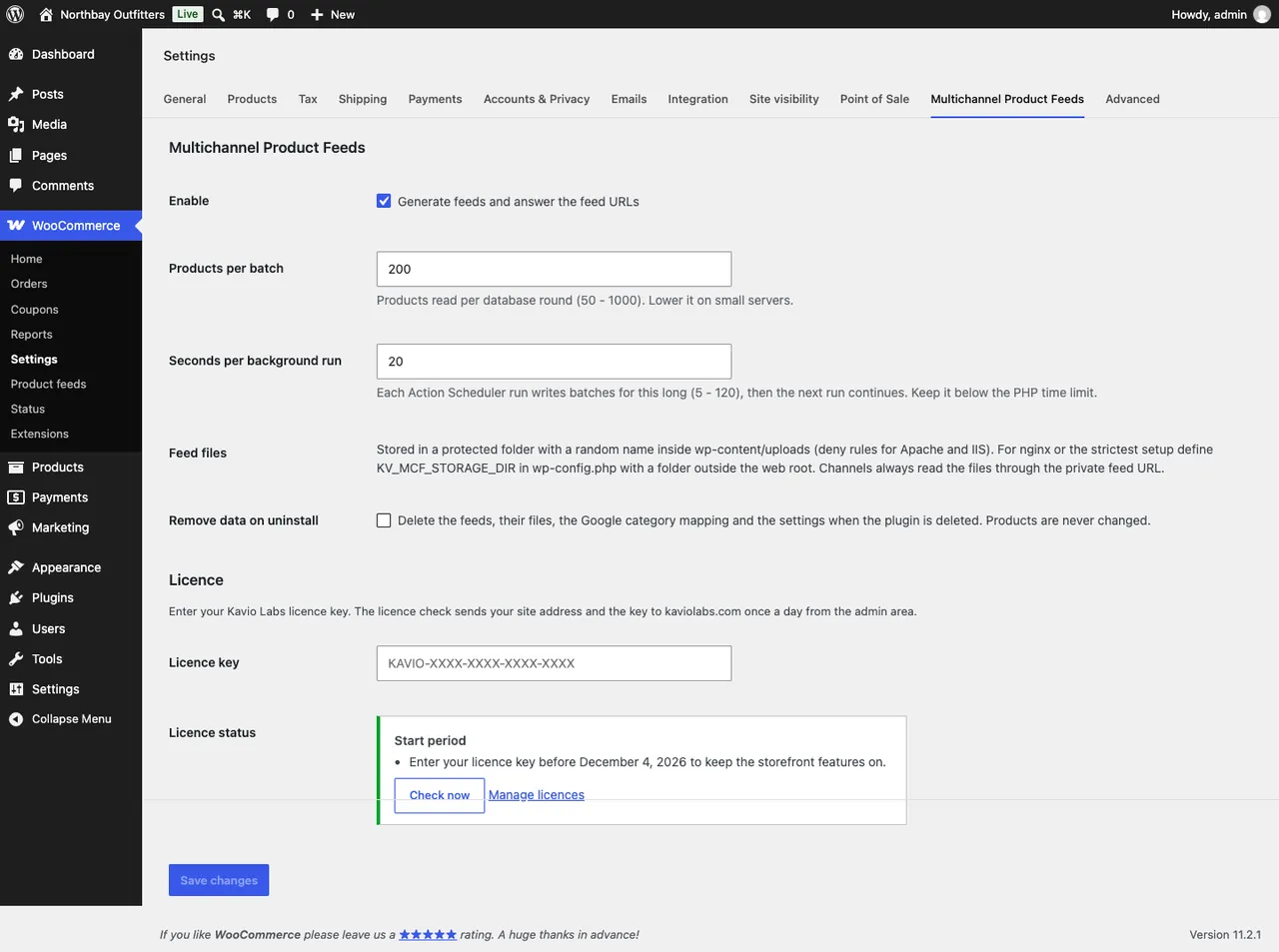
Own-site build: enter your licence key in WooCommerce > Settings > Multichannel Product Feeds. Feeds are generated during the start period and while the licence is active; settings, reports and published files always stay available.
Open WooCommerce > Product feeds and click Add feed.
On activation the plugin creates three tables (wp_kv_mcf_feeds, wp_kv_mcf_issues, wp_kv_mcf_seen), a protected folder for the feed files, the capabilities kv_mcf_view and kv_mcf_manage (administrator and shop manager) and a background task that checks every 5 minutes which feeds are due.
Settings
Settings
Setting
Meaning
Enable
Off: no feed is generated and every feed URL answers 404.
Products per batch
Products read per database round (50 - 1000, default 200). Lower it on a small server.
Seconds per background run
Each Action Scheduler run writes batches for this long (5 - 120, default 20), then the next run continues. Keep it below your PHP time limit.
Feed files
Where the files are kept (see below).
Remove data on uninstall
Off (default): deleting the plugin keeps feeds, files, reports and the Google category mapping, so a reinstall continues with the same feed URLs. On: everything the plugin stored is deleted. Products are never changed.
Where the files are
By default the files are kept in wp-content/uploads/kv-multichannel-feeds-<random>/ with deny rules for Apache (.htaccess) and IIS (web.config). The random folder name keeps them unguessable on servers that ignore those rules (nginx). Channels always read them through the private feed URL.
For the strictest setup put the folder outside the web root in wp-config.php:
Upload the new zip over the installed plugin; feeds, URLs and reports are kept. Deactivating removes the scheduled tasks and the URL rule (the URLs answer again after reactivation). See Remove data on uninstall above.
Configuration
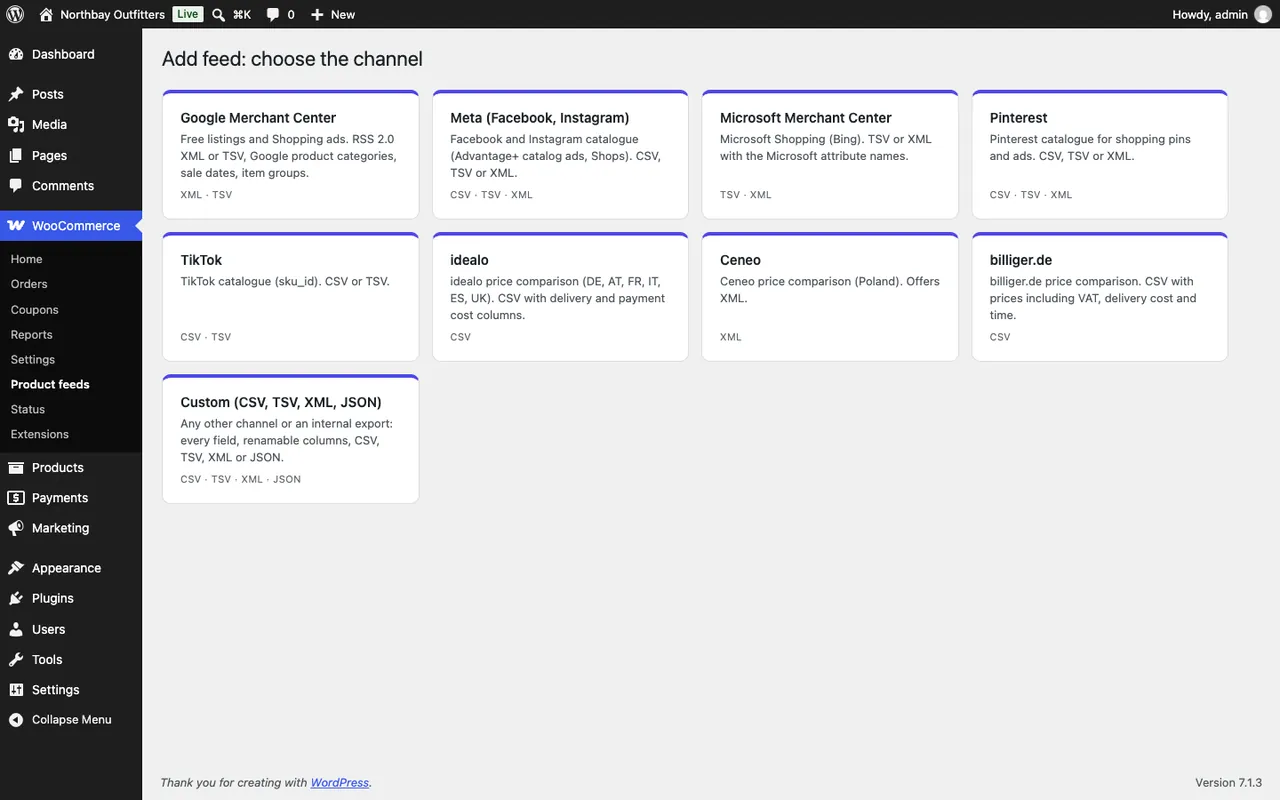
WooCommerce > Product feeds > Add feed: choose the channel, then fill the five tabs. The channel of a feed cannot change later (its columns and report belong to it); create another feed instead.
Choose the channel
Channel
Formats
Notes
Google Merchant Center
XML (RSS 2.0), TSV
price "29.99 EUR", sale_price + sale_price_effective_date, availability_date for preorder / backorder, identifier_exists, Google product categories, item_group_id, is_bundle, shipping
Meta (Facebook, Instagram)
CSV, TSV, XML
brand, gtin or mpn required; availability only "in stock" / "out of stock"; quantity_to_sell_on_facebook is off by default (Shops checkout only, written only for in-stock items with a quantity)
Microsoft Merchant Center
TSV, XML
brand required; shipping is required for Germany (the report warns once per feed when it is off)
Pinterest
CSV, TSV, XML
color / material / pattern / size max. 30 characters
TikTok
CSV, TSV
sku_id, brand required, JPG / PNG images
idealo
CSV
price = current price, formerPrice = regular price while on sale, packagingUnit (required, default 1), delivery text, deliveryCosts_<method>, paymentCosts_<method>
offers file, cat joined with "/", avail codes 1 / 3 / 7 / 14 / 90 / 99 / 110, stock only when positive
Custom
CSV, TSV, XML, JSON
every field, columns can be renamed
General
General
Target country: prices, tax and shipping follow this country. One feed per country.
Currency and Exchange rate: a feed in another currency than the shop's is converted once with the rate you enter (1 shop currency = rate units of the feed currency). A feed in the shop currency is never converted.
Language: the locale WordPress uses while the feed is written. Product texts are taken as stored; with a translation plugin create one feed per language and filter the products of that language with categories or tags (see the FAQ).
Schedule: manual, every hour, 3, 6, 12 hours or daily.
Products
Products
Variable products: one item per variation (item_group_id = parent ID or SKU, title "T-shirt - Blue, M", link that preselects the variation), one item per product at the price of the variation with the lowest current price, or both. Disabled variations and variations without a price are never written.
Item ID: product / variation ID (default, stable) or SKU (the ID when the SKU is empty). Keep it stable: a channel treats a new ID as a new product.
Only these categories / Exclude categories (sub categories included), Only these tags / Exclude tags, Catalog visibility (shop and search results, shop only, search only, hidden), Leave out products that are out of stock, Include external / affiliate products, Exclude SKUs, Minimum price.
Unlisted products (custom feeds only): also private products and every catalog visibility, for internal exports. Drafts and password-protected products are never exported.
Items with errors: left out of the file by default; they stay in the report.
Grouped products are not written as items (their child products are products of their own).
Prices and availability
Prices and availability
Tax: automatic (without tax for the US and Canada, as Google and Microsoft require, with tax elsewhere), with tax or without tax. billiger.de always takes prices including VAT. The amount is calculated with WooCommerce's own functions (wc_get_price_including_tax / wc_get_price_excluding_tax) for a shopper in the target country: "Prices entered with tax", "Calculate tax based on" (shipping, billing or shop base address), the product's tax status and class, the tax rates of the country and WooCommerce's rounding. Example with prices entered including 19 % German VAT: a 100.00 product is 100.00 in a German feed, 100.84 in an Austrian feed (20 %) and 84.03 without tax in a US feed.
Price source: "Prices as entered" (default) reads the regular price, the sale price and its schedule exactly as entered and applies WooCommerce's own sale rule; price filters of other plugins do not change it. "Storefront prices" reads the prices other plugins filter (role or dynamic pricing). See the FAQ about currency switchers.
Sale dates: while a scheduled sale is running, sale_price_effective_date is the WooCommerce schedule in the site time zone (WooCommerce stores the end date as 23:59:59); a sale without an end date has no window. A sale that starts in the future is not written yet.
Backorders (products "On backorder"): automatic = "backorder" with an availability date when you set a restock time, otherwise "in stock"; or always backorder / in stock / out of stock. Google requires an availability date with backorder.
Delivery time text / days: idealo, billiger.de, Ceneo and custom feeds; a backorder item with a restock time gets "N-M working days".
Shipping: one flat cost for the target country with an optional "free from" threshold (the price the shopper pays).
identifier_exists (Google), idealo delivery method and payment costs, UTM parameters for the product links.
Fields
Fields
Where each value comes from:
Source
Reads
Automatic
WooCommerce's own fields first: the GTIN, UPC, EAN or ISBN field and Brands; then common custom fields (for example _alg_ean, _wpm_gtin_code, _ts_gtin, _ts_mpn) and attributes (pa_brand, pa_color, Color, Size, Material ...; German labels such as Farbe and Marke are recognised)
Product attributes
a global attribute (pa_color ...); for a variation its own value
Custom product attribute
an attribute added on the product (name in the next column)
Custom field
a product meta key (next column), e.g. the GTIN field of another plugin
Built-in labels
price band, on sale, top category, brand, stock level, new arrival (30 days), product tags, shipping class
Fixed value / Empty
a text for every item / nothing
The fallback is used when the source is empty.
Columns
Columns
Optional and recommended columns can be switched off; required columns are always written. Custom feeds can rename every column.
Usage
Generate and publish
Open the feed and click Generate now. The file is written in steps of a few seconds while the page shows the progress; large catalogues take longer but never time out.
Copy the Feed URL and add it as a scheduled fetch in the channel account (Google Merchant Center: add a product source from a file and enter the link; Meta Commerce Manager: add a data feed with a scheduled URL; Microsoft, Pinterest and TikTok: a scheduled file / URL source; idealo, billiger.de and Ceneo: send the URL to the channel's merchant support).
With a schedule the feed is generated again in the background (Action Scheduler) at the interval you chose.
Feed page
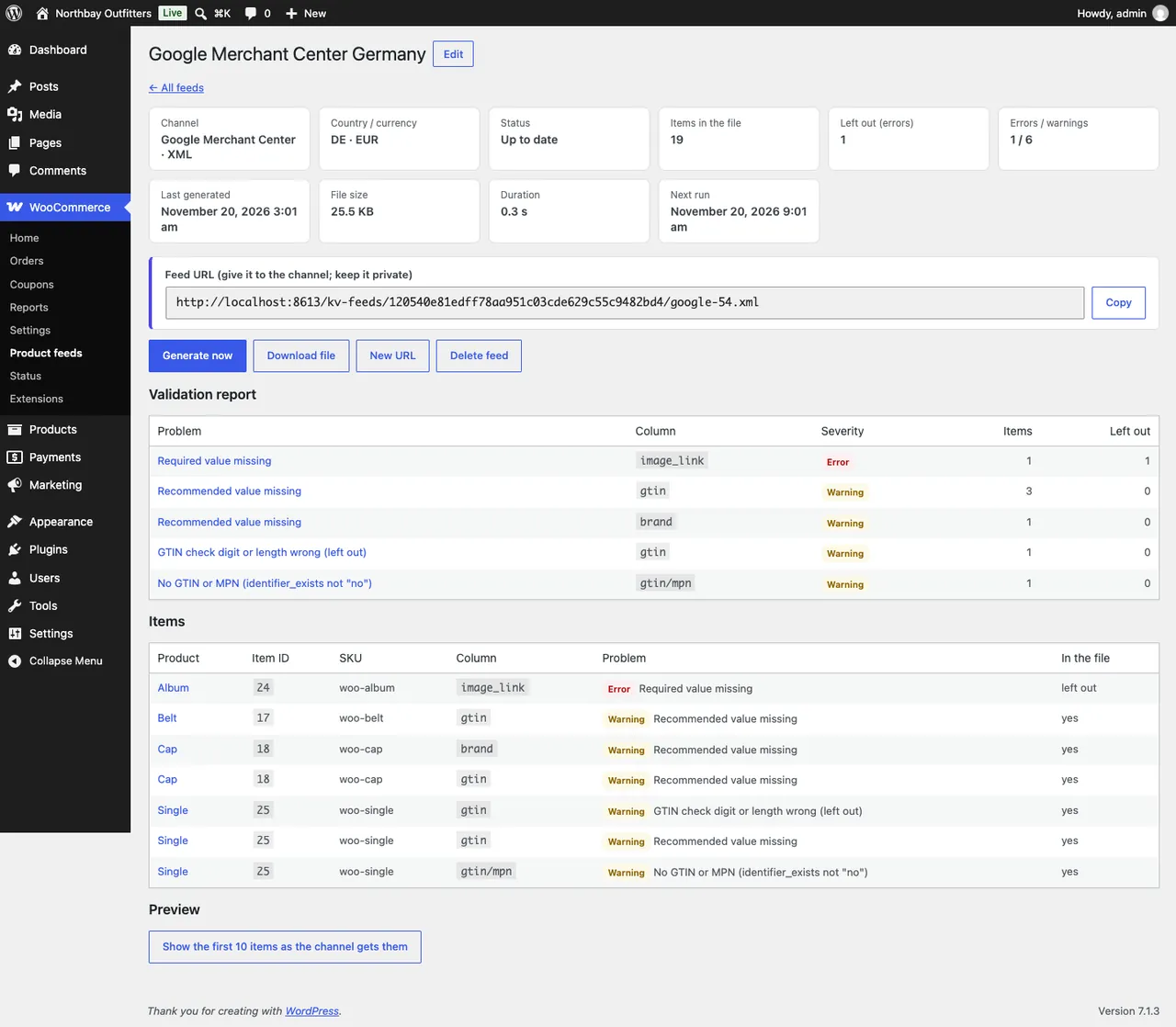
The feed page shows the channel, country and currency, the status, items written and left out, errors and warnings, the last run, file size, duration and next run.
Button
Does
Generate now
writes a new file now (background steps from the page)
Download file
downloads the published file
New URL
creates a new secret URL; the old URL stops working at once (update it in the channel account)
Delete feed
deletes the feed, its report and its files
While a new file is written the previous one stays online; it is replaced in one step when the new one is complete. If a run fails (for example the disk is full), the previous file stays online, the error is shown on the feed page and the next scheduled run tries again an hour later. A run that was interrupted (server restart, PHP killed) continues from its last finished batch within 10 minutes.
The feed URL
https://your-shop.example/kv-feeds/<40-character token>/<file name>, for example /kv-feeds/3f9c.../google-3.xml. With plain permalinks the URL is /?kv_mcf_token=<token>&kv_mcf_file=<file name> (it works on every server).
The URL answers only while the plugin is on, the feed is active and its file exists. Every other request (wrong token, wrong file name, inactive feed, POST) gets the same plain 404, so nobody can probe for feeds.
Responses are never cached (Cache-Control: no-store) and never indexed (X-Robots-Tag: noindex).
Only users with kv_mcf_manage see the URL.
The validation report
Validation report
Each run checks every item against the channel template: required, recommended and "one of" values, maximum lengths (texts are shortened at a word), allowed values (gender, age group, condition ...), GTIN check digits, https images, sale price lower than the price, availability date for backorder, titles in capital letters, duplicate item IDs. Click a problem to list its products; the product names link to the product editor. Errors leave the item out of the file (unless you switch that off); warnings are written.
Preview
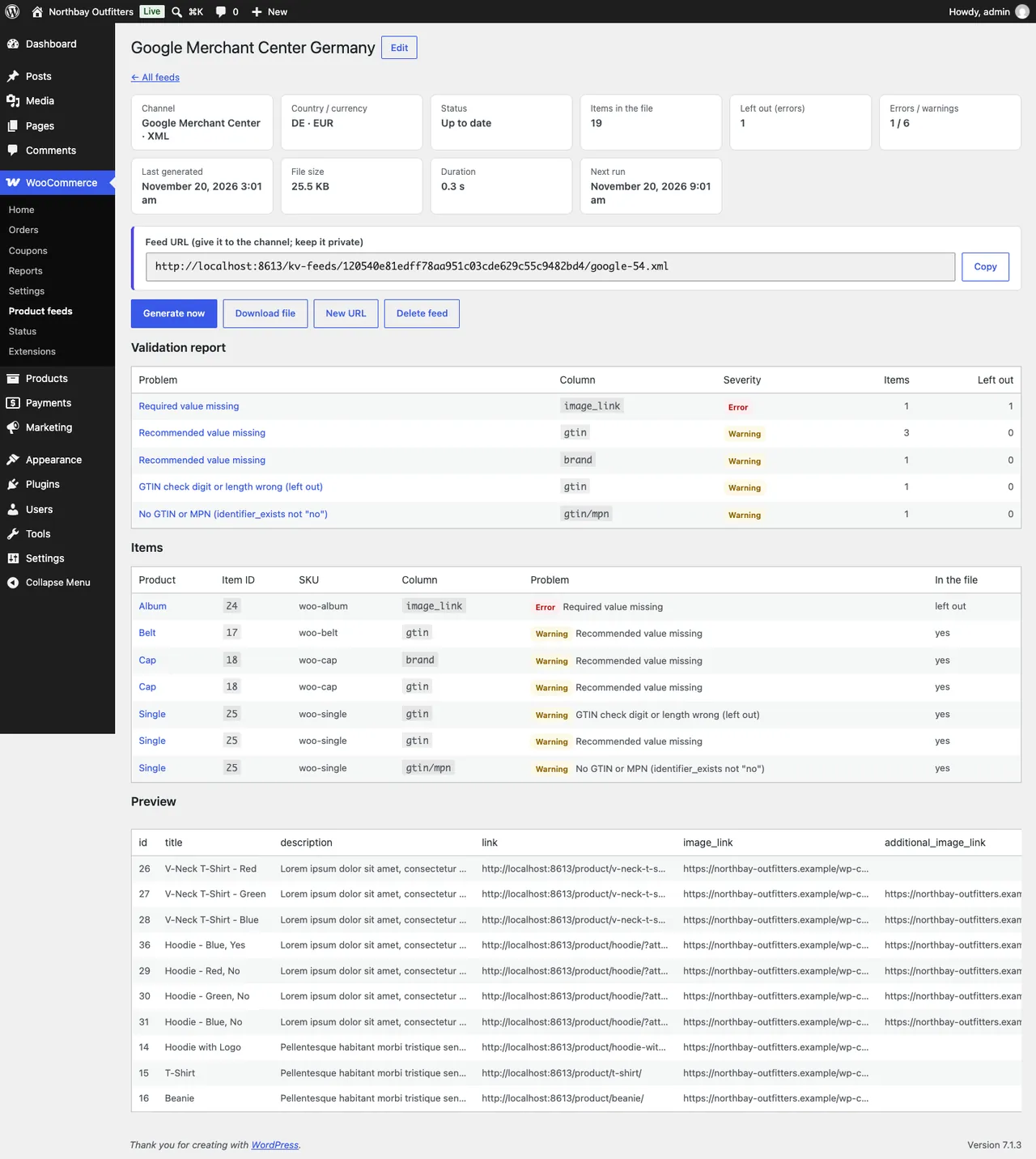
Show the first 10 items as the channel gets them on the feed page shows the first rows with their problems, without writing a file.
Preview
Google product categories
WooCommerce > Product feeds > Google product categories: one Google product category per WooCommerce category, shared by every feed (Google, Meta, Microsoft, Pinterest, TikTok and billiger.de use the same IDs). Type a few words or an ID and pick the category. A product takes the category of its main category (the primary category of Yoast SEO / Rank Math, else the deepest one) or of the nearest parent category with one.
Google product categories
Read-only users
Give a role the capability kv_mcf_view (and view_admin_dashboard so WooCommerce lets it into wp-admin): it sees the feed list, the feed pages, the report and the preview, but not the feed URL, and it cannot generate, download, edit or delete. kv_mcf_manage allows everything.
Developer notes
Channel specifications
The templates follow the channels' public specifications (read for the Shopware and Magento editions of this product and audited there; the same engine is used here):
Channel
Source
Google Merchant Center
support.google.com/merchants/answer/7052112 (product data specification)
solute "Leitfaden Feed-Optimierung" / Datensuperset DE (version 10.08.2026)
Ceneo
ceneo.pl "Instrukcja tworzenia pliku XML"
Google product taxonomy
taxonomy-with-ids.en-US.txt, version 2021-09-21 (current file of Google, bundled)
Formats: CSV (RFC 4180, UTF-8, every cell quoted, CRLF), TSV (tabs and line breaks in values become spaces), RSS 2.0 XML with the g: namespace (Google, Meta, Microsoft, Pinterest), plain XML / JSON (custom feeds), Ceneo offers XML (CDATA). HTML, block editor comments and shortcodes are removed from texts; characters XML 1.0 does not allow are dropped.
How products are read
Published products (custom feeds with "unlisted": also private), no password, all product types except grouped parents and (unless switched on) external products. Categories and tags are filtered in SQL, catalog visibility, SKUs, stock and minimum price per item.
Batches by product ID (cursor). Each batch primes the post, meta, term and image caches (_prime_post_caches) and flushes the runtime object cache afterwards, so memory stays flat. 50,000 products + 15,000 variations (60,020 items): Google XML in 19.9 s, peak memory 125.8 MB with WP-CLI on PHP 8.3 (6 MB above the start).
Prices: WC()->customer is a temporary, unsaved customer with the feed country while the feed is written (restored afterwards); then wc_get_price_including_tax() / wc_get_price_excluding_tax() with the regular or sale price. Local pickup does not switch to the base address. Currency conversion happens once, after the tax.
Generator::step( $feed_id, $budget, $restart ) writes batches until the budget (seconds) is used, saving cursor, byte count, counts and a heartbeat after each batch. Resume: the part file is cut back to the saved byte count and the report rows / seen IDs after the cursor are removed.
One run per feed: MySQL GET_LOCK( 'kv_mcf_<hash>_<feed id>', 0 ); released when the run ends or its database connection dies.
Action Scheduler (group kv-multichannel-feeds): kv_mcf_tick every 5 minutes (due feeds, runs without heartbeat for 10 minutes) and kv_mcf_generate (feed id) per step; a step that is not finished queues the next one.
Hooks
Hook
Type
Use
kv_mcf_storage_dir
filter
folder of the feed files (string, absolute path)
kv_mcf_batch_size
filter
products per batch (int, 10 - 1000)
kv_mcf_batch_written
action
after each batch ($feed_id, $cursor)
KV_MCF_STORAGE_DIR (wp-config.php) sets the folder too.
WP-CLI
wp kv-feeds list
wp kv-feeds generate                 # every active feed, until done
wp kv-feeds generate --feed=3 --restart
wp kv-feeds generate --due           # only feeds whose schedule is due (for a system cron)
wp kv-feeds generate --budget=30     # stop after 30 s, the next call continues
Data
Table
Content
wp_kv_mcf_feeds
feed definition, settings (JSON), token, run state, last result
wp_kv_mcf_issues
validation report (run 1 = in progress, 0 = last finished run)
wp_kv_mcf_seen
item IDs of the run in progress (duplicate check)
Options: kv_mcf_settings, kv_mcf_db_version, kv_mcf_storage_key. Term meta: kv_mcf_google_category (product categories). Capabilities: kv_mcf_view, kv_mcf_manage. Feeds contain product data only; no customer or order data is read.
FAQ
The feed URL answers 404. Generate the feed once, check that it is active and that the plugin is switched on. Some nginx setups send addresses ending in .xml / .csv straight to the file system; use the URL with query arguments then: /?kv_mcf_token=<token>&kv_mcf_file=<file name> (the token is the 40-character part of the feed URL).
Why are some products missing from the file?
Open the feed page: the validation report lists every item that was left out and why (for example a missing image, brand or price). Switch off "Leave items with errors out of the file" if you want them anyway. Drafts, private (except "unlisted" custom feeds), password-protected and grouped parent products, disabled variations and variations without a price are never written.
Google wants prices without tax in the US. "Tax: automatic" writes prices without tax for the US and Canada (Google and Microsoft add sales tax themselves) and with tax everywhere else. Set the tax in the channel account for those countries.
Can one feed cover several countries?
No: prices, tax and shipping differ per country, so create one feed per country (copy the settings, change the country).
I use a currency switcher plugin. Prices are read as entered and converted once with the feed's exchange rate, so a currency switcher cannot convert them twice. Fixed prices per currency that such a plugin stores are not read. With "Storefront prices" the plugin must not convert prices in background requests (WP-Cron / Action Scheduler); if it does, use "Prices as entered".
I use WPML or Polylang. Product texts are written as stored in WooCommerce. Create one feed per language and select the products of that language with categories or tags (with Polylang each language has its own categories). Language-specific product URLs of these plugins are not rewritten by the feed in this version.
Is the strike price (formerPrice / old_price / sale_price) allowed?
The feed writes WooCommerce's regular price as the price before a sale. In the EU the earlier price must be the lowest price of the last 30 days (Omnibus Directive); make sure your regular prices follow that rule.
Ceneo "Kup Teraz" needs GPSR data. The responsible producer elements Ceneo requires for "Kup Teraz" offers are not generated in this version.
How often should a channel fetch the file?
Once or twice a day is enough for most shops; generate the feed (schedule) a little before the channel fetches it.
Does the plugin change products or orders?
No. It only reads products, categories and settings. Orders are never read.
The department store block theme for WooCommerce: colour-coded departments, a department list beside the hero slider with two side promos, a big search with a department picker, tabbed product grids, a 2 + 1 + 2 offer grid, deals of the day with real countdowns, a department showcase, a promotions band and a three-column product page with a sticky buy box. Four styles (Meridian, Harbor, Citrus, Night) as Site Editor style variations, every colour editable. Cart and Checkout blocks styled, HPOS neutral.
Stop AI crawlers, scrapers, card testers, vulnerability scanners and unwanted countries before WordPress builds a page. Googlebot and Bingbot are verified by DNS and always allowed; 50+ bots get one switch each; country rules use free GeoIP databases and can close only the checkout (block and classic checkout, wc-ajax and Store API); card testing protection on order submissions; the add to cart flood fix for requests without a WooCommerce session; IP and network lists, rate limits for search, filters, forms and login, honeypots; a one-second challenge instead of a captcha; learning mode, dashboard, log, IP tester and Cloudflare export. HPOS and blocks compatible.
The campaign block theme for WooCommerce that makes a store feel like a sale is always on: a flash bar with the sale that ends first, a bento hero with a live deal tile, a dark flash deals zone with flip-tile countdowns on real sale end dates, round discount stickers, a category pill bar, stories with a player, a Discover feed with promo cells inside the grid, a product page campaign strip and a sticky phone buy bar. Sixteen colour styles as Site Editor style variations, two of them dark. Cart and Checkout blocks styled, HPOS neutral.