by Kavio Labs · for WooCommerce 10.1+ on WordPress 6.7+
The EU energy class arrow next to the price on product pages, lists and blocks, the full label on the first click and the product information sheet link, for products and variations. Class, label and sheet read from the public EPREL register (no API key), incl. smartphone repairability and tyre classes.
Tested on WooCommerce 11.2.1 & WordPress 7.1.3Updated Nov 20, 2026Version 1.0.0Compatible with WooCommerce 10.1 – 11.2, WordPress 6.7+ No core file edits
Built forWooCommerce
EU Energy Label & EPREL for WooCommerce: the energy class arrow right next to the price.1 of 9
What it does
The EU energy class arrow next to the price on product pages, lists and blocks, the full label on the first click and the product information sheet link, for products and variations. Class, label and sheet read from the public EPREL register (no API key), incl. smartphone repairability and tyre classes.
Selling appliances, TVs, lamps, tyres or phones in the EU? The energy label and the product information sheet have to be shown next to the price, online too. EU Energy Label & EPREL draws the coloured class arrow the rules describe, opens the full label on the first click and links the sheet, for every product and variation.
Features
The arrow, done right
Arrow in the class colour, white bold letter at the font size of your price, the class range in black, black border, left or right
A to G labels, the older A+++ scales and tyres A to E
Label on click, tap or roll-over; close button, Escape, click outside; PDF labels in a new tab; works without JavaScript
"Product information sheet" link next to the arrow; accessible link names for screen readers
From the EPREL register
Enter the registration number or paste the QR code address: class, scale, group, model, supplier and the label are read for you
No API key needed; only the registration number is sent
Label image copied into your media library and served from your domain (optional)
Product information sheet in the shop language (24 EU languages)
Smartphones and tablets (labels since June 2025): repairability class, software update years, spare parts and repair links; tyres: wet grip and rolling noise
Regular background refresh with back-off
Everywhere shoppers see a price
Product page (classic and block templates), the chosen variation
Product Collection block, classic shop and category pages, related products
Shortcode for custom layouts
Built for big catalogues
Energy column and filter in the products list (without class, read failed, waiting)
Bulk edit, product CSV import / export columns
REST API field, Store API extension, feed attributes (energy_efficiency_class, min / max)
No extra query per product on shop pages
What you get
Download & installThe plugin .zip, installed in Plugins > Add New Plugin > Upload Plugin. Download it from My licenses right after payment.
12 months of updates & supportNew versions and help for 12 months (24 or 36 months at checkout). After that the plugin keeps working; renew anytime at 50%.
License for your storeOne production domain with all its subdomains; staging and local development hosts are free. How licensing works
30-day refundFull refund within 30 days of your first purchase, no reason needed. Refund policy
Tested buildsWooCommerce 10.1 – 11.2, WordPress 6.7+. Tested on WooCommerce 11.2.1 and WordPress 7.1.3.
Documentation & supportFull guide (Installation, Configuration, Usage, Developer notes) on this page. Tickets from your account, same-day reply on weekdays (Mon-Fri 09:00-18:00 UTC+3).
Compatibility
EU Energy Label & EPREL works with WooCommerce 10.1 – 11.2, WordPress 6.7+.
We list the builds we install and test on. “Tested” means the test plan ran on that build; “Supported” means the build is inside the supported range.
Compatibility
Version
Range
Runs on
Status
WooCommerce 11
11.0 – 11.2
WordPress 6.7 – 7.1
Tested on 11.2.1
WooCommerce 10
10.1 – 10.x
WordPress 6.7+
Supported
WordPress
6.7 – 7.1
PHP 7.4 – 8.3
Tested on 7.1.3
1.0.0
Nov 20, 2026
Latest
First release: EU energy class arrow next to the price (class colour, white Calibri Bold letter at the price font size, black range and border, left / right format; scales A-G, A+++-D, A++-E, A+-F, A+-G, A++-G, A+++-G and tyres A-E) on the classic and block product page, classic loops and the Product Collection block, the chosen variation's arrow next to its own price; nested display dialog (click / tap or roll-over, close button, Escape, outside click, focus return, alt text at the price size), PDF labels in a new tab, "Product information sheet" link; EPREL register reads (key-free public endpoints, host-checked redirects, size caps, back-off, Action Scheduler batches, async read after a change): class, scale, group, model, supplier, tyre classes, smartphone / tablet repairability (class, update years, spare parts and repair links); label copies in the media library; sheet in the shop language; product tab, variation section, bulk edit, products list column + filter, CSV import / export columns, REST API v3 field, Store API extension, PHP API with feed attributes; shortcode; HPOS and Cart / Checkout blocks compatibility declared.
How do I install the plugin?
Upload the plugin. Plugins > Add New Plugin > Upload Plugin: choose the .zip from My licenses and click Install Now.
Activate. Activate it on the Plugins screen. WooCommerce must be active; the plugin tells you if it is not.
Enter the license key. WooCommerce > Settings, the plugin's own tab: paste the key from My licenses. You have 14 days to do it; staging and local sites are included.
WooCommerce 10.1 – 11.2, WordPress 6.7+. Tested on WooCommerce 11.2.1 and WordPress 7.1.3. The Compatibility tab lists every version range.
Do the plugins work with HPOS and the block checkout?
Yes. Every plugin declares compatibility with High-Performance Order Storage and the Cart and Checkout blocks, and is tested in both the block and the classic cart and checkout.
Will they work with my theme?
They use WooCommerce hooks, blocks and the Store API instead of template overrides, so block themes and classic themes both work. We test on Twenty Twenty-Five.
What does the license cover?
One production store domain with every subdomain (www, shop., staging.), plus local development hosts such as localhost, *.local and *.test. A store on another domain needs its own license; a second-store license is 40% off. You have 14 days after installing to enter the key. 12 months of updates and support are included; after that the plugin keeps working and renewals are 50% off. How licensing works
Can I get a refund?
Yes. Ask for a full refund within 30 days of your first purchase, no reason needed: open a ticket or write to [email protected] with your order number. The money goes back to the card or bank account you paid with within 5 business days of approval. Refund policy
How do I get help?
Open a ticket from your account, so your license details are attached. We answer with a same-day reply on weekdays (Mon-Fri 09:00-18:00 UTC+3). Support policy. Not a customer yet? Ask a pre-sales question.
The EU energy class arrow next to the price, the full label on the first click or tap, and the "Product information sheet" link, for every simple product, variable product and variation of your WooCommerce shop.
EU law asks dealers who sell online to show the energy label and the product information sheet of labelled products "in proximity to the price" (Regulation (EU) 2017/1369, Article 5, and the delegated act of each product group). The regulations allow a small coloured arrow, the "nested display", that opens the full label. WooCommerce has no fields for any of this. This plugin stores the class, the label and the sheet per product, reads them from the public EPREL register with the registration number, and draws the arrow the way the regulations describe. It helps you show the information; it does not check your products and is not legal advice. It is not affiliated with or endorsed by the European Commission or the EPREL register.
Tested on WooCommerce 11.2.1 and 10.1.4 with WordPress 7.1.3 (PHP 8.3), block theme Twenty Twenty-Five, Product Collection block and the classic [products] loop, HPOS and the legacy order storage.
Arrow under the price on the product page
What WooCommerce already does, and what this adds
WooCommerce 11.2 core
With EU Energy Label & EPREL
Energy class
Only as a free product attribute (plain text)
Class + scale per product and variation, validated against the scale
Arrow near the price
None
Arrow in the class colour, white letter at the price font size, black range and border (left or right)
Full label
Attach an image to the description yourself
Opens on the first click / tap / roll-over in a dialog; PDF in a new tab; works without JavaScript
Product information sheet
None
"Product information sheet" link next to the arrow (your file, an address, or the register in the shop language)
EPREL
None
Reads class, scale, group, model, supplier, tyre classes and smartphone repairability from the public register; label copies in your media library
Lists and blocks
None
Classic loops, Product Collection block, related products
Catalogue tools
None
Products list column + filter, bulk edit, CSV columns, REST API v3 field, Store API extension, feed attributes
What you get
The arrow next to the price on the product page (classic templates and the block template, right after the Product Price block) and in product lists (Product Collection block, classic shop and category pages, related products). Drawn as an accessible inline SVG: no image request, a link whose name says "Energy efficiency class B, scale A to G. Show the energy label".
Nested display: the label opens on the first click or tap (optionally also on mouse roll-over) in a dialog with a close button; Escape and a click outside close it, focus returns to the arrow. A PDF label opens in a new tab. If the image cannot be shown, the class appears as text at the price size.
EPREL register: enter the registration number (or paste the address behind the label's QR code). No API key is needed.
Smartphones and slate tablets (labels since 20 June 2025, Regulation (EU) 2023/1669): repairability class, minimum years of software updates, spare parts and repair information links. Tyres (Regulation (EU) 2020/740): wet grip class and external rolling noise.
Variations use the parent's label unless they have their own; the chosen variation's arrow sits next to its price (or next to the main price when all variations cost the same).
Scales: A to G (displays, washing machines, washer-dryers, light sources, refrigerating appliances, dishwashers, tumble dryers, smartphones and tablets), tyres A to E, and the older A+++ to D, A++ to E, A+ to F, A+ to G, A++ to G and A+++ to G.
Performance: no extra query per product in product grids (measured: 48 products with their own label and sheet files cost 2 queries in total); register reads run in Action Scheduler batches.
Pages
Installation
Requirements
WordPress 6.7 or later, WooCommerce 10.1 or later (tested with WooCommerce 11.2.1 and 10.1.4 on WordPress 7.1.3)
PHP 7.4 to 8.3
Block themes (Product Price and Product Collection blocks) and classic themes (WooCommerce templates and hooks)
Outgoing HTTPS from your server to eprel.ec.europa.eu for register reads (optional: you can also enter classes and files by hand)
Install
In Plugins > Add New > Upload Plugin upload kv-energy-label-kv.zip and activate it.
Own-site build: open WooCommerce > Settings > EU Energy Label & EPREL > Licence and enter your Kavio Labs licence key. The storefront features work during a 14-day start period without a key. Product data, register reads and all admin tools never depend on the licence.
Check the display settings on the same tab (Configuration).
Edit a product, open the Energy label tab and enter the EPREL registration number (Usage).
CodeCanyon build (-envato.zip): every feature works without a purchase code; the code enables updates and support. WooCommerce.com build (-woo.zip): licensed by WooCommerce.com, no licence card.
What the plugin adds to your site
Product meta keys _kv_eel_* on products and variations (no own database tables).
Label copies from EPREL as media library attachments of the product (when "Store label copies" is on).
One recurring Action Scheduler job kv_eel_refresh (group kv-energy-label, every 15 minutes) and short async jobs kv_eel_read_one after a registration was entered.
The option kv_eel_settings.
Deactivate and uninstall
Deactivating removes the arrows from the shop and stops the scheduled jobs; product data and files stay. Deleting the plugin keeps the data unless Remove data on uninstall is on: then the settings, every _kv_eel_* product field and the EPREL label copies are deleted. Files you chose from the media library and orders are never deleted.
Configuration
WooCommerce > Settings > EU Energy Label & EPREL
Settings tab
Storefront
Setting
Default
What it does
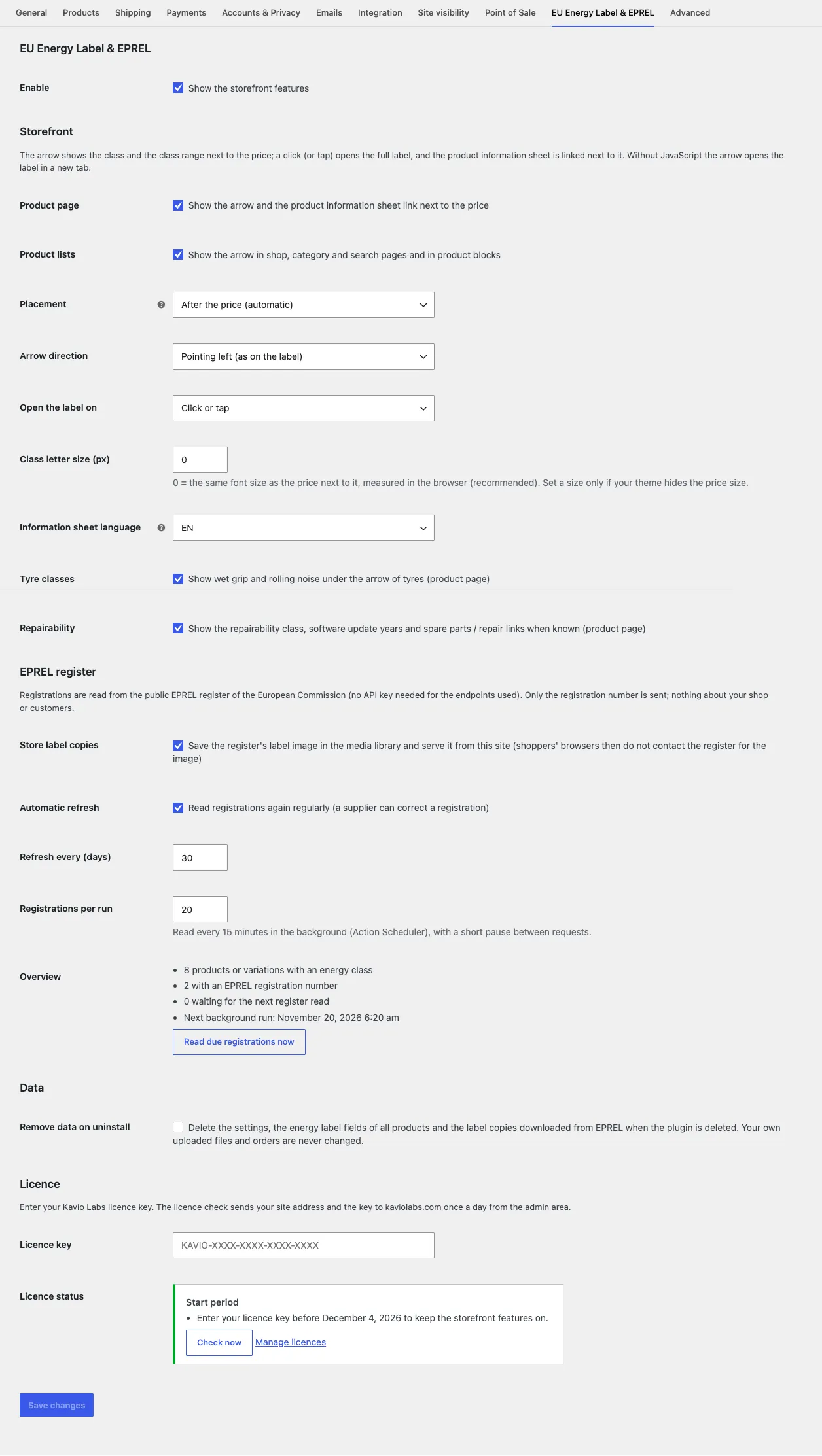
Enable
on
Switches all storefront output off without losing data.
Product page
on
Arrow + "Product information sheet" link right after the price (classic templates: after the price in the summary; block template: after the Product Price block).
Product lists
on
Arrow in Product Collection / product query blocks, classic shop, category, search and related product lists.
Placement
After the price
"Only where I place the [kv_energy_label] shortcode" turns the automatic output off. Use it only when your theme moves the price; the rules ask for the arrow in proximity to the price.
Arrow direction
Pointing left
Left as on the label, or right (both allowed by Annex VIII point 2(d)).
Open the label on
Click or tap
"Mouse roll-over" also opens the label when the pointer rests on the arrow (a click still works; touch screens always use the tap).
Class letter size (px)
0
0 = the class letter takes the font size of the price next to it, measured in the browser (Annex VIII point 2(b): "a font size equivalent to that of the price"). Set a size only if your theme hides the price font.
Information sheet language
EN
Register sheets open in the shop language when EPREL has it (24 EU languages); otherwise in this language.
Tyre classes
on
Product page: "Wet grip class B · External rolling noise 71 dB (B)" under the arrow of tyres.
Repairability
on
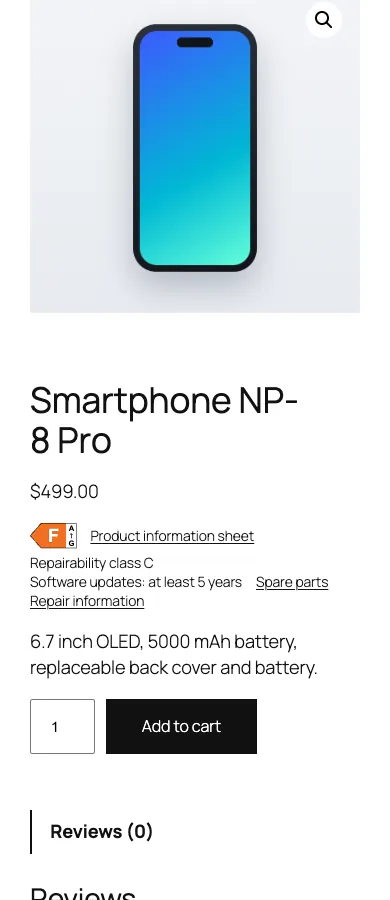
Product page: repairability class, minimum software update years, "Spare parts" and "Repair information" links when known (smartphones and slate tablets).
EPREL register
Setting
Default
What it does
Store label copies
on
The register's label PNG is saved in your media library (attached to the product) and served from your domain. Off: the shopper's browser loads the label from eprel.ec.europa.eu when it opens it.
Automatic refresh
on
Registrations are read again every Refresh every (days) (a supplier can correct a registration). Off: only new or changed registrations and "Read now" are read.
Refresh every (days)
30
1 to 365.
Registrations per run
20
1 to 200 per 15-minute background run, with a 0.3 s pause between requests and a 40 s time budget.
The Overview shows how many products and variations have a class, a registration, are waiting for a read or failed (link to the filtered products list), the next background run, and the button Read due registrations now.
Failed reads are retried automatically: 5 min, 15 min, 1 h, 3 h, 12 h, then daily; "too many requests" waits for the register's Retry-After. A registration the register does not know (404) or does not publish yet (403) is tried again after 7 days.
Licence (own-site and CodeCanyon builds): key or purchase code and the licence card with status and "Check now". Without a valid licence in the own-site build only the storefront output stops; shop managers then see a notice on the dashboard, the Plugins screen and the product screens, so the arrows never disappear unnoticed.
Usage
A product with an EPREL registration
Edit the product and open the Energy label tab.
Enter the EPREL registration number: the digits under the QR code of the label, or paste the QR code address (https://eprel.ec.europa.eu/qr/1234567) or the EPREL product page address.
Click Read from EPREL now (or just update the product: the registration is read in the background within a minute).
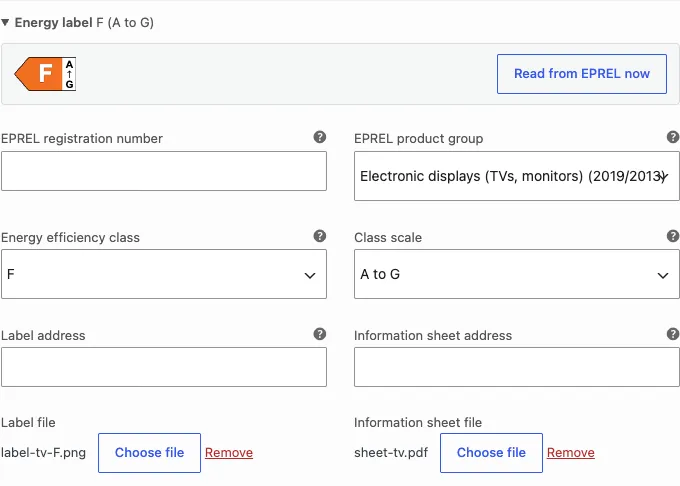
Energy label tab in the product editor
The register fills in the energy class, the scale, the product group, model and supplier (shown in the status line with a link "Open in EPREL"). With "Store label copies" on, the label image is copied into your media library. The product information sheet opens from the register in the shop language.
For smartphones and slate tablets the register also gives the repairability class, the minimum years of software updates and the supplier's spare parts and repair information links; for tyres the wet grip class and the external rolling noise.
A product without a registration
Choose the Energy efficiency class and, if the product group does not decide it, the Class scale (A to G for the current labels). Then add the label and the sheet:
Label file / Information sheet file: choose a PNG, JPG, WebP or PDF from the media library (SVG is refused), or
Label address / Information sheet address: an https:// address.
Precedence: stored file > address > register. A class that is not on the chosen scale is refused with a notice, and nothing invalid is saved.
Variations
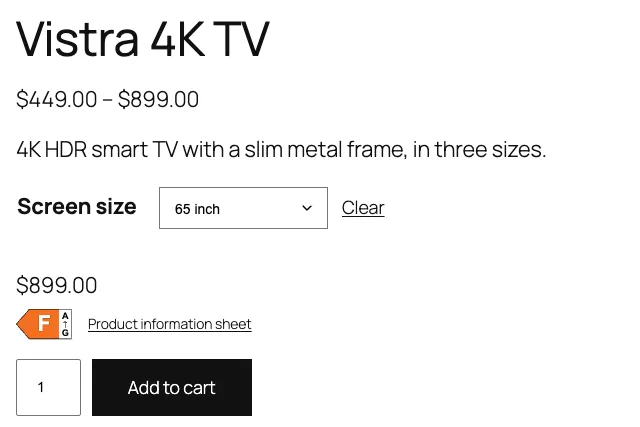
Every variation has an Energy label section. Leave it empty and the variation uses the parent's label; fill it (registration, or class + label + sheet) and it has its own. On the product page the parent's arrow sits next to the price range until a variation is chosen; then the chosen variation's arrow sits next to the variation price WooCommerce shows above the Add to cart button, and the arrow near the price range is hidden. When all variations cost the same, WooCommerce shows no separate variation price and the arrow next to the main price switches to the chosen variation.
Variation sectionArrow of the chosen variation
What shoppers see
Next to the price: the arrow with the class and the class range, and the link "Product information sheet".
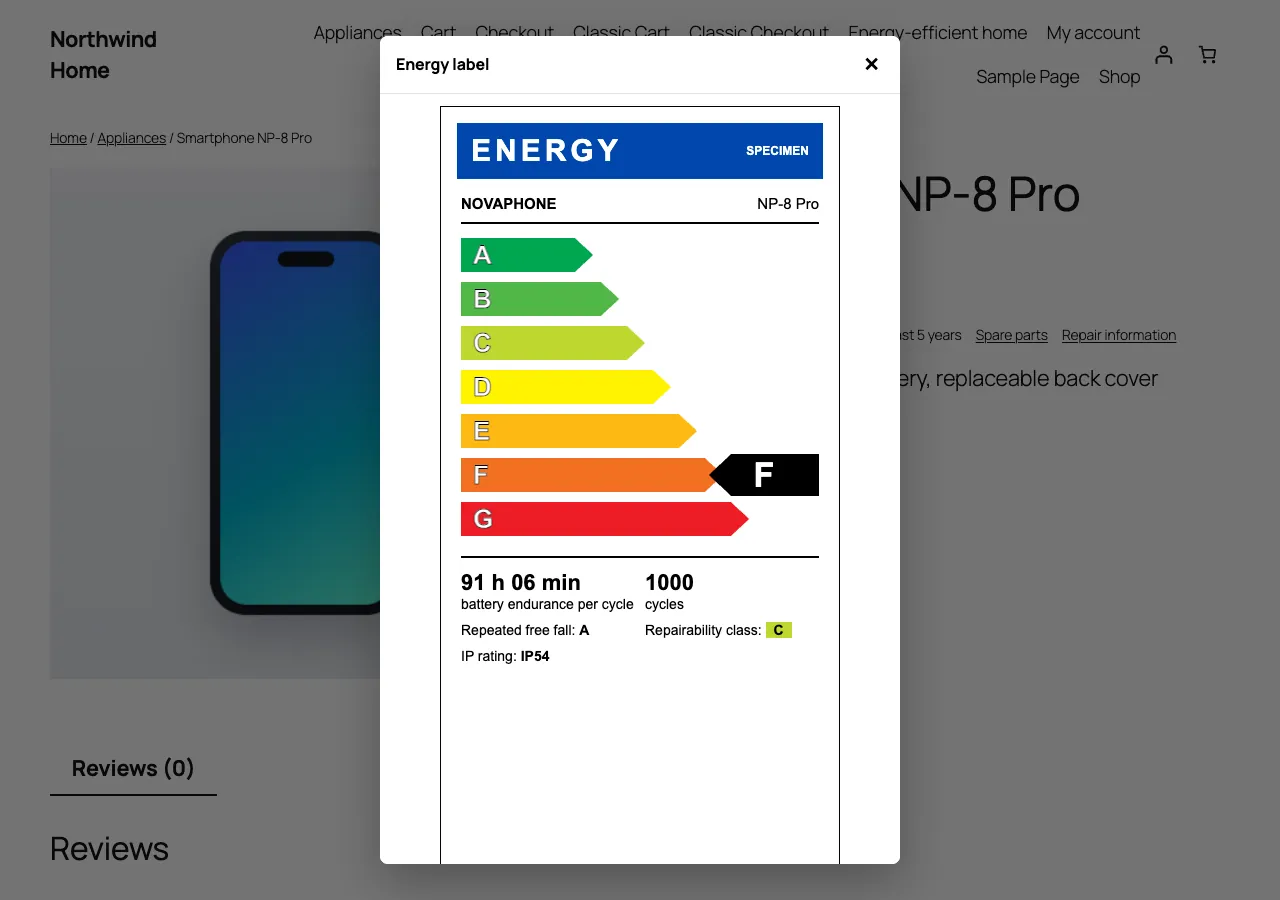
Click or tap on the arrow: the full label in a dialog (close button, Escape, click outside). A PDF label opens in a new tab.
Product page extras (settings): tyre classes and repairability facts.
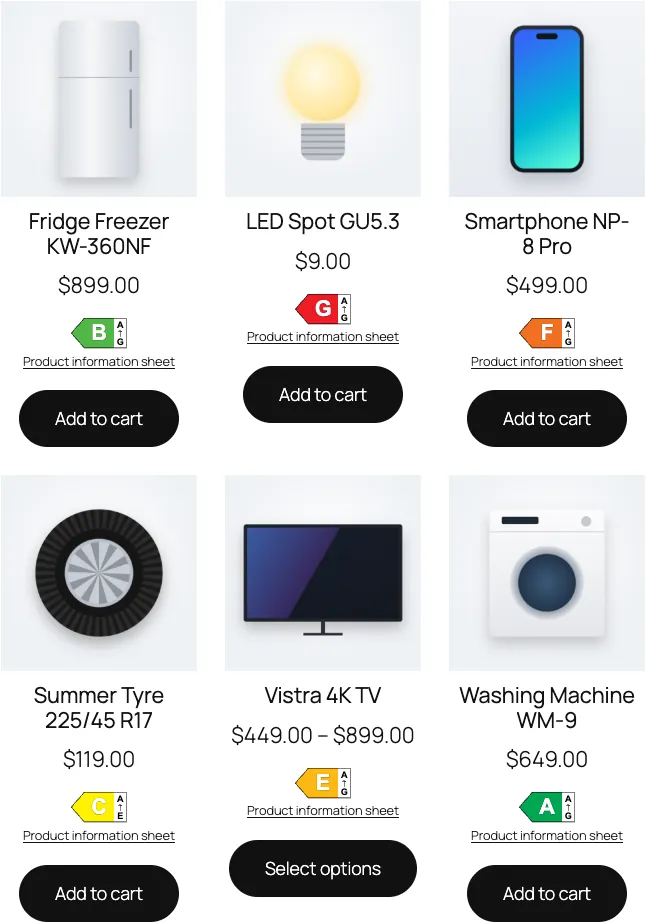
Label dialogProduct listsPhone
Manual placement: put the shortcode [kv_energy_label] (product page) or [kv_energy_label id="123" place="list"] into a Shortcode block or a template.
Many products at once
Products list: the Energy column shows the arrow, or what is missing ("No label", "No information sheet", "Register read failed", "Waiting for EPREL"). The filter Energy label shows products with a class, without a class, with failed reads or waiting for EPREL.
Bulk edit (Products > select > Bulk actions > Edit): set the energy class, scale or EPREL group, or remove the energy label.
CSV (Products > Export / Import): columns EPREL registration number, EPREL product group, Energy class scale, Energy efficiency class, Energy label URL, Product information sheet URL, Tyre wet grip class, Tyre noise class, Tyre noise (dB), Repairability class, Spare parts URL, Repair information URL. Our own export maps automatically on import. Empty cells clear a field; invalid cells are skipped and listed in WooCommerce > Status > Logs (source kv-energy-label). New registrations are read right after the import.
Products list with the Energy column
Developer notes
Technical reference for EU Energy Label & EPREL for WooCommerce (kv-energy-label, namespace KavioLabs\EnergyLabel, prefix kv_eel) and the sources behind every rule it implements. The plugin helps a shop show the arrow, the label and the product information sheet the way the EU rules describe. It does not check products, registrations or anyone's legal position; nothing here is legal advice.
Sources
Delegated Regulation (EU) 2023/1669 was read on EUR-Lex (CELEX:32023R1669, 2026-11-20). The older texts were read on 2026-11-16 in the "as adopted" EU versions published by legislation.gov.uk (EUR-Lex refused automated reads that day); EUR-Lex identifiers are given for reference.
Rule
Source
What the plugin does
Dealers display the label "including for online distance selling" and make the product information sheet available
Distance selling: label and sheet "provided in accordance with Annexes VII and VIII"; visual advertisements (also on the internet) and technical promotional material show the class and the range
The arrow always shows the range next to the class, also in product lists
Annex VIII point 1: label "in proximity to the price"; nested display allowed; "the label shall appear on the first mouse click, mouse roll-over or tactile screen expansion on the image"
2019/2013 Annex VIII; 2023/1669 Annex VIII point 1
After the Product Price block / the classic price; label on the first click or tap (roll-over by setting)
Annex VIII point 2: (a) arrow in the class colour; (b) class "in 100 % white, Calibri Bold and in a font size equivalent to that of the price"; (c) range "in 100 % black"; (d) letter "in the centre of the rectangular part", "visible border in 100 % black placed around the arrow and the letter"
2019/2013 Annex VIII; 2023/1669 Annex VIII point 2
Label\Arrow: polygon in the class colour, white Calibri Bold letter (fallbacks Carlito, Segoe UI, Arial) with a black outline, range box best / arrow up / lowest in black, black border; letter = 36 of 50 units, CSS height 1.389 x the price's font size (measured by assets/js/frontend.js, or the fixed setting)
Annex VIII point 3: image links to the label; label by "pop up, new tab, new page or inset screen display"; closed "by means of a close option or other standard closing mechanism"; alternative text = the class "in a font size equivalent to that of the price"
2019/2013 Annex VIII; 2023/1669 Annex VIII point 3
Native <dialog> (modal, labelled, close button, Escape, outside click, focus return); PDF labels in a new tab; without JavaScript a link (new tab); image alt = "Energy efficiency class X", shown as text at the price size if the image fails
Annex VIII point 4: sheet in proximity to the price; nested display or link to the product database that "shall clearly and legibly indicate 'Product information sheet'"
2019/2013 Annex VIII; 2023/1669 Annex VIII point 4
Link text "Product information sheet" next to the arrow; register sheet in the shop language
Colours (CMYK): A 100,0,100,0; B 70,0,100,0; C 30,0,100,0; D 0,0,100,0; E 0,30,100,0; F 0,70,100,0; G 0,100,100,0
2019/2013 Annex III point 2(f); 2023/1669 Annex III
Scales::CMYK (pinned by unit tests); screen colours Scales::COLOURS = the sRGB values in labels the Commission's EPREL generates (#00a651 #50b848 #bfd730 #fff200 #fdb913 #f37021 #ed1c24)
Tyres: label close to the price, sheet accessible, nested display allowed; fuel efficiency colours A 100,0,100,0; B 45,0,100,0; C 0,0,100,0; D 0,30,100,0; E 0,100,100,0
Regulation (EU) 2020/740, Article 6(2), 6(7), Annex II point 2.2(e) (32020R0740)
Scale A_E with Scales::TYRE_COLOURS (#00a651 #9aca3c #fff200 #fdb913 #ed1c24); wet grip and noise stored and shown. 2020/740 prescribes no separate nested-arrow image; the same arrow form is used with the tyre colours
Smartphones and slate tablets: applies from 20 June 2025 (final article), scale A to G, repairability class A to E from the repairability index (Annex II point C, Table 4: A R >= 4.00, B 4.00 > R >= 3.35, C 3.35 > R >= 2.55, ...)
Delegated Regulation (EU) 2023/1669 (32023R1669)
Group smartphonestablets20231669 with scale A to G; repairability class, index, minYearsSoftwareUpdates and the supplier's spare parts / repair instruction links read from the register and shown under the arrow (setting). The arrow shows the energy class only, as Annex VIII prescribes
Older acts and other groups
Register list /api/product-groups
Scale from the register's energyClassRange or the merchant
Scales drawn: A_G, A_E, APPP_D, APP_E, AP_F, AP_G, APP_G, APPP_G (anything else: state "unsupported"). Scales with more than seven classes keep the red G colour for the lowest classes, which is how the Commission's own EPREL arrow images colour them (file names such as F-Left-Red-WithAPPGScale.svg). Proportions follow those images (C-Left-LightGreen-WithAGScale.svg: viewBox 91 x 50, 22 tip, 49 body, 21 range box).
EPREL register (public endpoints, no key)
Checked with anonymous requests on 2026-11-16 and again on 2026-11-20:
Call
Answer
GET https://eprel.ec.europa.eu/api/product/{reg}
200 JSON; 404 NOT_FOUND; 403 UNVERIFIED_SUPPLIER for models not public yet
GET /api/products/{group}/{reg}/labels?format=PNG&noRedirect=true
{"address": "/labels/{group}/Label_{reg}_big_color.png"} (without noRedirect: 301 to the file)
GET /api/products/{group}/{reg}/fiches?language=DE
301 to /fiches/{group}/Fiche_{reg}_DE.pdf (the plugin restricts the language to the 24 EU languages)
GET /qr/{reg}
301 to the public product page
Search / list (/api/products/{group}?...)
403 without the EPREL Public API key: not used
The key of the EPREL Public API is requested from the European Commission (eprel.ec.europa.eu, "request public API key"); its terms of use govern rate, storage and attribution. The plugin needs no key and ships no key setting. If the register ever requires one for the endpoints above, add the header in kv_eel_eprel_request_args (the merchant brings the key). Tests never call the real register: tests/fixtures/eprel-fake.php answers through pre_http_request from real answer fields in tests/fixtures/*.json.
HTTP client (EprelClient): wp_safe_remote_get, TLS verified, 20 s timeout, no cookies, redirects followed by hand (at most 2) and only to https://eprel.ec.europa.eu, answers capped (1 MB JSON, 5 MB files; PNG checked by its first bytes, SVG refused), User-Agent EnergyLabelPlugin/<version> (WooCommerce) (the register answers 403 without one). Back-off: 5 min, 15 min, 1 h, 3 h, 12 h, then daily; 429 waits for Retry-After (at least 60 s); 404 / 403 retried after 7 days. Register reads are data handling and never depend on the licence.
Meta keys (products and variations): reg, group, scale, class, label_url, sheet_url, wet_grip, noise_class, noise_db, repair_class, repair_index, updates_years, parts_url, repair_url, label_file, label_source (upload / eprel), sheet_file, model, supplier, state, error, attempts, fetched_at, next_at (all prefixed _kv_eel_). Writes go through WooCommerce CRUD ($product->update_meta_data() + save()), so WooCommerce's caches and hooks run.
Storefront
Classic product page: woocommerce_single_product_summary priority 11 (after the price). Classic loops: woocommerce_after_shop_loop_item priority 7 (after the product link that holds title and price; inside it the arrow would be a link in a link). Block grids fire the classic loop hook through WooCommerce's compatibility layer: skipped inside render_block.
Blocks: render_block_woocommerce/product-price appends the arrow (single product template: detail; with queryId context: list card). Each product gets one arrow per card / page.
Variations: woocommerce_available_variation adds kv_eel_html / kv_eel_class; assets/js/frontend.js swaps the slot on found_variation / reset_data.
Assets: assets/css/frontend.css, assets/js/frontend.js (plain JS, deferred, enqueued only when an arrow is printed).
No N+1: the_posts primes meta and label / sheet attachments of product lists (Display::prime()), reads use get_post_meta() (primed cache).
Cached pages: the markup depends only on the product data, the settings and the site language.
Hooks
Hook
Type
Use
kv_eel_product_view
filter `( array
null $view, int $product_id, array $record )`
Change or hide what is shown
kv_eel_feed_attributes
filter ( array $attrs, $product, $data )
Feed attributes
kv_eel_eprel_request_args
filter ( array $args, string $url )
HTTP arguments of register requests (headers)
kv_eel_pause_us
filter ( int $microseconds )
Pause between register requests in a batch (default 300000)
feed_attributes() uses the Google Merchant Center attribute names: energy_efficiency_class, min_energy_efficiency_class (lowest class of the scale), max_energy_efficiency_class (best class).
REST API v3
Products and variations carry kv_energy_label: the stored fields (reg, group, scale, class, label_url, sheet_url, wet_grip, noise_class, noise_db, repair_class, parts_url, repair_url, label_file, sheet_file; read-only model, supplier, state, error, fetched_at) and view (what the shop shows, or null). Write with the same validation as the editor; any invalid field answers 400 kv_eel_invalid (with data.fields) and nothing is written. A new or changed registration is read right after the save.
PUT /wp-json/wc/v3/products/123
{"kv_energy_label": {"reg": "https://eprel.ec.europa.eu/qr/1234567"}}
Store API
/wc/store/v1/products and /products/{id}: extensions["kv-energy-label"] = class, scale, kind, best, lowest, range, colour, direction, svg, ratio, alt, label_url, label_is_pdf, sheet_url, registration, product_group, registry_url, tyre, repair (empty object when the product has no label).
Is this legal advice? Does the plugin check my products?
No. The plugin displays the class, label and sheet you or the register provide, in the form the regulations describe. Whether a product needs a label, which one and whether the supplier's registration is correct is your and your supplier's responsibility. The plugin is not affiliated with or endorsed by the European Commission or the EPREL register.
Do I need an EPREL API key?
No. The plugin uses only public register endpoints that answer without a key (product data by registration number, label file, product information sheet). The key of the EPREL Public API, which the European Commission issues on request, is needed for searching and listing the register; the plugin does not do that. Developers can add request headers with the filter kv_eel_eprel_request_args should the register ever ask for one.
What is sent to the register?
Only the registration number, from your server, with the user agent EnergyLabelPlugin/<version> (WooCommerce). Nothing about your shop or your customers. With "Store label copies" off, shoppers' browsers load label images from the register when they open them; the product information sheet link always points to the register unless you store your own sheet.
Why does the class letter look small or large?
It takes the font size of the price next to it (the rule says "a font size equivalent to that of the price"). If your theme styles the price unusually, set Class letter size (px).
The arrow is not where I expect it. Automatic placement follows the price: after the Product Price block in block templates and after the price in classic templates and loops. If your theme moves the price, choose manual placement and use [kv_energy_label].
Is the arrow shown in the cart or checkout?
No. The rules ask for the label and sheet where the product is offered with its price (product pages and lists). The Store API carries the data (extensions.kv-energy-label) for themes that want more.
Smartphones: where is the repairability class?
On the full label (it is part of the 2023/1669 label) and, with the Repairability setting, as a line under the arrow on the product page.
A registration shows "Register read failed". Open the product: the status line tells why (not found, not published yet, class not on the scale, register not reachable). Network problems are retried automatically. Correct the number or enter the class yourself.
Does it slow down my shop?
No query per product: product grids prime the label data in one go (measured on a 48-product grid: +2 queries in total). Register reads never run while a shopper loads a page.
What happens to my data when I deactivate or delete the plugin?
Deactivating keeps everything. Deleting keeps everything unless "Remove data on uninstall" is on; your own media files are never deleted.
Which WooCommerce features are supported?
HPOS and the legacy order storage, the Cart and Checkout blocks (declared compatible; the plugin does not change them), block and classic themes, simple, variable and external products.
The department store block theme for WooCommerce: colour-coded departments, a department list beside the hero slider with two side promos, a big search with a department picker, tabbed product grids, a 2 + 1 + 2 offer grid, deals of the day with real countdowns, a department showcase, a promotions band and a three-column product page with a sticky buy box. Four styles (Meridian, Harbor, Citrus, Night) as Site Editor style variations, every colour editable. Cart and Checkout blocks styled, HPOS neutral.
Stop AI crawlers, scrapers, card testers, vulnerability scanners and unwanted countries before WordPress builds a page. Googlebot and Bingbot are verified by DNS and always allowed; 50+ bots get one switch each; country rules use free GeoIP databases and can close only the checkout (block and classic checkout, wc-ajax and Store API); card testing protection on order submissions; the add to cart flood fix for requests without a WooCommerce session; IP and network lists, rate limits for search, filters, forms and login, honeypots; a one-second challenge instead of a captcha; learning mode, dashboard, log, IP tester and Cloudflare export. HPOS and blocks compatible.
The campaign block theme for WooCommerce that makes a store feel like a sale is always on: a flash bar with the sale that ends first, a bento hero with a live deal tile, a dark flash deals zone with flip-tile countdowns on real sale end dates, round discount stickers, a category pill bar, stories with a player, a Discover feed with promo cells inside the grid, a product page campaign strip and a sticky phone buy bar. Sixteen colour styles as Site Editor style variations, two of them dark. Cart and Checkout blocks styled, HPOS neutral.