by Kavio Labs · for WooCommerce 10.1+ on WordPress 6.7+
A store credit wallet for every customer: pay fully or partly with store credit next to another payment method, top-up products, refunds to store credit, staff credits and debits with a reason, cashback rules, expiry, e-mails and an append-only, row-locked ledger. Store credit is a payment, not a discount: taxes stay unchanged. Cart and Checkout blocks, HPOS.
Tested on WooCommerce 11.2.1 & WordPress 7.1.3Updated Nov 22, 2026Version 1.0.2Compatible with WooCommerce 10.1 – 11.2, WordPress 6.7+ No core file edits
Built forWooCommerce
Customer Wallet for WooCommerce: store credit that pays like money.1 of 9
What it does
A store credit wallet for every customer: pay fully or partly with store credit next to another payment method, top-up products, refunds to store credit, staff credits and debits with a reason, cashback rules, expiry, e-mails and an append-only, row-locked ledger. Store credit is a payment, not a discount: taxes stay unchanged. Cart and Checkout blocks, HPOS.
What you get
Download & installThe plugin .zip, installed in Plugins > Add New Plugin > Upload Plugin. Download it from My licenses right after payment.
12 months of updates & supportNew versions and help for 12 months (24 or 36 months at checkout). After that the plugin keeps working; renew anytime at 50%.
License for your storeOne production domain with all its subdomains; staging and local development hosts are free. How licensing works
30-day refundFull refund within 30 days of your first purchase, no reason needed. Refund policy
Tested buildsWooCommerce 10.1 – 11.2, WordPress 6.7+. Tested on WooCommerce 11.2.1 and WordPress 7.1.3.
Documentation & supportFull guide (Installation, Configuration, Usage, Developer notes) on this page. Tickets from your account, same-day reply on weekdays (Mon-Fri 09:00-18:00 UTC+3).
Compatibility
Customer Wallet & Store Credit works with WooCommerce 10.1 – 11.2, WordPress 6.7+.
We list the builds we install and test on. “Tested” means the test plan ran on that build; “Supported” means the build is inside the supported range.
Compatibility
Version
Range
Runs on
Status
WooCommerce 11
11.0 – 11.2
WordPress 6.7 – 7.1
Tested on 11.2.1
WooCommerce 10
10.1 – 10.x
WordPress 6.7+
Supported
WordPress
6.7 – 7.1
PHP 7.4 – 8.3
Tested on 7.1.3
1.0.2
Nov 22, 2026
Latest
Fix: store credit held by an unpaid order (for example an abandoned off-site payment) now goes back to the customer after a set time (new setting "Release unpaid orders after (minutes)", default 60) through a 15-minute background job, also in shops where WooCommerce does not cancel unpaid orders (stock management off or no hold time). Paying the order later takes the credit again. Before, such credit stayed with the order until staff cancelled it.
Fix: deleting a refund that was booked with "Refund to store credit" now takes that credit back from the wallet. Before, the credit stayed with the customer while WooCommerce showed the amount as refundable again, so a second refund could pay the same money twice. Credit the customer already spent is noted on the order and can no longer be refunded to store credit again.
1.0.1
Nov 20, 2026
Fix: paying an existing order through the Store API route for existing orders (POST /wc/store/v1/checkout/{id}, used by express pay buttons on the Pay for order page) now keeps the order's own store credit and total. Before, when the same session still had the order as its checkout order, the store credit of the payer's current cart was written to the order (more credit taken, or the credit dropped and the total raised). Store credit released by a failed payment is taken again before the payment; when the balance no longer covers it, the amount due is raised and the payer is asked to pay again. The Store credit payment method on that route follows the order, not the cart.
1.0.0
Nov 20, 2026
Packaging and code quality changes, no change in how the product works.
How do I install the plugin?
Upload the plugin. Plugins > Add New Plugin > Upload Plugin: choose the .zip from My licenses and click Install Now.
Activate. Activate it on the Plugins screen. WooCommerce must be active; the plugin tells you if it is not.
Enter the license key. WooCommerce > Settings, the plugin's own tab: paste the key from My licenses. You have 14 days to do it; staging and local sites are included.
WooCommerce 10.1 – 11.2, WordPress 6.7+. Tested on WooCommerce 11.2.1 and WordPress 7.1.3. The Compatibility tab lists every version range.
Do the plugins work with HPOS and the block checkout?
Yes. Every plugin declares compatibility with High-Performance Order Storage and the Cart and Checkout blocks, and is tested in both the block and the classic cart and checkout.
Will they work with my theme?
They use WooCommerce hooks, blocks and the Store API instead of template overrides, so block themes and classic themes both work. We test on Twenty Twenty-Five.
What does the license cover?
One production store domain with every subdomain (www, shop., staging.), plus local development hosts such as localhost, *.local and *.test. A store on another domain needs its own license; a second-store license is 40% off. You have 14 days after installing to enter the key. 12 months of updates and support are included; after that the plugin keeps working and renewals are 50% off. How licensing works
Can I get a refund?
Yes. Ask for a full refund within 30 days of your first purchase, no reason needed: open a ticket or write to [email protected] with your order number. The money goes back to the card or bank account you paid with within 5 business days of approval. Refund policy
How do I get help?
Open a ticket from your account, so your license details are attached. We answer with a same-day reply on weekdays (Mon-Fri 09:00-18:00 UTC+3). Support policy. Not a customer yet? Ask a pre-sales question.
A store credit wallet for every customer account. Customers pay with store credit at checkout, fully or partly next to another payment method, buy top-ups, receive refunds and cashback as store credit, and see their balance and history in My Account. Every balance change is one row in an append-only ledger, booked under a database row lock.
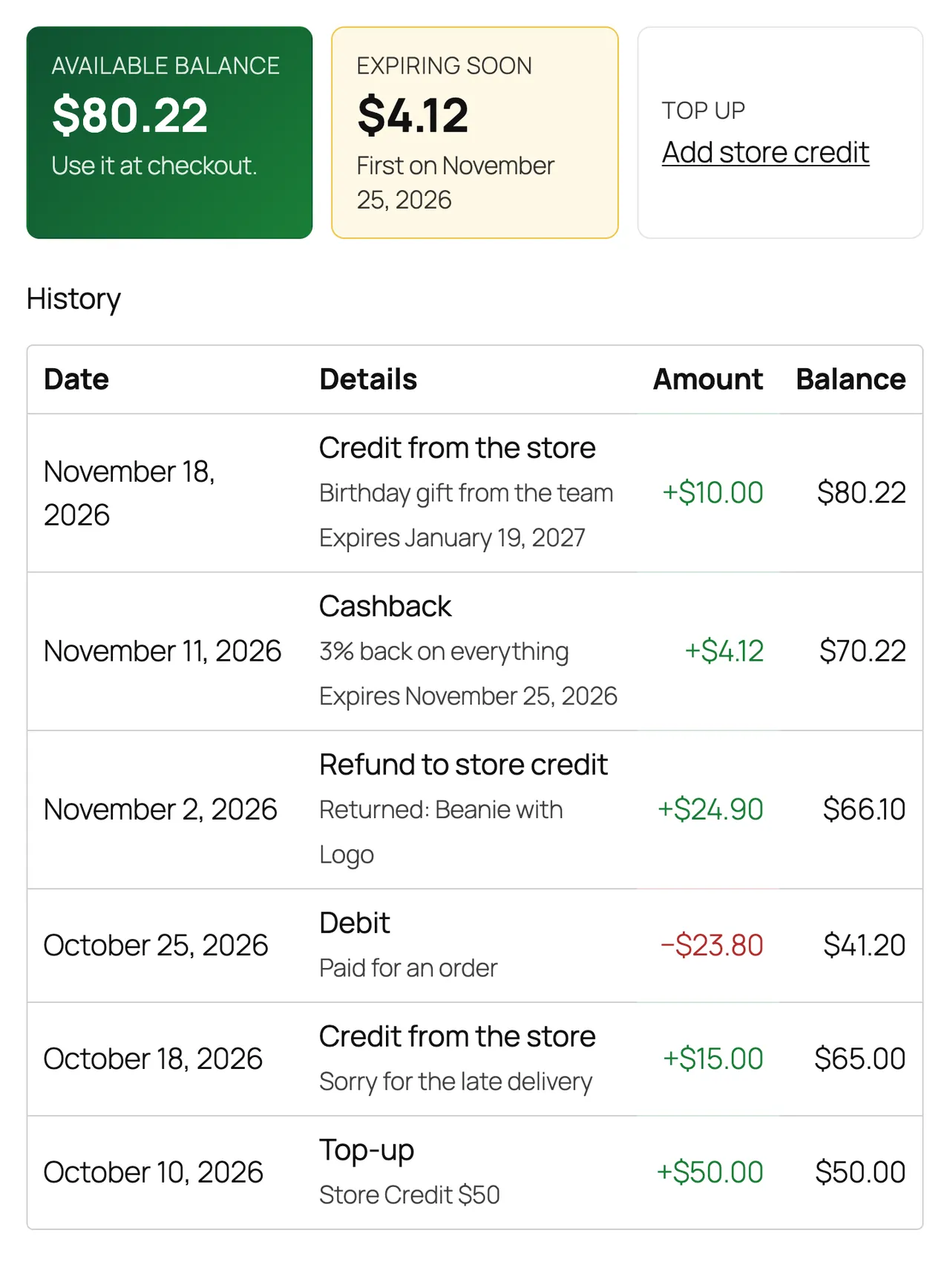
My Account > Store credit
What it does
Partial payment: "Use store credit" (all of it or a typed amount) in the Cart and Checkout blocks and in the classic cart and checkout. Optional highest share of an order and automatic use.
Full payment: a real payment method, "Store credit", offered when the balance covers the order. Refunds through the WooCommerce refund button go back to the wallet.
A payment, not a discount: store credit is taken off the finished order total; taxes of the goods and shipping stay exactly what they are. See Tax and accounting.
Top-up products: fixed amounts or "customer chooses the amount". Credited once the order is paid (offline methods: when completed), reversed on refund, cancellation or chargeback (when the payment plugin marks the order Failed, Cancelled or Refunded).
Refunds to store credit: return part of the store credit an order used, or refund money as store credit (a WooCommerce refund without contacting the payment provider).
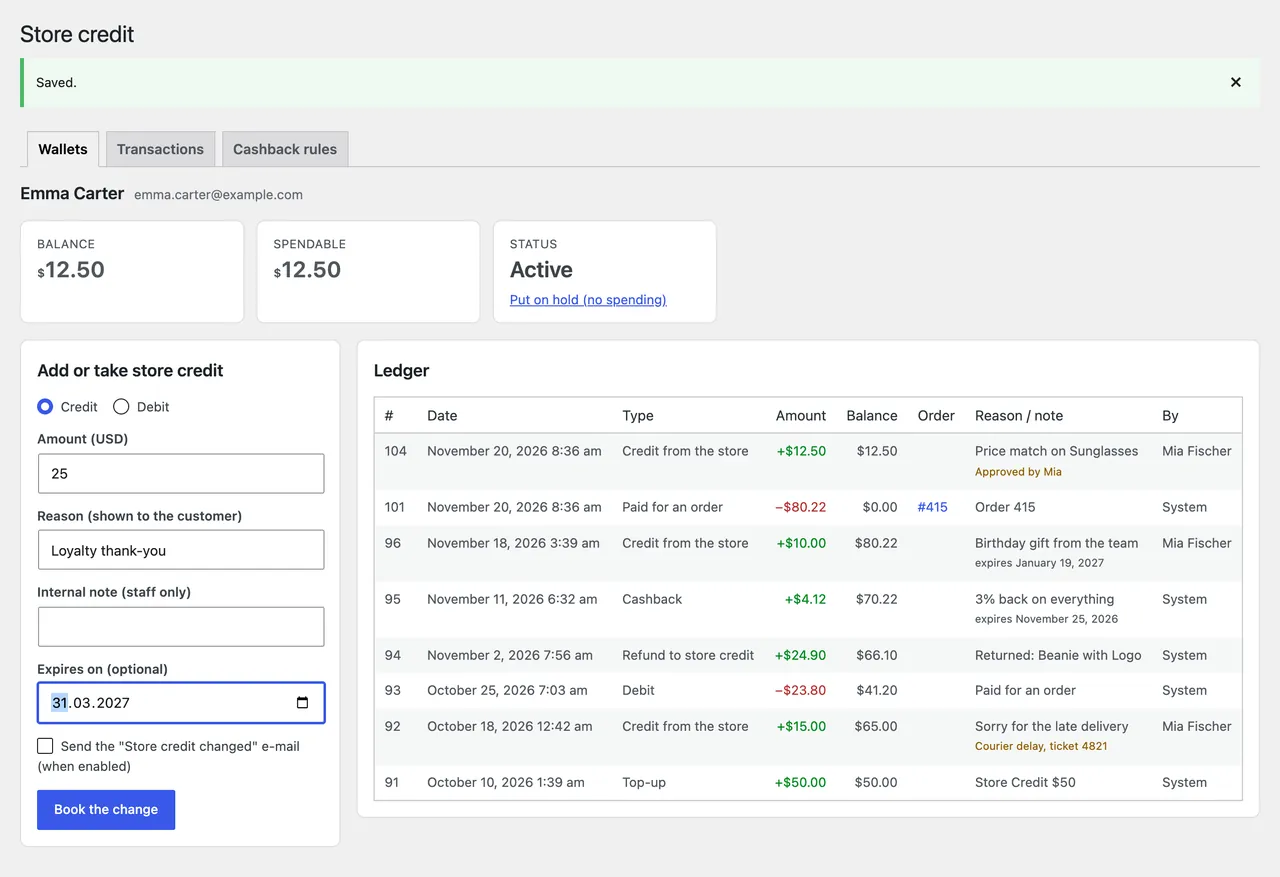
Staff credits and debits with a reason the customer sees, an internal note, an optional expiry date and an optional e-mail. Put a wallet on hold.
Cashback rules: percent or fixed, by category, minimum, cap and dates; credited at the order status you choose, scaled down by refunds, reversed on cancellation.
Expiry: per credit; expired credit is never spent and is booked out by a daily Action Scheduler job; optional reminder e-mail.
Money integrity: wallet row lock (InnoDB), no negative balance, settle-to-target bookings (a repeated event never books twice), one credit per refund, tested with parallel checkouts.
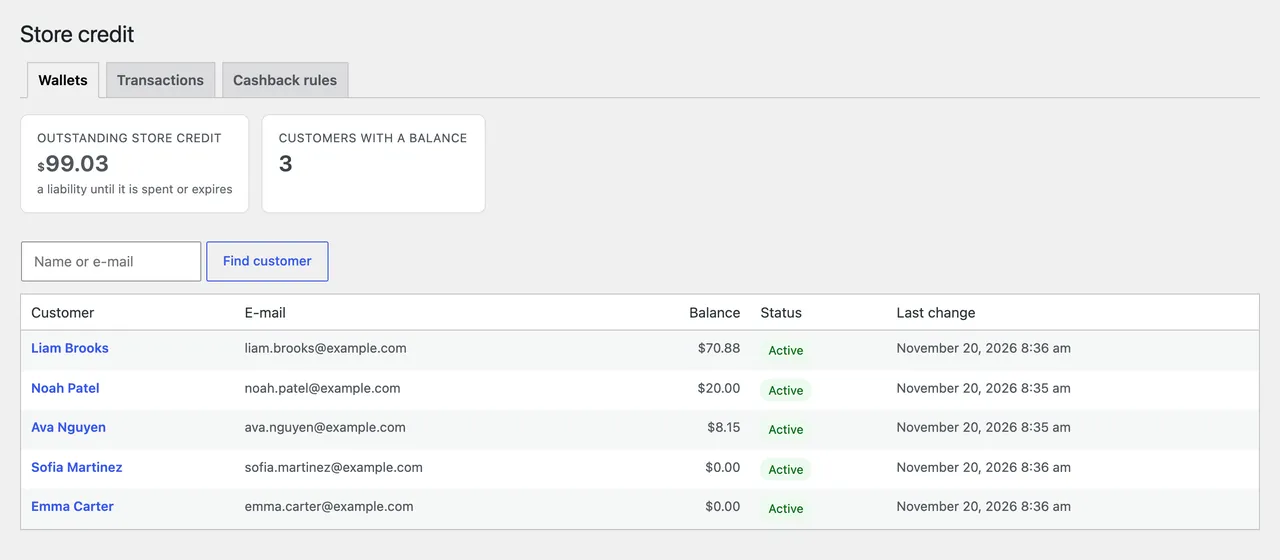
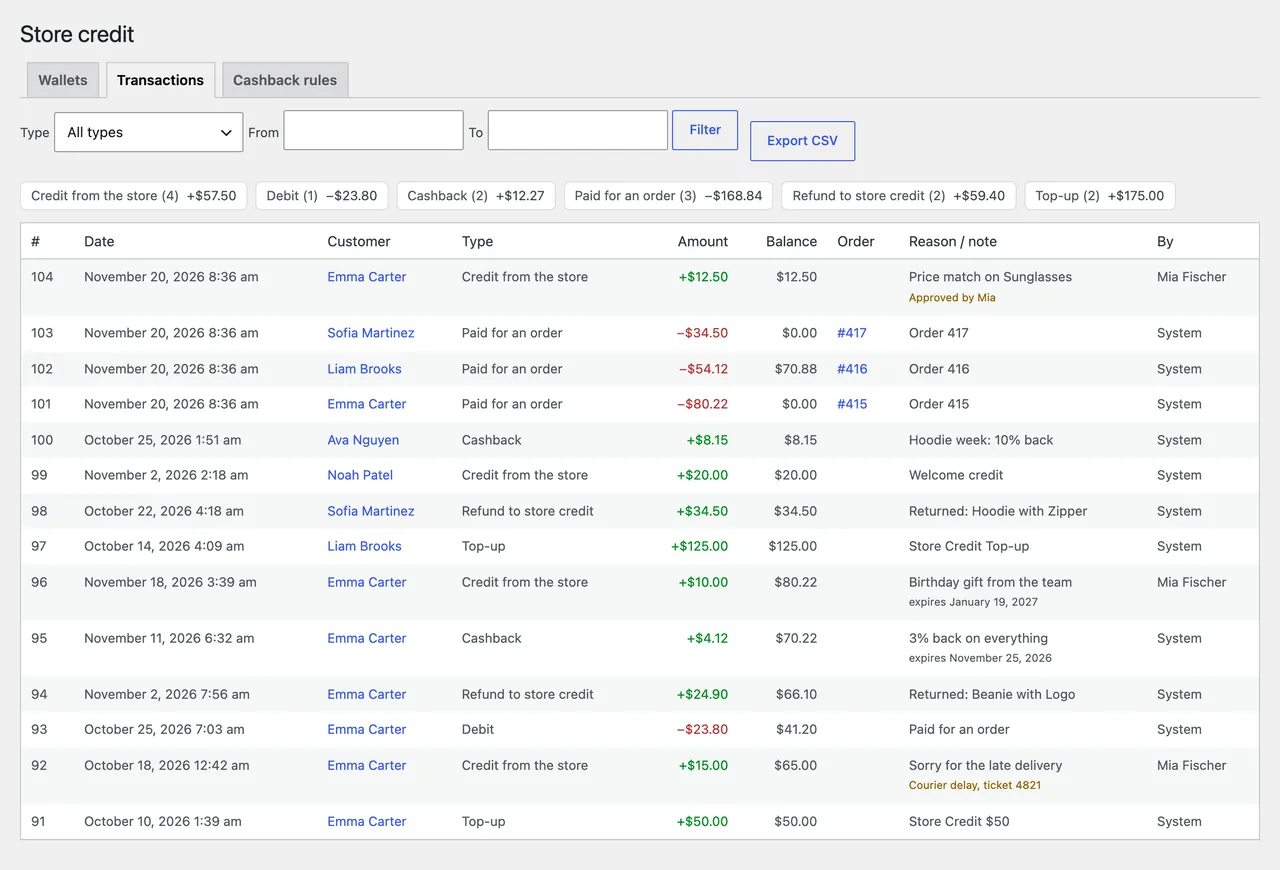
Admin ledger: WooCommerce > Store credit with the outstanding total, wallets, transactions with CSV export, cashback rules, a Store credit box on every order.
Two WooCommerce e-mails (switched off until you enable them), privacy exporter and eraser, REST API, HPOS and legacy order storage.
Requirements
WordPress
6.7 or later (tested on 7.1.3)
WooCommerce
10.1 or later (tested on 10.1.4 and 11.2.1)
PHP
7.4 or later (tested on 8.1 and 8.3)
Database
MySQL / MariaDB with InnoDB (the plugin's tables use row locks)
Order storage
HPOS and legacy posts storage (compatibility declared, both tested)
Cart / Checkout
Blocks and classic shortcodes
Pages
Installation
In WordPress go to Plugins > Add New Plugin > Upload Plugin and upload kv-customer-wallet-kv.zip (or the CodeCanyon / WooCommerce.com zip you bought).
Activate Customer Wallet for WooCommerce. Activation creates four InnoDB tables (wp_kv_cw_wallets, wp_kv_cw_ledger, wp_kv_cw_lots, wp_kv_cw_lot_uses), grants the capabilities kv_cw_view_wallets and kv_cw_manage_wallets to administrators and shop managers, adds the My Account endpoint store-credit and schedules the daily job kv_cw_daily (Action Scheduler, group kv-customer-wallet).
Own-site build: enter your licence key under WooCommerce > Settings > Customer Wallet > Licence. The storefront features run during a 14-day start period; without a valid key afterwards new store credit payments, top-up purchases and new cashback stop. Balances, history, admin pages, refunds and the follow-up of existing orders always keep working.
Check WooCommerce > Settings > Payments: "Store credit" is listed and enabled. Turn it off if customers should only pay partly with store credit.
If the My Account page shows "page not found" for Store credit, open Settings > Permalinks and click Save once.
Update
Upload the new zip over the old one (WordPress asks to replace the plugin). Data and settings stay.
Uninstall
Deactivating keeps everything. Deleting the plugin keeps the wallets and the ledger unless Remove data on uninstall is checked; then a CSV export of every wallet and ledger row is written to wp-content/uploads/kv-customer-wallet/ (folder closed to the web) before the tables, settings and capabilities are removed. If the export cannot be written, nothing is removed. Orders are never changed.
Configuration
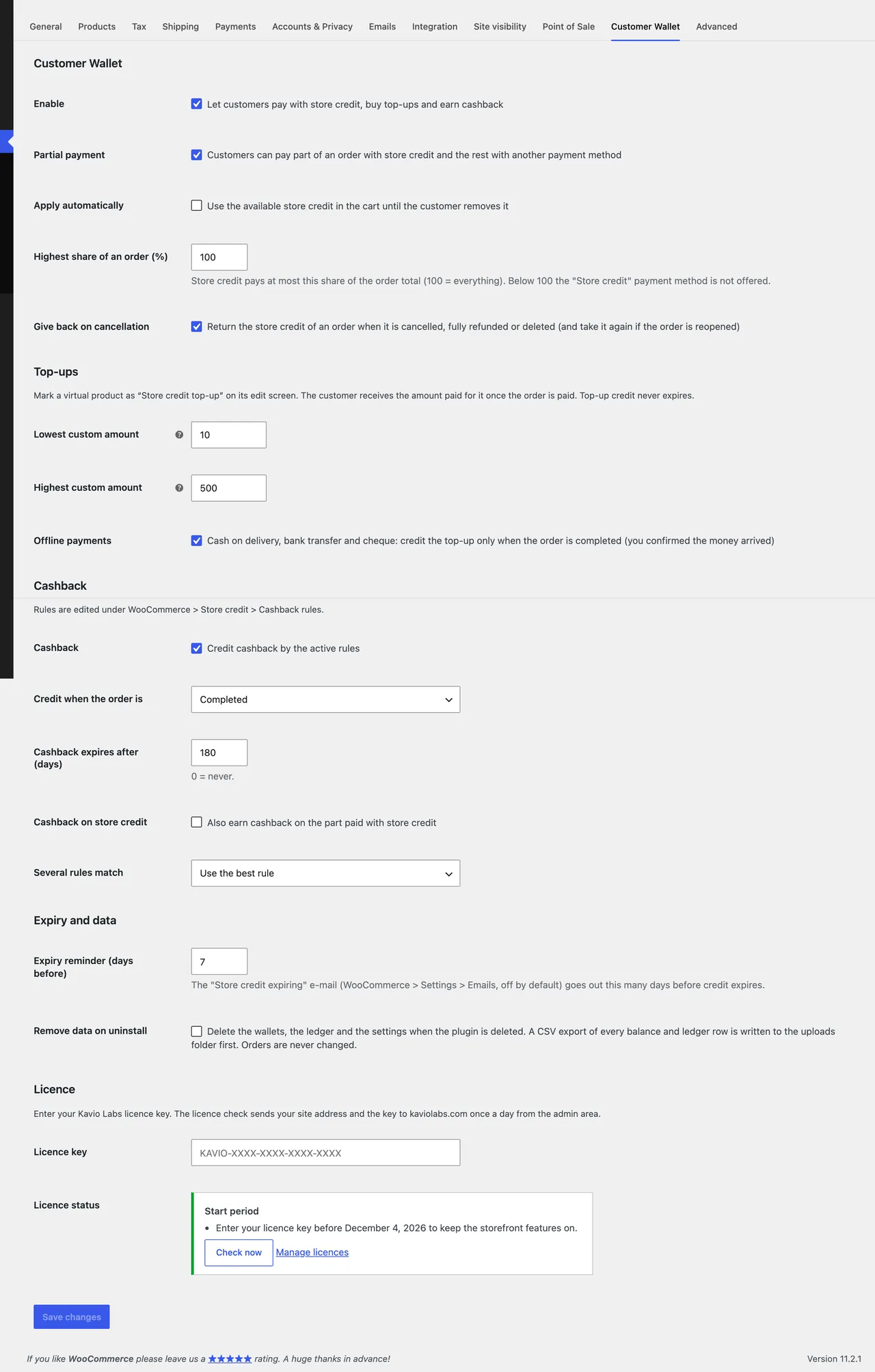
WooCommerce > Settings > Customer Wallet
Settings
Setting
Default
What it does
Enable
on
Store credit payments, top-up purchases and cashback on the storefront.
Partial payment
on
"Use store credit" for part of an order, the rest with another payment method.
Apply automatically
off
Store credit is used in the cart until the customer removes it.
Highest share of an order (%)
100
Store credit pays at most this share of the order total. Below 100 the "Store credit" payment method is not offered.
Give back on cancellation
on
Store credit of an order returns when it is cancelled, fully refunded, fails, is trashed or deleted, and is taken again when the order is reopened.
Lowest / highest custom amount
5 / 500
Limits for top-up products where the customer chooses the amount.
Offline payments
on
Cash on delivery, bank transfer, cheque and Net Terms (Kavio Labs): top-ups are credited only when the order is completed. Other "pay later" or invoice methods that set orders to Processing before payment: add their ids with the kv_cw_offline_gateways filter, or sell top-ups only with methods that take the money first.
Cashback
off
Credit cashback by the rules under WooCommerce > Store credit > Cashback rules.
Credit when the order is
Completed
Or "Processing or completed".
Cashback expires after (days)
0
0 = never.
Cashback on store credit
off
Also earn cashback on the part paid with store credit.
Several rules match
Use the best rule
Or add all rules up.
Expiry reminder (days before)
7
Window of the "Store credit expiring" e-mail and of the "Expiring soon" card.
WooCommerce > Settings > Payments > Store credit: enable, title and description of the full-payment method.
WooCommerce > Settings > Emails: "Store credit changed" and "Store credit expiring" (both off by default). "Store credit changed" goes out for top-ups, cashback, refunds to store credit, returns from orders, expiry and staff changes with "Send the e-mail" checked.
Top-up products
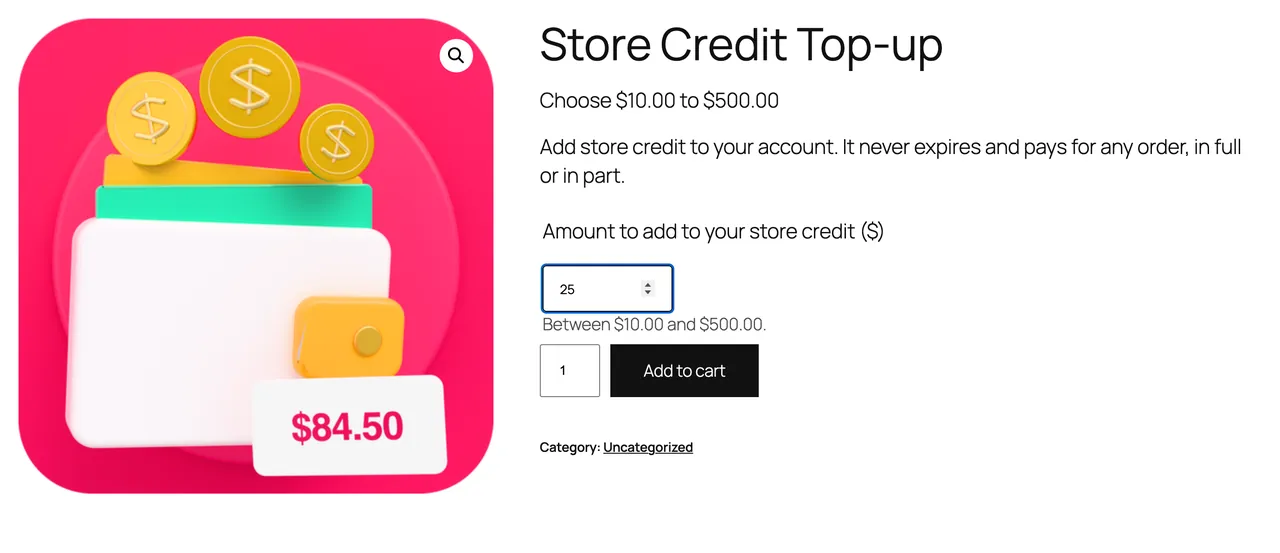
Create a product, make it Virtual, set Tax status to None (a top-up is a prepayment, see the FAQ) and check Store credit top-up in the General tab. Check Customer chooses the amount for an amount field instead of a price.
Top-up product
Cashback rules
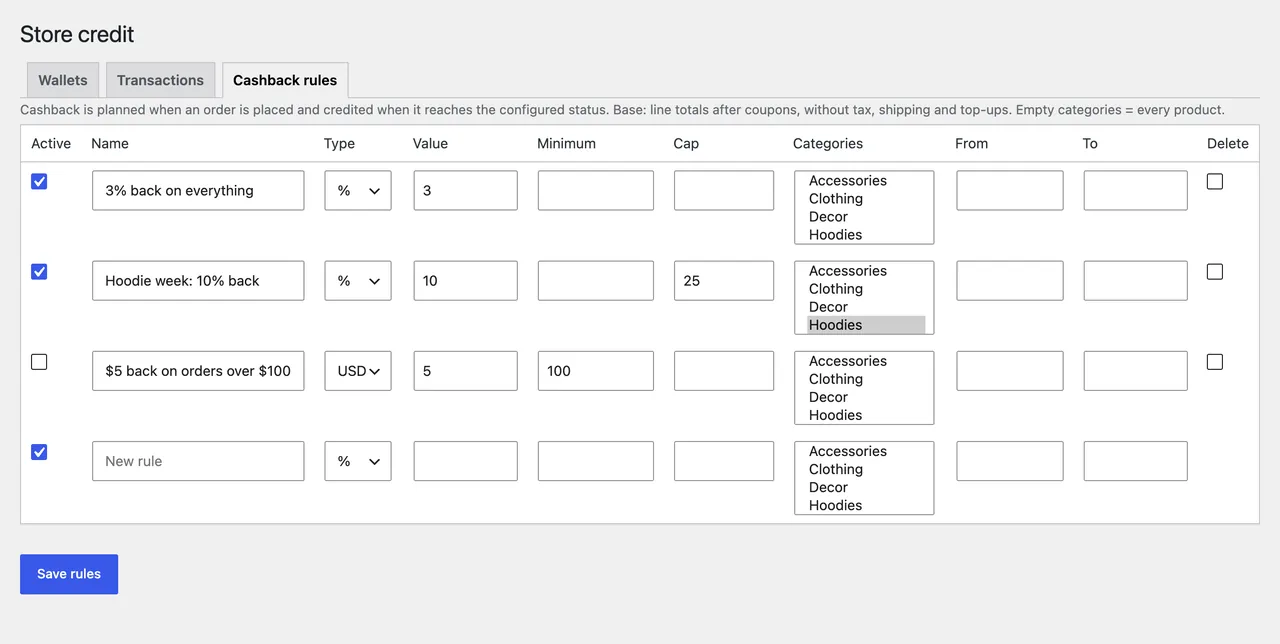
WooCommerce > Store credit > Cashback rules: one row per rule (active, name, percent or fixed amount, minimum eligible subtotal, cap, categories, from / to dates). An empty last row adds a rule.
Cashback rules
Capabilities
Capability
Default roles
Allows
kv_cw_view_wallets
Administrator, Shop manager
WooCommerce > Store credit pages, CSV export, order box, REST read
kv_cw_manage_wallets
Administrator, Shop manager
Credits, debits, hold, cashback rules, return / refund to store credit (with edit_shop_orders), REST adjust
Usage
Customers
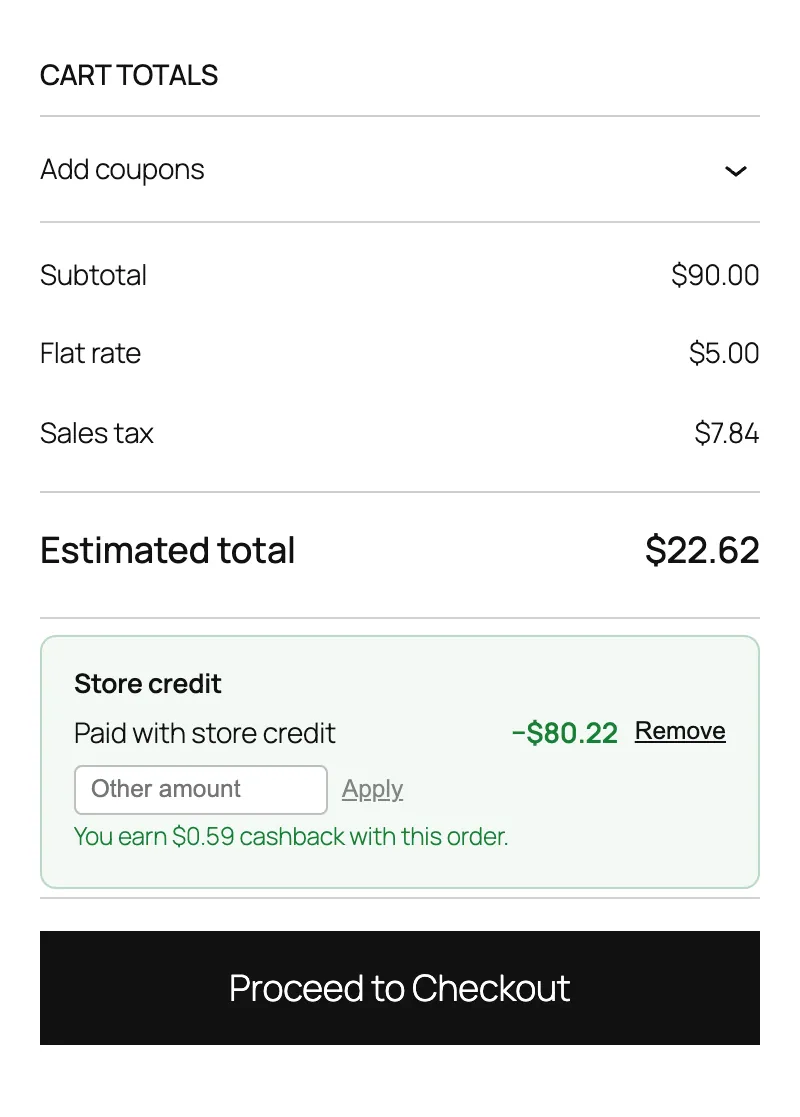
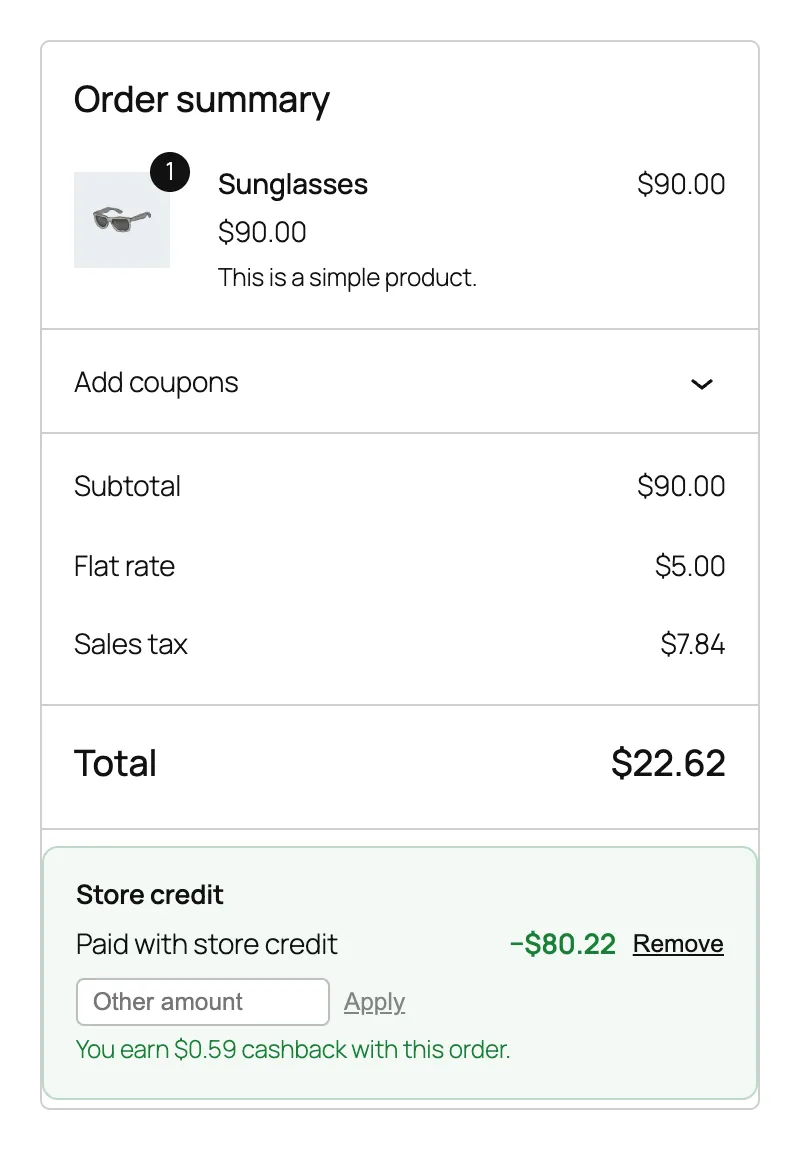
Partial payment. In the cart or checkout the Store credit panel shows the available balance. "Use store credit" applies all of it (up to the highest share of the order), "Other amount" a lower amount, "Remove" takes it off. The panel also shows the cashback the order earns.
Block cartBlock checkout
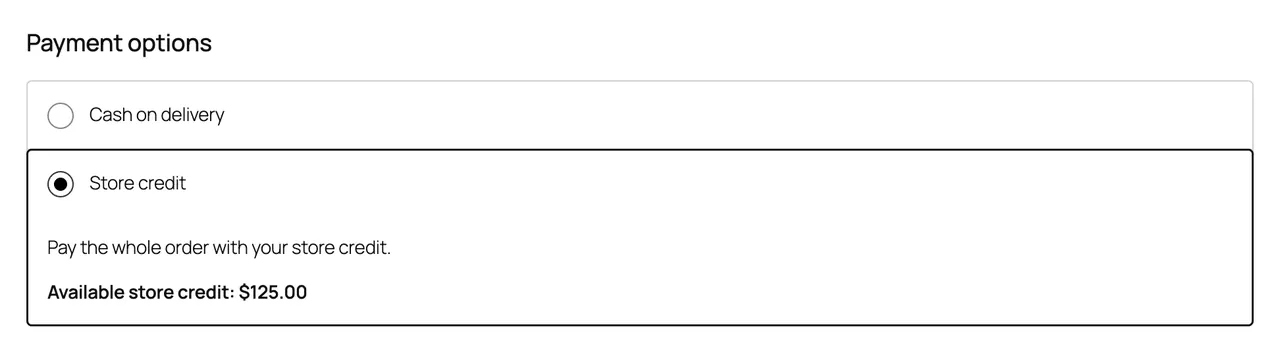
Full payment. When the balance covers the whole order, the panel says so and the payment method "Store credit" appears under Payment options.
Store credit payment method
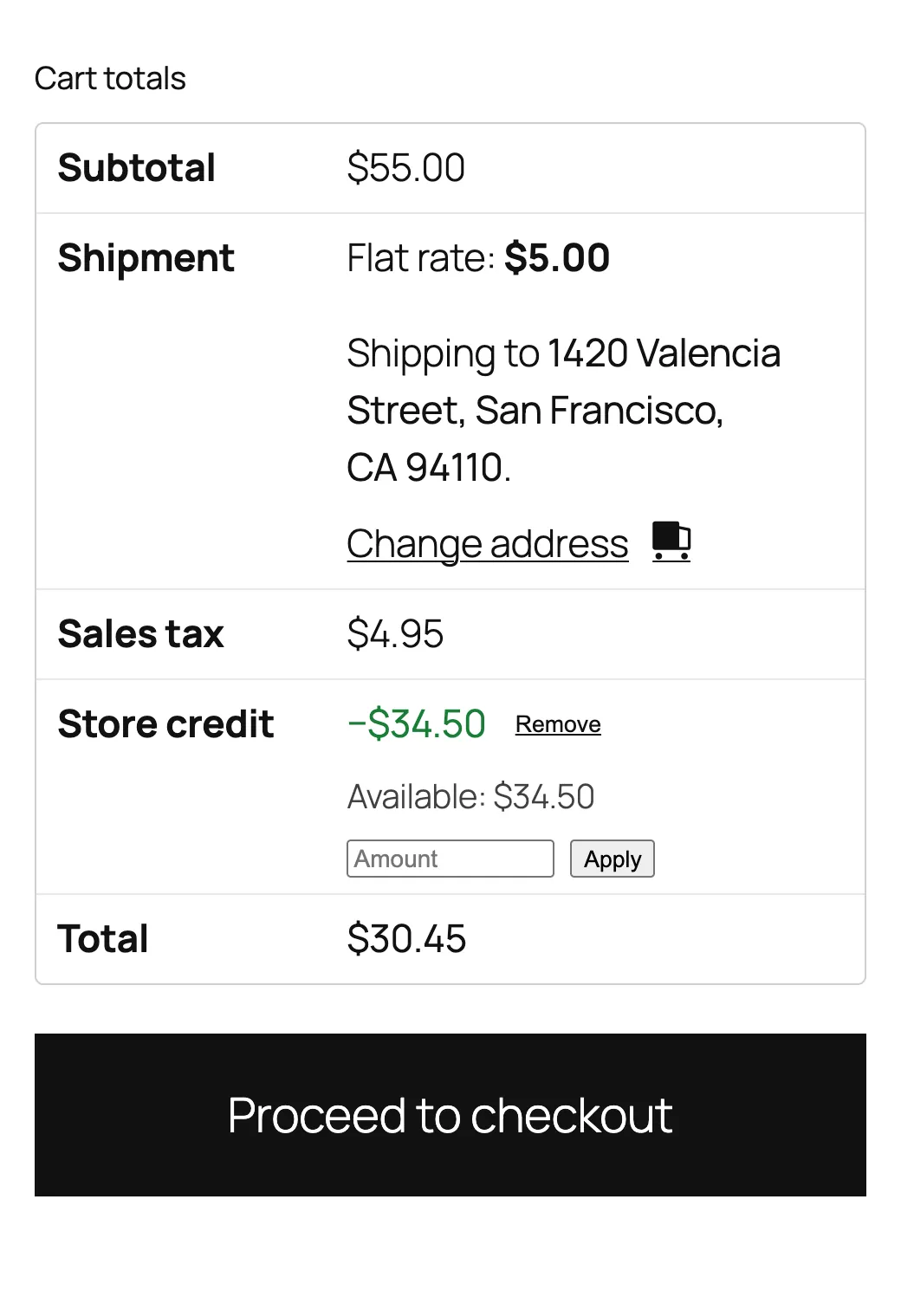
Classic cart and checkout show the same choices as a row of the totals table.
Classic cart
After the order the thank-you page, the order in My Account and the order e-mails show "Paid with store credit" above the total.
Order received
My Account > Store credit shows the available balance, credit that expires soon, a top-up link and the full history.
Store credit needs a customer account: guests cannot use or buy it, and a wallet is kept in the store currency.
Staff
WooCommerce > Store credit > Wallets: outstanding store credit, customers with a balance, search.
Wallets
Open a customer to credit or debit with a reason (shown to the customer), an internal note, an optional expiry date and an optional e-mail, or to put the wallet on hold (no spending). The ledger lists every change with the staff member who made it. A form sent twice books once.
Customer wallet
Transactions: every ledger row with filters by type and date, sums per type and a formula-safe CSV export.
Transactions
Order screen > Store credit box: customer balance, store credit held by the order, top-up and cashback state, shortfalls, and the actions
Return store credit: gives part of the store credit the order used back (never more than it holds),
Refund to store credit: creates a WooCommerce refund without contacting the payment provider and credits the amount to the wallet (never more than is left to refund).
Order box
Orders paid with the "Store credit" method are refunded with WooCommerce's own Refund button; the amount goes back to the wallet.
Orders paid partly with store credit. The order total is the part paid with the other payment method, so WooCommerce's Refund button refunds that part only (up to the order total). Give store credit back with Return store credit. When a refund reaches the whole order total, the plugin does not switch the order to Refunded while it still holds store credit (the refund may be for one item only; returning the store credit automatically would refund the customer twice): an order note says so. Return what the customer is owed with Return store credit, or set the order to Refunded or Cancelled to give all of its store credit back.
Chargebacks. WooCommerce has no chargeback event of its own. A top-up or cashback is reversed when the payment plugin moves the order to Failed, Cancelled or Refunded (what most payment plugins do when a dispute is lost); an order that stays On hold during a dispute keeps it. The store credit part of a paid order that turns Failed stays with the order.
What happens automatically
Event
Store credit used
Top-up
Cashback
Order placed
Booked (balance checked under a lock)
-
Planned
Payment failed (never paid), cancelled, set to Refunded, trashed
Given back
Reversed
Reversed
Chargeback: a paid order set to Failed by the payment plugin
Kept by the order (the bank refunds the other payment)
Reversed
Reversed
Refund of the whole amount paid with other methods
Kept, status not changed (see below)
Reduced
Scaled down
Order reopened / restored
Taken again (shortfall noted, never negative)
Credited again when paid
Credited again at the status
Paid later from Pay for order (also express pay buttons on the Store API route for existing orders)
The order's own amount; taken again when a failed payment gave it back; if the balance no longer covers it, the amount due is raised before payment
-
-
Paid (processing / completed)
-
Credited (offline methods: completed)
Credited at the configured status
Partial refund
Unchanged (use Return store credit)
Reduced (line or amount-only refunds)
Scaled down
Order deleted for good
Given back
Unchanged
Unchanged
Credit expires
-
never (top-ups do not expire)
Booked out by the daily job
Developer notes
Data
Table
Purpose
wp_kv_cw_wallets
One row per customer: cached balance, currency (store currency), status (active / frozen). Locked with SELECT ... FOR UPDATE for every change.
wp_kv_cw_ledger
Append-only ledger: type, signed amount, balance after, order / refund id, unique reference, customer note, internal note, staff id, expiry. No code updates or deletes a row.
wp_kv_cw_lots
Every credit is a lot (remaining, expiry); spending takes the earliest expiry first.
wp_kv_cw_lot_uses
Which lots a debit used.
Invariant (checked by Ledger::verify()): cached balance = sum of the ledger = sum of the lots, never below zero.
_kv_cw_amount (store credit taken off the order total), _kv_cw_mode (partial or full), _kv_cw_released, _kv_cw_shortfall, _kv_cw_cashback_plan; line meta _kv_cw_topup. The order total always equals what another payment method pays.
Amounts are integers in the store's minor unit. ref_key is unique: the same reference books once. Errors throw KavioLabs\CustomerWallet\WalletException (kind: insufficient, duplicate, frozen, invalid, too_much).
Hooks
Hook
Type
Use
kv_cw_entry_written
action
Inside the transaction, after a ledger row.
kv_cw_entry_committed
action
After COMMIT (id, notify). Send your own notifications here.
kv_cw_expiring
action
Customer with credit expiring soon (user id, amount, date).
kv_cw_offline_gateways
filter
Payment method ids whose top-ups are credited only when the order is completed (default cod, bacs, cheque, kv_net_terms).
kv_cw_release_statuses
filter
Statuses that give store credit back (cancelled, refunded, failed, trash). A paid order that turns failed (chargeback) keeps its store credit; a refund of the whole order total does not switch an order that still holds store credit to refunded.
kv_cw_reverse_statuses
filter
Statuses that reverse top-ups and cashback.
Store API (Cart / Checkout blocks, headless)
Cart extension extensions["kv-customer-wallet"]: balance, spendable, applied, choice, can_partial, full_ok, reason, message, cashback, cashback_other (amounts in minor units).
Update: POST /wp-json/wc/store/v1/cart/extensions with {"namespace":"kv-customer-wallet","data":{"use":"max"|"off"|"12.50"}} (logged-in customers; the server computes every amount).
Checkout refusal when the balance changed: HTTP 409, code kv_cw_balance_changed.
REST API
GET /wp-json/kv-customer-wallet/v1/me (logged-in customer).
GET /wp-json/kv-customer-wallet/v1/customers/<id> (kv_cw_view_wallets).
E-mails: emails/kv-cw-changed.php, emails/kv-cw-expiring.php (+ plain/), overridable in yourtheme/woocommerce/.
FAQ
Is store credit a discount? What about VAT and sales tax?
No. The plugin treats store credit as a means of payment, like a gift card balance: it is taken off the finished order total after taxes, so the taxable amount and the taxes of the goods and shipping are exactly what they would be without store credit. The order shows the taxes on the full price and a separate "Paid with store credit" row; the order total is what the other payment method pays.
We deliberately do not use a negative fee or a coupon: WooCommerce spreads the tax of a negative fee over the items (it lowers the VAT like a discount), and a coupon is a discount by definition.
Background (not legal advice, ask your tax adviser):
Top-ups are prepayments. Under the EU voucher rules (Directive 2016/1065) a balance that can buy goods at different VAT rates is a multi-purpose voucher: VAT is due when the goods are supplied, not when the top-up is sold. Set top-up products to Tax status: None. Similar rules apply to prepaid balances in the UK and to store credit in most US states.
Refunds to store credit return money the customer paid; the original sale is corrected by the WooCommerce refund as usual.
Cashback and goodwill credits are funded by you. Some tax authorities treat money given back on a sale as a later price reduction of that sale. The ledger keeps every cashback and staff credit with its order and date (Transactions, CSV export) so your accountant can book it the way your jurisdiction requires.
Order totals and Analytics: an order paid partly with store credit has the amount paid with the other method as its order total (the taxes and tax lines stay those of the full price); WooCommerce Analytics therefore count that order with the lower total. An order paid fully with the "Store credit" method keeps its full total, like any other payment method. A top-up order is counted as an order when it is sold, so money spent from a top-up can appear in Analytics twice (top-up order + order paid with it). Use the Transactions page and its CSV export to reconcile store credit.
Can two checkouts spend the same balance?
No. Every balance change locks the customer's wallet row in one database transaction and re-reads the balance; the second checkout finds the credit gone and is refused ("Your store credit balance changed..."), with nothing paid. This is tested with parallel Store API checkouts (partial and full payment) and parallel refunds.
Can a refund be credited twice?
No. Returns are booked as "settle to the amount the order should hold", so a repeated event books nothing; an order never gives back more than it took; "Refund to store credit" runs under a per-order lock, checks the refundable amount and stores one credit per form and per refund.
How are orders paid partly with store credit refunded?
WooCommerce's Refund button refunds the part paid with the other payment method (that is the order total). The store credit part is given back with "Return store credit" in the order's Store credit box. A refund that reaches the whole order total does not switch an order that still holds store credit to Refunded; set it to Refunded or Cancelled yourself to give all of its store credit back. A chargeback (paid order set to Failed by the payment plugin) does not give the store credit part back.
Can a balance go negative?
No. Debits need spendable credit. When a top-up or cashback is reversed after the customer spent it, the plugin takes what is left and notes the shortfall on the order.
Multi-currency?
A wallet is kept in the store currency (WooCommerce > Settings > General). If a currency switcher shows another currency, store credit cannot be used or bought in that currency (the panel says so); top-ups of orders in another currency are not credited (order note). This avoids exchange-rate gains or losses on balances.
Do top-ups expire?
No, top-up credit never expires (prepaid money; many jurisdictions forbid or limit expiry). Staff credits can have an expiry date; cashback can expire after a number of days.
Guests?
Store credit needs a customer account. Guests do not see the panel, cannot use the payment method and cannot buy top-ups.
What if the licence expires (own-site build)?
New store credit payments, top-up purchases and new cashback stop. Balances, history, the admin pages, refunds, returns and the follow-up of existing orders keep working; data is never locked.
Subscriptions?
Store credit of a parent order is never copied to WooCommerce Subscriptions renewal orders; renewals are paid with the subscription's payment method.
Known limits (1.0)
No transfers between customers, no withdrawals to a bank account, no store credit field on orders created in the admin, one currency per store, the Cart / Checkout block panel may disappear after resizing the window across the mobile breakpoint until the page is reloaded (the applied credit and the totals stay correct).
The department store block theme for WooCommerce: colour-coded departments, a department list beside the hero slider with two side promos, a big search with a department picker, tabbed product grids, a 2 + 1 + 2 offer grid, deals of the day with real countdowns, a department showcase, a promotions band and a three-column product page with a sticky buy box. Four styles (Meridian, Harbor, Citrus, Night) as Site Editor style variations, every colour editable. Cart and Checkout blocks styled, HPOS neutral.
Stop AI crawlers, scrapers, card testers, vulnerability scanners and unwanted countries before WordPress builds a page. Googlebot and Bingbot are verified by DNS and always allowed; 50+ bots get one switch each; country rules use free GeoIP databases and can close only the checkout (block and classic checkout, wc-ajax and Store API); card testing protection on order submissions; the add to cart flood fix for requests without a WooCommerce session; IP and network lists, rate limits for search, filters, forms and login, honeypots; a one-second challenge instead of a captcha; learning mode, dashboard, log, IP tester and Cloudflare export. HPOS and blocks compatible.
The campaign block theme for WooCommerce that makes a store feel like a sale is always on: a flash bar with the sale that ends first, a bento hero with a live deal tile, a dark flash deals zone with flip-tile countdowns on real sale end dates, round discount stickers, a category pill bar, stories with a player, a Discover feed with promo cells inside the grid, a product page campaign strip and a sticky phone buy bar. Sixteen colour styles as Site Editor style variations, two of them dark. Cart and Checkout blocks styled, HPOS neutral.