by Kavio Labs · for WooCommerce 10.1+ on WordPress 6.7+
The WooCommerce block theme you configure: three headers (a Catalog button with a vertical icon mega panel, an icon menu or one compact row), three home layouts, three product pages, grid, list and compact B2B listings, tiles inside the product grid, deal of the day, a promotion stage with days-left bars and quantity prices the cart really charges. Sixteen colour schemes as Site Editor style variations, two of them dark, a one-click demo store, Cart and Checkout blocks styled, HPOS neutral.
Tested on WooCommerce 11.2.1 & WordPress 7.1.3Updated Nov 8, 2026Version 1.0.2Compatible with WooCommerce 10.1 – 11.2, WordPress 6.7+ No core file edits
One theme you shape into your store: calm, precise and built to sell, on a desktop and a phone1 of 13
What it does
The WooCommerce block theme you configure: three headers (a Catalog button with a vertical icon mega panel, an icon menu or one compact row), three home layouts, three product pages, grid, list and compact B2B listings, tiles inside the product grid, deal of the day, a promotion stage with days-left bars and quantity prices the cart really charges. Sixteen colour schemes as Site Editor style variations, two of them dark, a one-click demo store, Cart and Checkout blocks styled, HPOS neutral.
Features
3 headers: a Catalog button with a vertical icon mega panel, an icon menu with big round icons, or one compact row.
3 home layouts: Store, Showcase and Deals; "Auto" follows the colour scheme.
3 product pages: Studio (sticky buy panel), Cascade (stacked gallery) and Compact (quantity price table first).
Stage with a promotion strip: the running promotions are the navigation, each with a days-left bar on the real sale end.
Tiles inside the product grid per category and in the home shelves: banner, countdown promo, video and article popups, 1 x 1, 2 wide or 2 x 2.
Deal of the day with a live countdown, stock left, quantity prices and a quantity stepper.
Quantity prices per product ("10:33, 25:29"): "from $29 at 25+" on cards, a table on the product page, charged in the cart.
Grid, list and compact rows with a switcher, Show more with a counter or loading while scrolling.
Cards with a hover panel (swatches, key specs, Add to cart without a reload), quick view, compare, wish list.
Department mosaic, offers rail, tabbed shelves, editors' picks, brand strip, journal with "Shop this story"; every section is a block pattern.
Live search with a category select, WooCommerce AJAX product filters, delivery dates, perks, sticky add-to-cart bar, phone bottom bar.
16 colour schemes as Site Editor style variations, two dark, AA contrast checked; every colour editable.
Vertex next to our other WooCommerce themes
Every Kavio Labs theme has its own character. This table shows where Vertex differs, so you can pick the one that fits your store.
Vertex compared with our other WooCommerce themes
Vertex ($149)
Atlas ($129)
Pulse ($129)
Prism ($129)
Niche themes ($69-79)
Character
calm precision retail: white + ink, one accent, colour only in tiles
busy department store, pastel department colours
loud campaign store, stickers, dark flash zone
five store styles in one package
one sector each
Layout control
3 headers + 3 homes + 3 product pages + 3 listing views, Auto per scheme
fixed
fixed
per style
fixed
Header
Catalog button with a vertical icon mega panel, icon menu, compact
All departments rail beside the hero
flash bar + pill bar
per style
niche
Home
stage + promotion strip with days-left bars, mosaic, offers rail, tabbed shelves with tiles, deal of the day, brands, journal with products
dept tiles, 2+1+2 offers, showcase
bento hero, flash zone, stories, Discover feed
per style
niche blocks
Listing
grid / list / compact rows (B2B), tiles 1x1 / 2x1 / 2x2 per category
department tree + promo tiles
promo cells, density
per style
basic
B2B
quantity prices on cards, product table, deal panel, charged in the cart
no
no
no
no
Product page
Studio, Cascade, Compact
3 columns + sticky buy box
campaign strip, sticky phone bar
per style
niche
Schemes
16 (2 dark)
4
16
5 styles
4
Demo
Circuit Hall (technology, 36 products)
Atlas Market
Brightloop
5 stores
per niche
What you get
Download & installThe theme .zip, installed in Appearance > Themes > Add New Theme > Upload Theme. Download it from My licenses right after payment.
12 months of updates & supportNew versions and help for 12 months (24 or 36 months at checkout). After that the theme keeps working; renew anytime at 50%.
License for your storeOne production domain with all its subdomains; staging and local development hosts are free. How licensing works
30-day refundFull refund within 30 days of your first purchase, no reason needed. Refund policy
Tested buildsWooCommerce 10.1 – 11.2, WordPress 6.7+. Tested on WooCommerce 11.2.1 and WordPress 7.1.3.
Documentation & supportFull guide (Installation, Configuration (Appearance > Vertex), Using Vertex, Developer notes) on this page. Tickets from your account, same-day reply on weekdays (Mon-Fri 09:00-18:00 UTC+3).
Compatibility
Vertex: Configurable Theme works with WooCommerce 10.1 – 11.2, WordPress 6.7+.
We list the builds we install and test on. “Tested” means the test plan ran on that build; “Supported” means the build is inside the supported range.
Compatibility
Version
Range
Runs on
Status
WooCommerce 11
11.0 – 11.2
WordPress 6.7 – 7.1
Tested on 11.2.1
WooCommerce 10
10.1 – 10.x
WordPress 6.7+
Supported
WordPress
6.7 – 7.1
PHP 7.4 – 8.3
Tested on 7.1.3
1.0.2
Nov 8, 2026
Latest
Licence: the daily licence check now runs on its own, once a day by WP-Cron and on any wp-admin page when a check is due. Before, it ran only while Appearance > Vertex was open, so a store with a valid key whose owner never reopened that page lost the licensed extras (quick view, wish list, compare, live search, sticky bars, Show more, grid tiles) 45 days after the last check. Update and the extras stay on; nothing to configure.
Categories created through the REST API, WP-CLI, wp wc or an importer (no WooCommerce sort-order value yet) now show in the menu row, the Catalog panel, Shop by category and the subcategory chips.
The product description tab and the short description are rendered exactly as WooCommerce renders them, so YouTube and Vimeo embeds, shortcode forms and plugin filters of the short description work.
Demo Remove no longer deletes a global product attribute that the demo created when your own products use it now.
1.0.1
Nov 7, 2026
Quantity prices on variable products: the price table on the product page now shows the prices of the option the shopper picked (a tier only appears for the options it really lowers, exactly as the cart charges it); before a choice the table lists every tier with a "from" price. What the cart charges is unchanged.
Keyboard and screen reader use: quick view, the video and article popups, the wish list, compare and the Catalog panel keep the focus inside while they are open (Tab and Shift+Tab go round), Esc closes them and the focus returns to the button that opened them.
The free-shipping progress bar follows your shipping settings at once: adding, removing, switching on or off or editing a Free shipping method (also in the zone popup) refreshes the amount; otherwise it is re-read every 10 minutes.
Faster category and home pages with many variable products: options, stock and sale dates are loaded once per product.
Smaller stylesheet: unused styles left over from the OpenCart edition removed.
The About us, FAQ and Shipping and returns page patterns are translatable (theme strings are translation ready; the .pot file is updated).
1.0.0
Nov 7, 2026
Vertex for WooCommerce 10.1+ on WordPress 6.7+ (tested with WooCommerce 11.2.1 and WordPress 7.1.3): the WooCommerce block theme edition of the Vertex flagship theme, with the same design, sixteen colour schemes and Circuit Hall demo as Vertex on CS-Cart and OpenCart.
Layouts from one settings page: three headers (Catalog button + icon menu, icon menu, compact), three home layouts (Store, Showcase, Deals), three product pages (Studio, Cascade, Compact B2B) and grid / list / compact listings with a switcher. "Auto" follows the colour scheme.
Catalog panel: a vertical icon mega menu with subcategory grids and a top product tile per department; a drawer with accordions on phones. Icon menu row with mega panels and a "More" overflow.
Home: stage with a promotion strip and days-left bars, department mosaic, offers rail, tabbed shelves and editors' picks with tiles inside the grid, deal of the day panel, brand wordmark strip, journal with "Shop this story". Every section is also a block pattern.
Tiles inside product grids per category: banner, countdown promo, video and article popups in 1 x 1, 2 wide and 2 x 2.
Quantity prices per product ("10:33, 25:29"): the "from $X at N+" line on cards, a price table on the product page and the deal of the day, and the tier price charged in the cart (all variations of a product count together; a lower sale price wins).
Countdowns on real data: every timer reads WooCommerce's sale price end date as it is stored; a timer hides when its end passes.
Product cards with a hover panel (swatches, key specs, Add to cart through the Store API), quick view, wish list and compare.
Sixteen colour schemes as Site Editor style variations, two of them dark, all text / ground pairs AA; Mona Sans self-hosted.
One-click Circuit Hall demo (30 categories, 36 products, 4 with colour variations, 7 with quantity prices), removable.
How do I install the theme?
Download the package from My licenses and install it in Appearance > Themes > Add New Theme > Upload Theme, like any other WooCommerce theme. The Documentation tab has every step, from the first activation to the theme settings.
Which WooCommerce versions does it work with?
WooCommerce 10.1 – 11.2, WordPress 6.7+. Tested on WooCommerce 11.2.1 and WordPress 7.1.3. The Compatibility tab lists every version range.
What does the license cover?
One production store domain with every subdomain (www, shop., staging.), plus local development hosts such as localhost, *.local and *.test. A store on another domain needs its own license; a second-store license is 40% off. You have 14 days after installing to enter the key. 12 months of updates and support are included; after that the theme keeps working and renewals are 50% off. How licensing works
Can I get a refund?
Yes. Ask for a full refund within 30 days of your first purchase, no reason needed: open a ticket or write to [email protected] with your order number. The money goes back to the card or bank account you paid with within 5 business days of approval. Refund policy
How do I get help?
Open a ticket from your account, so your license details are attached. We answer with a same-day reply on weekdays (Mon-Fri 09:00-18:00 UTC+3). Support policy. Not a customer yet? Ask a pre-sales question.
Vertex is the flagship block theme of Kavio Labs for WooCommerce, the WooCommerce edition of the Vertex theme for CS-Cart and OpenCart. It is one calm, precise design that you shape into your store from one settings page: three headers, three home layouts, three product pages and three listing views, with tiles inside the product grid, a deal of the day, promotions with days left and quantity prices that the cart really charges. It suits any kind of store; the demo is a technology store.
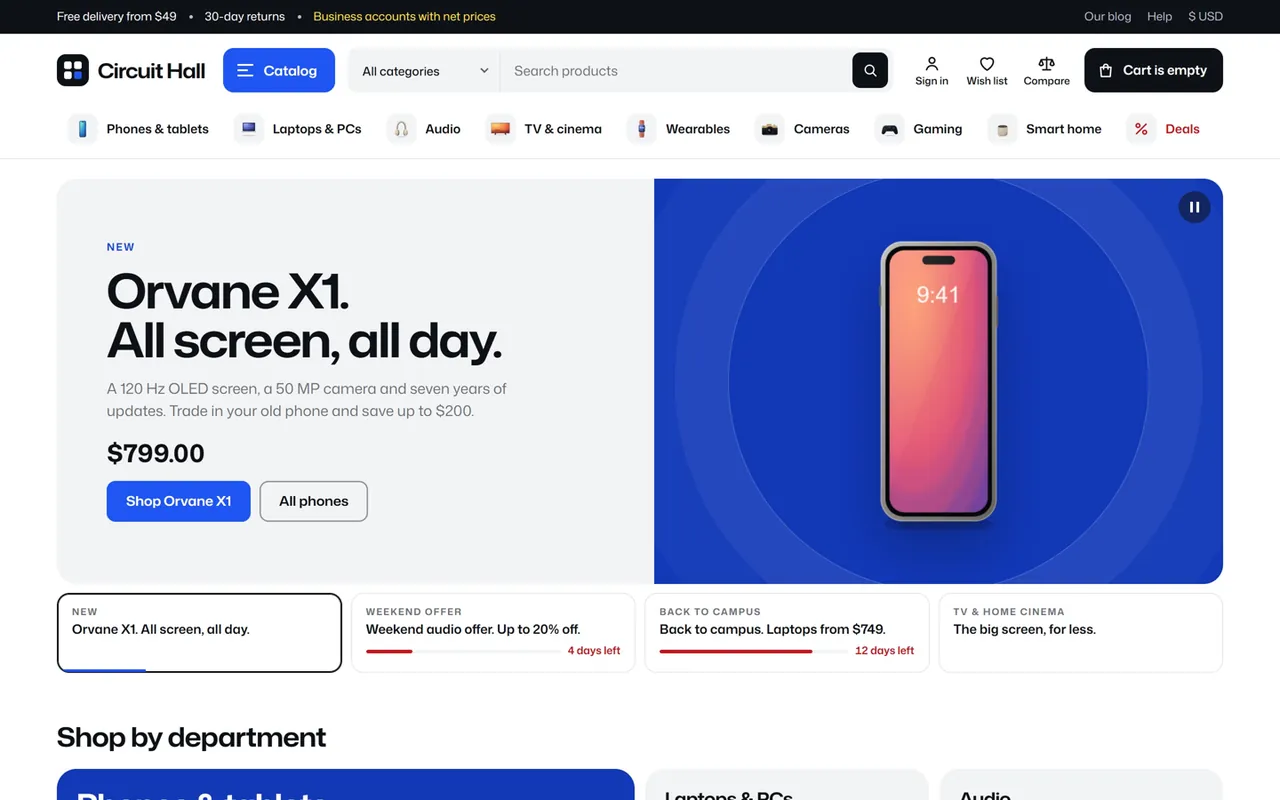
Vertex home page, Azure scheme
What you get
Three headers. A Catalog button that opens a vertical icon mega panel (departments, subcategory grid and a top product tile) with an icon menu row; an icon menu with big round icons; or one compact row. A search with a category select and live suggestions in all three.
Three home layouts. Store (stage, departments, offers, tabbed shelves, deal of the day, brands, journal), Showcase (big stage, departments, editors' picks, brands, journal) and Deals (compact stage, deal of the day first, offers, tabbed shelves, journal). "Auto" follows the colour scheme.
Stage with a promotion strip. A wide banner stage whose navigation is the list of running promotions, each with a days-left bar that follows a real sale end date. A dated slide hides itself after its end.
Tiles inside the product grid. Banner, countdown promo, video and article tiles that take a place in the grid of the categories you choose (a parent covers its subcategories) and of the home shelves; 1 x 1, 2 wide or 2 x 2.
Deal of the day. A dark panel with a live countdown, the stock left, quantity prices, a quantity stepper and Add to cart, next to a short list of more deals.
Quantity prices. Set "10:33, 25:29" on a product: cards show "from $29 at 25+", the product page and the deal of the day a price table, and the cart charges the tier price (all variations of a product count together).
Three listing views. Grid, list and compact rows for B2B buyers, with a switcher each visitor's browser remembers, and Show more with a counter or loading while scrolling.
Product cards. Packshot wells, discount and new flags, a deal countdown, brand, rating, the quantity price line and a hover panel that opens over the next row (colour swatches, key specs, Add to cart without a reload), wish list, compare and quick view.
Three product pages. Studio (sticky buy panel), Cascade (stacked gallery, sticky details) and Compact (quantity price table first). Delivery dates from a "Ships in" attribute, perks, a product video and a sticky add-to-cart bar.
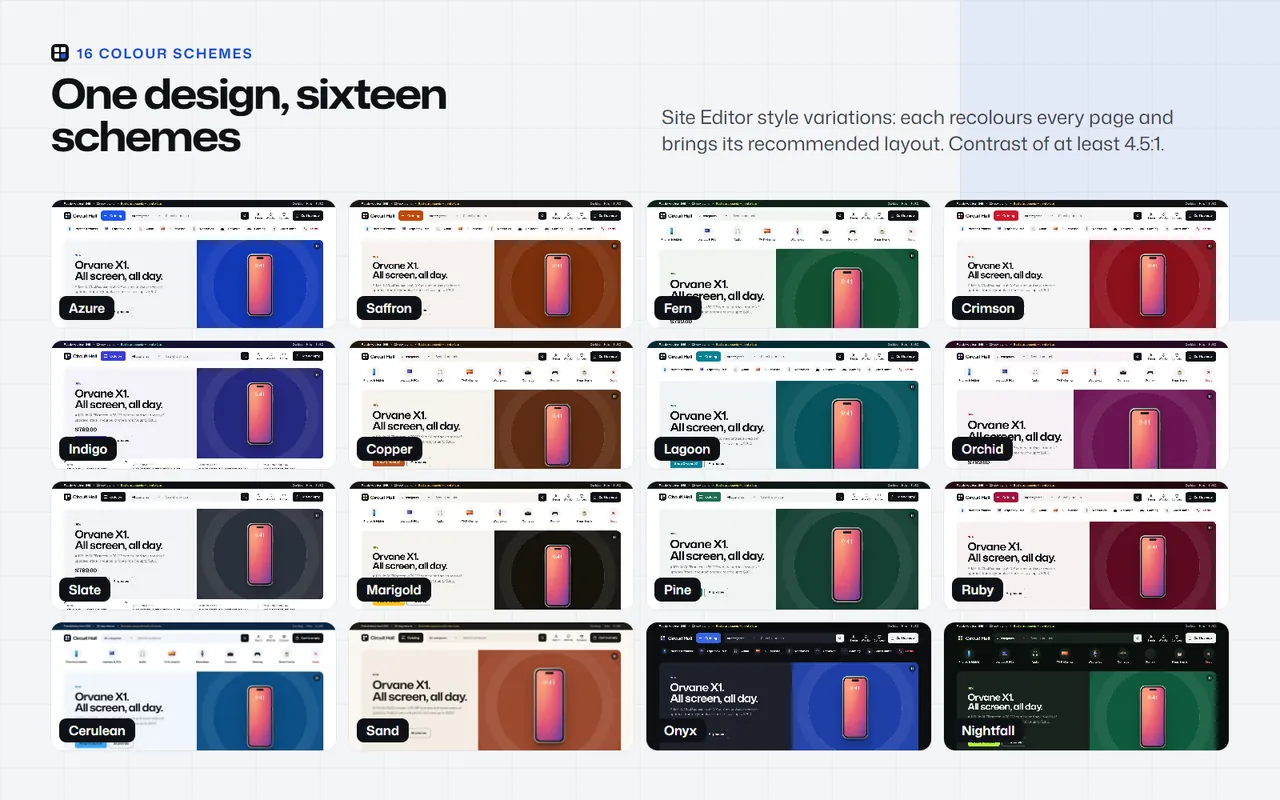
Sixteen colour schemes. Azure, Saffron, Fern, Crimson, Indigo, Copper, Lagoon, Orchid, Slate, Marigold, Pine, Ruby, Cerulean, Sand and the dark Onyx and Nightfall. Schemes are Site Editor style variations, so every colour stays editable in Appearance > Editor > Styles > Colors. Every text colour on its background passes WCAG AA (16 pairs per scheme, checked at build).
Block theme done right. WooCommerce's Cart and Checkout blocks, Product Collection, Product Filters and Mini Cart blocks are used and styled; the classic cart, checkout and account pages are styled too. Vertex never reads or writes orders, so it is neutral to High-Performance Order Storage (HPOS).
Fast and self-hosted. One variable font (Mona Sans, SIL Open Font License 1.1), one stylesheet and one deferred script, no font or icon CDNs.
The sixteen colour schemesCategory page with tiles in the gridProduct page, Studio layout
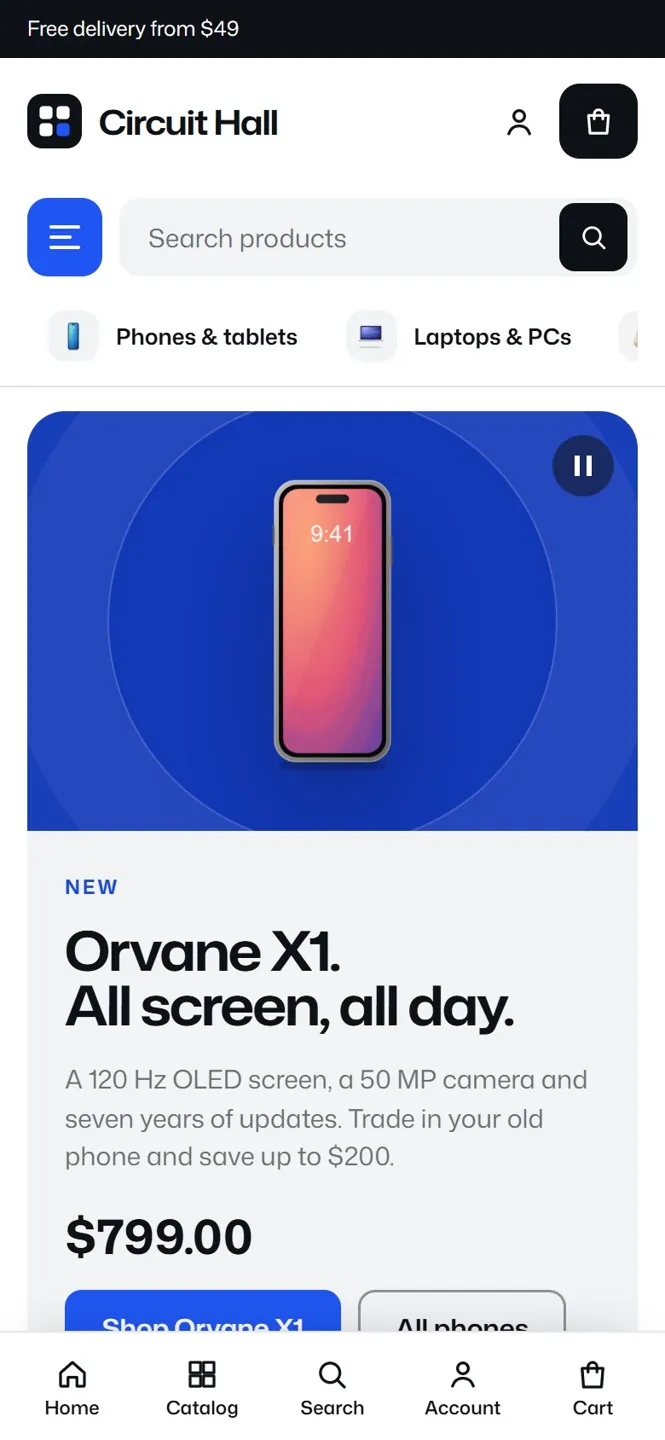
On a phone the Catalog panel becomes a drawer with accordions, the rails swipe, a bottom bar gives Home, Catalog, Search, Account and Cart, category pages get a Filter and Sort bar and product pages a sticky add-to-cart bar.
Vertex on a phone
Pages of this documentation
Installation
Requirements
WordPress 6.7 or newer (tested with 7.1.3), PHP 7.4 or newer (tested with 8.3).
WooCommerce 10.1 or newer (tested with 11.2.1) for the store templates. Without WooCommerce the blog and page templates still work.
Install
Appearance > Themes > Add New Theme > Upload Theme, choose kv-vertex.zip, Install Now, then Activate.
Open Appearance > Vertex.
Own-site build: open the Licence tab and paste the key from your Kavio Labs account. Without a key the theme keeps working in basic mode (templates, layouts, colour schemes and home sections); quick view, wish list, compare, live search, tiles in the grid, Show more and the sticky add-to-cart bar need a valid licence. A licence problem never blocks the store or the admin.
Demo store (optional)
Demo store tab > Import the demo store adds Circuit Hall, a fictional technology store: 30 categories, 36 products from six invented brands (four with colour variations, seven with quantity prices), deals with end dates, reviews, four journal posts with attached products, four pages and every Vertex setting. Your own products, pages and orders are never touched. Remove the demo store deletes exactly the items the import created and puts your previous Vertex settings back.
Pick a colour scheme (Design & layouts tab, scheme cards) and the header, home and product page layouts.
Order your top product categories (drag them in Products > Categories): they fill the Catalog panel and the icon menu. Give each a short name, an icon image and a top product on the category edit screen.
Give your sale prices an end date (Product data > General > Schedule): that date drives every countdown and days-left bar.
Add quantity prices on products you sell in bulk (Product data > General > Quantity prices).
Configuration (Appearance > Vertex)
Design & layouts
Colour scheme cards. Sixteen schemes of one design. A scheme sets the buttons, links, the dark band (top note, deal panel, footer), the tile colour (stage art, mosaic, tiles, offers), the discount colour and the sale price; fine-tune any colour in Appearance > Editor > Styles > Colors.
Header: Auto, Catalog button + icon menu row, Icon menu (big round icons), Compact (one row).
Home page: Auto, Store, Showcase, Deals (which sections show and in which order).
Product page: Studio, Cascade, Compact (B2B).
Category pages: default view: Grid, List, Compact rows. View switcher on or off. Products per row 3, 4 or 5.
Card hover panel, Subtle animations (visitors who prefer reduced motion never see animations).
Text logo: shown with the Vertex mark when the site has no logo image.
Header & menu
Top note: three messages (the third highlighted, with an optional link), service links (Blog, Help), phone number.
Sticky header, Search placeholder, Category select in the search, Live search.
Catalog button label, Number of departments (the rest goes into "More"), Deals link label (empty hides it).
Per category (Products > Categories > Edit): Icon menu name, Icon image, Top product (empty = the best deal of the category).
Home page
Each section has Show and Show on (all devices, desktop and tablet only, phones only).
Stage: seconds per slide (0 = no autoplay) and up to six slides: strip label, label, title (| = new line), text, product (packshot and price), image (without a product), two buttons and links, promotion end.
Department mosaic: title and category slugs or ids (empty = your top categories).
Offers running now: up to eight cards: label, title, text, product or image, link, promotion end, style (light, tile colour, dark).
Tabbed shelves: three tabs (new, bestsellers, on sale) with optional product ids or SKUs, products per tab.
Editors' picks: title, products (empty = the most reviewed), number.
Deal of the day: label, product (empty = the sale with the biggest saving that ends soonest), more deals.
Brand strip: title and number of brands (Products > Brands).
Journal: title and number of stories (your latest posts with a featured image; the Products in this post box on the post edit screen adds "Shop this story").
Promotion end values: empty = no bar; a date (2026-11-30 = the end of that day, or 2026-11-30 18:00); p:<id or SKU> = the end of that product's sale; auto = the sale that ends first.
Category pages & tiles
Tiles: where (category grids, home tabbed shelves, home editors' picks), categories, position, size (1 x 1, 2 wide, 2 x 2), type (banner, countdown promo, video popup, article popup), label, title, text, product or image, button, link, promotion end, video URL (MP4, YouTube, Vimeo), post or page id.
Subcategories as tiles or hidden, Pagination (Show more, load while scrolling, page numbers), phone Filter and Sort bar.
Product cards: brand line, quantity prices, key spec attributes (names of attributes shown in the hover panel), colour swatches, deal countdowns, quick view, wish list, compare, discount and new flags, new for N days, low stock from N.
Product pages
Hover zoom, sticky add-to-cart bar, delivery time attribute ("Ships in 1-2 days" shows arrival dates) and a fallback line, perks (icon, title, text), related products title. Per product: Quantity prices and Product video (Product data > General).
Footer & mobile
Promise line, newsletter band (title, text, button, link), about text, payment chips (plain text), social links (Name|https://...), mobile bottom bar, back to top, free-shipping amount for the cart progress bar. Left empty, the bar uses the lowest minimum amount of your enabled Free shipping methods; it refreshes when you add, remove, switch or edit one (otherwise within 10 minutes).
Using Vertex
Layouts and schemes
Every scheme recommends a header and a home layout; with the layout settings on Auto they follow the scheme (for example Saffron = Catalog header + Deals home, Fern = Icon menu + Showcase, Indigo = Compact + Store). Pick a layout to fix it. Schemes are style variations: after applying one you can change any colour in the Site Editor.
Countdowns and days-left bars
Every timer reads the sale price end date of WooCommerce (Product data > General > Schedule). The date picker stores the end of that day in your site time zone, and WooCommerce ends the sale at that moment; the countdown stops at the same moment. A timer never restarts on reload. Countdowns show only for sales that end within 60 days.
Quantity prices
On a product, Product data > General > Quantity prices: 10:33, 25:29 means 33 each from 10 pieces and 29 each from 25. Enter the prices the way you enter your product prices (with or without tax, as in WooCommerce > Settings > Tax). On a variable product set it on the parent: it applies to every variation and the quantities of all variations in the cart count together. A tier never raises a price: when a running sale is lower, the sale price wins. On a variable product the price table lists every tier with a "from" price until the shopper picks an option; then it shows the prices of that option (a tier above the option's price is left out, because the cart does not charge it). Switch the feature off in Category pages & tiles > Product cards > Quantity prices.
Tiles in the grid
A tile takes a place in the product grid. Positions count the places of the grid, so with tiles at 3 and 8 the second tile is the eighth place. Tiles show on the first page of a category only, never on search results. A countdown promo needs a promotion end; a video tile opens the video in a dialog; an article tile opens the post or page in a dialog.
Block patterns
Every home section is a block pattern (inserter > Patterns > Vertex sections), so you can place the stage, the deal of the day or the journal on any page. Store page patterns (FAQ, shipping and returns, about) are in Vertex store pages.
Wish list, compare, recently viewed
They are saved in the shopper's browser (localStorage), work for guests and need no account; nothing is sent to the server.
Developer notes
Block theme, text domain kv-vertex, PHP namespace KavioLabs\Vertex, option kv_vertex_settings (one autoloaded array; the schema in inc/Settings.php drives defaults, sanitising and the settings page).
Storefront parts are marker groups in templates, parts and patterns (class vx-dyn-*, for example vx-dyn-header, vx-dyn-home, vx-dyn-home-stage, vx-dyn-card, vx-dyn-pinfo, vx-dyn-pbuytop, vx-dyn-ptabs); the Group with class vx-pp gets the layout modifier vx-pp--studio|cascade|compact; inc/Blocks.php fills them on render_block.
The product grid is WooCommerce's Product Collection; each item renders the Vertex card (inc/Cards.php). Tiles are inserted into the product template output (inc/Catalog.php, filter render_block_woocommerce/product-template).
Countdowns: Data::sale_end() is get_date_on_sale_to() unchanged (earliest of the variations on sale; 0 beyond 60 days), Data::soonest() the first end among the running sales, Data::end_of() resolves the "Ends" settings. Markup: Cards::clock() and [data-vx-end] (unix time) with [data-vx-left] (seconds, used by static snapshots when window.KVDEMO is set). The script hides an element when its end passes.
The product page keeps WooCommerce's Add to cart form block (classic form) in the buy box; the colour and option chips ([data-vx-proxy]) set its selects. Product tabs are WooCommerce's tabs (woocommerce_product_tabs) in the Vertex markup, so tabs added by other extensions stay.
Colour tokens: --vx-* CSS variables read the theme.json palette (--wp--preset--color--*) and settings.custom.vx of the active style (--wp--custom--vx--*). The styles are theme.json (Azure) and styles/*.json; css/00-map.css, inc/schemes.php and the variations are generated by tests/gen-theme-json.js with a contrast gate.
Top categories: Data::depts(); term meta kv_vertex_short, kv_vertex_icon_image, kv_vertex_top. Quantity prices: product meta _kv_vertex_tiers (inc/Tiers.php, applied on woocommerce_before_calculate_totals). Product video: product meta _kv_vertex_video. Post products: post meta _kv_vertex_products.
Caches: transients kv_vertex_menu, kv_vertex_depts, kv_vertex_deals, kv_vertex_brands (cleared when products, categories, brands or settings change; expired deals are filtered on read).
Script: assets/js/theme.js (no jQuery except the variation form events on product pages), settings in window.vxCfg; add to cart, quick view and lists use the Store API. After an add it fires wc-blocks_store_sync_required so the Interactivity mini cart reads the cart again. Editor: assets/js/editor.js.
Visibility classes: vx-hide-d, vx-hide-t, vx-hide-m (usable in any block's Additional CSS classes).
WP-CLI: wp kv-vertex demo import|remove|status|scheme <scheme>|set '<json>' (use --user=1 so the scheme saves).
Layout tokens: <html data-vx="head-* home-* pp-* more hover still"> (Theme::html_flags()); the CSS styles the three headers and home layouts from these tokens, so the markup stays the same.
FAQ
Is Vertex only for electronics stores?
No. The design is sector neutral (white page, ink type, one accent); the Circuit Hall demo happens to be a technology store. Pick a scheme that fits your brand and replace the demo content with your own.
Does the cart really charge the quantity prices?
Yes. The theme sets the tier price on the cart line before WooCommerce calculates totals, so the cart, the mini cart, the checkout and the order all show the tier price. Switching the theme off removes the tier prices again.
Why does a countdown not show?
The sale needs an end date within 60 days, and the product must be on sale now.
Does Vertex change my orders or need HPOS settings?
No. The theme never reads or writes orders.
Will my products and pages be touched by the demo?
No. The importer tags everything it creates and Remove deletes only those items.
Can I use it without a licence key?
Yes, in basic mode. The licensed extras are quick view, wish list, compare, live search, tiles in the grid, Show more and the sticky add-to-cart bar.
Is Vertex also available for other platforms?
Yes, for CS-Cart / Multi-Vendor and OpenCart: the same design, separate products.
The department store block theme for WooCommerce: colour-coded departments, a department list beside the hero slider with two side promos, a big search with a department picker, tabbed product grids, a 2 + 1 + 2 offer grid, deals of the day with real countdowns, a department showcase, a promotions band and a three-column product page with a sticky buy box. Four styles (Meridian, Harbor, Citrus, Night) as Site Editor style variations, every colour editable. Cart and Checkout blocks styled, HPOS neutral.
Stop AI crawlers, scrapers, card testers, vulnerability scanners and unwanted countries before WordPress builds a page. Googlebot and Bingbot are verified by DNS and always allowed; 50+ bots get one switch each; country rules use free GeoIP databases and can close only the checkout (block and classic checkout, wc-ajax and Store API); card testing protection on order submissions; the add to cart flood fix for requests without a WooCommerce session; IP and network lists, rate limits for search, filters, forms and login, honeypots; a one-second challenge instead of a captcha; learning mode, dashboard, log, IP tester and Cloudflare export. HPOS and blocks compatible.
The campaign block theme for WooCommerce that makes a store feel like a sale is always on: a flash bar with the sale that ends first, a bento hero with a live deal tile, a dark flash deals zone with flip-tile countdowns on real sale end dates, round discount stickers, a category pill bar, stories with a player, a Discover feed with promo cells inside the grid, a product page campaign strip and a sticky phone buy bar. Sixteen colour styles as Site Editor style variations, two of them dark. Cart and Checkout blocks styled, HPOS neutral.