by Kavio Labs · for WooCommerce 10.1+ on WordPress 6.7+
Store pickup for WooCommerce: pickup locations with opening hours, holidays and time zones, pickup slots or days with capacity taken atomically, a pickup code with QR on the order and e-mails, a Ready for pickup status and e-mail, and a pickup desk where staff check the code of that order. Built on WooCommerce Local Pickup (Checkout block Pickup tab) and the classic checkout, HPOS.
Tested on WooCommerce 11.2.1 & WordPress 7.1.3Updated Nov 20, 2026Version 1.0.1Compatible with WooCommerce 10.1 – 11.2, WordPress 6.7+ No core file edits
Built forWooCommerce
Click & Collect Store Pickup for WooCommerce: order online, collect at the counter.1 of 9
What it does
Store pickup for WooCommerce: pickup locations with opening hours, holidays and time zones, pickup slots or days with capacity taken atomically, a pickup code with QR on the order and e-mails, a Ready for pickup status and e-mail, and a pickup desk where staff check the code of that order. Built on WooCommerce Local Pickup (Checkout block Pickup tab) and the classic checkout, HPOS.
Order online, collect at the counter. Click & Collect Store Pickup for WooCommerce turns WooCommerce's Local Pickup into a full pickup workflow: customers choose a store and a pickup time, get a pickup code, and your staff hand the order over after checking it.
What you get
Download & installThe plugin .zip, installed in Plugins > Add New Plugin > Upload Plugin. Download it from My licenses right after payment.
12 months of updates & supportNew versions and help for 12 months (24 or 36 months at checkout). After that the plugin keeps working; renew anytime at 50%.
License for your storeOne production domain with all its subdomains; staging and local development hosts are free. How licensing works
30-day refundFull refund within 30 days of your first purchase, no reason needed. Refund policy
Tested buildsWooCommerce 10.1 – 11.2, WordPress 6.7+. Tested on WooCommerce 11.2.1 and WordPress 7.1.3.
Documentation & supportFull guide (Installation, Configuration, Usage, Developer notes) on this page. Tickets from your account, same-day reply on weekdays (Mon-Fri 09:00-18:00 UTC+3).
Compatibility
Click & Collect Store Pickup works with WooCommerce 10.1 – 11.2, WordPress 6.7+.
We list the builds we install and test on. “Tested” means the test plan ran on that build; “Supported” means the build is inside the supported range.
Compatibility
Version
Range
Runs on
Status
WooCommerce 11
11.0 – 11.2
WordPress 6.7 – 7.1
Tested on 11.2.1
WooCommerce 10
10.1 – 10.x
WordPress 6.7+
Supported
WordPress
6.7 – 7.1
PHP 7.4 – 8.3
Tested on 7.1.3
1.0.1
Nov 20, 2026
Latest
Fix: paying an existing order through the Store API route for existing orders (POST /wc/store/v1/checkout/{id}, used by express pay buttons on the Pay for order page) no longer asks for a pickup time (HTTP 400) and never moves the order's slot to a choice in the payer's cart. The order keeps its own pickup, like on the classic Pay for order page; a failed order's pickup is reopened when it is paid.
1.0.0
Nov 20, 2026
First release: pickup locations (address, hours with breaks, holidays and special days, time zone, import of WooCommerce Local Pickup locations), pickup slots / pickup days / ready-from per location with capacity, preparation time, cut-off and days ahead, shipping method on the WooCommerce Local Pickup framework (Checkout block Pickup tab, tax at the store) and in the classic checkout, server-side placement with atomic capacity, pickup code + QR (order received, My Account, e-mails; never in order data, REST or Store API), "Ready for pickup" order status and e-mail (switched off), reminders and auto-cancel (Action Scheduler), Pickup desk with a Pickup staff role (mark ready, scan / type, code check with try-lock, attempt limit and rate limit, manager override), order box and orders-list column, optional stock per location, store finder block and shortcode, HPOS and legacy storage.
How do I install the plugin?
Upload the plugin. Plugins > Add New Plugin > Upload Plugin: choose the .zip from My licenses and click Install Now.
Activate. Activate it on the Plugins screen. WooCommerce must be active; the plugin tells you if it is not.
Enter the license key. WooCommerce > Settings, the plugin's own tab: paste the key from My licenses. You have 14 days to do it; staging and local sites are included.
WooCommerce 10.1 – 11.2, WordPress 6.7+. Tested on WooCommerce 11.2.1 and WordPress 7.1.3. The Compatibility tab lists every version range.
Do the plugins work with HPOS and the block checkout?
Yes. Every plugin declares compatibility with High-Performance Order Storage and the Cart and Checkout blocks, and is tested in both the block and the classic cart and checkout.
Will they work with my theme?
They use WooCommerce hooks, blocks and the Store API instead of template overrides, so block themes and classic themes both work. We test on Twenty Twenty-Five.
What does the license cover?
One production store domain with every subdomain (www, shop., staging.), plus local development hosts such as localhost, *.local and *.test. A store on another domain needs its own license; a second-store license is 40% off. You have 14 days after installing to enter the key. 12 months of updates and support are included; after that the plugin keeps working and renewals are 50% off. How licensing works
Can I get a refund?
Yes. Ask for a full refund within 30 days of your first purchase, no reason needed: open a ticket or write to [email protected] with your order number. The money goes back to the card or bank account you paid with within 5 business days of approval. Refund policy
How do I get help?
Open a ticket from your account, so your license details are attached. We answer with a same-day reply on weekdays (Mon-Fri 09:00-18:00 UTC+3). Support policy. Not a customer yet? Ask a pre-sales question.
Customers choose a pickup location and a pickup time at checkout and get a pickup code with a QR code. Your staff prepare the order, mark it ready and hand it over at the Pickup desk after checking the code of that order.
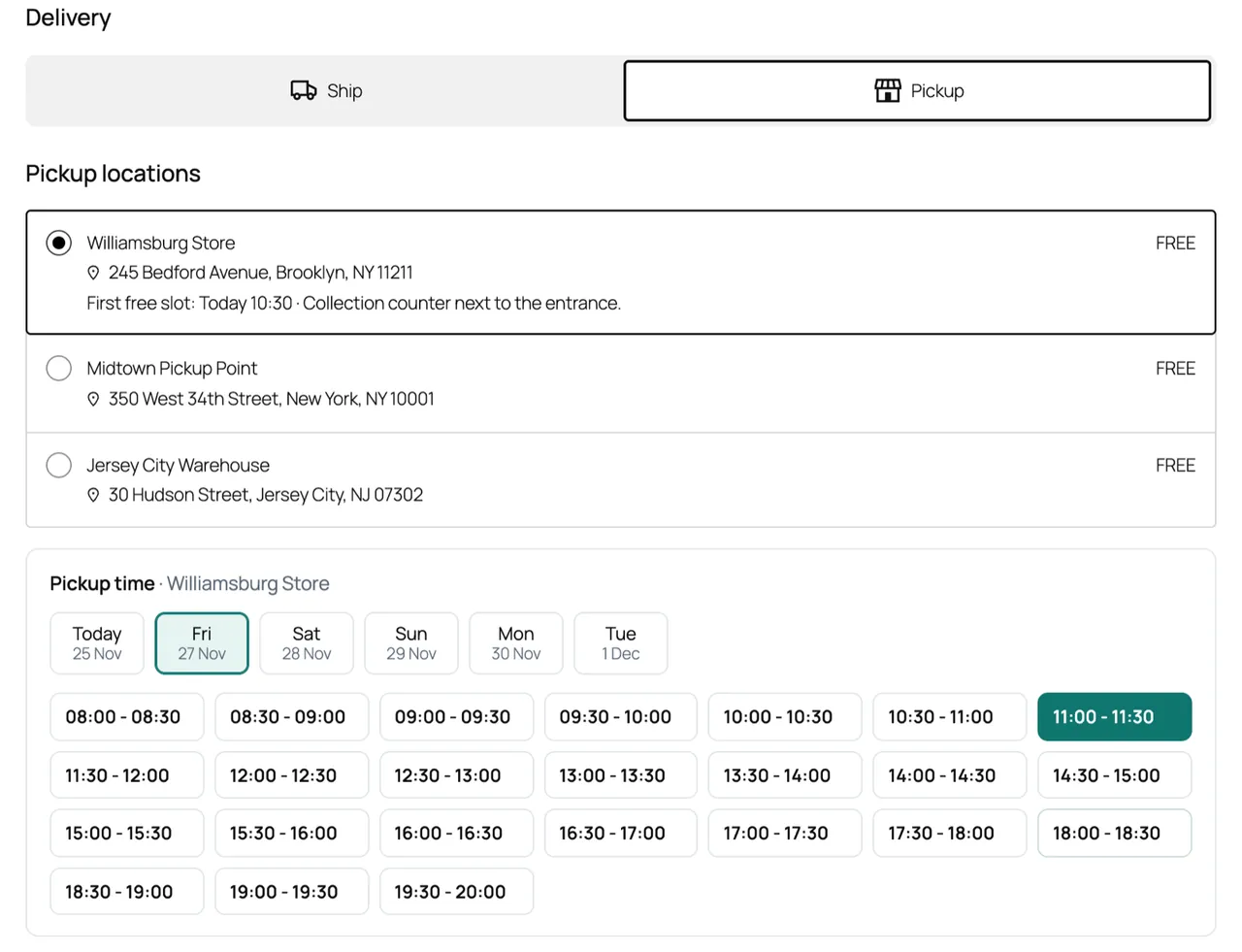
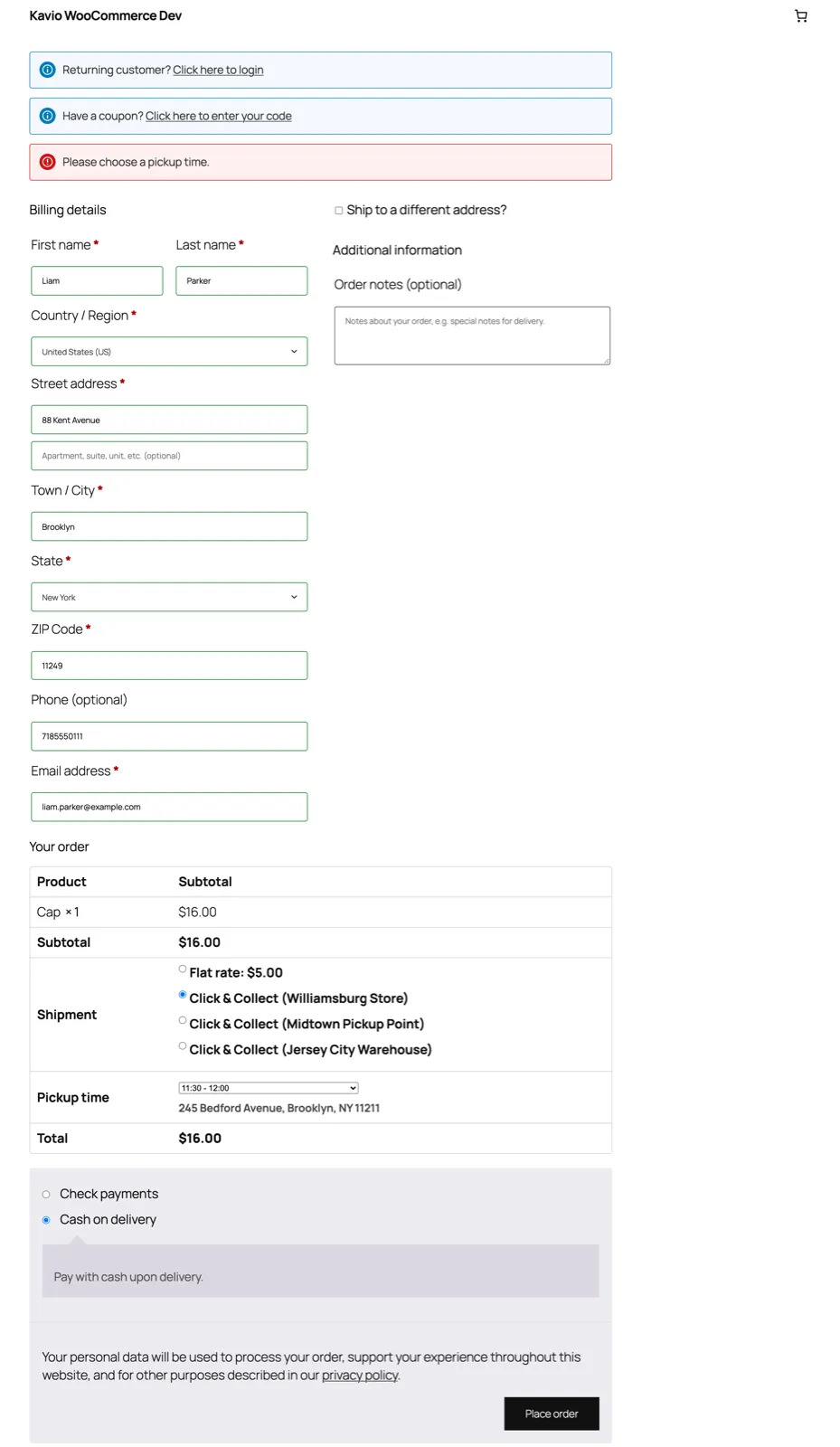
Pickup time in the Checkout block
What it does
Pickup locations with address, phone, pickup details, weekly opening hours (with breaks), holidays and special days, and their own time zone. Import of WooCommerce's Local Pickup locations.
Pickup time at checkout, per location: a time slot (slot length, orders per slot), a pickup day (orders per day) or no choice ("Ready from today 14:30"); preparation time, same-day cut-off and days to choose from.
Built on WooCommerce Local Pickup: the locations appear in the Checkout block's Pickup tab, with no shipping address asked and tax at the store. In the classic checkout they are shipping options with a pickup time select.
Checked on the server when the order is placed (classic checkout, Checkout block, Store API), in the location's time zone. Places are taken with one atomic database update, so parallel orders never overbook a slot.
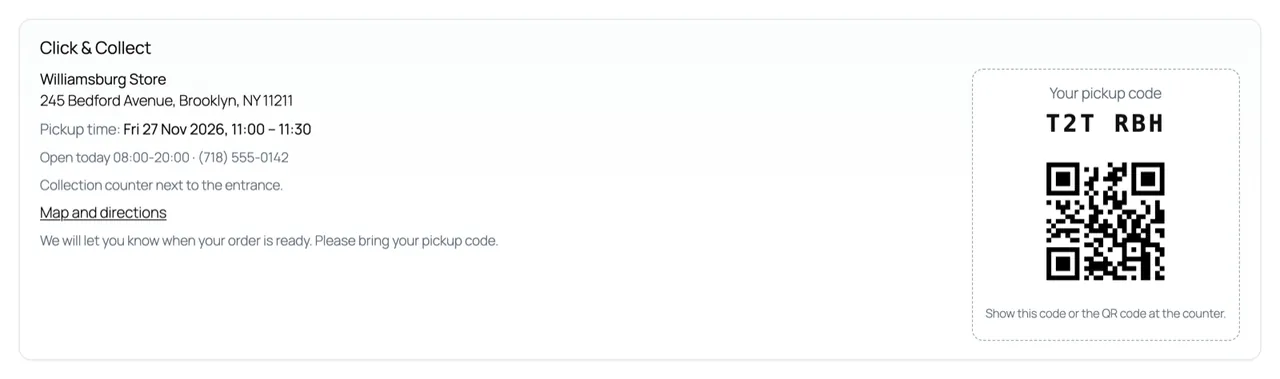
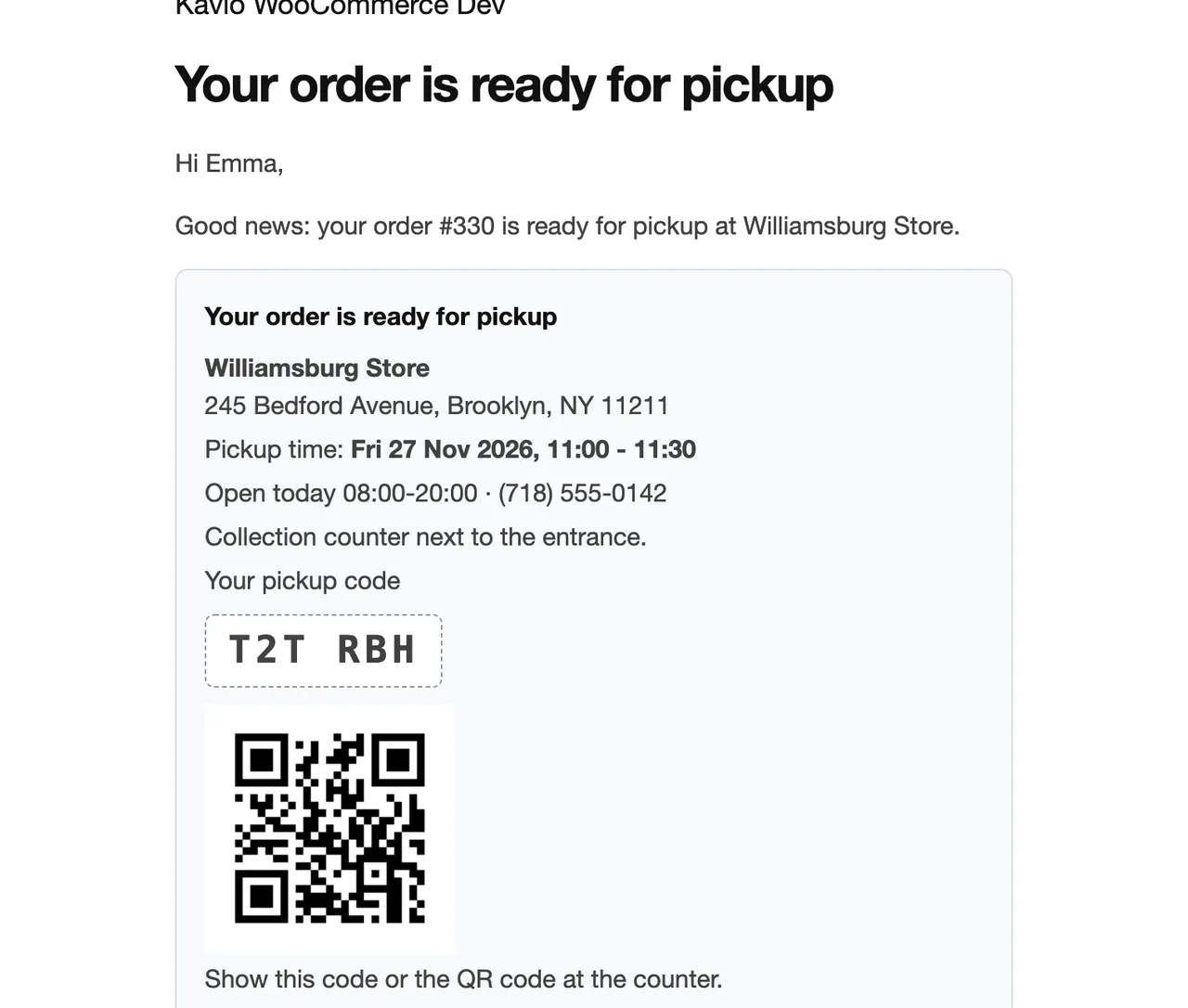
Pickup code + QR on the order received page, in My Account and in the customer e-mails. Never stored in order data, never returned by the REST API or the Store API, never shown to staff.
"Ready for pickup" order status and e-mail (installed switched off), reminders and an optional auto-cancel for orders nobody collects.
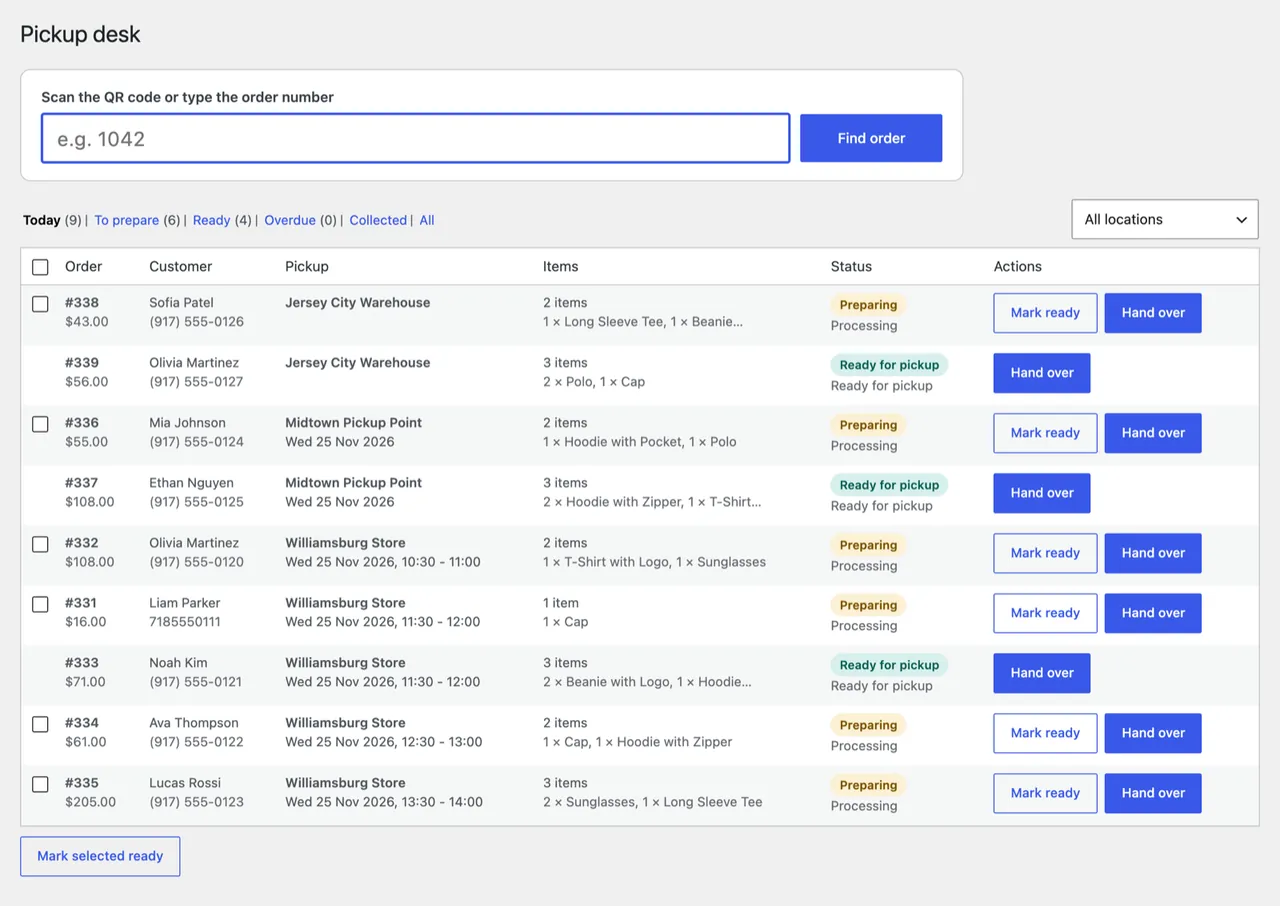
Pickup desk for a new "Pickup staff" role and shop managers: today, to prepare, ready, overdue, collected; mark ready; scan or type; hand over with the code. Wrong codes locked per order, rate limit per staff member, one check per order at a time.
Store finder block and shortcode. Optional stock per location. HPOS and legacy order storage.
Requirements
WordPress
6.7 or later (tested on 7.1.3)
WooCommerce
10.1 or later (tested on 10.1.4 and 11.2.1)
PHP
7.4 or later (tested on 8.1 and 8.3)
Order storage
HPOS and legacy posts storage (compatibility declared)
Checkout
Checkout block (Pickup tab) and classic shortcode checkout
Pages
Installation
In WordPress go to Plugins > Add New > Upload Plugin, choose kv-click-collect-kv.zip (or the CodeCanyon / WooCommerce.com zip you bought) and activate it. WooCommerce 10.1 or later must be active.
Activation creates the plugin tables, the Pickup staff role and the Pickup desk menu, registers the "Ready for pickup" order status and e-mail (switched off) and schedules a sweep every 15 minutes (Action Scheduler).
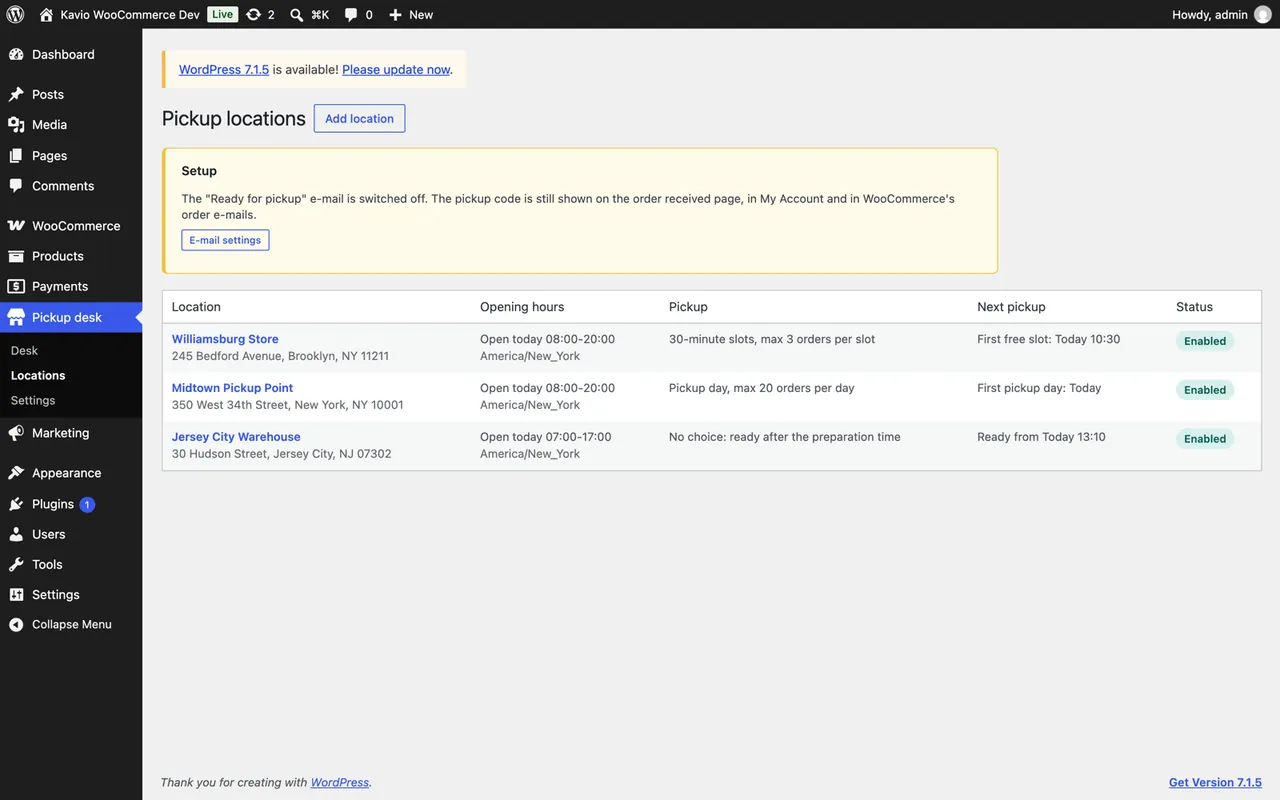
Open Pickup desk > Locations and add your first store, or click Import locations to take over the WooCommerce Local Pickup locations.
If your checkout uses the Checkout block, the Locations screen shows Turn on the Pickup tab while WooCommerce Local Pickup is off. Turn it on so the locations appear in the Pickup tab. Your core Local Pickup locations are not changed.
Optional: WooCommerce > Settings > Emails > Ready for pickup: switch the e-mail on.
Own-site build: enter your licence key in WooCommerce > Settings > Click & Collect. The storefront features run during a start period without a key.
Pickup locations
Staff accounts
Create a user with the role Pickup staff for every counter. They log in to the Pickup desk only (no WooCommerce, products or settings). Administrators and shop managers can use the desk and manage locations.
Updating and uninstalling
Updates keep all data. Deleting the plugin keeps locations and pickup records unless Remove data on uninstall is on (Settings); then the tables, settings, the e-mail settings and the Pickup staff role are removed. Orders are never changed.
Configuration
Locations (Pickup desk > Locations)
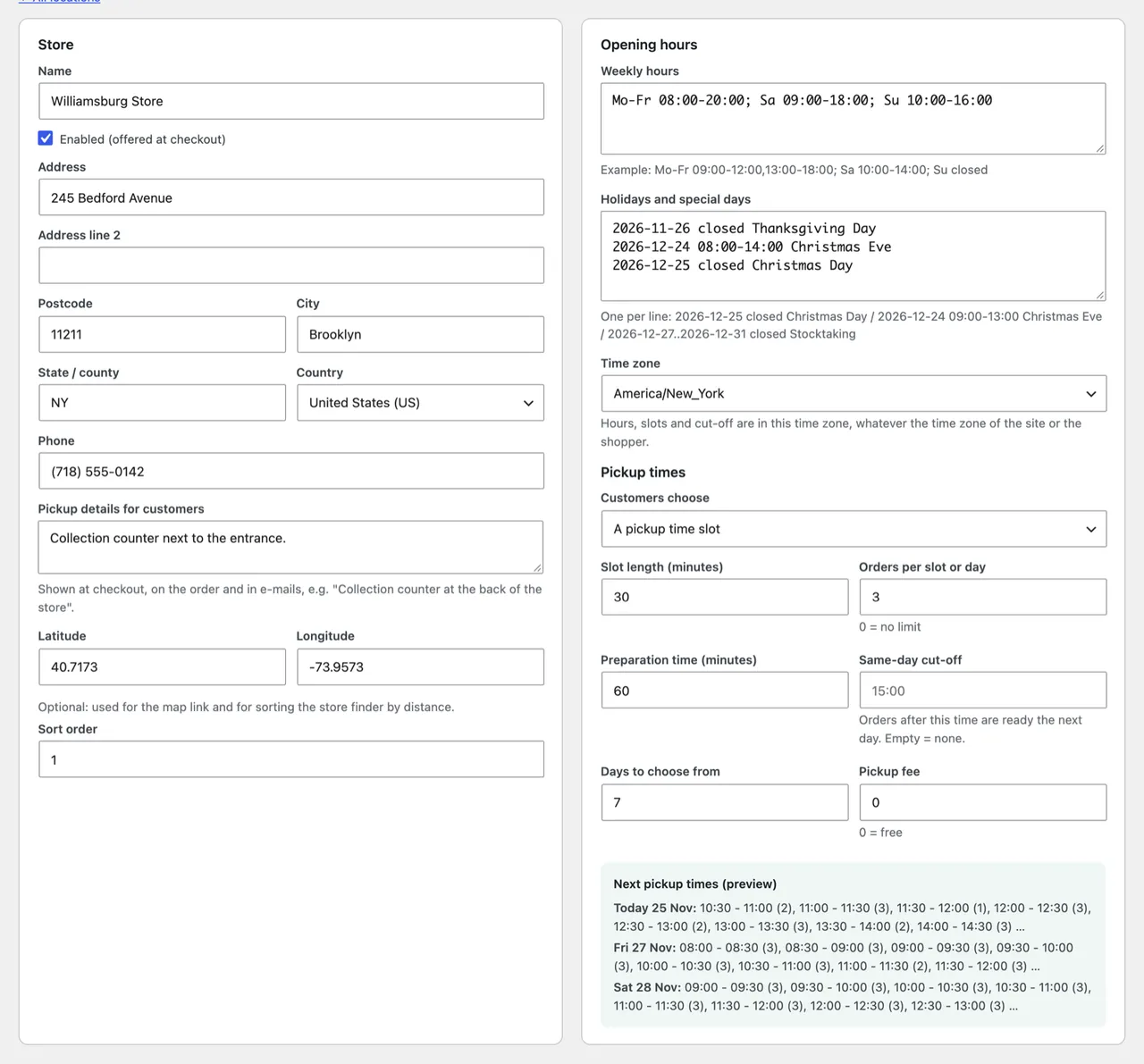
Location form
Field
Meaning
Name, address, phone
Shown at checkout, on the order, in e-mails and in the store finder.
Pickup details for customers
e.g. "Collection counter at the back of the store".
Latitude / longitude
Optional: map link and "Near me" sorting in the store finder. Without them the map link searches the address on OpenStreetMap.
Weekly hours
Mo-Fr 09:00-12:00,13:00-18:00; Sa 10:00-14:00; Su closed. Day ranges wrap (Fr-Mo). Empty = always open.
Holidays and special days
One per line: 2026-12-25 closed Christmas Day, 2026-12-24 09:00-13:00 Christmas Eve, 2026-12-27..2026-12-31 closed Stocktaking. The last matching line wins.
Time zone
Hours, slots and cut-off are in this time zone, whatever the site's or the shopper's.
Customers choose
A pickup time slot, a pickup day, or nothing (the order is ready after the preparation time; the customer sees "Ready from ...").
Slot length
Minutes per slot (5-720).
Orders per slot or day
Capacity; 0 = no limit.
Preparation time
Minutes from the order to the first possible pickup.
Same-day cut-off
Orders after this time are ready the next day at the earliest.
Days to choose from
1-60.
Pickup fee
Charged as the shipping cost of that location (taxable).
The preview under the form shows the next pickup times with the places left. A location that has no free time within the days to choose from is not offered at checkout.
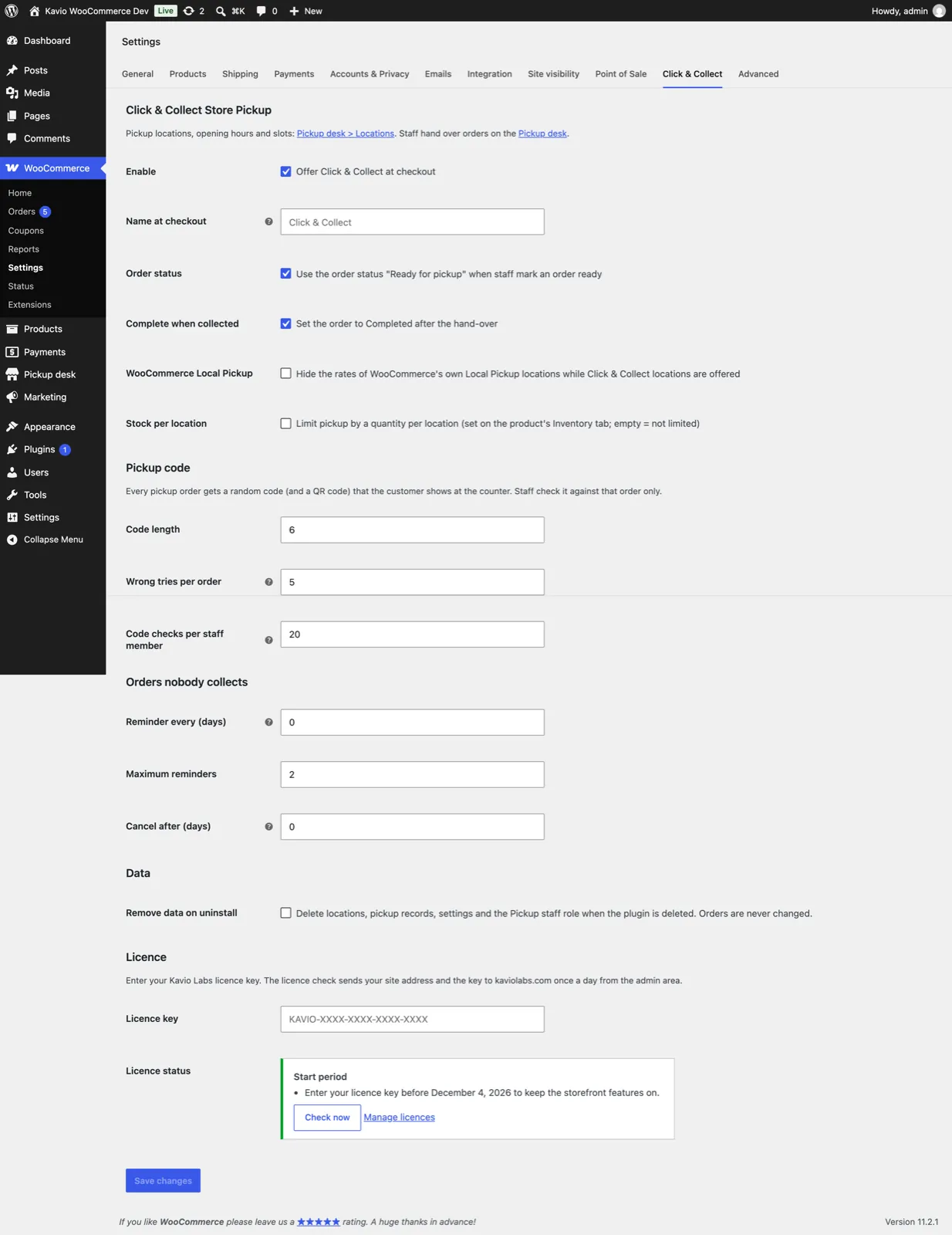
Offer Click & Collect at checkout. Existing pickups can always be handed over.
Name at checkout
Click & Collect
Shown before the location name.
Order status
on
Use the status "Ready for pickup" when staff mark an order ready (otherwise an order note).
Complete when collected
on
The hand-over sets the order to Completed.
WooCommerce Local Pickup
off
Hide the core Local Pickup rates while Click & Collect locations are offered (after an import).
Stock per location
off
Pickup quantities per location on the product's Inventory tab (empty = not limited).
Code length
6
6-10 characters from 31 unambiguous letters and digits.
Wrong tries per order
5
Then the order is locked until a manager resets the tries, sends a new code or hands over with a reason.
Wrong codes per staff member
20
Per 10 minutes; right codes do not count, so a busy counter is never blocked.
Reminder every (days) / Maximum reminders
0 / 2
Sends the ready e-mail again for orders nobody collected (when the e-mail is on).
Cancel after (days)
0
Cancels ready orders nobody collected (WooCommerce restocks as usual).
Remove data on uninstall
off
See Installation.
E-mail (WooCommerce > Settings > Emails > Ready for pickup)
Subject, heading, additional content and format like every WooCommerce e-mail. Installed switched off. The pickup box (location, time, code, QR) is also added to WooCommerce's own customer order e-mails; store e-mails show the location and time without the code. Templates: templates/emails/kv-clc-ready.php (override in yourtheme/woocommerce/emails/).
Licence
Own-site build: without a valid licence (after the start period) new orders are no longer offered Click & Collect and the store finder is empty. The desk, existing pickups, codes and e-mails keep working. CodeCanyon and WooCommerce.com builds lock nothing.
Usage
At checkout
Checkout block: the customer opens the Pickup tab, chooses a location (each shows its address and the first free slot) and then a day and a time. Full slots are disabled. "Place order" without a time shows "Please choose a pickup time".
Classic checkout: the locations are shipping options; under them a Pickup time select grouped by day.
Classic checkout
The server checks everything again when the order is placed and takes the place atomically; if the slot was taken meanwhile, the customer sees "the chosen pickup time has just been fully booked" and chooses another one.
After the order
The order received page, My Account > View order and the customer e-mails show the location, pickup time, today's hours and the pickup code with its QR code.
Pickup code
Pickup desk
Pickup desk
Today / To prepare / Ready / Overdue / Collected / All, with a location filter.
Mark ready: the order gets the status "Ready for pickup" and the customer the ready e-mail (when switched on). Select several orders and click Mark selected ready (e-mails go out through Action Scheduler).
Find order: scan the customer's QR code (a 2D scanner types it) or type the order number.
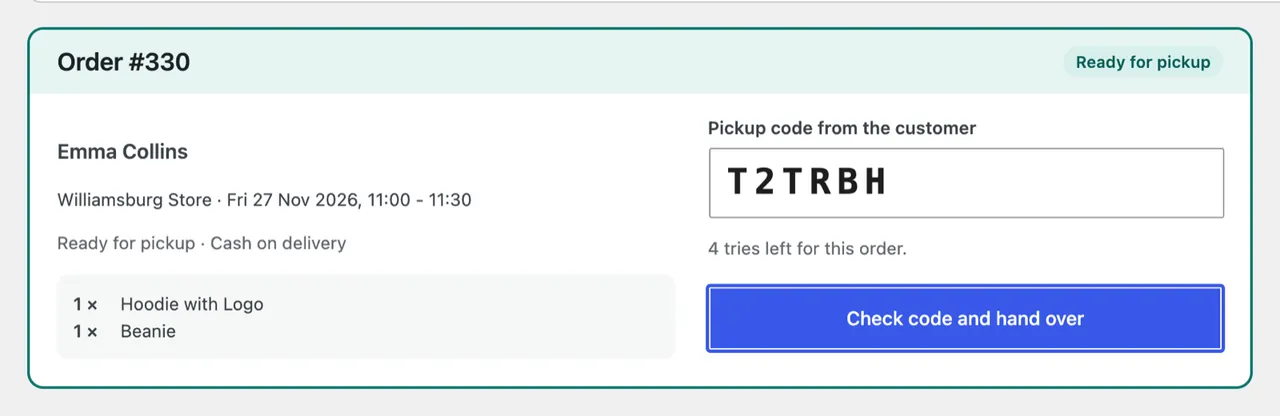
Hand over: type the customer's code (spaces, dashes and lower case are fine) and click Check code and hand over. The order is completed and the note says who handed it over.
Hand-over
Wrong codes count per order; after the limit the order is locked. Managers can reset the tries or send a new code in the order screen, or hand over without the code with a written reason (recorded on the order).
Order screen
Order box
The Click & Collect box shows the location, the pickup time, the state, the wrong tries and the history. Actions: mark ready, hand over at the desk, New pickup code (the old one stops working; with the ready e-mail on, the customer gets the new code), Reset wrong tries, Change location or time (capacity applies). For orders you create in the admin, choose a location there to make them pickup orders.
The orders list has a Pickup column and the bulk action Change status to ready for pickup.
Cancel, refund, delete
Cancelled, refunded, deleted and trashed orders give their place (and location stock) back once. Reopening a cancelled order takes them again when the slot is still free. Abandoned checkout drafts are freed by the sweep after 30 minutes.
Card declined / failed payment: the place and the location stock are given back. When the customer pays later from Pay for order (also with express pay buttons that use the Store API route for existing orders), the order keeps its own location and slot (nothing to choose again) and takes its place again when the slot is still free.
Store finder
Add the block Pickup store finder or the shortcode [kv_store_finder] (search="no", hours="no", pickup="no", title="Our stores").
Store finder
Ready e-mail
Ready e-mail
Developer notes
Shipping methodkv_clc, one rate per location: kv_clc:<location id>, supports local-pickup. Rate meta pickup_location, pickup_address, pickup_details (core keys), _kv_clc_location; after placement the shipping line gets pickup_time (readable, location time). The pickup code is never order or item meta.
Store API: cart extension kv-click-collect (location_id, picker with days and slots, slot); checkout request field extensions["kv-click-collect"].slot (slot start as a Unix timestamp); update callback namespace kv-click-collect (data.slot). The placement runs on woocommerce_store_api_checkout_update_order_from_request for POST and answers HTTP 400 kv_clc_pickup with the reason.
Classic checkout: field kv_clc_slot; validation on woocommerce_after_checkout_validation, placement on woocommerce_checkout_order_created.
Order statuswc-kv-pickup-ready (paid status). E-mail id kv_clc_ready.
Tables (prefix wp_kv_clc_): locations, pickups (one per order: code, state, attempts, collected by), slots (counter per location + slot start), holds (one per order), stock, events.
Capabilities: kv_clc_desk (desk), kv_clc_manage (locations, override, new code); role kv_clc_pickup_staff.
Filters: kv_clc_now (clock for slots, Unix time), kv_clc_collectable_statuses (order statuses that can be handed over, default processing, kv-pickup-ready), woocommerce_shipping_kv_clc_is_available.
QR payload: KVCC:<order id>:<code>.
HPOS: orders only through CRUD; compatibility declared for custom_order_tables and cart_checkout_blocks.
FAQ
Does it replace WooCommerce Local Pickup?
It builds on it. Core Local Pickup lists locations with an address and details, only in the Checkout block. This plugin adds opening hours, holidays, pickup slots with capacity, pickup codes, the ready status and e-mail, the pickup desk, the store finder and the classic checkout. Its locations use the same Pickup tab; import the core locations and hide their rates if you want each store listed once.
Why does it keep its own locations instead of adding hours to the core ones?
WooCommerce stores its Local Pickup locations as a numbered list without ids: deleting or reordering one renumbers the others, so hours, slots and codes would end up on the wrong store. The core method also is not available in the classic checkout.
Which time zone do the slots use?
The location's. A store in New York shows New York times on a site set to London.
Can two customers get the last place of a slot?
No. The place is taken with one conditional database update when the order is placed; we test 8 parallel checkouts for 3 places.
Can staff see the pickup code?
No. The customer brings it. Managers can send a new code or hand over with a written reason.
What if a customer lost the code?
Open the order and click New pickup code (with the ready e-mail on the customer gets it at once), or a manager hands over with a reason after checking ID.
Is the QR code made by an online service?
No, it is drawn on your server (SVG on pages, PNG embedded in e-mails).
Does it work with page caches?
The checkout, order and account pages are not cached by WooCommerce-aware caches. The store finder shows "open now" and the next pickup time at the time the page was rendered.
Multisite, multi-currency, translations?
Not tested in 1.0. The plugin is translation-ready (languages/kv-click-collect.pot).
Why does the order summary show "Click & Collect" on WooCommerce 10.1?
The Checkout block of WooCommerce 10.1 prints shipping labels with an ampersand in that encoded form in the order summary (WooCommerce 11 shows "Click & Collect"). On 10.1 you can set a title without "&" (for example "Click and Collect") in WooCommerce > Settings > Click & Collect.
The department store block theme for WooCommerce: colour-coded departments, a department list beside the hero slider with two side promos, a big search with a department picker, tabbed product grids, a 2 + 1 + 2 offer grid, deals of the day with real countdowns, a department showcase, a promotions band and a three-column product page with a sticky buy box. Four styles (Meridian, Harbor, Citrus, Night) as Site Editor style variations, every colour editable. Cart and Checkout blocks styled, HPOS neutral.
Stop AI crawlers, scrapers, card testers, vulnerability scanners and unwanted countries before WordPress builds a page. Googlebot and Bingbot are verified by DNS and always allowed; 50+ bots get one switch each; country rules use free GeoIP databases and can close only the checkout (block and classic checkout, wc-ajax and Store API); card testing protection on order submissions; the add to cart flood fix for requests without a WooCommerce session; IP and network lists, rate limits for search, filters, forms and login, honeypots; a one-second challenge instead of a captcha; learning mode, dashboard, log, IP tester and Cloudflare export. HPOS and blocks compatible.
The campaign block theme for WooCommerce that makes a store feel like a sale is always on: a flash bar with the sale that ends first, a bento hero with a live deal tile, a dark flash deals zone with flip-tile countdowns on real sale end dates, round discount stickers, a category pill bar, stories with a player, a Discover feed with promo cells inside the grid, a product page campaign strip and a sticky phone buy bar. Sixteen colour styles as Site Editor style variations, two of them dark. Cart and Checkout blocks styled, HPOS neutral.