by Kavio Labs · for WooCommerce 10.1+ on WordPress 6.7+
Cost prices per product, variation and supplier, frozen on every order line at checkout, with profit and margin reports for products, categories, suppliers, orders, payment and shipping methods, coupons, taxes and refunds, CSV export and import; works with WooCommerce's own Cost of Goods Sold field.
Tested on WooCommerce 11.2.1 & WordPress 7.1.3Updated Nov 20, 2026Version 1.0.0Compatible with WooCommerce 10.1 – 11.2, WordPress 6.7+ No core file edits
Built forWooCommerce
Product Cost & Profit for WooCommerce: cost prices frozen on every order line, real profit per product and order.1 of 9
What it does
Cost prices per product, variation and supplier, frozen on every order line at checkout, with profit and margin reports for products, categories, suppliers, orders, payment and shipping methods, coupons, taxes and refunds, CSV export and import; works with WooCommerce's own Cost of Goods Sold field.
Revenue is not profit. WooCommerce shows what you sold. Product Cost & Profit shows what you kept: net sales minus the cost of the goods, payment fees, shipping costs and refunds, per order, per product, per variation, per supplier, per payment and shipping method.
Features
Cost prices, your way
A cost field on products, variable products and every variation; quick edit and bulk edit
One cost list for the whole catalogue: type a cost, press Enter, saved; filter by category, supplier or missing cost
Suppliers with a rule "cost = X % of the price" for products without their own cost; a default rule if you like
CSV export and import by id or SKU (also a supplier price list), with a test run, decimal comma support and a formula guard
Works with WooCommerce's own Cost of Goods Sold feature: when it is on, the plugin uses the same field, so a cost is never entered twice
Frozen on every order
The unit cost of each line is stored when the order is placed (Checkout block, classic checkout, admin, REST); later cost changes never rewrite last month
Payment fee per payment method (percent + fixed), shipping cost per shipping method and a fixed cost per order, frozen too
An order box with line costs, fees, net profit and margin; enter the courier invoice or other costs of an order by hand
Partial refunds: refunded lines, shipping and amount-only refunds come off; the cost of restocked units goes back
Orders from before the plugin: filled in the background with today's costs and marked "estimated"
Ten reports, every one as CSV
Overview with comparison, chart, "where the money went" and data quality (lines without cost, orders that lost money)
Products without a cost show no margin instead of a fake 100 %
Built properly
HPOS and the legacy order storage, Cart and Checkout blocks; nothing on the storefront
Own indexed tables: one year of 50,000 orders loads each report in under half a second on our test store
Capabilities for viewing, editing costs and managing order costs; nonces on every action
What you get
Download & installThe plugin .zip, installed in Plugins > Add New Plugin > Upload Plugin. Download it from My licenses right after payment.
12 months of updates & supportNew versions and help for 12 months (24 or 36 months at checkout). After that the plugin keeps working; renew anytime at 50%.
License for your storeOne production domain with all its subdomains; staging and local development hosts are free. How licensing works
30-day refundFull refund within 30 days of your first purchase, no reason needed. Refund policy
Tested buildsWooCommerce 10.1 – 11.2, WordPress 6.7+. Tested on WooCommerce 11.2.1 and WordPress 7.1.3.
Documentation & supportFull guide (Installation, Configuration, Usage, Developer notes) on this page. Tickets from your account, same-day reply on weekdays (Mon-Fri 09:00-18:00 UTC+3).
Compatibility
Product Cost & Profit works with WooCommerce 10.1 – 11.2, WordPress 6.7+.
We list the builds we install and test on. “Tested” means the test plan ran on that build; “Supported” means the build is inside the supported range.
Compatibility
Version
Range
Runs on
Status
WooCommerce 11
11.0 – 11.2
WordPress 6.7 – 7.1
Tested on 11.2.1
WooCommerce 10
10.1 – 10.x
WordPress 6.7+
Supported
WordPress
6.7 – 7.1
PHP 7.4 – 8.3
Tested on 7.1.3
1.0.0
Nov 20, 2026
Latest
First release: cost prices on products, variable products (default for variations) and variations, quick / bulk edit, cost list with inline editing and margins, suppliers (private taxonomy) with percent rules, default percent rule, bulk percent tool, cost CSV export / import by id or SKU (test run, decimal comma, formula guard, supplier assignment); WooCommerce Cost of Goods Sold integration (reads / writes the core field when the feature is on, additive variations, frozen core order values on recalculation and refunds, copy tool); unit cost frozen per order line (order item meta, HPOS and posts storage) with frozen payment fee rule per gateway, shipping cost rule per method and fixed cost per order; order box with manual shipping cost, other costs, note and unit cost corrections; profit column in the orders list and cost / margin column in the products list; refunds and partial refunds (line, shipping, fee and amount-only refunds, restock rule); ten reports (overview with comparison and chart, products / variations, categories, suppliers, orders, payment, shipping, coupons, taxes, refunds) with CSV export; other currencies through an exchange rate meta key; background backfill of historic orders (Action Scheduler); capabilities and nonces; HPOS and Cart / Checkout blocks compatibility declared.
How do I install the plugin?
Upload the plugin. Plugins > Add New Plugin > Upload Plugin: choose the .zip from My licenses and click Install Now.
Activate. Activate it on the Plugins screen. WooCommerce must be active; the plugin tells you if it is not.
Enter the license key. WooCommerce > Settings, the plugin's own tab: paste the key from My licenses. You have 14 days to do it; staging and local sites are included.
WooCommerce 10.1 – 11.2, WordPress 6.7+. Tested on WooCommerce 11.2.1 and WordPress 7.1.3. The Compatibility tab lists every version range.
Do the plugins work with HPOS and the block checkout?
Yes. Every plugin declares compatibility with High-Performance Order Storage and the Cart and Checkout blocks, and is tested in both the block and the classic cart and checkout.
Will they work with my theme?
They use WooCommerce hooks, blocks and the Store API instead of template overrides, so block themes and classic themes both work. We test on Twenty Twenty-Five.
What does the license cover?
One production store domain with every subdomain (www, shop., staging.), plus local development hosts such as localhost, *.local and *.test. A store on another domain needs its own license; a second-store license is 40% off. You have 14 days after installing to enter the key. 12 months of updates and support are included; after that the plugin keeps working and renewals are 50% off. How licensing works
Can I get a refund?
Yes. Ask for a full refund within 30 days of your first purchase, no reason needed: open a ticket or write to [email protected] with your order number. The money goes back to the card or bank account you paid with within 5 business days of approval. Refund policy
How do I get help?
Open a ticket from your account, so your license details are attached. We answer with a same-day reply on weekdays (Mon-Fri 09:00-18:00 UTC+3). Support policy. Not a customer yet? Ask a pre-sales question.
Product Cost & Profit for WooCommerce shows what your orders really earned. You enter what your products cost you (per product, per variation, by supplier rule, in bulk or by CSV), the plugin freezes that cost on every order line when the order is placed, and the profit reports subtract cost of goods, payment fees, shipping costs, fixed costs and refunds from your net sales.
Tested on WooCommerce 11.2.1 and 10.1.4 with WordPress 7.1.3 (PHP 8.3), HPOS and the legacy order storage, the Checkout block and the classic checkout.
Overview: net sales, cost of goods, profit and margin
What you get
Cost prices on simple products, variable products (default for the variations) and every variation, in quick edit and bulk edit, and in one cost list with inline editing, filters and a margin column.
WooCommerce's own Cost of Goods Sold feature: when it is on, the plugin reads and writes the same "Cost" field (also the "add to the parent's cost" option of variations), so there is one cost per product. When it is off, the plugin brings its own field; turning the core feature on later keeps every value.
Suppliers: assign products to suppliers; a supplier can carry a rule "cost = X % of the regular price" for its products without their own cost. A default rule for the whole shop is optional.
Bulk tool and CSV: set costs as a percent of the price for a supplier or a category; export the cost list, edit it in a spreadsheet, import it back by id or SKU (also a supplier price list), with a test run and a formula guard.
Frozen order costs: the unit cost of every line, the payment fee rule of the payment method, the shipping cost of the shipping method and the fixed cost per order are stored with the order. Changing a cost or a rule later never changes older orders.
Order screen box: line costs, shipping cost, payment fee, other costs, net profit and margin; shipping cost, other costs, a note and single line costs can be corrected by hand. A profit column in the orders list.
Refunds: refunded lines, refunded shipping and amount-only refunds are taken off; the cost of refunded units goes back when WooCommerce restocked them (or always, or never: your choice).
Ten reports with CSV export: overview with comparison and chart, products / variations, categories, suppliers, orders, payment methods, shipping methods, coupons, taxes, refunds.
History: orders placed before the plugin get their rows in the background (Action Scheduler) with today's costs, marked "estimated".
Large shops: one indexed row per order and per line in two plugin tables; a year of 50,000 orders loads each report in under half a second on our test store.
What it does not do
It does not change prices, orders or stock. It never writes WooCommerce's order totals.
It is not an accounting system: profit here is your gross / contribution profit per order, not your company result (rent, salaries, ads are not in it).
WooCommerce's Analytics screens are not extended: the reports are on the plugin's own page.
One shop currency: orders in another currency are left out of the reports unless the order stores its exchange rate (see Configuration).
No storefront output: customers never see cost data.
Pages
Installation
Requirements
WordPress 6.7 or later, WooCommerce 10.1 or later (tested with 10.1.4 and 11.2.1), PHP 7.4 or later (tested on 8.3).
HPOS or the legacy posts order storage; both are supported and declared.
Install
In Plugins > Add New > Upload Plugin, upload kv-product-cost-profit-kv.zip (own site), -envato.zip (CodeCanyon) or -woo.zip (WooCommerce.com) and activate it.
Activation creates two tables ({prefix}kv_pcp_orders, {prefix}kv_pcp_lines), adds three capabilities to administrators and shop managers and saves the default settings. Nothing else changes.
Own-site build: enter your licence key in WooCommerce > Settings > Product Cost & Profit > Licence. Without an active licence, the reports are switched off after the start period; cost entry, order snapshots, the cost import / export and the tools keep working, so no order is missing later.
First steps
Settings (WooCommerce > Settings > Product Cost & Profit): counted order statuses, payment fee per method, shipping cost per method, fixed cost per order. See Configuration.
Older orders: Cost & Profit > Tools > Historic orders > Start. The job runs in the background in batches of 100 orders.
Update
Upload the new zip ("Replace current with uploaded"). The tables are upgraded automatically on the next admin page view. Frozen costs and settings are kept.
Uninstall
Deactivate: scheduled jobs are removed; data stays. Orders placed while the plugin is inactive get their rows later with the "Historic orders" tool (marked "estimated").
Delete: by default the tables, settings, cost prices and suppliers are kept (a reinstall continues where you were); only the licence state is removed.
Delete with "Remove data on uninstall" (settings): the tables, the plugin's cost field, the frozen line costs on order items, the suppliers, the capabilities and the settings are deleted. Orders themselves and WooCommerce's own Cost of Goods Sold values are never changed.
Configuration
WooCommerce > Settings > Product Cost & Profit
Settings
Cost prices
Setting
Default
Meaning
Store costs in
WooCommerce COGS when it is on
With WooCommerce's Cost of Goods Sold feature on (WooCommerce > Settings > Advanced > Features), costs are written to its "Cost" field through the product API. "Always the plugin field" keeps them in the plugin's own field (_kv_pcp_cost). Reads always fall back to the other field, so no value is lost when you switch.
Keep core order costs frozen
on
WooCommerce's COGS feature recalculates an order's cost with today's product cost when the order is recalculated or refunded. With this on, the plugin returns the frozen unit cost instead, so WooCommerce's own order screen agrees with the reports.
Default cost rule (%)
empty
Products without a cost and without a supplier rule use this percent of their regular net price. Empty = no rule.
Supplier rules are set per supplier (Cost & Profit > Cost prices > Suppliers, or Products > Suppliers screen). Order of use for a line: own cost > (variation: parent cost; with core COGS "additive": parent + variation) > supplier rule > default rule > no cost.
Reports
Setting
Default
Meaning
Counted order statuses
Processing, Completed, Refunded
Orders with these statuses count. Refunded orders count so that their costs (fees, written-off goods) are visible; their sales are cancelled out by the refund.
Report date
Order date
Or the paid date (orders without one use the order date). Dates are in the shop's time zone.
Cost of refunded items
Goes back only for restocked units
"Restocked" uses what WooCommerce restocked when the refund was made (stock-managed products). "Always": every refunded unit returns its cost. "Never": refunded goods are written off.
Low margin below (%)
15
Margins below this are shown amber, negative ones red.
Order costs
These rules are frozen on each order when it gets its first product; changing them later does not change older orders. A change of payment or shipping method on an order takes the rule of the new method.
Setting
Example
Meaning
Payment fee (%) and (fixed)
2.9 and 0.30
Default fee on the gross order total.
Fee per payment method
`stripe \
2.9 \
0.30`
One line per gateway id. Ids of your store are listed below the field.
Shipping cost per method
`flat_rate \
4.20`
Your cost per order for a shipping method id. Methods without a line use the shipping charged to the customer as the cost (result 0). The cost can be changed on each order.
Fixed cost per order
0.85
Packaging, handling.
Other currencies
WooCommerce has one shop currency (WooCommerce > Settings > General). Currency switcher plugins store orders in other currencies. Such orders are left out of the reports (counted in the data quality tile) unless you name the order meta field that holds the order's exchange rate and say how it reads:
"1 shop currency unit = rate x order currency" (for example USD shop, EUR order, rate 0.92)
"1 order currency unit = rate x shop currency"
Cost prices are always in the shop currency. On an order in another currency the plugin converts the unit costs, the fixed payment fee, the shipping cost per method and the fixed cost per order with that order's rate before it subtracts them; costs typed into the order's Cost & Profit box (shipping cost, other costs) are in the order currency.
Capabilities
Capability
Default roles
Allows
kv_pcp_view_reports
Administrator, Shop manager
Reports, report CSV, the order box and the profit columns
Give them to other roles with any role editor plugin.
Usage
Entering cost prices
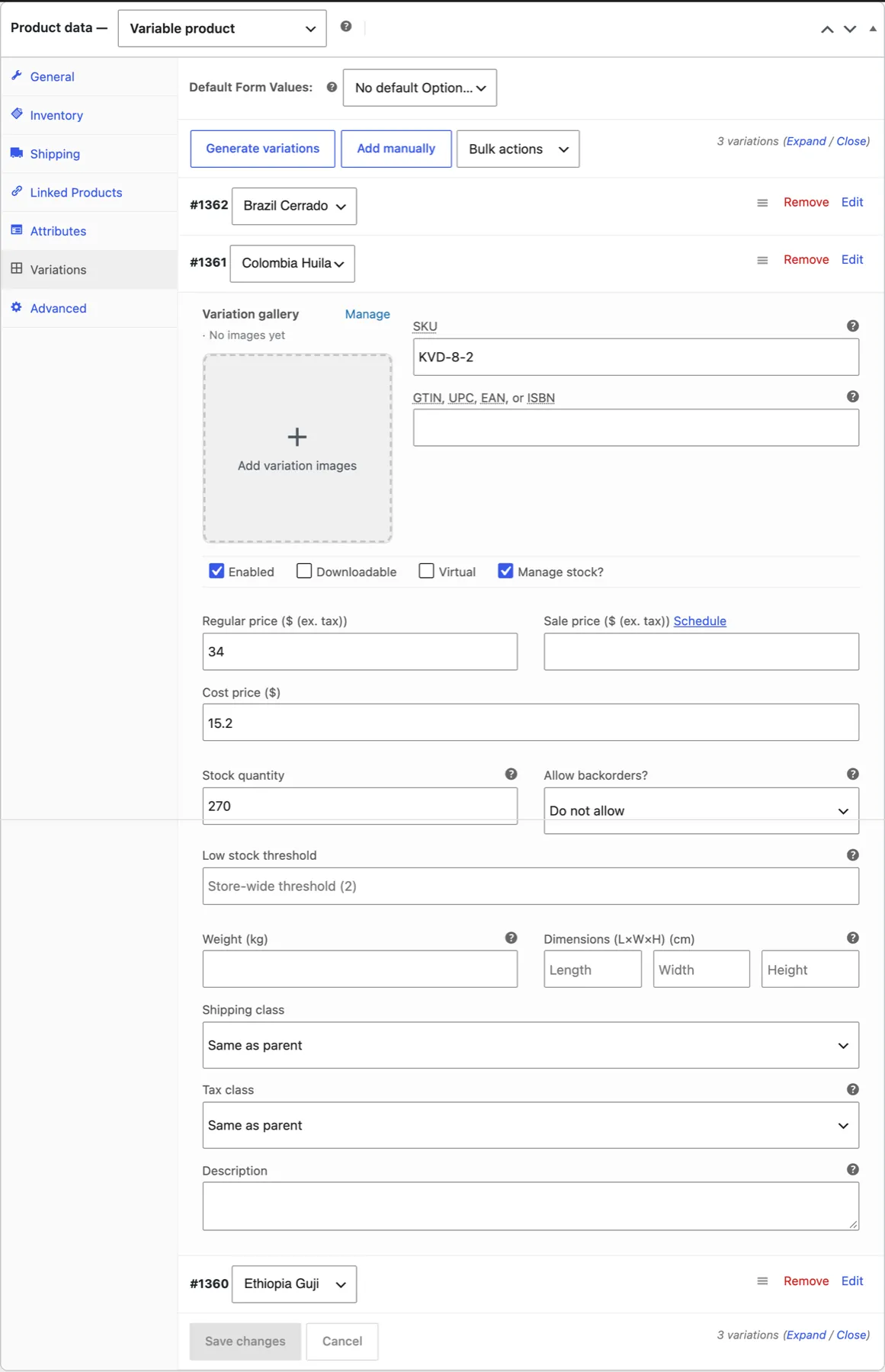
Product editor. With the plugin field (WooCommerce's COGS feature off) you find Cost price below the price on simple products, a default cost for variable products and a cost field in every variation. With WooCommerce's COGS feature on, use WooCommerce's own Cost field: it is the same value. The margin at the regular price is shown below the price.
Product editorVariation cost
Cost list.WooCommerce > Cost & Profit > Cost prices lists products and variations with their price, cost, the cost new orders would use (and where it comes from: own cost, parent, supplier rule, default rule) and the margin. Type a cost and press Enter or leave the field: it is saved at once. Filter by name / SKU, category, supplier or "only without cost".
Cost list
Quick and bulk edit. In the products list, quick edit has a Cost field; bulk edit can set a cost, set it to a percent of the regular price or remove it.
Suppliers. Assign suppliers in the product editor (Suppliers box) or by CSV. Each supplier can have a cost rule (percent of the regular net price) for its products without their own cost, a code and contact notes.
Suppliers
Bulk percent. Cost prices > "Set costs as a percent of the price": for all products, one supplier and / or one category, only for products without a cost (default) or for all.
CSV. "Export cost list" downloads id, parent_id, type, sku, name, regular_price, cost, effective_cost, cost_source, supplier. Edit the cost column and import the file: rows are matched by id, else by sku. A supplier price list with only sku,cost works too, and the import can assign the matched products to a supplier. "Test run" (on by default) shows what would change without saving. Decimal comma and point are both read; text cells that a spreadsheet would run as a formula are refused. An empty cost cell is skipped unless you tick "An empty cost cell removes the cost".
What is frozen on an order
When an order gets its products (checkout, admin, REST), the plugin stores per line the unit cost (order item meta _kv_pcp_unit_cost) and per order the payment fee rule, shipping cost rule and fixed cost. Later changes of costs or rules do not change the order.
A line whose product had no cost counts at 0 and is listed under "lines without a cost". When you enter the cost later, the next update of the order, or Tools > Lines without a cost, fills it in and marks the order estimated.
Orders placed before the plugin was active get their rows from Tools > Historic orders with today's costs, marked estimated.
WooCommerce's "Edit order" changes (items added in the admin) take the cost of the day they are added; removed items drop out.
The order screen
The Cost & Profit box shows each line's frozen unit cost and its source, line net, line cost and profit, then net sales, cost of goods, shipping cost, payment fee, fixed cost, other costs, net profit and margin.
Order box
You can enter the real shipping cost (a courier invoice), other costs of the order and a note, and correct a single unit cost (it is then marked "entered on the order"). Empty shipping cost = the rule or the charged shipping; an empty unit cost takes the product's current cost again. Saved with the order's Update button.
Reports
WooCommerce > Cost & Profit. Choose a period (or a quick range); every report has Export CSV.
Products report
Overview: net sales, cost of goods, gross profit, net profit, margin, orders, profit per order and refunds, each compared with the period of the same length before; a chart per day / week / month; "where the money went"; data quality (lines without cost, estimated orders, orders that lost money, orders left out for currency); most profitable products.
Products: by product or by variation: units kept, net sales after discounts and refunds, cost of goods, gross profit, margin, units without cost. Margin counts only units with a cost; a product without any cost shows "-", never 100 %.
Categories / Suppliers: the same per category (a product in two categories counts in both) and per supplier ("No supplier" row).
Orders: every counted order with its costs and profit; filters "lost money", "missing costs", "estimated", "refunded".
Payment: per payment method: orders, paid amount, net sales, payment fees, fee share, profit, margin.
Shipping: per method: charged, refunded, cost, result, orders with a cost entered by hand.
Coupons: per code: orders, discount, net sales, cost of goods, profit of the orders that used it.
Taxes: tax per rate (product and shipping tax). Tax is collected for the tax office and is never in sales or profit.
Refunds: refunded net amount split into products, shipping and amount-only / fee refunds; cost returned to stock and cost of refunded goods not returned.
Refunds
How profit is calculated (per order, without tax)
net sales  = products after discounts + fees + shipping charged - refunds (net)
net profit = net sales - cost of goods (units kept) - shipping cost - payment fee - fixed cost - other costs
margin     = net profit / net sales
Amount-only refunds (no lines) are split into net and tax with the order's tax share. Payment fees are calculated on the gross order total and are not returned on refunds. Refunds belong to the period of their order.
Tools
Tools
Historic orders: rows for orders without rows (today's costs, estimated), filling lines without a cost, or a refresh of every row from its order (frozen costs kept). Optional date range; runs in the background, can be stopped.
Move cost prices: copy every cost from the plugin field into WooCommerce's COGS field (when the core feature is on) or back.
Developer notes
Storage
Data
Where
Cost price (plugin field)
product / variation meta _kv_pcp_cost (decimal, shop currency)
Cost price (core COGS on)
WooCommerce's cogs_value through WC_Product::set_cogs_value() (meta _cogs_total_value); the plugin field is kept as a mirror, also when the cost is changed in WooCommerce's own Cost field (filter woocommerce_save_product_cogs_value)
Supplier
private taxonomy kv_pcp_supplier (no front end, no REST); term meta kv_pcp_percent, kv_pcp_code, kv_pcp_contact
Frozen line cost
order item meta _kv_pcp_unit_cost (unit cost, 6 decimals) and _kv_pcp_cost_src (order, late, backfill, manual); the order item tables are the same for HPOS and posts storage
Report rows
{prefix}kv_pcp_orders (one row per order: amounts in order currency (shop currency costs converted with 1 / rate), rate to the shop currency, frozen fee / shipping / fixed cost rules in the shop currency, manual costs, derived net sales and profit) and {prefix}kv_pcp_lines (one row per product line; unit_cost in the shop currency, cogs_after in the order currency)
Settings
option kv_pcp_settings; backfill state kv_pcp_backfill; schema version kv_pcp_db_version
Rows are rebuilt from the order on woocommerce_after_order_object_save, woocommerce_order_refunded, woocommerce_refund_deleted, trash / untrash and removed on woocommerce_delete_order. The status is read from the order table (Store API checkout can save an older copy of the order object after the gateway changed the status). Checkout drafts get no row.
Hooks
kv_pcp_cost_saved (action) ( int $product_id, float|null $cost ): after the plugin saved a cost.
WooCommerce filter woocommerce_calculated_order_item_cogs_value is used to keep core COGS frozen (setting "Keep core order costs frozen").
Action Scheduler
Hook kv_pcp_backfill, group kv-product-cost-profit; one async action per batch of up to 100 orders (20 s budget), re-queued until done. wp action-scheduler run --group=kv-product-cost-profit runs it from the CLI.
All report amounts are in the shop currency (SUM(amount * rate)), orders with an unknown rate are excluded.
Security
Every admin action is a POST with a nonce and a capability check (GET returns 405); the inline cost save is an AJAX POST with its own nonce; CSV cells starting with = + - @, tab or CR (also full-width forms) are prefixed with a quote; imports are limited to 5 MB / 20,000 rows. Cost data is never printed on the storefront or added to the Store API.
FAQ
WooCommerce has a "Cost of Goods Sold" feature now. Do I need this plugin?
The core feature (WooCommerce 10.x experimental, 11.x stable, off by default) stores a cost per product and shows it on the order screen. It has no profit reports, it recalculates an order's cost with today's product cost when the order is recalculated or refunded, and it has no payment fees, shipping costs, suppliers, percent rules or cost CSV tools. The plugin uses the core field when the feature is on, so you never enter a cost twice, and keeps the core order values frozen.
Do I lose my costs if I switch WooCommerce's COGS feature on or off?
No. The plugin writes to the active field and reads the other one as a fallback; "Tools > Move cost prices" copies them over in one go.
Why does an old order show "estimated"?
Its costs were not frozen at checkout: it was placed before the plugin was active (or while it was deactivated), or a line got its cost after the order was placed. The cost used is the one of the day it was filled in.
A product without cost shows "-" as margin. Why not 100 %?
A missing cost is not a free product. Product, category and supplier rows count margins over units with a cost only; order totals count missing costs as 0 and list them under data quality.
Are refunds attributed to the refund date?
No, to the period of their order, so a month's margin includes what was later given back. The refund report shows them per order.
Does the payment fee go down after a refund?
No. Most payment providers keep their fee on refunds; the plugin does the same.
I use a currency switcher. Orders in another currency are left out unless the order stores its exchange rate in a meta field you name in the settings. Check your switcher's documentation for the meta key.
Bundles, composite products, subscriptions?
Every order line is valued with the cost of its own product. Bundle plugins that add child lines with their own products work line by line; give the parent line no cost (or the bundle cost) to avoid counting twice. Subscription renewals are normal orders.
How fast is it with many orders?
On our test store a year of 50,000 orders (125,000 lines) loads each report in 0.0-0.5 s and all ten together in about 1.6 s; the snapshot adds about 2 ms per order save.
Can a shop manager see costs?
Yes by default. Remove the capabilities kv_pcp_view_reports, kv_pcp_edit_costs, kv_pcp_manage from the role with a role editor to hide them.
Is cost data sent anywhere?
No. The only outgoing request is the daily licence check (own-site and CodeCanyon builds): site address and licence key.
The department store block theme for WooCommerce: colour-coded departments, a department list beside the hero slider with two side promos, a big search with a department picker, tabbed product grids, a 2 + 1 + 2 offer grid, deals of the day with real countdowns, a department showcase, a promotions band and a three-column product page with a sticky buy box. Four styles (Meridian, Harbor, Citrus, Night) as Site Editor style variations, every colour editable. Cart and Checkout blocks styled, HPOS neutral.
Stop AI crawlers, scrapers, card testers, vulnerability scanners and unwanted countries before WordPress builds a page. Googlebot and Bingbot are verified by DNS and always allowed; 50+ bots get one switch each; country rules use free GeoIP databases and can close only the checkout (block and classic checkout, wc-ajax and Store API); card testing protection on order submissions; the add to cart flood fix for requests without a WooCommerce session; IP and network lists, rate limits for search, filters, forms and login, honeypots; a one-second challenge instead of a captcha; learning mode, dashboard, log, IP tester and Cloudflare export. HPOS and blocks compatible.
The campaign block theme for WooCommerce that makes a store feel like a sale is always on: a flash bar with the sale that ends first, a bento hero with a live deal tile, a dark flash deals zone with flip-tile countdowns on real sale end dates, round discount stickers, a category pill bar, stories with a player, a Discover feed with promo cells inside the grid, a product page campaign strip and a sticky phone buy bar. Sixteen colour styles as Site Editor style variations, two of them dark. Cart and Checkout blocks styled, HPOS neutral.