by Kavio Labs · for WooCommerce 10.1+ on WordPress 6.7+
Customers upload resale and exemption certificates, you approve them for chosen countries or states and dates, and WooCommerce stops charging them tax until the certificate ends. Block and classic checkout, recorded on every order.
Tested on WooCommerce 11.2.1 & WordPress 7.1.3Version 1.0.0Compatible with WooCommerce 10.1 – 11.2, WordPress 6.7+ No core file edits
Built forWooCommerce
Tax Exemption Certificates for WooCommerce: tax stops where an approved certificate applies.1 of 7
What it does
Customers upload resale and exemption certificates, you approve them for chosen countries or states and dates, and WooCommerce stops charging them tax until the certificate ends. Block and classic checkout, recorded on every order.
Your resellers and exempt customers should not pay tax, and you need the paperwork. WooCommerce has a tax exemption flag for customers, but no certificate upload, no review, no expiry and no way to limit the exemption to the places a certificate covers. Tax Exemption Certificates collects the certificate from each customer, lets you approve it for the right countries or states, and removes tax only for that customer, only where the certificate applies and only while it is valid.
Features
Collected in My Account
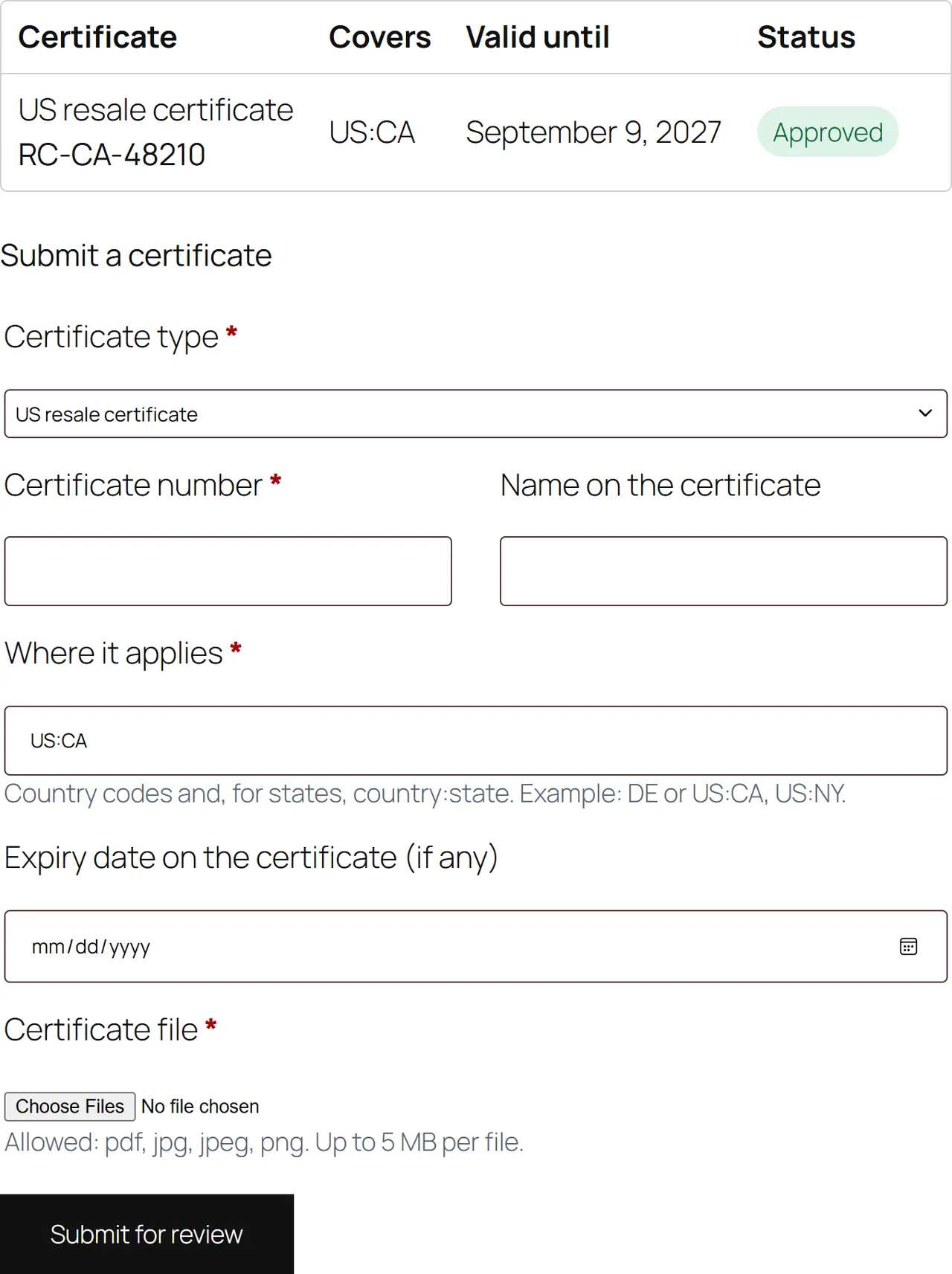
Certificate type, number, name, countries or states covered, expiry date and the file (PDF or image)
A notice in the cart and checkout: certificate applied, waiting for review, not valid for this address, or a link to submit one
Pending, approved, rejected and expiring states visible to the customer
Reviewed in one queue
WooCommerce > Tax certificates: tabs for pending, approved, expiring, expired, rejected and revoked, with counts and search
Approve for chosen countries or states (DE, US:CA) with valid-from and valid-until dates, reject with a reason, revoke, change terms
Documents, the orders that used the certificate and the full audit history in one view
Tax-free the WooCommerce way
Uses the WooCommerce customer tax exemption, on the server: product tax, shipping tax, classic checkout, block checkout and orders you create in the admin
Ends by itself on the expiry date, on revoke, or when the delivery address is outside the approved places
The certificate reference is stored on the order, shown in an admin order box, in My Account, on the thank-you page and in the WooCommerce order e-mails, with an order note
What you get
Download & installThe plugin .zip, installed in Plugins > Add New Plugin > Upload Plugin. Download it from My licenses right after payment.
12 months of updates & supportNew versions and help for 12 months (24 or 36 months at checkout). After that the plugin keeps working; renew anytime at 50%.
License for your storeOne production domain with all its subdomains; staging and local development hosts are free. How licensing works
30-day refundFull refund within 30 days of your first purchase, no reason needed. Refund policy
Tested buildsWooCommerce 10.1 – 11.2, WordPress 6.7+. Tested on WooCommerce 11.2.1 and WordPress 7.1.3.
Documentation & supportFull guide (Installation, Configuration, Usage, FAQ) on this page. Tickets from your account, same-day reply on weekdays (Mon-Fri 09:00-18:00 UTC+3).
Compatibility
Tax Exemption Certificates works with WooCommerce 10.1 – 11.2, WordPress 6.7+.
We list the builds we install and test on. “Tested” means the test plan ran on that build; “Supported” means the build is inside the supported range.
Compatibility
Version
Range
Runs on
Status
WooCommerce 11
11.0 – 11.2
WordPress 6.7 – 7.1
Tested on 11.2.1
WooCommerce 10
10.1 – 10.x
WordPress 6.7+
Supported
WordPress
6.7 – 7.1
PHP 7.4 – 8.3
Tested on 7.1.3
1.0.0
Latest
First release.
Customer certificate upload in My Account, with a link from the cart and checkout.
Review queue: approve with countries or states and valid-from / valid-until dates, reject with a reason, revoke.
Tax removed through the WooCommerce customer tax exemption in the classic and block cart and checkout and in orders created in the admin.
Certificate reference on every exempt order (order note, order screen box, My Account, thank-you page, e-mails).
Upload the plugin. Plugins > Add New Plugin > Upload Plugin: choose the .zip from My licenses and click Install Now.
Activate. Activate it on the Plugins screen. WooCommerce must be active; the plugin tells you if it is not.
Enter the license key. WooCommerce > Settings, the plugin's own tab: paste the key from My licenses. You have 14 days to do it; staging and local sites are included.
WooCommerce 10.1 – 11.2, WordPress 6.7+. Tested on WooCommerce 11.2.1 and WordPress 7.1.3. The Compatibility tab lists every version range.
Do the plugins work with HPOS and the block checkout?
Yes. Every plugin declares compatibility with High-Performance Order Storage and the Cart and Checkout blocks, and is tested in both the block and the classic cart and checkout.
Will they work with my theme?
They use WooCommerce hooks, blocks and the Store API instead of template overrides, so block themes and classic themes both work. We test on Twenty Twenty-Five.
What does the license cover?
One production store domain with every subdomain (www, shop., staging.), plus local development hosts such as localhost, *.local and *.test. A store on another domain needs its own license; a second-store license is 40% off. You have 14 days after installing to enter the key. 12 months of updates and support are included; after that the plugin keeps working and renewals are 50% off. How licensing works
Can I get a refund?
Yes. Ask for a full refund within 30 days of your first purchase, no reason needed: open a ticket or write to [email protected] with your order number. The money goes back to the card or bank account you paid with within 5 business days of approval. Refund policy
How do I get help?
Open a ticket from your account, so your license details are attached. We answer with a same-day reply on weekdays (Mon-Fri 09:00-18:00 UTC+3). Support policy. Not a customer yet? Ask a pre-sales question.
Collect resale and exemption certificates in your shop and stop charging tax to approved customers until the certificate ends. Customers upload a certificate from My Account (or from the cart), you review it in a queue and approve it for the countries or states and the dates you choose, and WooCommerce then calculates the cart tax free while a valid certificate covers the tax destination. Every exempt order keeps the certificate reference.
Review queue: pending, approved, expiring, expired, rejected and revoked certificates
Key features
Certificate upload in My Account > Tax exemption certificates and from a link in the cart and checkout: type, number, name on the certificate, countries or states, the expiry date printed on it and the file (PDF or image).
Review queue under WooCommerce > Tax certificates with tabs for pending, approved, expiring, expired, rejected and revoked, with counts and search.
Approve with scope and dates: countries (DE), states (US:CA), a list, or everywhere (*), valid from and valid until. Reject with a reason the customer sees, revoke later, change scope and dates at any time.
Tax removed on the server with WooCommerce's own tax exemption of the customer (is_vat_exempt): product prices, shipping tax, the classic cart and checkout, the Cart and Checkout blocks and orders created in the admin panel.
Scope matters: a California certificate is not used for a New York delivery address; the cart tells the customer when the certificate does not cover the address.
Order record: the certificate number, type, scope and destination are stored on the order, an order note is added, and the reference shows in the admin order screen (a box), My Account, the thank-you page and the WooCommerce order e-mails.
Expiry: the exemption ends by itself on the end date. Customers see a banner before and after; you see an Expiring tab, an admin notice and a menu counter. No e-mail is sent unless you switch it on.
Audit history per certificate and the list of orders that used it.
Protected documents: files are stored in a protected folder under random names and are served only through the plugin to the customer and to shop managers.
Privacy: personal data exporter and eraser; erasing or deleting a customer deletes their certificates and files, except certificates that orders used: those are tax records and are kept like the order data (unless WooCommerce > Settings > Accounts & Privacy removes order data on erasure requests).
REST API (/wp-json/kv-tec/v1/certificates) for ERP and accounting tools.
Compatibility
WordPress 6.7+, WooCommerce 10.1+ (tested with WordPress 7.1.3 and WooCommerce 11.2.1), PHP 7.4 - 8.3.
High-Performance Order Storage (HPOS) and the legacy order storage; Cart and Checkout blocks and the classic shortcode checkout; block and classic themes.
What it does not do
It does not decide what is a valid certificate. You review the file and set the scope; the plugin keeps the records.
It does not calculate tax rates and does not file or report anything. The tax that would apply is decided by your own tax settings.
It does not exempt only some taxes: while a certificate applies, WooCommerce removes all taxes of the cart (including shipping tax).
It does not look certificates up in government registers.
Guests cannot use it: a certificate belongs to a customer account.
Installation
Requirements
WordPress 6.7 or later, WooCommerce 10.1 or later (tested with 11.2.1), PHP 7.4 - 8.3
WooCommerce taxes switched on (WooCommerce > Settings > General > Enable tax rates and calculations) with your tax rates set up
Write access to wp-content/uploads (the plugin creates a protected kv-tec-private folder there)
Install
Download kv-tax-exempt-certificates-kv.zip from My licences > Downloads on woocommerce.kaviolabs.com.
In WordPress: Plugins > Add New > Upload Plugin, choose the zip, Install Now, Activate.
Open WooCommerce > Settings > Tax Exemption Certificates and enter your licence key at the bottom. The plugin works for 14 days without a key.
First steps
Check the Certificate types list and the allowed file types on the settings tab.
Sign in as a test customer, open My Account > Tax exemption certificates and submit a certificate.
Open WooCommerce > Tax certificates, open the certificate, check the file and approve it with the countries or states and an end date.
Back in the storefront, the cart and checkout show "Tax exempt" and no tax line.
Web server note
The documents folder contains .htaccess and web.config deny rules (Apache, IIS) and files get random names with a neutral .dat extension. On nginx, add location ~* /uploads/kv-tec-private/ { deny all; } to your server block so the folder is closed for direct requests as well. Downloads always go through the plugin.
Update and uninstall
Upload the new zip over the old one (Plugins > Add New > Upload > Replace current). Deleting the plugin keeps certificates, documents and settings unless Remove data on uninstall is on: certificates are legal records, so nothing is deleted by default. Orders are never changed.
Off: no exemption is applied and the customer pages are hidden. Records stay.
Customer uploads
on
Off: customers see their certificates read only (for shops that load certificates through the REST API).
Cart and checkout notice
on
Shows "Tax exempt: certificate ... applied", or a link to submit one.
Certificate types
five types
One per line. Customers pick one when they submit.
Default validity (days)
0
Used when you approve a certificate without an end date. 0 = no expiry.
Remind before expiry (days)
30
Approved certificates ending inside this window show in the Expiring tab, in an admin notice and in the customer banner. 0 = off.
Customer e-mails
off
Off: the plugin sends no e-mail at all. On: approved, rejected and expiring e-mails are sent through one WooCommerce e-mail ("Tax exemption certificate update", editable under WooCommerce > Settings > Emails).
Documents
Setting
Default
Meaning
File required
on
A customer must attach at least one file.
Allowed file types
pdf,jpg,jpeg,png
Script and web page types (php, html, js, svg, exe ...) are always refused, whatever you enter. The content of every file is checked against its type.
Maximum file size (MB)
5
Per file, 1-50. Your PHP upload_max_filesize and post_max_size must be at least this.
Files per certificate
3
1-10.
Remove data on uninstall
off
Deletes certificates, documents and settings when the plugin is deleted.
Licence
Enter your licence key here. Without a valid licence, approved certificates no longer remove tax and the customer pages are hidden; your records and the admin pages stay.
Taxes
The exemption uses the tax exemption of the WooCommerce customer: all taxes of the cart, including shipping tax, are removed while the certificate applies. The tax destination follows Calculate tax based on (shipping address, billing address or shop base; local pickup uses the shop base address). The scope only decides whether the exemption applies to that destination.
The settings tab
Usage
Customer side
The customer signs in and opens My Account > Tax exemption certificates (or follows Submit a certificate in the cart or checkout, which brings them back afterwards).
They choose the type, enter the certificate number, where it applies (for example US:CA, US:NY or DE), optionally the expiry date printed on it, and attach the file.
The certificate is "Pending review". Tax is still charged and the cart says so.
After approval, the next cart calculation for an address inside the scope is tax free; the cart and checkout show "Tax exempt: certificate ... applied".
A banner warns before the end date and after it has passed. Customers can delete pending and rejected certificates; approved ones are kept for your records.
Review queue (WooCommerce > Tax certificates)
Tabs: Pending review, Approved, Expiring, Expired, Rejected, Revoked, with counts. A counter on the menu shows what waits for review.
Open a certificate to see the customer, the data, the documents, the orders that used it and the history.
Approve: scope (prefilled with what the customer asked for), valid from, valid until, internal note.
Reject: a reason is required and the customer sees it.
Revoke: tax is charged again from the next cart calculation. Orders already placed keep their record.
Change scope and dates of an approved certificate at any time.
Delete removes the certificate, its files and its history.
Scope syntax
Written
Covers
DE
the whole country
US:CA
one state or province (the state code of the address)
US:CA, US:NY, DE
a list
*
every destination
On the order
The order stores the certificate number, type, scope and destination and is marked tax exempt (WooCommerce's own is_vat_exempt). An order note is added. Administrators see a Tax exemption certificate box on the order screen; customers see the reference on the thank-you page, in My Account and in the WooCommerce order e-mails. The record stays after the certificate ends.
Orders created in the admin panel use the same rule when you calculate taxes: the exemption applies while the order's customer has a valid certificate that covers the order's tax destination.
REST API
Needs the manage_woocommerce capability (application password or cookie with nonce).
GET /wp-json/kv-tec/v1/certificates?status=pending|approved|expiring|expired|rejected|revoked&search=&page=&per_page=
GET /wp-json/kv-tec/v1/certificates/<id>
POST /wp-json/kv-tec/v1/certificates/<id> with action = approve (optional scope, valid_from, valid_until), reject (reason) or revoke.
Developer hooks
kv_tec_certificate_submitted, kv_tec_certificate_approved, kv_tec_certificate_rejected and kv_tec_certificate_expiring actions receive the certificate id.
Screens
A certificate with its documents, the decision form and the historyThe cart tells the customer that a certificate is appliedMy Account: the customer's certificates and the submission formThe certificate box on the order screen
FAQ
WooCommerce can exempt a customer already. What is new here?
WooCommerce has a "VAT exempt" flag on the customer but no certificate upload, no review, no scope, no expiry and no record on the order. This plugin adds those and sets the WooCommerce flag only while a valid certificate covers the delivery address.
Is a certificate checked against a government register?
No. You review the file and approve it. The plugin keeps the records.
Does it work with the block checkout?
Yes: Cart and Checkout blocks and the classic shortcode pages, tested on both. The tax is removed on the server from the Store API cart calculation, never by the browser.
Which tax is removed?
All taxes of the cart, including shipping tax, as the WooCommerce customer exemption does. If you need to exempt only some taxes, use separate tax classes.
Which address decides?
The tax destination WooCommerce uses (shipping, billing or shop base, per your tax setting). A customer who changes the delivery address in the checkout is evaluated again for the new address.
What happens when a certificate expires?
From the end date the next cart calculation charges tax again. The customer sees a banner; you see it in the Expiring and Expired tabs. Placed orders are never changed.
Are e-mails sent?
Not by default. Switch on "Customer e-mails" to send approved, rejected and expiring e-mails through the WooCommerce e-mail system.
Where are the documents?
In wp-content/uploads/kv-tec-private/ under random names, protected by deny rules and served only through the plugin. See the web server note in the installation guide.
Can guests submit certificates?
No. A certificate belongs to a customer account. The cart asks guests to sign in.
Does it work with HPOS?
Yes. Orders are read and written only through WooCommerce order CRUD, and the plugin declares HPOS and Cart/Checkout blocks compatibility.
What happens to my data when I delete the plugin?
Nothing, unless you switch on "Remove data on uninstall". Certificates are legal records.
Does it handle several vendors or multisite?
It is a single-store plugin. It does not add vendor-specific certificates.
How many certificates can a customer send?
Up to 5 can wait for review at the same time (developers: filter kv_tec_max_pending_per_customer). Decided certificates do not count.
The department store block theme for WooCommerce: colour-coded departments, a department list beside the hero slider with two side promos, a big search with a department picker, tabbed product grids, a 2 + 1 + 2 offer grid, deals of the day with real countdowns, a department showcase, a promotions band and a three-column product page with a sticky buy box. Four styles (Meridian, Harbor, Citrus, Night) as Site Editor style variations, every colour editable. Cart and Checkout blocks styled, HPOS neutral.
Stop AI crawlers, scrapers, card testers, vulnerability scanners and unwanted countries before WordPress builds a page. Googlebot and Bingbot are verified by DNS and always allowed; 50+ bots get one switch each; country rules use free GeoIP databases and can close only the checkout (block and classic checkout, wc-ajax and Store API); card testing protection on order submissions; the add to cart flood fix for requests without a WooCommerce session; IP and network lists, rate limits for search, filters, forms and login, honeypots; a one-second challenge instead of a captcha; learning mode, dashboard, log, IP tester and Cloudflare export. HPOS and blocks compatible.
The campaign block theme for WooCommerce that makes a store feel like a sale is always on: a flash bar with the sale that ends first, a bento hero with a live deal tile, a dark flash deals zone with flip-tile countdowns on real sale end dates, round discount stickers, a category pill bar, stories with a player, a Discover feed with promo cells inside the grid, a product page campaign strip and a sticky phone buy bar. Sixteen colour styles as Site Editor style variations, two of them dark. Cart and Checkout blocks styled, HPOS neutral.